Maxed Out Processor

despuit

New member
Power User
Local time
2:04 AM
Messages
88
Location
Everywhere
Hello all,

At the moment I am very limited by computers performance, the processor is all ways maxing out at a 100% if multi-tasking. Or if doing a single task it juts, presently I have a Intel Core Duo @ 2.26ghz on a dell.

I am looking at Quad-Core i7 2.2GHz as a replacement, however not sure if it'd be better. I just like it because it is a thinkpad. Other options CORE i7 M620 2.67GHZ but it is an HP laptop and I'd regret buying it based on that fact.

Simply put would an I7 be an improvement, or is my issue more related to clock speed? I know a lot about the OS, but when it comes to hardware I am lost.

Thanks
 

My Computer My Computer

Computer type
Laptop
Computer Manufacturer/Model Number
Lenovo
OS
Windows 7 - Home Edition - Build 7601x8086
Memory
Samsung DDR3 4GB
Graphics Card(s)
Intergrated
Sound Card
Intergrated
Screen Resolution
1400 x 1050
Hard Drives
80GB HDD 2.5
PSU
20V adapter
Case
Piece of plastic
Cooling
Copper heatsink
Keyboard
Intergrated PS2
Mouse
TouchPad
Antivirus
Commodo
Browser
K-Melon
Hi,
Right click your taskbar and click on Open task manager
Post a screen shot of the Processes section.
 

My Computer My Computer

Computer type
PC/Desktop
Computer Manufacturer/Model Number
Custom assembled by me :}
OS
Win-7-Pro64bit 7-H-Prem-64bit
CPU
i7-5930K 2nd i9-9940x both water blocked VRM's too
Motherboard
ASUS SABERTOOTH X99 2nd ASUS x299 Apex
Memory
Trident-z 3200C14 2nd Trident-z 3600C16
Graphics Card(s)
EVGA 1080ti ftw3 2nd Titan Xp both water blocked
Sound Card
Built-in Realtek
Monitor(s) Displays
1-AOC G2460PG 24"G-Sync 144Hz/ 2nd 1-ASUS VG248QE 24" 144Hz
Screen Resolution
1920 x 1080 144Hz
Hard Drives
2-Samsung M.2 Evo & Evo Plus
2-Samsung 850 EVO 500GB SSD's/ 3-2.5 W.D. Black 1tb-&3-1tb/3-3.5 WD Black 1tb hdd's
PSU
EVGA SuperNOVA 1000-P2 2nd 1200-P2
Case
2-Corsair Obsidian Series 450D Black ATX Mid Tower
Cooling
Custom water loops
Keyboard
Logitech G710+/ 2nd Logitech G910
Mouse
2-RedDragon M901 Perdition 16400 dpi Gaming mouse = wired
Internet Speed
Comcast Ping 19ms 89.31mbps download speed 6.12mbps upload
Antivirus
Malwarebytes Pro/ Superantispyware Pro
Browser
FireFox & Pale moon
Other Info
2nd ASUS X299 Apex/Intel i9-9940x with Custom water loop/7H-Prem-x64/Corsair 450D case/Ram Trident-z 3600C16 4x8gb / Samsung970Evo plus 500gb SSD/Dual ssd EZ swap evo/PSU EVGA SuperNova 1200w-P2 80+Platinum/GPU Titan Xp /8-ML-140 on push-pull on 2-280GTX rads
Is nothing special ATM, I am not doing anything to provoke it. I am more or less referring to when I have a browser with a tabs open in the background while running a video with high datarates. Or research and development projects where I need the browser open, along side editing software from PEExplorer, to PhotoShop, Audition, or Sony Vegas and when any of those are up I have 3-10 other programs I am working with consecutively while having Tidal, or FooBar on in the background. Notepad++ would all ways be running as well as Paint ++, SQL, and Word/Excel/Power Point I all so like to have U-Torrent up all the time, and often enough a VM. I am a heavy user and atm I haven't been able to do much because this processor can barely handle 2 things at once, so I usually just do one program at a time. I've edited the actual system a lot and can manage to get away with two needy programs now with just a little jutting but that's all the performance space I can muster out of her. Thanks for the reply, though my question was really if clock speed would make the difference or having an updated processor that could maybe manage programs a bit better would be the ticket. If I just half ass this reply as it is late and I am up in a couple hours, I would gauge that clock speed would effect the application response/load times where as updated processor could most likely handle a heavier load then again that is only a guess.

Update:

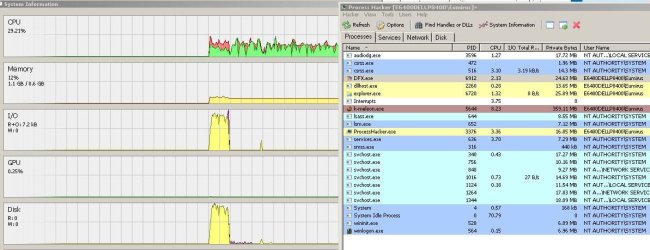
Can't sleep, so was watching a video. Regardless of what browser I use this will happen the CPU spikes up to 60 percent and everything becomes choppy, playback, application load times, tab switching. It's not a flash issue, or directly tied to video it is something to do with the way programs are cached per se. They seem to become stuck on something as if it goes

1 and 1 is 2
2 and 2 is 4
4 and 4 is ?
1 and 1 is 2
2 and 2 is 4
8
4 and 4 is 8
1 and 1 is 2
2 and 2 is ?
4 and 4 is 8
2
1 and 1 is 2

That makes me believe not the believe it is the clock speed in said regard, or some type of defect. But then on the other hand it all so does become overwhelmed if you have multiple applications, I've had 3 easy go apps and received an error "authui is unable to execute the spkash screen or w.e it is called" because it was so unresponsive.
 

Attachments

  • CPU Graph - 11-07-2015-0349 - Ver 2.0.JPG
    CPU Graph - 11-07-2015-0349 - Ver 2.0.JPG
    15 KB · Views: 21
  • CPU Graph - 11-07-2015-0349 - Ver 3.0.JPG
    CPU Graph - 11-07-2015-0349 - Ver 3.0.JPG
    16.2 KB · Views: 0
Last edited:

My Computer My Computer

Computer type
Laptop
Computer Manufacturer/Model Number
Lenovo
OS
Windows 7 - Home Edition - Build 7601x8086
Memory
Samsung DDR3 4GB
Graphics Card(s)
Intergrated
Sound Card
Intergrated
Screen Resolution
1400 x 1050
Hard Drives
80GB HDD 2.5
PSU
20V adapter
Case
Piece of plastic
Cooling
Copper heatsink
Keyboard
Intergrated PS2
Mouse
TouchPad
Antivirus
Commodo
Browser
K-Melon
Hi,
That's not the screen shot I requested :)
But either way I would guess cooling could be a issue thermal paste...
I doubt over clocking wouldn't be a good idea cpu is low enough 36% is nothing almost,
I'd look at the temps and see what they look like as the issue occurs personally.

Could also be psu related = power supply ?
 

My Computer My Computer

Computer type
PC/Desktop
Computer Manufacturer/Model Number
Custom assembled by me :}
OS
Win-7-Pro64bit 7-H-Prem-64bit
CPU
i7-5930K 2nd i9-9940x both water blocked VRM's too
Motherboard
ASUS SABERTOOTH X99 2nd ASUS x299 Apex
Memory
Trident-z 3200C14 2nd Trident-z 3600C16
Graphics Card(s)
EVGA 1080ti ftw3 2nd Titan Xp both water blocked
Sound Card
Built-in Realtek
Monitor(s) Displays
1-AOC G2460PG 24"G-Sync 144Hz/ 2nd 1-ASUS VG248QE 24" 144Hz
Screen Resolution
1920 x 1080 144Hz
Hard Drives
2-Samsung M.2 Evo & Evo Plus
2-Samsung 850 EVO 500GB SSD's/ 3-2.5 W.D. Black 1tb-&3-1tb/3-3.5 WD Black 1tb hdd's
PSU
EVGA SuperNOVA 1000-P2 2nd 1200-P2
Case
2-Corsair Obsidian Series 450D Black ATX Mid Tower
Cooling
Custom water loops
Keyboard
Logitech G710+/ 2nd Logitech G910
Mouse
2-RedDragon M901 Perdition 16400 dpi Gaming mouse = wired
Internet Speed
Comcast Ping 19ms 89.31mbps download speed 6.12mbps upload
Antivirus
Malwarebytes Pro/ Superantispyware Pro
Browser
FireFox & Pale moon
Other Info
2nd ASUS X299 Apex/Intel i9-9940x with Custom water loop/7H-Prem-x64/Corsair 450D case/Ram Trident-z 3600C16 4x8gb / Samsung970Evo plus 500gb SSD/Dual ssd EZ swap evo/PSU EVGA SuperNova 1200w-P2 80+Platinum/GPU Titan Xp /8-ML-140 on push-pull on 2-280GTX rads
Open task manager and go to Processes tab and end process cmd.exe - you have to do this every time you shutdown or reboot
 

My Computer My Computer

Computer type
PC/Desktop
Computer Manufacturer/Model Number
Asus custome build
OS
Windows 7 Ultimate
CPU
AMD FX8350
Motherboard
M5A99FX Pro R2.0
Memory
G.SKILL Sniper Series 16GB DDR3 1866
Graphics Card(s)
GIGABYTE GeForce GTX 770 2GB 256-Bit GDDR5 PC
Hard Drives
Western Digital Blue WD10EZEX 1TB 7200 RPM 64MB Cache SATA 6.0Gb/s 3.5" Internal Hard Drive
Antivirus
Avast
Browser
FireFox
Hi,
That's not the screen shot I requested :)
But either way I would guess cooling could be a issue thermal paste...
I doubt over clocking wouldn't be a good idea cpu is low enough 36% is nothing almost,
I'd look at the temps and see what they look like as the issue occurs personally.

Could also be psu related = power supply ?

I would agree with you as I've had the issue in the past, however atm I have the device raised and it is blowing cold air. Never mentioned over clocking, was reiterating my initial question if this issue was to do with clock speed, or simply that it can't handle the load. Yes 36% does seem to be nothing and obviously I don't have problems when it is like that. However when it spikes past 60% it begins giving out. That is one application running, add a second application and it locks it in to 100% making the system useless. This is not a productive use of machinery in modern times.

The only thing that provokes CPU usage is a task executing a service/command, so therefore the application I am utilising is executing a non-essential command which is causing the spikes. This a development problem that 90% of applications have along side of excessive memory usage, I/O activity, and so fourth. Most people are too ignorant to know about these issues and just go to the store and are conned into buying a couple thousand dollar computer. And it is not about to magically change any time soon unless the user wants to write their own program, or is able to identify the root cause of the issue and rectify it or by-pass it utilising an alternative application/service. I have no desire wasting my time on such a venture considering this is not a singularity. Therefore I really need a new computer as it has been rendered obsolete by incompetent programming (I think my favorite satire of this was TSC where they go it has more ram that means you can do more then one things at a time).

I have an intel core 2 duo @ 2.26 GHZ, and am wondering if an improved clock speed would be able handle multiple background commands/services in conjunction with whatever application that is being presently used. Or is it simply an outdated CPU, and if updating to a newer model such as the i3, i5, or i7 would rectify this issue. Or perhaps it is best to just go for the i7 because it has a quad core capabilities. I really don't know as I am not hardware person, and thus I am asking.

By the way it is hard powered by AC cable, is a laptop without the battery.

Thanks for replying though.
 

My Computer My Computer

Computer type
Laptop
Computer Manufacturer/Model Number
Lenovo
OS
Windows 7 - Home Edition - Build 7601x8086
Memory
Samsung DDR3 4GB
Graphics Card(s)
Intergrated
Sound Card
Intergrated
Screen Resolution
1400 x 1050
Hard Drives
80GB HDD 2.5
PSU
20V adapter
Case
Piece of plastic
Cooling
Copper heatsink
Keyboard
Intergrated PS2
Mouse
TouchPad
Antivirus
Commodo
Browser
K-Melon
Browsers are getting out of control :mad:
I sometime notice ie10 is using 175.000 kb which on this one machine is quite a bit and causing cpu usage to skyrocket
I have to kill iexplorer.exe manually = pretty much why I asked for a screen shot of the processes when the issue occurs to see which program is causing the issue.
 

My Computer My Computer

Computer type
PC/Desktop
Computer Manufacturer/Model Number
Custom assembled by me :}
OS
Win-7-Pro64bit 7-H-Prem-64bit
CPU
i7-5930K 2nd i9-9940x both water blocked VRM's too
Motherboard
ASUS SABERTOOTH X99 2nd ASUS x299 Apex
Memory
Trident-z 3200C14 2nd Trident-z 3600C16
Graphics Card(s)
EVGA 1080ti ftw3 2nd Titan Xp both water blocked
Sound Card
Built-in Realtek
Monitor(s) Displays
1-AOC G2460PG 24"G-Sync 144Hz/ 2nd 1-ASUS VG248QE 24" 144Hz
Screen Resolution
1920 x 1080 144Hz
Hard Drives
2-Samsung M.2 Evo & Evo Plus
2-Samsung 850 EVO 500GB SSD's/ 3-2.5 W.D. Black 1tb-&3-1tb/3-3.5 WD Black 1tb hdd's
PSU
EVGA SuperNOVA 1000-P2 2nd 1200-P2
Case
2-Corsair Obsidian Series 450D Black ATX Mid Tower
Cooling
Custom water loops
Keyboard
Logitech G710+/ 2nd Logitech G910
Mouse
2-RedDragon M901 Perdition 16400 dpi Gaming mouse = wired
Internet Speed
Comcast Ping 19ms 89.31mbps download speed 6.12mbps upload
Antivirus
Malwarebytes Pro/ Superantispyware Pro
Browser
FireFox & Pale moon
Other Info
2nd ASUS X299 Apex/Intel i9-9940x with Custom water loop/7H-Prem-x64/Corsair 450D case/Ram Trident-z 3600C16 4x8gb / Samsung970Evo plus 500gb SSD/Dual ssd EZ swap evo/PSU EVGA SuperNova 1200w-P2 80+Platinum/GPU Titan Xp /8-ML-140 on push-pull on 2-280GTX rads
The odd's of you being able to change the processor is slim to nill almost all laptops solder their processors to the motherboard,
With that said I would read this tutorial from sevenforums and see if their are any programs you can disable at startup it is a long read though. I also recommend reading whole tutorial before deciding what method you want to use,

http://www.sevenforums.com/tutorials/1401-startup-programs-change.html
 

My Computer My Computer

Computer type
PC/Desktop
Computer Manufacturer/Model Number
Compac
OS
Microsoft Windows 7 Ultimate 32-bit 7601
CPU
Intel(R) Pentium(R) Dual CPU E2160 @ 1.80GHz
Motherboard
MSI Boston
Memory
4.00 GB
Graphics Card(s)
(1) VNC Mirror Driver (2) Intel(R) G33/G31 Express Chipset
Sound Card
Disabled
Monitor(s) Displays
Headless
Screen Resolution
1280 x 960 x 32 bits (4294967296 colors) @ 60 Hz
Hard Drives
ST3320820AS ATA Device
Keyboard
Headless
Mouse
Headless
Antivirus
Malwarebytes pro
Other Info
Also
Windows 8.1 Laptop and Desktop both Acer
The odd's of you being able to change the processor is slim to nill almost all laptops solder their processors to the motherboard,
With that said I would read this tutorial and see if their are any programs you can disable at startup it is a long read though.

http://www.sevenforums.com/tutorials/1401-startup-programs-change.html

I wanted to replace the computer all together I referenced a thinkpad in my original post...

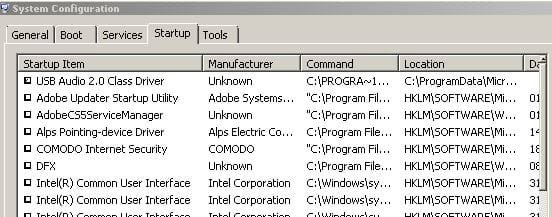
As for startup I have one program that starts which is my external audio driver for DAC/AMP combo, which has not effect on load times. Which boots with 500-700MB, instantly from logon screen. Sometimes I receive an error it loads so fast because the DWM wasn't able to load fast enough.

As you can see most my services are disabled, and don't start when the computer boots. They're configured via scripts with hot-keys to activate things like networking protocols. Most drivers have been disabled on the machine, it is very finely tuned.
 

Attachments

  • MSCONFIG - STARTUP - 12.07.15 2236 - Ver 1.0.JPG
    MSCONFIG - STARTUP - 12.07.15 2236 - Ver 1.0.JPG
    39.5 KB · Views: 12
  • Services - 12.07.15 2237 - Ver 1.0.JPG
    Services - 12.07.15 2237 - Ver 1.0.JPG
    61 KB · Views: 12

My Computer My Computer

Computer type
Laptop
Computer Manufacturer/Model Number
Lenovo
OS
Windows 7 - Home Edition - Build 7601x8086
Memory
Samsung DDR3 4GB
Graphics Card(s)
Intergrated
Sound Card
Intergrated
Screen Resolution
1400 x 1050
Hard Drives
80GB HDD 2.5
PSU
20V adapter
Case
Piece of plastic
Cooling
Copper heatsink
Keyboard
Intergrated PS2
Mouse
TouchPad
Antivirus
Commodo
Browser
K-Melon
LOL I thought you wanted to just try to stuff a different processor in there but ya getting a new laptop would be better especially if you make sure its 64 bit and put as much ram as you can
 

My Computer My Computer

Computer type
PC/Desktop
Computer Manufacturer/Model Number
Compac
OS
Microsoft Windows 7 Ultimate 32-bit 7601
CPU
Intel(R) Pentium(R) Dual CPU E2160 @ 1.80GHz
Motherboard
MSI Boston
Memory
4.00 GB
Graphics Card(s)
(1) VNC Mirror Driver (2) Intel(R) G33/G31 Express Chipset
Sound Card
Disabled
Monitor(s) Displays
Headless
Screen Resolution
1280 x 960 x 32 bits (4294967296 colors) @ 60 Hz
Hard Drives
ST3320820AS ATA Device
Keyboard
Headless
Mouse
Headless
Antivirus
Malwarebytes pro
Other Info
Also
Windows 8.1 Laptop and Desktop both Acer
Browsers are getting out of control :mad:
I sometime notice ie10 is using 175.000 kb which on this one machine is quite a bit and causing cpu usage to skyrocket
I have to kill iexplorer.exe manually = pretty much why I asked for a screen shot of the processes when the issue occurs to see which program is causing the issue.

Browsers, Media Programs, anything and every thing. I missed that suffix, the problem with that is it is a multitude of programs. Some times it is my browser, which I am forced to use to Torch atm as my other computer (that one is older then this one, it can't even run a modern video file in the nicest of environments) isn't with me atm and my K-Meleon install isn't how I want it, and can't copy a new version. When I run that program I never have a spike from my browser, no I/O issues, no memory issues.

Then I have KMplayer in the background which can cause it, it's an issue of multi-tasking. And some background service/command being executed let it be a refresh rate, update protocol, or what not. My computer can't do that it can only go ok you do this do that and nothing else or you'll have a bad time.

And I want to start working on developing Music Videos, Albums, Software/Web Development, Database work, and publishing. However the computer can't handle it, memory is fine I know how to optimise the little I have to maximise performance however my CPU is at its ceiling. The only way I can see moving forward is a new laptop all together though my problem is price point. I can find the I7 think pad 2.2GHZ at 500 CDN, I5 thinkpad 2.5GHZ @ 269$. But I don't understand hardware this is my second laptop going the cheap route to do what I need to do and they just can't handle the work load I supply to them. Which is now costing me more. Thus I am asking what is the best recommendation, one is more modern CPU, one has better clock speed. What would work in my advantage as I am not a gamer, I just need it for professional purposes.

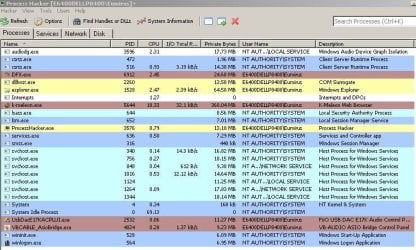
(as soon as I closed torch and switched to K-Meleon which actually works not sure why it was so engrained into my mind it didn't everything loads as if I just started the computer, is instantanous) I attached a normal look at my processes, DFX normally isn't running but not using my headphones.
 

Attachments

  • Processes - 130715 0313 - VER 1.0.JPG
    Processes - 130715 0313 - VER 1.0.JPG
    90.9 KB · Views: 0
Last edited:

My Computer My Computer

Computer type
Laptop
Computer Manufacturer/Model Number
Lenovo
OS
Windows 7 - Home Edition - Build 7601x8086
Memory
Samsung DDR3 4GB
Graphics Card(s)
Intergrated
Sound Card
Intergrated
Screen Resolution
1400 x 1050
Hard Drives
80GB HDD 2.5
PSU
20V adapter
Case
Piece of plastic
Cooling
Copper heatsink
Keyboard
Intergrated PS2
Mouse
TouchPad
Antivirus
Commodo
Browser
K-Melon
LOL I thought you wanted to just try to stuff a different processor in there but ya getting a new laptop would be better especially if you make sure its 64 bit and put as much ram as you can

That'd be a neat trick though! The 64 bit thing for sure is what happened to my last computer, ordered it and subnumber wasn't on the order form and when I receive it I look it up and not supported. Then I obtain this machine and the CPU can't handle the 64 bit programs. As for RAM, you don't need much if you use forgiving software.
 

My Computer My Computer

Computer type
Laptop
Computer Manufacturer/Model Number
Lenovo
OS
Windows 7 - Home Edition - Build 7601x8086
Memory
Samsung DDR3 4GB
Graphics Card(s)
Intergrated
Sound Card
Intergrated
Screen Resolution
1400 x 1050
Hard Drives
80GB HDD 2.5
PSU
20V adapter
Case
Piece of plastic
Cooling
Copper heatsink
Keyboard
Intergrated PS2
Mouse
TouchPad
Antivirus
Commodo
Browser
K-Melon
If the computer in your specs is the one have problems doing all this, it's simply not made for doing all that at the same time.

PhotoShop alone will eat up the resources of that computer.

From post #1

Is nothing special ATM, I am not doing anything to provoke it. I am more or less referring to when I have a browser with a tabs open in the background while running a video with high datarates. Or research and development projects where I need the browser open, along side editing software from PEExplorer, to PhotoShop, Audition, or Sony Vegas and when any of those are up I have 3-10 other programs I am working with consecutively while having Tidal, or FooBar on in the background. Notepad++ would all ways be running as well as Paint ++, SQL, and Word/Excel/Power Point I all so like to have U-Torrent up all the time, and often enough a VM.

Look at My System Specs.
Trying to do all those things would slow it down to a slow crawl.
 

My Computer My Computer

Computer type
PC/Desktop
Computer Manufacturer/Model Number
Home made Desktop
OS
Windows 10 Pro. 64/ version 1709 Windows 7 Pro/64
CPU
Intel i7-6800K @ 4.3
Motherboard
ASUS X-99 Deluxe II
Memory
Corsair Platinum 16 gig @2400
Graphics Card(s)
EVGA GTX 1070 OC
Monitor(s) Displays
Asus 27" LED LCD/VE278Q
Screen Resolution
1920-1080 or 1280-720 HDMI
Hard Drives
INTEL SSD 730-240 Gb Sata 3.0/
PSU
EVGA Platium 1200W
Case
Phanteks Luxe Tempered Glass 8 fans/ one radiator
Cooling
XSPC/ Water Cooled CPU
Keyboard
Das 4 Professional
Mouse
Logitech M705/MX Anywhere 2-S
Internet Speed
100 mbits
Antivirus
Microsoft Security Essentials/ Malwarebytes Premium 3.0/ SAS
Browser
I.E. 11 default/Firefox/ ISP Time Warner Cable/Spectrum
Other Info
LG BluRay Burner/
Sound system-KLipsch-THX/
Icy Dock ssd Hot Swap bays.
If the computer in your specs is the one have problems doing all this, it's simply not made for doing all that at the same time.

PhotoShop alone will eat up the resources of that computer.

From post #1

Is nothing special ATM, I am not doing anything to provoke it. I am more or less referring to when I have a browser with a tabs open in the background while running a video with high datarates. Or research and development projects where I need the browser open, along side editing software from PEExplorer, to PhotoShop, Audition, or Sony Vegas and when any of those are up I have 3-10 other programs I am working with consecutively while having Tidal, or FooBar on in the background. Notepad++ would all ways be running as well as Paint ++, SQL, and Word/Excel/Power Point I all so like to have U-Torrent up all the time, and often enough a VM.
Look at My System Specs.
Trying to do all those things would slow it down to a slow crawl.

Understood, and I think you under estimate your computer. I've not had many issues memory wise audition only takes 200MBS and depending on how your SQL is set up it can be death of you indeed as long as you have things split up you're ok. Again my issue is the processor it just dies when I have whatever set loaded:

Song Creation Set: Audition, FooBar, Fidelizer, ASIO Bridge, Audio Control Panel, K-Meleon, NotePad ++

Document Creation:

Power Point, SQL, Word, Excel, FooBar, Fidelizer, Asio-Bridge, Audio CPL, K-Meleon, NotePad ++

Video Set: Vegas, K-Meleon, Kastor, Convert X, NotePad ++

And then between the three I sometimes add onto them Animation Editors, AutoCad, PhotoShop, and Paint which aren't all ways open but I use them often enough. Same with a VM, sometimes software or whatever program won't work. I all so use the VM for any programming/system changes. It depends, memory wise I've very rarely had a problem or am able to compensate by breaking off projects into tinier steps. So maybe if it is more intensive file creation needed then I will in my project plan dedicated this time block to just imagery, or animation and later incorporate where I need it.

And no it is a new computer that one was 32 bit couldn't do anything I wanted it to, and this one just can't multi-task.

So like I said "I can find a I7 think pad 2.2GHZ at 500 CDN, or a I5 thinkpad 2.5GHZ @ 269$ for example. But I don't understand hardware this is my second laptop going the cheap route to do what I need to do and they just can't handle the work load I supply to them. Thus I am asking what is the best recommendation, one is more modern CPU, one has better clock speed. What would work in my advantage as I am not a gamer, I just need it for professional purposes." atm I have Core Duo 2.26 GHZ processor/

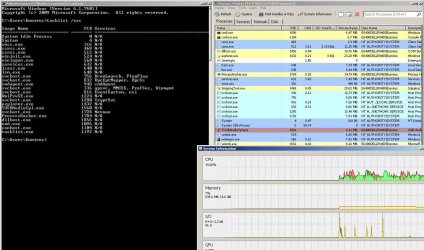
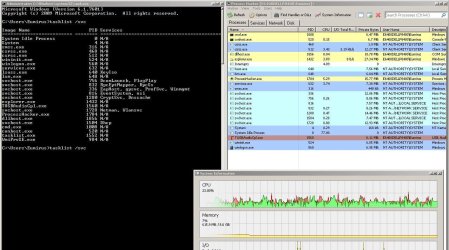
Attached is my computer idling with what I normally have loaded. Both Power and FontCache are normally disabled I must have never switched it back after I was screwing around.
 

Attachments

  • Standard Operating Specs - 130715 0320.JPG
    Standard Operating Specs - 130715 0320.JPG
    99.5 KB · Views: 2
  • Taslist svc - 13.07.15 0326 - Ver 1.0.JPG
    Taslist svc - 13.07.15 0326 - Ver 1.0.JPG
    36.5 KB · Views: 9
Last edited:

My Computer My Computer

Computer type
Laptop
Computer Manufacturer/Model Number
Lenovo
OS
Windows 7 - Home Edition - Build 7601x8086
Memory
Samsung DDR3 4GB
Graphics Card(s)
Intergrated
Sound Card
Intergrated
Screen Resolution
1400 x 1050
Hard Drives
80GB HDD 2.5
PSU
20V adapter
Case
Piece of plastic
Cooling
Copper heatsink
Keyboard
Intergrated PS2
Mouse
TouchPad
Antivirus
Commodo
Browser
K-Melon
Haven't done a reboot in a week so here are specs on startup, then when I activate networking functionality.
 

Attachments

  • startup - 13.07.15 0333 - Ver 1.0.JPG
    startup - 13.07.15 0333 - Ver 1.0.JPG
    144 KB · Views: 2
  • startup - 13.07.15 0339 - Ver 2.0 - NETWORKING.JPG
    startup - 13.07.15 0339 - Ver 2.0 - NETWORKING.JPG
    142.3 KB · Views: 1

My Computer My Computer

Computer type
Laptop
Computer Manufacturer/Model Number
Lenovo
OS
Windows 7 - Home Edition - Build 7601x8086
Memory
Samsung DDR3 4GB
Graphics Card(s)
Intergrated
Sound Card
Intergrated
Screen Resolution
1400 x 1050
Hard Drives
80GB HDD 2.5
PSU
20V adapter
Case
Piece of plastic
Cooling
Copper heatsink
Keyboard
Intergrated PS2
Mouse
TouchPad
Antivirus
Commodo
Browser
K-Melon
Back
Top