Solved Maxed Out Processor

despuit

New member
Power User
Local time
6:59 AM
Messages
88
Location
Everywhere
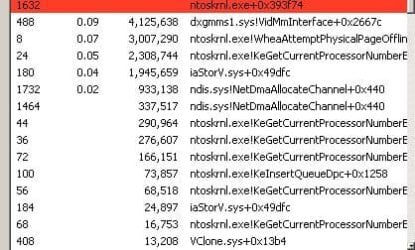
I've rebooted the computer twice now, please help with this man it is not normal. There is anomulous I/O read activity as well. The thing has been acting really odd lately for example it pauses after loading boot drivers and states the Advanced Boot Options before going to the logonui. Tool bars don't work in explorer is just odd, I doubt that has anything to do with I'm just saying ODD. It is 30 degrees celsius in side, and I just want to watch this tv show and sleep. :/

I just ran malware bytes says I'm clean, this is a different issue then my other post. One was meant that my CPU was at its limitations which was never resolved, this is about the CPU being maxed out by the ntoskrnl

screw it, I doubt I'd get a response in time it is a 11 at night, the god dang internet went on it, is a complete piece of crap the ntoskrnl makes it completely unusable now is a brick. I'll go toms hardware maybe they can point in the right direction for a replacement
 

Attachments
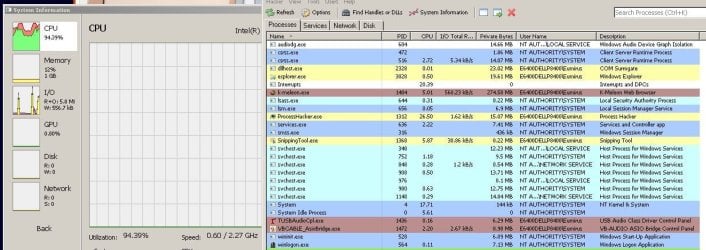
  • System + Interrupt Maxing CPU - 18-07-15 - ver 1.0.JPG
    System + Interrupt Maxing CPU - 18-07-15 - ver 1.0.JPG
    114.5 KB · Views: 7
  • System Maxing CPU - 18-07-15 - ver 1.0.JPG
    System Maxing CPU - 18-07-15 - ver 1.0.JPG
    36.3 KB · Views: 23
Last edited:

My Computer

Computer type
Laptop
Computer Manufacturer/Model Number
Lenovo
OS
Windows 7 - Home Edition - Build 7601x8086
Memory
Samsung DDR3 4GB
Graphics Card(s)
Intergrated
Sound Card
Intergrated
Screen Resolution
1400 x 1050
Hard Drives
80GB HDD 2.5
PSU
20V adapter
Case
Piece of plastic
Cooling
Copper heatsink
Keyboard
Intergrated PS2
Mouse
TouchPad
Antivirus
Commodo
Browser
K-Melon
How long has this been going on?
Do you have a system restore point from before the issue started?
 

My Computer

Computer type
PC/Desktop
Computer Manufacturer/Model Number
Custom Build
OS
Windows 7 Ultimate x64 SP1
CPU
AMD Phenom 2 1090T
Motherboard
Gigabyte GA-890FXA-UD5
Memory
2x8GB Kingston HyperX Fury Black 1600Mhz Unganged
Graphics Card(s)
MSI GTX 970 Gaming 4G
Sound Card
Realtek On-Board HD 7.1 Audio / Logitech G35
Monitor(s) Displays
3xAcer GD245HQ
Screen Resolution
1920x1080
Hard Drives
Samsung 850 Pro 512GB SSD - OS /
WD Caviar Black SATA 3 - 1 TBx2 - Dynamic RAID 0 /
WD Caviar Green SATA 2 - 640GBx2 - Dynamic RAID 0 /
WD Caviar Green SATA 2 - 640GB - Internal Backup /
Seagate Barracude SATA 3 - 3TB - External Backup/ Sync
PSU
HighPower 1000W
Case
Cooler Master HAF 932
Cooling
Noctua NH-D14
Keyboard
Logitech G19
Mouse
Logitech G500
Internet Speed
100/4 Mbit Cable (100GB quota)
Antivirus
ZoneAlarm Extreme Security / MBAM Pro / MBAE Free / SAS Free
Browser
IE 11 - Firefox - Chrome
Other Info
Logitech F710/ G27/ G940/ Z5500 // TrackIR 5 // Nvidia 3D Surround Vision
How long has this been going on?
Do you have a system restore point from before the issue started?


I appreciate your response, no that functionality is disabled. Like if the system blue screens at boot it can revert to the last session loaded so it will bypass any changes made on the last session termination. But it can't back more then that, and it can't be controlled is just a fail safe.

The issue started when I posted this. I think this happened when I was downloading files, then it had some networking anomaly where the connections seized up because the application was overwhelmed and I closed it. Still problem so I check and it was the kernel, that was causing the application to be overwhelmed. It was just youtube videos.

But the system is just burning up because of it. Even where the ram is scroching hot, it actually hurts to touch the mouse pad because of it. The system never runs this hot it is just being exhausted, I think that is why the wifi went out yesterday. Just over heated and was 40 degrees in here today so it can't do anything. Video won't work any longer it stutters to the point sounds are not audible. It litterally is a brick at this point. The system is really old in the first place so it could never do much maybe one application at a time if that application was nice, two or three if you suspend them in between usage. Is 2.26ghz core duo.

I know nothing about those threads, the read outs don't make any sense with regards to the threads correlating to the usage. The interrupts and DPCs are taking just as much out of the cpu making it red line 100% any time the device is on pretty much and I have no idea how to check that. I am just going to cut my losses at this point, perseve my sanity. It just is way too hot in this house, and too many problems/noises to focus on resolving the issue. Either I am going to put a hole through the laptop or am going to become hurt myself over the issue. Is just not worth my time.
 

My Computer

Computer type
Laptop
Computer Manufacturer/Model Number
Lenovo
OS
Windows 7 - Home Edition - Build 7601x8086
Memory
Samsung DDR3 4GB
Graphics Card(s)
Intergrated
Sound Card
Intergrated
Screen Resolution
1400 x 1050
Hard Drives
80GB HDD 2.5
PSU
20V adapter
Case
Piece of plastic
Cooling
Copper heatsink
Keyboard
Intergrated PS2
Mouse
TouchPad
Antivirus
Commodo
Browser
K-Melon
Keep it optimistic mate :)

My room is 30C as well.

Tried going in Safe Mode with Networking yet?
 

My Computer

Computer type
PC/Desktop
Computer Manufacturer/Model Number
Custom Build
OS
Windows 7 Ultimate x64 SP1
CPU
AMD Phenom 2 1090T
Motherboard
Gigabyte GA-890FXA-UD5
Memory
2x8GB Kingston HyperX Fury Black 1600Mhz Unganged
Graphics Card(s)
MSI GTX 970 Gaming 4G
Sound Card
Realtek On-Board HD 7.1 Audio / Logitech G35
Monitor(s) Displays
3xAcer GD245HQ
Screen Resolution
1920x1080
Hard Drives
Samsung 850 Pro 512GB SSD - OS /
WD Caviar Black SATA 3 - 1 TBx2 - Dynamic RAID 0 /
WD Caviar Green SATA 2 - 640GBx2 - Dynamic RAID 0 /
WD Caviar Green SATA 2 - 640GB - Internal Backup /
Seagate Barracude SATA 3 - 3TB - External Backup/ Sync
PSU
HighPower 1000W
Case
Cooler Master HAF 932
Cooling
Noctua NH-D14
Keyboard
Logitech G19
Mouse
Logitech G500
Internet Speed
100/4 Mbit Cable (100GB quota)
Antivirus
ZoneAlarm Extreme Security / MBAM Pro / MBAE Free / SAS Free
Browser
IE 11 - Firefox - Chrome
Other Info
Logitech F710/ G27/ G940/ Z5500 // TrackIR 5 // Nvidia 3D Surround Vision
Keep it optimistic mate :)

My room is 30C as well.

Tried going in Safe Mode with Networking yet?

I'm Canadian though, used to cold cold temperatures. Supposed to have a long winter this year though so it will make up for these couple weeks.

It yields the same result, the threads are the same. It seems to be more spasmodic now though, not as frequent. Sometimes the interrupts will be at 50% and then back to 8 while the ntoskrnl will be 13-50% on and off. It makes it actually usable for basic things, music/video are kind of pointless if you want no interruptions. And I am sure it is just killing the computer having it on in the first place. Reached the point of diminishing returns I think.

I'll flash a new copy of windows to it when I can make a copy, that should resolve the issue. Other wise I'll just use Linux or XP Portable disc in the meantime. Thanks again for your efforts.

By the way, I think this is the result of a faulty boot driver, and or service loop. Could try resetting the chains and then reconfigure based off that. Which could make sense if the kernel is trying to compensate for something not running properly.

Have a good one!
 

My Computer

Computer type
Laptop
Computer Manufacturer/Model Number
Lenovo
OS
Windows 7 - Home Edition - Build 7601x8086
Memory
Samsung DDR3 4GB
Graphics Card(s)
Intergrated
Sound Card
Intergrated
Screen Resolution
1400 x 1050
Hard Drives
80GB HDD 2.5
PSU
20V adapter
Case
Piece of plastic
Cooling
Copper heatsink
Keyboard
Intergrated PS2
Mouse
TouchPad
Antivirus
Commodo
Browser
K-Melon

My Computer

Computer type
PC/Desktop
Computer Manufacturer/Model Number
Custom Build
OS
Windows 7 Ultimate x64 SP1
CPU
AMD Phenom 2 1090T
Motherboard
Gigabyte GA-890FXA-UD5
Memory
2x8GB Kingston HyperX Fury Black 1600Mhz Unganged
Graphics Card(s)
MSI GTX 970 Gaming 4G
Sound Card
Realtek On-Board HD 7.1 Audio / Logitech G35
Monitor(s) Displays
3xAcer GD245HQ
Screen Resolution
1920x1080
Hard Drives
Samsung 850 Pro 512GB SSD - OS /
WD Caviar Black SATA 3 - 1 TBx2 - Dynamic RAID 0 /
WD Caviar Green SATA 2 - 640GBx2 - Dynamic RAID 0 /
WD Caviar Green SATA 2 - 640GB - Internal Backup /
Seagate Barracude SATA 3 - 3TB - External Backup/ Sync
PSU
HighPower 1000W
Case
Cooler Master HAF 932
Cooling
Noctua NH-D14
Keyboard
Logitech G19
Mouse
Logitech G500
Internet Speed
100/4 Mbit Cable (100GB quota)
Antivirus
ZoneAlarm Extreme Security / MBAM Pro / MBAE Free / SAS Free
Browser
IE 11 - Firefox - Chrome
Other Info
Logitech F710/ G27/ G940/ Z5500 // TrackIR 5 // Nvidia 3D Surround Vision
Hey, wondered how it is now. Did you open a Resource Monitor, switch to CPU and sort Processes and Services by CPU? It may give us an idea.

You can try a repair install (http://www.sevenforums.com/tutorials/3413-repair-install.html) by the way, before a clean reinstall (http://www.sevenforums.com/tutorials/219487-clean-reinstall-factory-oem-windows-7-a.html).

That functionality is disabled lol, all so that repair install functionality is as well. All so would never do a clean install, I'd use a modified boot image where everything is pre-configured less hassle works as you want it out of box.

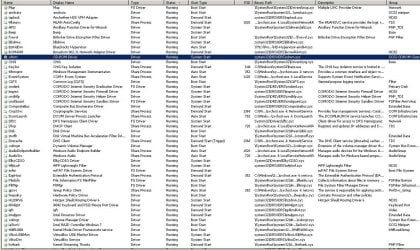
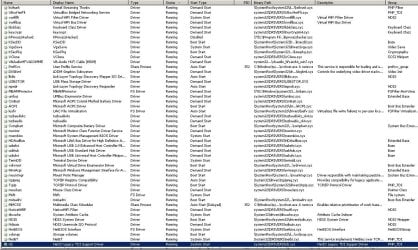
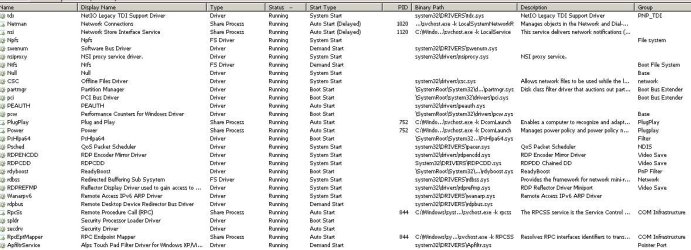
I've attached everything running on my system, a lot of that at one point was disabled though my settings were reverted and I've never bothered touching it again.

Page 1 services that should be disabled:

fvevol, blbdrive, BstHdDrv, I8042prt, cdrom, taphss6, amdxata, CLFS, Dfsc, storflt, HssDRV6, isStorV, VBoxUSBMon, VBoxDrv

There so much crap there, and some of it you just can't disable unless it is a pre-configuration I think readyboost will blue screen you if disable it and you don't install windows natively without it.
 

Attachments

  • List of Drivers 001 - 21.07.15 - Ver 1.0.JPG
    List of Drivers 001 - 21.07.15 - Ver 1.0.JPG
    205.8 KB · Views: 1
  • List of Drivers 002 - 21.07.15 - Ver 1.0.JPG
    List of Drivers 002 - 21.07.15 - Ver 1.0.JPG
    184.9 KB · Views: 0
  • List of Drivers 003 - 21.07.15 - Ver 1.0.JPG
    List of Drivers 003 - 21.07.15 - Ver 1.0.JPG
    110.5 KB · Views: 1
Last edited:

My Computer

Computer type
Laptop
Computer Manufacturer/Model Number
Lenovo
OS
Windows 7 - Home Edition - Build 7601x8086
Memory
Samsung DDR3 4GB
Graphics Card(s)
Intergrated
Sound Card
Intergrated
Screen Resolution
1400 x 1050
Hard Drives
80GB HDD 2.5
PSU
20V adapter
Case
Piece of plastic
Cooling
Copper heatsink
Keyboard
Intergrated PS2
Mouse
TouchPad
Antivirus
Commodo
Browser
K-Melon
Oh heh, I now wonder if you are causing these issues yourself?! :p (don't hate me saying it :D)

You should have Resource Monitor: Open Task Manager, switch to performance tab, the clicky at the bottom. Then switch to CPU and sort by CPU both Processes and Services.

However, this won't help accomplish anything if you are not having the issue at the moment.
 

My Computer

Computer type
PC/Desktop
Computer Manufacturer/Model Number
Custom Build
OS
Windows 7 Ultimate x64 SP1
CPU
AMD Phenom 2 1090T
Motherboard
Gigabyte GA-890FXA-UD5
Memory
2x8GB Kingston HyperX Fury Black 1600Mhz Unganged
Graphics Card(s)
MSI GTX 970 Gaming 4G
Sound Card
Realtek On-Board HD 7.1 Audio / Logitech G35
Monitor(s) Displays
3xAcer GD245HQ
Screen Resolution
1920x1080
Hard Drives
Samsung 850 Pro 512GB SSD - OS /
WD Caviar Black SATA 3 - 1 TBx2 - Dynamic RAID 0 /
WD Caviar Green SATA 2 - 640GBx2 - Dynamic RAID 0 /
WD Caviar Green SATA 2 - 640GB - Internal Backup /
Seagate Barracude SATA 3 - 3TB - External Backup/ Sync
PSU
HighPower 1000W
Case
Cooler Master HAF 932
Cooling
Noctua NH-D14
Keyboard
Logitech G19
Mouse
Logitech G500
Internet Speed
100/4 Mbit Cable (100GB quota)
Antivirus
ZoneAlarm Extreme Security / MBAM Pro / MBAE Free / SAS Free
Browser
IE 11 - Firefox - Chrome
Other Info
Logitech F710/ G27/ G940/ Z5500 // TrackIR 5 // Nvidia 3D Surround Vision
Oh heh, I now wonder if you are causing these issues yourself?! :p (don't hate me saying it :D)

You should have Resource Monitor: Open Task Manager, switch to performance tab, the clicky at the bottom. Then switch to CPU and sort by CPU both Processes and Services.

However, this won't help accomplish anything if you are not having the issue at the moment.

Still this doesn't work for me xD, it just generates error service is disabled. I've tried enabling it before for another issue and no luck.

However I think the issue is resolved actually I just disabled/enabled a bunch of drivers, I think something did get all messed up. Windows is weird system how things depend on each other, is not clear ever. Like have no idea what caused or resolved the error now. Am going to run a boot trace see what pops up.

Thanks for bearing with me.
 

My Computer

Computer type
Laptop
Computer Manufacturer/Model Number
Lenovo
OS
Windows 7 - Home Edition - Build 7601x8086
Memory
Samsung DDR3 4GB
Graphics Card(s)
Intergrated
Sound Card
Intergrated
Screen Resolution
1400 x 1050
Hard Drives
80GB HDD 2.5
PSU
20V adapter
Case
Piece of plastic
Cooling
Copper heatsink
Keyboard
Intergrated PS2
Mouse
TouchPad
Antivirus
Commodo
Browser
K-Melon
I wouldn't be here if I minded helping out :)

But I am at a loss at the moment, do you know what you have disabled so you can enable them back?

Hmm, maybe All-in-one Repair will help. Get it from Tweaking.com - Windows Repair and run it as admin in Safe Mode with Networking. Repair with default options, see if that will help.
 

My Computer

Computer type
PC/Desktop
Computer Manufacturer/Model Number
Custom Build
OS
Windows 7 Ultimate x64 SP1
CPU
AMD Phenom 2 1090T
Motherboard
Gigabyte GA-890FXA-UD5
Memory
2x8GB Kingston HyperX Fury Black 1600Mhz Unganged
Graphics Card(s)
MSI GTX 970 Gaming 4G
Sound Card
Realtek On-Board HD 7.1 Audio / Logitech G35
Monitor(s) Displays
3xAcer GD245HQ
Screen Resolution
1920x1080
Hard Drives
Samsung 850 Pro 512GB SSD - OS /
WD Caviar Black SATA 3 - 1 TBx2 - Dynamic RAID 0 /
WD Caviar Green SATA 2 - 640GBx2 - Dynamic RAID 0 /
WD Caviar Green SATA 2 - 640GB - Internal Backup /
Seagate Barracude SATA 3 - 3TB - External Backup/ Sync
PSU
HighPower 1000W
Case
Cooler Master HAF 932
Cooling
Noctua NH-D14
Keyboard
Logitech G19
Mouse
Logitech G500
Internet Speed
100/4 Mbit Cable (100GB quota)
Antivirus
ZoneAlarm Extreme Security / MBAM Pro / MBAE Free / SAS Free
Browser
IE 11 - Firefox - Chrome
Other Info
Logitech F710/ G27/ G940/ Z5500 // TrackIR 5 // Nvidia 3D Surround Vision
I wouldn't be here if I minded helping out :)

But I am at a loss at the moment, do you know what you have disabled so you can enable them back?

Hmm, maybe All-in-one Repair will help. Get it from Tweaking.com - Windows Repair and run it as admin in Safe Mode with Networking. Repair with default options, see if that will help.

Not really, I've changed so many things on here now I wouldn't know where to start. I just checked the boot time and it is 62 seconds on an HDD. The break down:

7-11 seconds on average to shutdown

From boot to desktop:

3-7 seconds to boot drivers (it lags out cause of the stupid bios, I have a linux partition and the hardware here is not compatible so it causes a delay)
5-6 seconds to load every boot driver
45-53 seconds to logon into the desktop minus the 5 second delay to actually use it now

average 60-70 seconds

It has never once taken more then 10 seconds from the boot drivers to the desktop before, usually it is instantaneous. I've had error before that certain system components failed to load because it was so fast.

The thing with that though is I have to do every component individual and track the changes. It is a great tool granted, but it is a lot of work. If I can isolate what the delay is without using it, it would be a lot easier.
----------------
Since this has happened I disabled Shell Hardware Detection, adaptive brightness, and then I just don't know I don't have a means to track it... uhm AsyncMAc,


The week before that was:

Windows Presentation Foundation Font Cache, Application Layer Gateway Service, Application Identity, Certificate Propagation, Disk Defragmenter, Wired AutoConfi, Microsoft iSCSI Initiator Service, and BranchCache

I know it has nothing to do with the registry, nothing has been change there lately. The only thing I was doing when it happened was using Torch. I've checked Autoruns and it looks clean. The biggest thing I did change actually which might cause it is directory changes. I changed over my user account to an external drive....... I know it effected my K-Meleon install where the os can't even tell it is running at times causing it not to work intermittently. I just don't know where down the line it happened.
====================
Wifi static IP - FIXED NativeWIFI driver not loaded
Toolbars - FIXED Internet Security Options Reset (why does effect explorer so)
MSCONFIG - FIXED
Interrupts - Was a hardware failure problem damn wifi wasn't over heating it was missing a driver

Advanced boot options being displayed after boot are still occurring as well as the black screen to logonui+delay. Must be a driver:

3 hours later, tested that and nope that just made things worst. OK if you disable every service but 4 the advanced boot options will not load as in safe mode, though there is a black screen still and long pause after as logonui loads till you reach the desktop. So that narrows down the issue to:

Networking misconfiguration: which was fixed
Remote Procedure Issue: ?????
Audio Issue: ?????
CryptSvc Issue: ?????
GroupPolicy Issue: ?????
LSASS Issue: ?????
Power Issue: ?????
WMI Issue: ?????

I really don't know, is like 4am now. I'll check those routes tomorrow, and if no leads I'll try putting the directories back to the main system and just symlink the ones I need to.

The CPU issue is resolved though, so thanks again. I'll have to figure out this messed up boot issue on my own by tracing the dependencies, is way too much information to go through on here. I should be happy it is booting in 60 seconds, isn't too bad is just the fact for 30 of those seconds are sitting on a black screen for no apparent reason. Then the other 15 seconds or so is just to make it pass the logon screen.
 
Last edited:

My Computer

Computer type
Laptop
Computer Manufacturer/Model Number
Lenovo
OS
Windows 7 - Home Edition - Build 7601x8086
Memory
Samsung DDR3 4GB
Graphics Card(s)
Intergrated
Sound Card
Intergrated
Screen Resolution
1400 x 1050
Hard Drives
80GB HDD 2.5
PSU
20V adapter
Case
Piece of plastic
Cooling
Copper heatsink
Keyboard
Intergrated PS2
Mouse
TouchPad
Antivirus
Commodo
Browser
K-Melon
Back
Top