Maximum RAM Read on 32 bit systems

blaquee

New member
Local time
10:59 PM
Messages
10
Hi, I was just wondering about the 32bit RAM range, if im not mistkaen a 32bit system can recognize up to 4GB of ram right?

If so how much does Windows 7 have reserved? because i have 4gb ram installed but windows only reveals 2.99GB RAM useable in the control panel. Anyone can clear this up?
 

My Computer

OS
Windows 7
CPU
Intel Quad Core i5
Motherboard
ASUS p7p55d Deluxe
Memory
4GB RAM @1033mhz
Graphics Card(s)
ASUS eah4770 512MG GDDR5
Monitor(s) Displays
hp 2159m
Hard Drives
OCZ Vertex 120gb
Case
HAF Tower
Hi, I was just wondering about the 32bit RAM range, if im not mistkaen a 32bit system can recognize up to 4GB of ram right?

If so how much does Windows 7 have reserved? because i have 4gb ram installed but windows only reveals 2.99GB RAM useable in the control panel. Anyone can clear this up?
The RAM that you do not see is mapped for hardware resources. 32-bit OS can address 4GB. You will be better served by reading what Wikipedia has available.
 
2.99GB is probably all the RAM you will need, as long as you don't let your system go overboard with running processes. If you want to use the full 4GB, you'll need 64-bit Windows.
 

My Computer

Computer Manufacturer/Model Number
Too many to list.
OS
XP, Seven, 2008R2
CPU
AMD, Intel, VIA
Motherboard
Various
Memory
Corsair, Kingston, etc.
Graphics Card(s)
ATI, NVIDIA
Monitor(s) Displays
Samsung
Hard Drives
Maxtor, Western Digital
Keyboard
qwerty
Internet Speed
22 Mb/s @ home, 1 Gb/s @ server
Other Info
All of my systems still run fastest on XP 32-bit for the most part. Win7 is fun to play with, but I still prefer XP for raw speed, security, and functionality.
32 Bit Os systems can only use 3.2 of Ram.
 

My Computer

Computer type
Laptop
Computer Manufacturer/Model Number
Panasonic Toughbook CF54
OS
W7 Pro
CPU
Intel Core i-5300U
Motherboard
America MegaTrends
Memory
16Gb DDR3
Graphics Card(s)
Intel HD Graphics 5500
Sound Card
SoundMax
Monitor(s) Displays
DFP W/CircularPolarization 1000 Nit Touch
Screen Resolution
1920X1080
Hard Drives
Samsung SSD 850 Pro 512Gb
PSU
N/A
Case
Magnesium
Cooling
Passive
Keyboard
Emissive
Internet Speed
U-Verse Extreme 21MBPS,
Antivirus
MSE, Malwarebytes Professional
Its not how much RAM that 32bit is able to address, rather its the amount MS licenses to be addressed ...
 

My Computer

Computer type
PC/Desktop
Computer Manufacturer/Model Number
LENOVO K450 @3.0GHZ
OS
64-bit Windows 8.1 Pro
CPU
Core(TM) i5 CPU 4330 Haswell @ 3.20GHz
Motherboard
LENOVO
Memory
12.00 GB
Graphics Card(s)
Intel(R) HD Graphics
Sound Card
Intel HD integtrated
Monitor(s) Displays
HP 25' ISP Monitor
Screen Resolution
1900/1020
Hard Drives
(1) ST1000DM003-1CH162 (2) Generic STORAGE DEVICE USB Device (3) Generic STORAGE DEVICE USB Device
Internet Speed
100mb down/10mb up
32 Bit Os systems can only use 3.2 of Ram.

Um, no. most 32 bit computers fall somewhere between 3.25 and 3.5 gigs. I will not get that discussion started again
 
Last edited:

My Computer

Computer Manufacturer/Model Number
HP Pavillion dv-7 1005 Tx
OS
Win 8 Release candidate 8400
CPU
[email protected]
Memory
4 gigs
Graphics Card(s)
Nvidia 9600M
Sound Card
HD built-in
Monitor(s) Displays
17" Wxga
Screen Resolution
1440x900
Cooling
none
Internet Speed
45Mb down 5Mb up
Its not how much RAM that 32bit is able to address, rather its the amount MS licenses to be addressed ...

This is correct.
 

My Computer

Computer type
PC/Desktop
Computer Manufacturer/Model Number
Alienware Aurora-R4
OS
Windows 7 Professional x64
CPU
Intel(R) Core(TM) i7-3820 CPU, 4 Cores, 8 Logical Cores
Motherboard
Alienware
Memory
32 GB DDR3 1600
Graphics Card(s)
ATI Radeon HD 8950 3GB vDDR5 & ATI Radeon HD 7950 3GB vDDR5
Sound Card
Realtek 7.1 Audio
Monitor(s) Displays
Dell SP2309W 23 inch
Screen Resolution
2048x1152
Hard Drives
7.3 TB in 4 drives (Raid 0), 2TB NAS backup drive.
PSU
875w
Case
ALX Chasis with active venting
Cooling
Liquid cooled with active venting and fans.
Keyboard
Alienware TactX
Mouse
Alienware TactX
Internet Speed
15mb Cable
Antivirus
Malwarebytes
Browser
Pale Moon (Optimized Mozilla Based)
Other Info
http://www.y0himba.net
Yeah you know it is the hardware...
 

My Computer

Computer type
PC/Desktop
Computer Manufacturer/Model Number
Alienware Aurora ALX R4
OS
Windows 10 Pro (x64)
CPU
Intel Core i7-3930K (3.2GHz - 4.5GHz)
Motherboard
Alienware Aurora-R4 x79
Memory
4x Samsung 4GB PC3-12800 DDR3 (16GB 1600MHz)
Graphics Card(s)
Nvidia Geforce GTX 690
Sound Card
SteelSeries Siberia Elite
Monitor(s) Displays
Dell UltraSharp U3011
Screen Resolution
2560x1600
Hard Drives
Samsung 850 Pro 256 GB, Seagate 1TB Desktop Hybrid HDD, 2x Western Digital 4TB Green HDD
PSU
875W Some Dell PSU <.<
Case
Alienware Aurora ALX
Cooling
Custom Liquid Cooling (EK CPU & GPU blocks) dual EK 480RAD
Keyboard
Logitech G710+ Mechanical
Mouse
Logitech G700s
Internet Speed
Verizon Fios (50 mbps average)
Other Info
Server: Intel NUC D54250WYK: i5-4250U, 16GB, 256 GB mSATA, Windows Server 2012 R2

My Computer

Computer type
PC/Desktop
Computer Manufacturer/Model Number
Alienware Aurora-R4
OS
Windows 7 Professional x64
CPU
Intel(R) Core(TM) i7-3820 CPU, 4 Cores, 8 Logical Cores
Motherboard
Alienware
Memory
32 GB DDR3 1600
Graphics Card(s)
ATI Radeon HD 8950 3GB vDDR5 & ATI Radeon HD 7950 3GB vDDR5
Sound Card
Realtek 7.1 Audio
Monitor(s) Displays
Dell SP2309W 23 inch
Screen Resolution
2048x1152
Hard Drives
7.3 TB in 4 drives (Raid 0), 2TB NAS backup drive.
PSU
875w
Case
ALX Chasis with active venting
Cooling
Liquid cooled with active venting and fans.
Keyboard
Alienware TactX
Mouse
Alienware TactX
Internet Speed
15mb Cable
Antivirus
Malwarebytes
Browser
Pale Moon (Optimized Mozilla Based)
Other Info
http://www.y0himba.net
PAE is already enabled by default on Intel Core Processors, it is required to use DEP. However PAE is not for accessing 4 GB, it is for accessing OVER 4 GB. The problem is not 32 bit addressing but hardware address reservations.
 

My Computer

Computer type
PC/Desktop
Computer Manufacturer/Model Number
Alienware Aurora ALX R4
OS
Windows 10 Pro (x64)
CPU
Intel Core i7-3930K (3.2GHz - 4.5GHz)
Motherboard
Alienware Aurora-R4 x79
Memory
4x Samsung 4GB PC3-12800 DDR3 (16GB 1600MHz)
Graphics Card(s)
Nvidia Geforce GTX 690
Sound Card
SteelSeries Siberia Elite
Monitor(s) Displays
Dell UltraSharp U3011
Screen Resolution
2560x1600
Hard Drives
Samsung 850 Pro 256 GB, Seagate 1TB Desktop Hybrid HDD, 2x Western Digital 4TB Green HDD
PSU
875W Some Dell PSU <.<
Case
Alienware Aurora ALX
Cooling
Custom Liquid Cooling (EK CPU & GPU blocks) dual EK 480RAD
Keyboard
Logitech G710+ Mechanical
Mouse
Logitech G700s
Internet Speed
Verizon Fios (50 mbps average)
Other Info
Server: Intel NUC D54250WYK: i5-4250U, 16GB, 256 GB mSATA, Windows Server 2012 R2
That 32-bit editions of Windows Vista are limited to 4GB is not because of any physical or technical constraint on 32-bit operating systems. The 32-bit editions of Windows Vista all contain code for using physical memory above 4GB. Microsoft just doesn’t license you to use that code.

Well, to say it that way is perhaps to put words in Microsoft’s mouth. I say the restriction to 4GB is a licensing issue because that’s how Microsoft’s programmers evidently have thought of it. The 4GB limit is retrieved from the registry by calling a function named ZwQueryLicenseValue, which is itself called from an internal procedure which Microsoft’s published symbol files name as MxMemoryLicense. If you remove this check for the licensed memory limit then a restriction to 4GB is demonstrably not enforced by other means. Yet I must admit that I have not found where Microsoft says directly that 32-bit Windows Vista is limited to 4GB only by licensing. The supposed License Agreement doesn’t even mention the word memory. What, really, is going on?
From:
Geoff Chappell, Software Analyst - Viewer
 

My Computer

Computer type
PC/Desktop
Computer Manufacturer/Model Number
Alienware Aurora-R4
OS
Windows 7 Professional x64
CPU
Intel(R) Core(TM) i7-3820 CPU, 4 Cores, 8 Logical Cores
Motherboard
Alienware
Memory
32 GB DDR3 1600
Graphics Card(s)
ATI Radeon HD 8950 3GB vDDR5 & ATI Radeon HD 7950 3GB vDDR5
Sound Card
Realtek 7.1 Audio
Monitor(s) Displays
Dell SP2309W 23 inch
Screen Resolution
2048x1152
Hard Drives
7.3 TB in 4 drives (Raid 0), 2TB NAS backup drive.
PSU
875w
Case
ALX Chasis with active venting
Cooling
Liquid cooled with active venting and fans.
Keyboard
Alienware TactX
Mouse
Alienware TactX
Internet Speed
15mb Cable
Antivirus
Malwarebytes
Browser
Pale Moon (Optimized Mozilla Based)
Other Info
http://www.y0himba.net
Right, but didn't you notice the OP has only 4 GBs of memory. He/She doesn't need to go above that. Or did I miss something?
 

My Computer

Computer type
PC/Desktop
Computer Manufacturer/Model Number
Alienware Aurora ALX R4
OS
Windows 10 Pro (x64)
CPU
Intel Core i7-3930K (3.2GHz - 4.5GHz)
Motherboard
Alienware Aurora-R4 x79
Memory
4x Samsung 4GB PC3-12800 DDR3 (16GB 1600MHz)
Graphics Card(s)
Nvidia Geforce GTX 690
Sound Card
SteelSeries Siberia Elite
Monitor(s) Displays
Dell UltraSharp U3011
Screen Resolution
2560x1600
Hard Drives
Samsung 850 Pro 256 GB, Seagate 1TB Desktop Hybrid HDD, 2x Western Digital 4TB Green HDD
PSU
875W Some Dell PSU <.<
Case
Alienware Aurora ALX
Cooling
Custom Liquid Cooling (EK CPU & GPU blocks) dual EK 480RAD
Keyboard
Logitech G710+ Mechanical
Mouse
Logitech G700s
Internet Speed
Verizon Fios (50 mbps average)
Other Info
Server: Intel NUC D54250WYK: i5-4250U, 16GB, 256 GB mSATA, Windows Server 2012 R2
Has 4, doesn't show mare than 3.would like to utilize all 4. This explains why the OP cannot see more than 3. Hopefully this article will help explain to the OP what is going on.

Done replying, back on topic.
 

My Computer

Computer type
PC/Desktop
Computer Manufacturer/Model Number
Alienware Aurora-R4
OS
Windows 7 Professional x64
CPU
Intel(R) Core(TM) i7-3820 CPU, 4 Cores, 8 Logical Cores
Motherboard
Alienware
Memory
32 GB DDR3 1600
Graphics Card(s)
ATI Radeon HD 8950 3GB vDDR5 & ATI Radeon HD 7950 3GB vDDR5
Sound Card
Realtek 7.1 Audio
Monitor(s) Displays
Dell SP2309W 23 inch
Screen Resolution
2048x1152
Hard Drives
7.3 TB in 4 drives (Raid 0), 2TB NAS backup drive.
PSU
875w
Case
ALX Chasis with active venting
Cooling
Liquid cooled with active venting and fans.
Keyboard
Alienware TactX
Mouse
Alienware TactX
Internet Speed
15mb Cable
Antivirus
Malwarebytes
Browser
Pale Moon (Optimized Mozilla Based)
Other Info
http://www.y0himba.net
PAE is already enabled by default on Intel Core Processors, it is required to use DEP. However PAE is not for accessing 4 GB, it is for accessing OVER 4 GB. The problem is not 32 bit addressing but hardware address reservations.
+1(x)
 
Has 4, doesn't show mare than 3.would like to utilize all 4. This explains why the OP cannot see more than 3. Hopefully this article will help explain to the OP what is going on.

Done replying, back on topic.

A novella-sized programmer-level explanation laced with anti-Microsoft bitterness may not be the ideal way to get the OP started on their journey of understanding.
 

My Computer

Computer Manufacturer/Model Number
Multiple machines in various stages of decomposition.
OS
Win7x64
Gurus, I am only getting 1640MB (1.6G) with 4GB installed in Win 7 32 bit home edition, dual AMD E-350 processor. Task manager reports 2456MB reserved for hardware and available for Windows is only 1640MB ! What went wrong ? BIOS had PAE enable.
 

My Computer

OS
windows 7 Home Basic 32bit
PAE is already enabled by default on Intel Core Processors, it is required to use DEP. However PAE is not for accessing 4 GB, it is for accessing OVER 4 GB. The problem is not 32 bit addressing but hardware address reservations.
+1(x)

Actually, if 32 bit windows fully supported PAE for 36bits of address, then then the reserved device memory could be mapped to a virtual address range beyond the physical 4GB of RAM, and the OP might be able to see his full 4GB Intel/MB supported memory remapping for this configuration. That is how it is done in x64 - it would be just like that. (actually I think the device memory is still mapped to virtual addresses under the 4GB, and that section of RAM physical address is mapped to virtual addresses above 4GB).

But that is not the way it is. You are limited to 4GB of virtual address space, and the device Memeory mapped I/O has to be mapped to an address range in that 4GB, which makes it unavailable for the operating system and programs.
 

My Computer

Computer type
PC/Desktop
Computer Manufacturer/Model Number
Home built (GeneO industries)/Model 4
OS
Windows 10 Pro. EFI boot partition, full EFI boot
CPU
i7 4770k 4.4GHz (44-44-43-43 turbo) @ 1.248V
Motherboard
ASUS Maximus VI Hero
Memory
16GB (8GBx2) @2200 MHz G.skill Sniper 10-11-10-30-1, 1.6V
Graphics Card(s)
MSI GTX 970 Gaming 4G
Sound Card
Onboard SupremeFX Audio
Monitor(s) Displays
NEC Spectraview 2490WUXi-SV
Screen Resolution
1920 x 1200
Hard Drives
Samsung 850 Pro 256GB (OS), Samsung 2x 128GB 840 Pro SSD in RAID0, 3x WD Blue 6Gb/s 1TB RAID0, WD 2TB Black external USB 3.0, 2TB WD20EARS Green external USB 3.0, 2x 500GB Seagate and 1 750 GB external USB, 1x 350GB external USB3
PSU
Seasonic X-850 (2012 KM3 model)
Case
Fractal Design Define R4
Cooling
NH-D14, NF-F12, NF-A15; NF-P14, NF-P12,NF-A14, S12A PWM
Keyboard
Cooler Master Storm Quickfire Rapid - Brown
Mouse
Logitech G602
Internet Speed
126.4 Mb/s down, 24.3 Mb/s up
Other Info
USB 3.0 x8 , SATA III x8, eSATA, USB 2.0 x6. Samsung DVD R/W drive.

WEI: CPU 7.8, Memory 7.9, Graphics 7.9, Disk 7.9
Gurus, I am only getting 1640MB (1.6G) with 4GB installed in Win 7 32 bit home edition, dual AMD E-350 processor. Task manager reports 2456MB reserved for hardware and available for Windows is only 1640MB ! What went wrong ? BIOS had PAE enable.

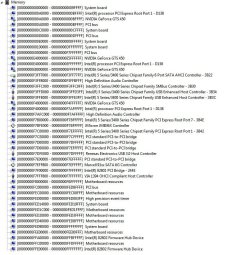
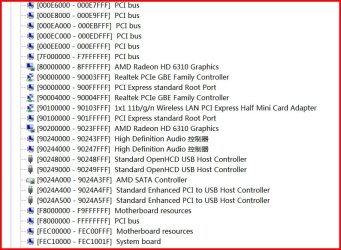
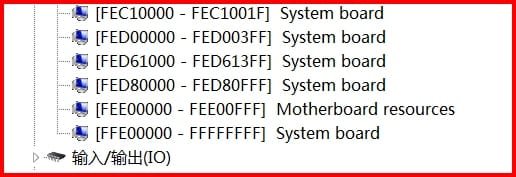
My Computer -> Manage -> Device manager
View -> Resources by Type -> Memory

You should get something like Mine which is attached. Snip it and post it and we can see what is using it

You'll notice that even though I have 8GB of memory in x64 and I have all 8GB usable, hardware is still mapped below 4 GB (on mine you'll see hardware mapped up to FFFFFFFF Hex = 4 GB). The physical memory corresponding to that hole is mapped to virtual address space above 8GB, so is still accessible as I mentioned above.
 

Attachments

  • Capture.JPG
    Capture.JPG
    143.5 KB · Views: 24

My Computer

Computer type
PC/Desktop
Computer Manufacturer/Model Number
Home built (GeneO industries)/Model 4
OS
Windows 10 Pro. EFI boot partition, full EFI boot
CPU
i7 4770k 4.4GHz (44-44-43-43 turbo) @ 1.248V
Motherboard
ASUS Maximus VI Hero
Memory
16GB (8GBx2) @2200 MHz G.skill Sniper 10-11-10-30-1, 1.6V
Graphics Card(s)
MSI GTX 970 Gaming 4G
Sound Card
Onboard SupremeFX Audio
Monitor(s) Displays
NEC Spectraview 2490WUXi-SV
Screen Resolution
1920 x 1200
Hard Drives
Samsung 850 Pro 256GB (OS), Samsung 2x 128GB 840 Pro SSD in RAID0, 3x WD Blue 6Gb/s 1TB RAID0, WD 2TB Black external USB 3.0, 2TB WD20EARS Green external USB 3.0, 2x 500GB Seagate and 1 750 GB external USB, 1x 350GB external USB3
PSU
Seasonic X-850 (2012 KM3 model)
Case
Fractal Design Define R4
Cooling
NH-D14, NF-F12, NF-A15; NF-P14, NF-P12,NF-A14, S12A PWM
Keyboard
Cooler Master Storm Quickfire Rapid - Brown
Mouse
Logitech G602
Internet Speed
126.4 Mb/s down, 24.3 Mb/s up
Other Info
USB 3.0 x8 , SATA III x8, eSATA, USB 2.0 x6. Samsung DVD R/W drive.

WEI: CPU 7.8, Memory 7.9, Graphics 7.9, Disk 7.9
Many thanks for correcting re PAE (for >4GB). Here is the snip, in 3 files. Noticed that Win 7 Home Basic has not snipping tool. Need to use Snippy for it.

Here are the is it. Look forward for answers to access my memory. (PS this is a Win 7 Chinese version - hence there characters means Memory)
 

Attachments

  • Memory Usage-1.jpg
    Memory Usage-1.jpg
    95 KB · Views: 5
  • Memory Usage-2.jpg
    Memory Usage-2.jpg
    129.3 KB · Views: 7
  • Memory Usage-3.jpg
    Memory Usage-3.jpg
    47.7 KB · Views: 4

My Computer

OS
windows 7 Home Basic 32bit
Back
Top