
Solved MBR error on reinstalling Win7 to clean HD

Beanster

New member
Local time
5:06 PM
Messages
61
I have been having problems for almost 2 years now, since installing Windows 7 on a new pc --- specifically with Windows Update not working. I have paid for Microsoft support, and I learned after that that I didn't have to because WU problems are covered under their warranty. Working directly with MS Tech Support has failed to resolve the problem, even after reinstalling the OS.

I am profoundly disappointed in MS's inability to solve my problem. This forum is my best hope for a solution. I posted my problem on this forum on April 11th, where I received excellent guidance (which I followed), but because I misstated some things (which I tried to clarify), I was dismissed. If I could explain things in precise tech language, I wouldn't need this forum! I need patience and HELP!

Anyway, that's my backstory. What everyone agrees on is this: I need to reformat my hard drive and then do a clean install of the OS. Note: the MS Tech Support guy had me download a new OS file, since he thought my CD might be corrupted. So I was first instructed to burn the ISO file to a flash drive.

From gregrocker on this site ON 4/11:

"Make sure the download completed and is the correct size, then write it to flash stick or burn to DVD using "Windows 7 USB-DVD Download Tool", boot the installation media to do a "Clean Install Windows 7."
It will be best to power down to unplug all other drives first. Then during the booted install use the drive options pictured in Steps 7/8 to delete all partitions on the target HD, create New and do the install.
I'd also look over these same steps for "Clean Reinstall - Factory OEM Windows 7" which are the same for retail and compile everything that works best to get and keep a perfect install."

When I went to get the Download Tool, I saw this:

Warning!
The Windows 7 USB/DVD Download Tool does not work with UEFI.
To create a 64-bit Windows 7 or Windows 8 UEFI USB flash drive, see:
How to Create a Bootable UEFI USB Flash Drive for Installing Windows 7 and Windows 8

I have UEFI, so I went to the link above to create a bootable UEFI USB Flash Drive. This was completed successfully.

Next, in following your link for a clean install, I found "How to Install Windows 7 Using the "Unified Extensible Firmware Interface" (UEFI)" at this link: UEFI (Unified Extensible Firmware Interface) - Install Windows 7 with (on this site) and followed all those instructions exactly.

So, I now have a bootable flash drive, and I have wiped my hard drive clean. I now proceed to install the OS from the flash drive and I get this error message:

"Windows cannot be installed to this disk. The selected disk has an MBR partition table. On EFI Systems, Windows can only be installed to GPT disks."

I thought the "clean install" wiped out ALL partitions? Someone, please help me.
 

My Computer My Computer

At a glance

win 7 pro 64Intel Core i5-2500K 3.3GHz (3.7GHz Turbo Boos...CORSAIR Vengeance 8GB (2x4GB) 240-Pin DDR3 SDRAMEVGA 01G-P3-1556-KR GeForce GTX550 Ti (Fermi)...
Computer type
PC/Desktop
Computer Manufacturer/Model Number
custom build
OS
win 7 pro 64
CPU
Intel Core i5-2500K 3.3GHz (3.7GHz Turbo Boost) LGA 1155 95W
Motherboard
ASUS P8Z68-V LX LGA 1155 Intel Z68 HDMI SATA 6Gb/sUSB3.0 ATX
Memory
CORSAIR Vengeance 8GB (2x4GB) 240-Pin DDR3 SDRAM
Graphics Card(s)
EVGA 01G-P3-1556-KR GeForce GTX550 Ti (Fermi) FPB 1GB
Monitor(s) Displays
ASUS VW246H 24" 2ms(GTG) HDMI Widescreen LCD
Hard Drives
C:\ Crucial M4 CT256M4SSD2CCA 256GB SATA III MLC
D:\ Western Digital WD1002FAEX 1TB 7200 RPM SATA 6.0Gb/s
both internally mounted
PSU
Antec EA-500D 500W
Case
Antec Sonata III 500 Mid Tower Case
Cooling
Cooler Master Hyper 212 Plus RR-B10-212P-G1 120mm CPU Cooler
Keyboard
Logitech Cordless MK700
Mouse
Logitech Cordless MK700
Internet Speed
1.5 Mbps for both upload and download
Other Info
Additional cooling fan: Antec 761345-75121-6 120mm Case Fan

BIOS: ASUS with UEFI, Build date: 7/1/2013, Version 4105
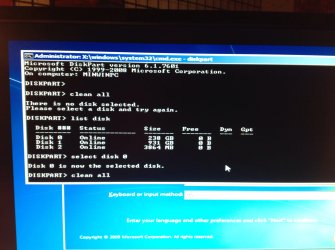
Did you delete all partitions during the booted install? The error means you have not cleared the MBR partition table by doing so.

If it's not enough to delete all partitions and create and format new, then run Diskpart Clean Command on the drive from the System Recovery Options Command Line.

If that fails check your UEFI settings. What are UEFI, CSM, and Legacy Boot exact settings choices and selection? Are you booting flash stick as UEFI device?

Report back results and if required exact failure error and behavior.
 
Your specs are lacking much. did the PC come with w7 or Win 8 installed?

Greg may correct this, but just because you have a UEFI board doesn't require you to do a UEFI install, however if Win 8 was factory installed it's a different story.

My board has a UEFI BIOS but I did not install with it.
 

My Computer My Computer

At a glance

Windows 7 Ultimate X64 SP1Intel i5-2550K, Differing ~4.4-4.8GHz No buil...16GB G.Skill Sniper 1866MHz @ 2133MHz 2x8GBASUS GTX650TIB-DC2OC-2GD5, (650TI Boost)
Computer type
PC/Desktop
Computer Manufacturer/Model Number
Home Built Desktop By DataTech
OS
Windows 7 Ultimate X64 SP1
CPU
Intel i5-2550K, Differing ~4.4-4.8GHz No built in GPU
Motherboard
ASUS P8Z68-V PRO/GEN3
Memory
16GB G.Skill Sniper 1866MHz @ 2133MHz 2x8GB
Graphics Card(s)
ASUS GTX650TIB-DC2OC-2GD5, (650TI Boost)
Sound Card
Onboard Realtek 5-1
Monitor(s) Displays
Samsung P2570HD
Screen Resolution
1920x1080
Hard Drives
Samsung 840 Pro 256GB SSD for OS, 500GB Seagate Constellation (Enterprise drive) for Data
PSU
Corsair HX650W
Case
Inwin Dragon Rider
Cooling
Hyper 212 EVO w/two Noctua fans, push-pull, @1300 RPM
Keyboard
E-Z Eyes, bright yellow keys with large characters
Mouse
steelseries SENSEI Laser Pro Gaming
Internet Speed
48-51Mbs Mbs down, 11 Mbs up Xfinity Cable
Antivirus
Norton Internet Security 2013
Browser
IE 10, Opera, Pale Moon if needed
Other Info
4 case fans, LG BluRay-RE, ASUS DVD-RW, Mr. Fusion power supply, 1.21 gigawatts.
Greg, I did follow the instructions and ran the Diskpart Clean Command. I opted for the "clean all" command, and attached is a screen shot. I'm in way over my head here. I must be booting from UEFI device (?) because I followed the instructions to create a UEFI bootable device. Also attached is my boot menu showing my two internal hard drives:
Crucial M4 256GB SATA III Internal Solid State Drive (C:\ install drive)
Western Digital WD1002FAEX 1TB Internal Hard Drive (D:\ data drive)
The flash drive contains the iso Win7 file. Hope this helps? And THANK YOU.

Looks like I can only upload one image at a time. Here's the boot menu:

P3: ASUS DRW-24B1ST
JetFlashTranscend 4GB 1100
P2: M4-CT256M4SSD2
P1: WDC WD1002FAEX-00Z3AO
UEFI: JetFlashTranscend 4GB 1100
 

Attachments

  • image.jpg
    image.jpg
    277.8 KB · Views: 3

My Computer My Computer

At a glance

win 7 pro 64Intel Core i5-2500K 3.3GHz (3.7GHz Turbo Boos...CORSAIR Vengeance 8GB (2x4GB) 240-Pin DDR3 SDRAMEVGA 01G-P3-1556-KR GeForce GTX550 Ti (Fermi)...
Computer type
PC/Desktop
Computer Manufacturer/Model Number
custom build
OS
win 7 pro 64
CPU
Intel Core i5-2500K 3.3GHz (3.7GHz Turbo Boost) LGA 1155 95W
Motherboard
ASUS P8Z68-V LX LGA 1155 Intel Z68 HDMI SATA 6Gb/sUSB3.0 ATX
Memory
CORSAIR Vengeance 8GB (2x4GB) 240-Pin DDR3 SDRAM
Graphics Card(s)
EVGA 01G-P3-1556-KR GeForce GTX550 Ti (Fermi) FPB 1GB
Monitor(s) Displays
ASUS VW246H 24" 2ms(GTG) HDMI Widescreen LCD
Hard Drives
C:\ Crucial M4 CT256M4SSD2CCA 256GB SATA III MLC
D:\ Western Digital WD1002FAEX 1TB 7200 RPM SATA 6.0Gb/s
both internally mounted
PSU
Antec EA-500D 500W
Case
Antec Sonata III 500 Mid Tower Case
Cooling
Cooler Master Hyper 212 Plus RR-B10-212P-G1 120mm CPU Cooler
Keyboard
Logitech Cordless MK700
Mouse
Logitech Cordless MK700
Internet Speed
1.5 Mbps for both upload and download
Other Info
Additional cooling fan: Antec 761345-75121-6 120mm Case Fan

BIOS: ASUS with UEFI, Build date: 7/1/2013, Version 4105
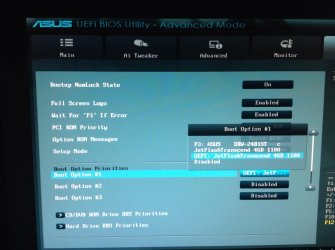
Boot Option Priorities attached.
 

Attachments

  • image.jpg
    image.jpg
    439.5 KB · Views: 4

My Computer My Computer

At a glance

win 7 pro 64Intel Core i5-2500K 3.3GHz (3.7GHz Turbo Boos...CORSAIR Vengeance 8GB (2x4GB) 240-Pin DDR3 SDRAMEVGA 01G-P3-1556-KR GeForce GTX550 Ti (Fermi)...
Computer type
PC/Desktop
Computer Manufacturer/Model Number
custom build
OS
win 7 pro 64
CPU
Intel Core i5-2500K 3.3GHz (3.7GHz Turbo Boost) LGA 1155 95W
Motherboard
ASUS P8Z68-V LX LGA 1155 Intel Z68 HDMI SATA 6Gb/sUSB3.0 ATX
Memory
CORSAIR Vengeance 8GB (2x4GB) 240-Pin DDR3 SDRAM
Graphics Card(s)
EVGA 01G-P3-1556-KR GeForce GTX550 Ti (Fermi) FPB 1GB
Monitor(s) Displays
ASUS VW246H 24" 2ms(GTG) HDMI Widescreen LCD
Hard Drives
C:\ Crucial M4 CT256M4SSD2CCA 256GB SATA III MLC
D:\ Western Digital WD1002FAEX 1TB 7200 RPM SATA 6.0Gb/s
both internally mounted
PSU
Antec EA-500D 500W
Case
Antec Sonata III 500 Mid Tower Case
Cooling
Cooler Master Hyper 212 Plus RR-B10-212P-G1 120mm CPU Cooler
Keyboard
Logitech Cordless MK700
Mouse
Logitech Cordless MK700
Internet Speed
1.5 Mbps for both upload and download
Other Info
Additional cooling fan: Antec 761345-75121-6 120mm Case Fan

BIOS: ASUS with UEFI, Build date: 7/1/2013, Version 4105
It looks like the stick is set first to boot in BIOS setup. For UEFI the Windows Boot Manager needs to be set first to boot. For Legacy the target Hard drive. Let us see the choices when you choose Boot Option 1 to change it. It may be worded differently for your model.

All other hard drives should be unplugged during install.

Then trigger the stick to boot using the one-time BIOS Boot menu key to prevent it from autostarting during the install reboots. If it still restarts the install anyway, unplug it at first reboot.

We still cannot see the UEFI, CSM, Legacy BIOS or other related settings which are normally on the Advanced BIOS tab. Can you scour the BIOS for these and post back pictures showing all available choices for each? Click on each setting to read the explanation text to the right on most BIOS'. If not read the Manual on the mobo's Support Downloads webpage.

WHile on the Mobo's Support downloads webpage check for a new BIOS firmware update. THis is critical for UEFI installs because its such crapware that it needs continual patching.

What other choices for Setup Mode are available?
 
Last edited:
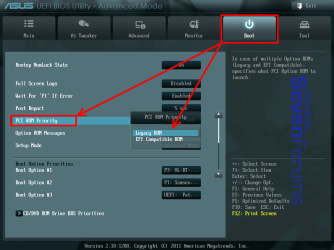
Your BIOS is the same version as mine. To change to UEFI (EFI) mode, go to Boot tab>PCI ROM Priority as shown. Change it to EFI Compatible ROM for UEFI.

TIP: Insert a USB flash drive before going to BIOS and you can press F12 to capture a screenshot of what you see in BIOS.


140620191707.png
 

My Computer My Computer

At a glance

Windows 7 Ultimate X64 SP1Intel i5-2550K, Differing ~4.4-4.8GHz No buil...16GB G.Skill Sniper 1866MHz @ 2133MHz 2x8GBASUS GTX650TIB-DC2OC-2GD5, (650TI Boost)
Computer type
PC/Desktop
Computer Manufacturer/Model Number
Home Built Desktop By DataTech
OS
Windows 7 Ultimate X64 SP1
CPU
Intel i5-2550K, Differing ~4.4-4.8GHz No built in GPU
Motherboard
ASUS P8Z68-V PRO/GEN3
Memory
16GB G.Skill Sniper 1866MHz @ 2133MHz 2x8GB
Graphics Card(s)
ASUS GTX650TIB-DC2OC-2GD5, (650TI Boost)
Sound Card
Onboard Realtek 5-1
Monitor(s) Displays
Samsung P2570HD
Screen Resolution
1920x1080
Hard Drives
Samsung 840 Pro 256GB SSD for OS, 500GB Seagate Constellation (Enterprise drive) for Data
PSU
Corsair HX650W
Case
Inwin Dragon Rider
Cooling
Hyper 212 EVO w/two Noctua fans, push-pull, @1300 RPM
Keyboard
E-Z Eyes, bright yellow keys with large characters
Mouse
steelseries SENSEI Laser Pro Gaming
Internet Speed
48-51Mbs Mbs down, 11 Mbs up Xfinity Cable
Antivirus
Norton Internet Security 2013
Browser
IE 10, Opera, Pale Moon if needed
Other Info
4 case fans, LG BluRay-RE, ASUS DVD-RW, Mr. Fusion power supply, 1.21 gigawatts.
I wasn't clear, he should set it to enable the EFI Compatible ROM.
This is a Z68 chip board and I don't find anything regarding CSM.
 

My Computer My Computer

At a glance

Windows 7 Ultimate X64 SP1Intel i5-2550K, Differing ~4.4-4.8GHz No buil...16GB G.Skill Sniper 1866MHz @ 2133MHz 2x8GBASUS GTX650TIB-DC2OC-2GD5, (650TI Boost)
Computer type
PC/Desktop
Computer Manufacturer/Model Number
Home Built Desktop By DataTech
OS
Windows 7 Ultimate X64 SP1
CPU
Intel i5-2550K, Differing ~4.4-4.8GHz No built in GPU
Motherboard
ASUS P8Z68-V PRO/GEN3
Memory
16GB G.Skill Sniper 1866MHz @ 2133MHz 2x8GB
Graphics Card(s)
ASUS GTX650TIB-DC2OC-2GD5, (650TI Boost)
Sound Card
Onboard Realtek 5-1
Monitor(s) Displays
Samsung P2570HD
Screen Resolution
1920x1080
Hard Drives
Samsung 840 Pro 256GB SSD for OS, 500GB Seagate Constellation (Enterprise drive) for Data
PSU
Corsair HX650W
Case
Inwin Dragon Rider
Cooling
Hyper 212 EVO w/two Noctua fans, push-pull, @1300 RPM
Keyboard
E-Z Eyes, bright yellow keys with large characters
Mouse
steelseries SENSEI Laser Pro Gaming
Internet Speed
48-51Mbs Mbs down, 11 Mbs up Xfinity Cable
Antivirus
Norton Internet Security 2013
Browser
IE 10, Opera, Pale Moon if needed
Other Info
4 case fans, LG BluRay-RE, ASUS DVD-RW, Mr. Fusion power supply, 1.21 gigawatts.
Hi, Greg,
1st, other drive is unplugged.

2nd, do not know how to re-do my stick. Option 1 requires that I download a file from internet (not installed) and save to desktop (not installed; no OS). Hoping we can just use the bootable I already have and hope it's good.

3rd, I do not prefer UEFI. In fact, I'd lose it in a heartbeat if I knew how to. I'm just guessing at every point what's the right thing to do. I did not know that I had options.

4th, I'm on the line now with ASUS to get what you need RE UEFI, CSM (Compatibility Mode), Legacy BIOS or Legacy Boot settings. I'm assuming they will know what screens you need. Back as soon as can.

Again, thank you.
 

My Computer My Computer

At a glance

win 7 pro 64Intel Core i5-2500K 3.3GHz (3.7GHz Turbo Boos...CORSAIR Vengeance 8GB (2x4GB) 240-Pin DDR3 SDRAMEVGA 01G-P3-1556-KR GeForce GTX550 Ti (Fermi)...
Computer type
PC/Desktop
Computer Manufacturer/Model Number
custom build
OS
win 7 pro 64
CPU
Intel Core i5-2500K 3.3GHz (3.7GHz Turbo Boost) LGA 1155 95W
Motherboard
ASUS P8Z68-V LX LGA 1155 Intel Z68 HDMI SATA 6Gb/sUSB3.0 ATX
Memory
CORSAIR Vengeance 8GB (2x4GB) 240-Pin DDR3 SDRAM
Graphics Card(s)
EVGA 01G-P3-1556-KR GeForce GTX550 Ti (Fermi) FPB 1GB
Monitor(s) Displays
ASUS VW246H 24" 2ms(GTG) HDMI Widescreen LCD
Hard Drives
C:\ Crucial M4 CT256M4SSD2CCA 256GB SATA III MLC
D:\ Western Digital WD1002FAEX 1TB 7200 RPM SATA 6.0Gb/s
both internally mounted
PSU
Antec EA-500D 500W
Case
Antec Sonata III 500 Mid Tower Case
Cooling
Cooler Master Hyper 212 Plus RR-B10-212P-G1 120mm CPU Cooler
Keyboard
Logitech Cordless MK700
Mouse
Logitech Cordless MK700
Internet Speed
1.5 Mbps for both upload and download
Other Info
Additional cooling fan: Antec 761345-75121-6 120mm Case Fan

BIOS: ASUS with UEFI, Build date: 7/1/2013, Version 4105
Be sure to check if there's a BIOS update which might have what you need.

If your under 1 year warranty they may help you flash the BIOS and make the necessary adjustments. I wonder if they only support UEFI install. At least try to find out how to set to Legacy BIOS.

How did you create the stick exactly? The method I've found that works best is Option One.
 
So, according to Gary, if I change the PCI ROM Priority to EFI Compatible ROM, I can proceed to try the install?
 

My Computer My Computer

At a glance

win 7 pro 64Intel Core i5-2500K 3.3GHz (3.7GHz Turbo Boos...CORSAIR Vengeance 8GB (2x4GB) 240-Pin DDR3 SDRAMEVGA 01G-P3-1556-KR GeForce GTX550 Ti (Fermi)...
Computer type
PC/Desktop
Computer Manufacturer/Model Number
custom build
OS
win 7 pro 64
CPU
Intel Core i5-2500K 3.3GHz (3.7GHz Turbo Boost) LGA 1155 95W
Motherboard
ASUS P8Z68-V LX LGA 1155 Intel Z68 HDMI SATA 6Gb/sUSB3.0 ATX
Memory
CORSAIR Vengeance 8GB (2x4GB) 240-Pin DDR3 SDRAM
Graphics Card(s)
EVGA 01G-P3-1556-KR GeForce GTX550 Ti (Fermi) FPB 1GB
Monitor(s) Displays
ASUS VW246H 24" 2ms(GTG) HDMI Widescreen LCD
Hard Drives
C:\ Crucial M4 CT256M4SSD2CCA 256GB SATA III MLC
D:\ Western Digital WD1002FAEX 1TB 7200 RPM SATA 6.0Gb/s
both internally mounted
PSU
Antec EA-500D 500W
Case
Antec Sonata III 500 Mid Tower Case
Cooling
Cooler Master Hyper 212 Plus RR-B10-212P-G1 120mm CPU Cooler
Keyboard
Logitech Cordless MK700
Mouse
Logitech Cordless MK700
Internet Speed
1.5 Mbps for both upload and download
Other Info
Additional cooling fan: Antec 761345-75121-6 120mm Case Fan

BIOS: ASUS with UEFI, Build date: 7/1/2013, Version 4105
You can try but it would be better to see the choices available on your Advanced BIOS tab and any other related settings elsewhere. If you already checked then please report back what is there so I don't have to keep asking.

Gary said he has the same board and that there are no CSM settings he sees. But he may have a different BIOS version so that also needs to be answered.
 
Why are the email notifications different than what is posted here? The email states "You can try but it would be better to see the choices available on your Advanced BIOS tab. If you already checked then please report back what is there so I don't have to keep asking. This is annoying. I will stop helping you if every single one of the questions and steps I give you are not responded to henceforth because it is impossible to troubleshoot these issues without utter thoroughness and not skipping around." But I do not see such a message here that I can respond to. Anyway, ASUS says my firmware is up-to-date.

And you're right, this is annoying because I don't know what to do! I can set the boot priority to Legacy, as you say, or to EFI compatible, as Gary says. And I created the stick from the instructions you sent me in April. What next?
 

My Computer My Computer

At a glance

win 7 pro 64Intel Core i5-2500K 3.3GHz (3.7GHz Turbo Boos...CORSAIR Vengeance 8GB (2x4GB) 240-Pin DDR3 SDRAMEVGA 01G-P3-1556-KR GeForce GTX550 Ti (Fermi)...
Computer type
PC/Desktop
Computer Manufacturer/Model Number
custom build
OS
win 7 pro 64
CPU
Intel Core i5-2500K 3.3GHz (3.7GHz Turbo Boost) LGA 1155 95W
Motherboard
ASUS P8Z68-V LX LGA 1155 Intel Z68 HDMI SATA 6Gb/sUSB3.0 ATX
Memory
CORSAIR Vengeance 8GB (2x4GB) 240-Pin DDR3 SDRAM
Graphics Card(s)
EVGA 01G-P3-1556-KR GeForce GTX550 Ti (Fermi) FPB 1GB
Monitor(s) Displays
ASUS VW246H 24" 2ms(GTG) HDMI Widescreen LCD
Hard Drives
C:\ Crucial M4 CT256M4SSD2CCA 256GB SATA III MLC
D:\ Western Digital WD1002FAEX 1TB 7200 RPM SATA 6.0Gb/s
both internally mounted
PSU
Antec EA-500D 500W
Case
Antec Sonata III 500 Mid Tower Case
Cooling
Cooler Master Hyper 212 Plus RR-B10-212P-G1 120mm CPU Cooler
Keyboard
Logitech Cordless MK700
Mouse
Logitech Cordless MK700
Internet Speed
1.5 Mbps for both upload and download
Other Info
Additional cooling fan: Antec 761345-75121-6 120mm Case Fan

BIOS: ASUS with UEFI, Build date: 7/1/2013, Version 4105
OK, changed the boot priority from Legacy to EFI Compatible and got the same error message about the MBR partition. How screwed am I?
 

My Computer My Computer

At a glance

win 7 pro 64Intel Core i5-2500K 3.3GHz (3.7GHz Turbo Boos...CORSAIR Vengeance 8GB (2x4GB) 240-Pin DDR3 SDRAMEVGA 01G-P3-1556-KR GeForce GTX550 Ti (Fermi)...
Computer type
PC/Desktop
Computer Manufacturer/Model Number
custom build
OS
win 7 pro 64
CPU
Intel Core i5-2500K 3.3GHz (3.7GHz Turbo Boost) LGA 1155 95W
Motherboard
ASUS P8Z68-V LX LGA 1155 Intel Z68 HDMI SATA 6Gb/sUSB3.0 ATX
Memory
CORSAIR Vengeance 8GB (2x4GB) 240-Pin DDR3 SDRAM
Graphics Card(s)
EVGA 01G-P3-1556-KR GeForce GTX550 Ti (Fermi) FPB 1GB
Monitor(s) Displays
ASUS VW246H 24" 2ms(GTG) HDMI Widescreen LCD
Hard Drives
C:\ Crucial M4 CT256M4SSD2CCA 256GB SATA III MLC
D:\ Western Digital WD1002FAEX 1TB 7200 RPM SATA 6.0Gb/s
both internally mounted
PSU
Antec EA-500D 500W
Case
Antec Sonata III 500 Mid Tower Case
Cooling
Cooler Master Hyper 212 Plus RR-B10-212P-G1 120mm CPU Cooler
Keyboard
Logitech Cordless MK700
Mouse
Logitech Cordless MK700
Internet Speed
1.5 Mbps for both upload and download
Other Info
Additional cooling fan: Antec 761345-75121-6 120mm Case Fan

BIOS: ASUS with UEFI, Build date: 7/1/2013, Version 4105
I edited my post. Instead of quoting the original why don't you actually provide the settings I've been asking for repeatedly?

I've always found Legacy BIOS setting but I can't see the choices

You took a picture before then dropped the ball ignoring very specific questions and settings I needed you to find. Take pictures of all if necessary.
 
Greg, I'm doing the best I can. There are no "settings" that I can see. Gary has the exact same BIOS screens that I have. Maybe he can tell me more precisely what I need to send to you???
 

My Computer My Computer

At a glance

win 7 pro 64Intel Core i5-2500K 3.3GHz (3.7GHz Turbo Boos...CORSAIR Vengeance 8GB (2x4GB) 240-Pin DDR3 SDRAMEVGA 01G-P3-1556-KR GeForce GTX550 Ti (Fermi)...
Computer type
PC/Desktop
Computer Manufacturer/Model Number
custom build
OS
win 7 pro 64
CPU
Intel Core i5-2500K 3.3GHz (3.7GHz Turbo Boost) LGA 1155 95W
Motherboard
ASUS P8Z68-V LX LGA 1155 Intel Z68 HDMI SATA 6Gb/sUSB3.0 ATX
Memory
CORSAIR Vengeance 8GB (2x4GB) 240-Pin DDR3 SDRAM
Graphics Card(s)
EVGA 01G-P3-1556-KR GeForce GTX550 Ti (Fermi) FPB 1GB
Monitor(s) Displays
ASUS VW246H 24" 2ms(GTG) HDMI Widescreen LCD
Hard Drives
C:\ Crucial M4 CT256M4SSD2CCA 256GB SATA III MLC
D:\ Western Digital WD1002FAEX 1TB 7200 RPM SATA 6.0Gb/s
both internally mounted
PSU
Antec EA-500D 500W
Case
Antec Sonata III 500 Mid Tower Case
Cooling
Cooler Master Hyper 212 Plus RR-B10-212P-G1 120mm CPU Cooler
Keyboard
Logitech Cordless MK700
Mouse
Logitech Cordless MK700
Internet Speed
1.5 Mbps for both upload and download
Other Info
Additional cooling fan: Antec 761345-75121-6 120mm Case Fan

BIOS: ASUS with UEFI, Build date: 7/1/2013, Version 4105
Where are the answers to these questions I spent time writing out. Do you think skipping around to answer one or two and ignoring all the rest is the kind if thoroughness that will solve a problem like this? Why am I having to ask again? If you need help with a question just ask but this is getting ridiculous trying to pump you for info! :huh:

It looks like the stick is set first to boot in BIOS setup. For UEFI the Windows Boot Manager needs to be set first to boot. For Legacy the target Hard drive. Let us see the choices when you choose Boot Option 1 to change it. It may be worded differently for your model.

All other hard drives should be unplugged during install.

Then trigger the stick to boot using the one-time BIOS Boot menu key to prevent it from autostarting during the install reboots. If it still restarts the install anyway, unplug it at first reboot.

We still cannot see the UEFI, CSM, Legacy BIOS or other related settings which are normally on the Advanced BIOS tab. Can you scour the BIOS for these and post back pictures showing all available choices for each? Click on each setting to read the explanation text to the right on most BIOS'. If not read the Manual on the mobo's Support Downloads webpage.

WHile on the Mobo's Support downloads webpage check for a new BIOS firmware update. THis is critical for UEFI installs because its such crapware that it needs continual patching.

What other choices for Setup Mode are available?

Were you in Advanced Boot Tab when pic was taken? If not that's what is needed.
 
Greg, I hope these answers are what you are needing. My responses are UPPERCASE.

It looks like the stick is set first to boot in BIOS setup. For UEFI the Windows Boot Manager needs to be set first to boot. For Legacy the target Hard drive. Let us see the choices when you choose Boot Option 1 to change it. It may be worded differently for your model. SEE ATTACHMENT

All other hard drives should be unplugged during install. DONE

Then trigger the stick to boot using the one-time BIOS Boot menu key to prevent it from autostarting during the install reboots. If it still restarts the install anyway, unplug it at first reboot. I JUST UNPLUGGED IT.

We still cannot see the UEFI, CSM, Legacy BIOS or other related settings which are normally on the Advanced BIOS tab. Can you scour the BIOS for these and post back pictures showing all available choices for each? Click on each setting to read the explanation text to the right on most BIOS'. If not read the Manual on the mobo's Support Downloads webpage. CANNOT FIND ANY "SETTINGS" FOR THESE OPTIONS. AGAIN, PERHAPS GARY CAN HELP(?)

WHile on the Mobo's Support downloads webpage check for a new BIOS firmware update. THis is critical for UEFI installs because its such crapware that it needs continual patching. CONFIRMED WITH ASUS THAT FIRMWARE IS CURRENT.

What other choices for Setup Mode are available? ADVANCED MODE or EZ MODE (default setting is Advanced)

Were you in Advanced Boot Tab when pic was taken? If not that's what is needed. YES, I WAS IN ADVANCED MODE.
 

Attachments

  • image.jpg
    image.jpg
    299.9 KB · Views: 5

My Computer My Computer

At a glance

win 7 pro 64Intel Core i5-2500K 3.3GHz (3.7GHz Turbo Boos...CORSAIR Vengeance 8GB (2x4GB) 240-Pin DDR3 SDRAMEVGA 01G-P3-1556-KR GeForce GTX550 Ti (Fermi)...
Computer type
PC/Desktop
Computer Manufacturer/Model Number
custom build
OS
win 7 pro 64
CPU
Intel Core i5-2500K 3.3GHz (3.7GHz Turbo Boost) LGA 1155 95W
Motherboard
ASUS P8Z68-V LX LGA 1155 Intel Z68 HDMI SATA 6Gb/sUSB3.0 ATX
Memory
CORSAIR Vengeance 8GB (2x4GB) 240-Pin DDR3 SDRAM
Graphics Card(s)
EVGA 01G-P3-1556-KR GeForce GTX550 Ti (Fermi) FPB 1GB
Monitor(s) Displays
ASUS VW246H 24" 2ms(GTG) HDMI Widescreen LCD
Hard Drives
C:\ Crucial M4 CT256M4SSD2CCA 256GB SATA III MLC
D:\ Western Digital WD1002FAEX 1TB 7200 RPM SATA 6.0Gb/s
both internally mounted
PSU
Antec EA-500D 500W
Case
Antec Sonata III 500 Mid Tower Case
Cooling
Cooler Master Hyper 212 Plus RR-B10-212P-G1 120mm CPU Cooler
Keyboard
Logitech Cordless MK700
Mouse
Logitech Cordless MK700
Internet Speed
1.5 Mbps for both upload and download
Other Info
Additional cooling fan: Antec 761345-75121-6 120mm Case Fan

BIOS: ASUS with UEFI, Build date: 7/1/2013, Version 4105
Back
Top