Media center connection issues

DragonPoo

New member
Local time
2:40 PM
Messages
4
OK before anyone refers me to another thread here... I've "been there and done that!":sarc:
My PC will NOT connect to the 360 period! It finds it, it's enabled, WMC is enabled, it's exempt in the firewall.. But no matter what I've tried all I get is "Configuration Error" :mad:
Please feel free to ask if I've done this or that; so I can tell you I did that and it didn't work, or maybe someone will finally tell me something I haven't tried :shock:

Win 7 ult. with Apple Airpot Extreme

Thanks!

I might add, it will not connect tru the wireless nor thru a wired network either...
 

My Computer My Computer

At a glance

Windows 7 Ultimate X84
OS
Windows 7 Ultimate X84
Well I guess no one knows here.....From what I've seen it just been ppl pointing to the same generic answers that won't help me anyway (lol! kinda like calling tech support and hearing them ask: "is it plugged into the wall and is the green light above the power button on?").. Just one more point to prove that Win 7 SUXS!
 

My Computer My Computer

At a glance

Windows 7 Ultimate X84
OS
Windows 7 Ultimate X84
Pardon me for asking, but when you say "360" are you referring to trying to use an XBox360 as a WMC Extender to watch TV, etc., delivered from WMC running on the HTPC? Is that your goal?

I probably shouldn't be participating here because I don't actually have an Xbox. I also am not familiar with the Apple Airpot wireless router. No excuses, just the facts.

However I do have two Linksys DMA2100 media center extenders that I use in my own "wired" HTPC/WMC environment to deliver TV around the house. Works perfectly, through my wired Netgear 802.11n router. Note that I had unsuccessful results trying to use one of the DMA2100's in wireless mode just because of where it was in my house relative to the router, and I was forced to run an Ethernet cable to that location.

So I'm quite familiar with how to "add an extender" to WMC, and how to configure the Linksys DMA2100, and the use of WMC and remote extenders. I know that's not relevant for your XBox situation, but if you described the steps you're going through (including what you do at the XBox end) perhaps I might be able to contribute something useful based on my own WMC/extender experience.


Also, it would be helpful if you'd fill out your "System Specs" so that we know what your hardware arrangement looks like.
 

My Computer My Computer

At a glance

Windows 7 Pro x64 (1), Win7 Pro X64 (2)i5-3350p 3.1Ghz/6MB-cache (1); E8400 3.0Ghz/6...8GB PC3-12800 DDR3 (1); 4GB PC3-10600 DDR3 (2)ATI HD7750 (1), (see TV cards); ATI R7 250 (2)
Computer type
PC/Desktop
Computer Manufacturer/Model Number
Home-built, two systems (1) and (2)
OS
Windows 7 Pro x64 (1), Win7 Pro X64 (2)
CPU
i5-3350p 3.1Ghz/6MB-cache (1); E8400 3.0Ghz/6MB-cache (2)
Motherboard
ASUS P8Z77-V Pro (1); ASUS P5Q3 (2)
Memory
8GB PC3-12800 DDR3 (1); 4GB PC3-10600 DDR3 (2)
Graphics Card(s)
ATI HD7750 (1), (see TV cards); ATI R7 250 (2)
Sound Card
Realtek ALC892 HD Audio (1); Realtek ALC1200 HD Audio (2)
Monitor(s) Displays
Eizo HD2441W LCD, Eizo S2433W (1); Eizo 24" S2433W (2)
Screen Resolution
1920x1200, 1920x1200 (1); 1920x1200 (2)
Hard Drives
(1) 1TB SATA-II (7200RPM), 2x2TB SATA-III (7200RPM), 250GB SATA-III (10000RPM) for OS; 2x2TB external USB 3.0

(2) 320GB SATA-II (7200RPM), 750GB SATA-II (7200RPM), 150GB SATA-II (10000RPM) for OS; 2TB external USB 3.0
PSU
Nesteq ECS-6001 600W (1); Nesteq ECS-5001 500W (2)
Case
Acousti-Case 360 (1) and (2)
Cooling
Noctua NH-U12P SE2 for CPU, 2x120mm case fans (1) and (2)
Keyboard
IBM PS/2 (1) and (2)
Mouse
Logitech MX Revolution wireless (1); Microsoft wired (2)
Internet Speed
100mbps down / 10mbps up
Antivirus
Microsoft Security Essentials; Malwarebyte Anti-Malware Pro
Browser
Firefox
Other Info
Ceton InfiniTV 4-tuner cablecard-enabled TV card as well as Hauppauge HVR-2250 OTA/ATSC 2-tuner TV card in (1), running under Win7 WMC
Just one more suggestion if you don't already know about it...

There's another online forum specifically dedicated to Windows Media Center, inhabited by members who are SUPER-KNOWLEDGEABLE about WMC and all related subjects of course.

This other forum used to be named "The Green Button" (known as TGB), and was actually run by Microsoft. Earlier this year TGB was absorbed directly into Microsoft's Experts.Windows.com collection of forums, and it uses the Connect.Microsoft signon usernames and passwords.

So, if you want to ask people who TRULY have experience with your WMC/XBox issue, although the people here at SevenForums are very good, you might try your luck over at the Experts.Windows.com forum.

Specifically, the sub-forum devoted to "Windows Media Center with XBox or extenders" is this one.

I'd suggest registering over there (if you're not already) and re-asking your questions over there, if nobody here has provided the kind of assistance you're looking for to help resolve your problem.
 

My Computer My Computer

At a glance

Windows 7 Pro x64 (1), Win7 Pro X64 (2)i5-3350p 3.1Ghz/6MB-cache (1); E8400 3.0Ghz/6...8GB PC3-12800 DDR3 (1); 4GB PC3-10600 DDR3 (2)ATI HD7750 (1), (see TV cards); ATI R7 250 (2)
Computer type
PC/Desktop
Computer Manufacturer/Model Number
Home-built, two systems (1) and (2)
OS
Windows 7 Pro x64 (1), Win7 Pro X64 (2)
CPU
i5-3350p 3.1Ghz/6MB-cache (1); E8400 3.0Ghz/6MB-cache (2)
Motherboard
ASUS P8Z77-V Pro (1); ASUS P5Q3 (2)
Memory
8GB PC3-12800 DDR3 (1); 4GB PC3-10600 DDR3 (2)
Graphics Card(s)
ATI HD7750 (1), (see TV cards); ATI R7 250 (2)
Sound Card
Realtek ALC892 HD Audio (1); Realtek ALC1200 HD Audio (2)
Monitor(s) Displays
Eizo HD2441W LCD, Eizo S2433W (1); Eizo 24" S2433W (2)
Screen Resolution
1920x1200, 1920x1200 (1); 1920x1200 (2)
Hard Drives
(1) 1TB SATA-II (7200RPM), 2x2TB SATA-III (7200RPM), 250GB SATA-III (10000RPM) for OS; 2x2TB external USB 3.0

(2) 320GB SATA-II (7200RPM), 750GB SATA-II (7200RPM), 150GB SATA-II (10000RPM) for OS; 2TB external USB 3.0
PSU
Nesteq ECS-6001 600W (1); Nesteq ECS-5001 500W (2)
Case
Acousti-Case 360 (1) and (2)
Cooling
Noctua NH-U12P SE2 for CPU, 2x120mm case fans (1) and (2)
Keyboard
IBM PS/2 (1) and (2)
Mouse
Logitech MX Revolution wireless (1); Microsoft wired (2)
Internet Speed
100mbps down / 10mbps up
Antivirus
Microsoft Security Essentials; Malwarebyte Anti-Malware Pro
Browser
Firefox
Other Info
Ceton InfiniTV 4-tuner cablecard-enabled TV card as well as Hauppauge HVR-2250 OTA/ATSC 2-tuner TV card in (1), running under Win7 WMC
Yes I was refering to the Xbox 360s :D Thanks for the info... I found the issue. Basicly even tho it was an exemption in Win firewall it was not TOTALY exempt :rolleyes:
I did check it originally and it was :huh: but I did a couple of "re-do's" and took it out of the exemptions and back in a couple of times and some how the last time I made it exempt it wasn't fully exempt.....

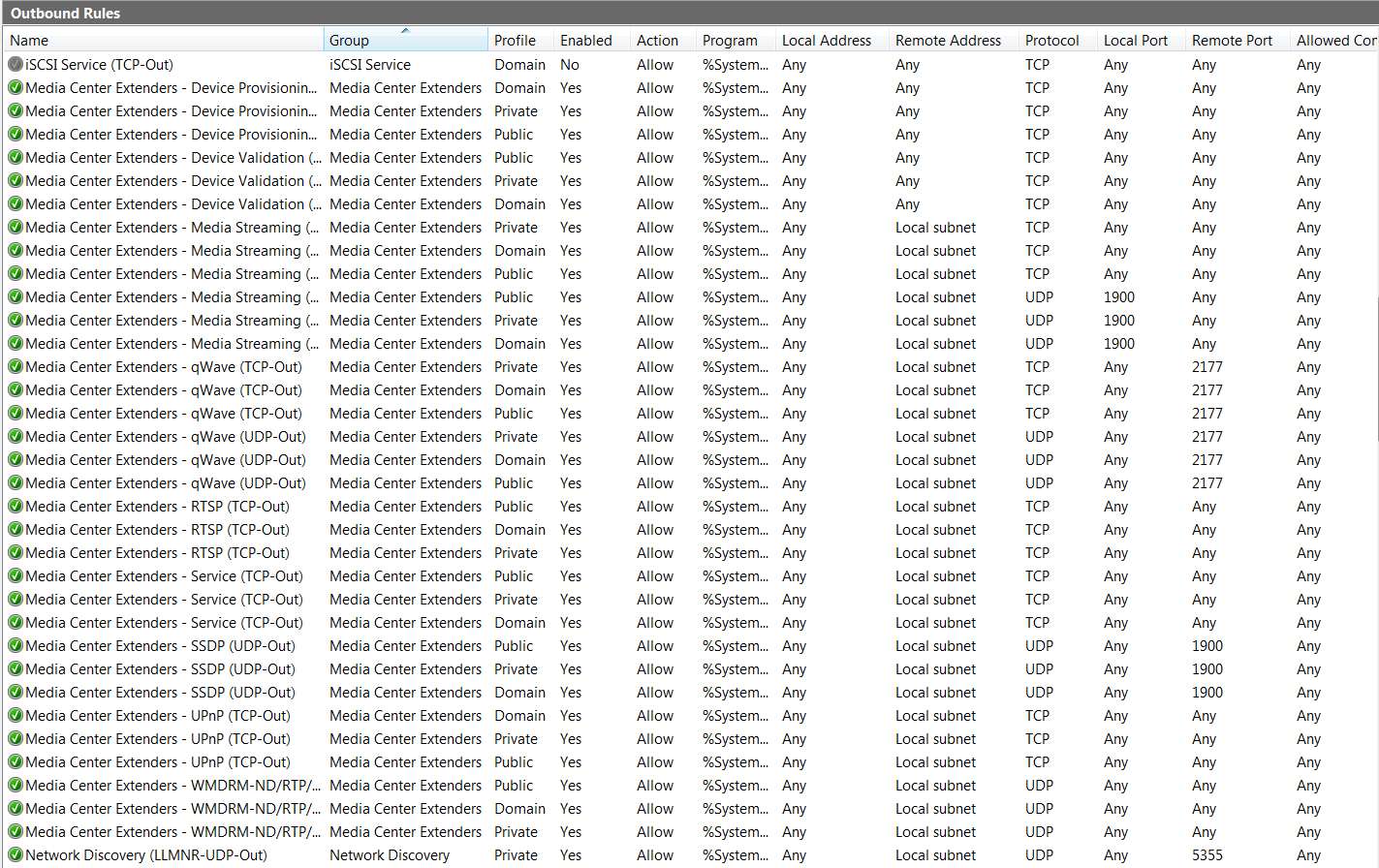
Just incase anyone would like to know or see (if they are having this issue): In Windows firewall open "Advanced Settings" the check the "Inbound" and "Outbound" rules... ;)

Still no clue as to why it didn't work to begain with.... But I did also uninstall & reinstall WMC too, so maybe it was some issue on the first install and the later just an issue with full acess thru the firewall....
 

My Computer My Computer

At a glance

Windows 7 Ultimate X84
OS
Windows 7 Ultimate X84
Yes I was refering to the Xbox 360s :D Thanks for the info... I found the issue. Basicly even tho it was an exemption in Win firewall it was not TOTALY exempt :rolleyes:
I did check it originally and it was :huh: but I did a couple of "re-do's" and took it out of the exemptions and back in a couple of times and some how the last time I made it exempt it wasn't fully exempt.....

Just incase anyone would like to know or see (if they are having this issue): In Windows firewall open "Advanced Settings" the check the "Inbound" and "Outbound" rules... ;)
This must be something unique to your Apple router, pertaining to describing how things work BEHIND your external firewall, i.e. internal on your LAN.

EDIT: just saw your post in that other similar thread, and you are actually referring to "Advanced Settings" in WINDOWS FIREWALL, not in your Apple router. I myself have done nothing special in Windows Firewall relative to my two DMA2100s. Just out of curiosity why/what are you trying to block or prevent with your own Inbound/Outbound rules customization?

Here are my "advanced settings":

firewall2d.jpg


firewall1.jpg


You must have some reason for wanting to restrict access from these Xbox devices to other devices on the network, for you to have configured this "exempt" setting as you have.

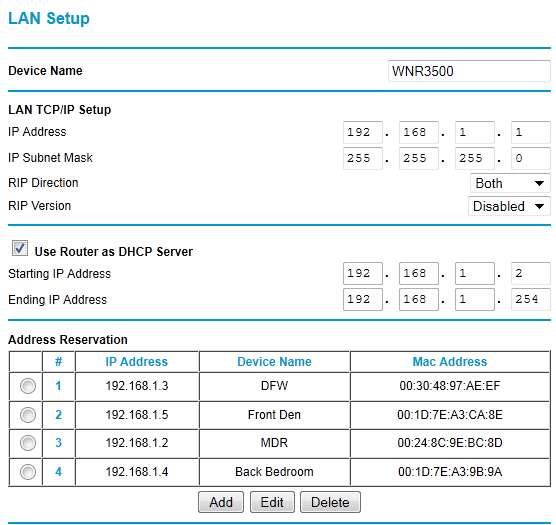
Certainly in my own situation, I have two PCs on my LAN as well as two DMA2100 extenders. I've simply configured them as "reserved" (i.e. static) IP addresses based on their MAC address, just to avoid any DHCP-related consequences.

But aside from that, there's no other such restrictions on services to/from each device. And I want all four devices to be able to get to the Internet anyway. Hey... it's my LAN!

routerz.jpg
 

My Computer My Computer

At a glance

Windows 7 Pro x64 (1), Win7 Pro X64 (2)i5-3350p 3.1Ghz/6MB-cache (1); E8400 3.0Ghz/6...8GB PC3-12800 DDR3 (1); 4GB PC3-10600 DDR3 (2)ATI HD7750 (1), (see TV cards); ATI R7 250 (2)
Computer type
PC/Desktop
Computer Manufacturer/Model Number
Home-built, two systems (1) and (2)
OS
Windows 7 Pro x64 (1), Win7 Pro X64 (2)
CPU
i5-3350p 3.1Ghz/6MB-cache (1); E8400 3.0Ghz/6MB-cache (2)
Motherboard
ASUS P8Z77-V Pro (1); ASUS P5Q3 (2)
Memory
8GB PC3-12800 DDR3 (1); 4GB PC3-10600 DDR3 (2)
Graphics Card(s)
ATI HD7750 (1), (see TV cards); ATI R7 250 (2)
Sound Card
Realtek ALC892 HD Audio (1); Realtek ALC1200 HD Audio (2)
Monitor(s) Displays
Eizo HD2441W LCD, Eizo S2433W (1); Eizo 24" S2433W (2)
Screen Resolution
1920x1200, 1920x1200 (1); 1920x1200 (2)
Hard Drives
(1) 1TB SATA-II (7200RPM), 2x2TB SATA-III (7200RPM), 250GB SATA-III (10000RPM) for OS; 2x2TB external USB 3.0

(2) 320GB SATA-II (7200RPM), 750GB SATA-II (7200RPM), 150GB SATA-II (10000RPM) for OS; 2TB external USB 3.0
PSU
Nesteq ECS-6001 600W (1); Nesteq ECS-5001 500W (2)
Case
Acousti-Case 360 (1) and (2)
Cooling
Noctua NH-U12P SE2 for CPU, 2x120mm case fans (1) and (2)
Keyboard
IBM PS/2 (1) and (2)
Mouse
Logitech MX Revolution wireless (1); Microsoft wired (2)
Internet Speed
100mbps down / 10mbps up
Antivirus
Microsoft Security Essentials; Malwarebyte Anti-Malware Pro
Browser
Firefox
Other Info
Ceton InfiniTV 4-tuner cablecard-enabled TV card as well as Hauppauge HVR-2250 OTA/ATSC 2-tuner TV card in (1), running under Win7 WMC
Back
Top