Media Center- Setup Movie Library

How to Setup a Media Center Movie Library in Windows 7

   Information
This tutorial will show how to manage your movie library in Media Center, including poster images & full synopsis information.
   Note
Windows Media Center is not available in Windows 7 Starter and Windows 7 Home Basic editions.


The N and KN editions of Windows 7 have all the features that normally come with each individual Windows 7 edition, except for Windows Media Player 12 and related programs, such as Windows Media Center or Windows DVD Maker.

The N editions of Windows 7 allow you to choose your own media player and software required to manage and play CDs, DVDs, and other digital media files. If you choose to use Windows Media Player 12, downloading it, along with related software, is free. Download Media Feature Pack for Windows 7 N with Service Pack 1 and Windows 7 KN with Service Pack 1 (KB968211) from Official Microsoft Download Center

Examples: With & without poster information.
7 Example Media Center (Movies without posters).PNG8 Example Media Center (Movies with posters).png

Before you start:
NOTE: Special thanks to DemonSeed for the file2folder batch file. 1. Click on the Download button below to download the file2folder.zip file and extract the file2folder.bat file to the drive containing your movie files (e.g. G:\MOVIES). Run the file which will create directories based on the movie file name (e.g. Babylon A.D.avi will have the directory Babylon A.D created) and the movie file moved to the directory.

2. Search for & download a file for the movie you would like as a poster and save it in the movie folder and name it folder.jpg. Do this for each movie.
   Warning
I would advise at least 2GB of memory as due to the size of the folder.jpg files there is a lot of memory used. You could (like me) resize all folder.jpg files to a width of 300 pixels & maintain aspect ratio.


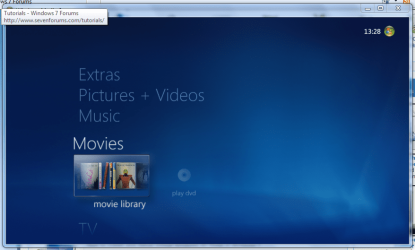
Here's How: 1. Run Media Center and navigate to Movies 1 Media Center (Start Page).PNG
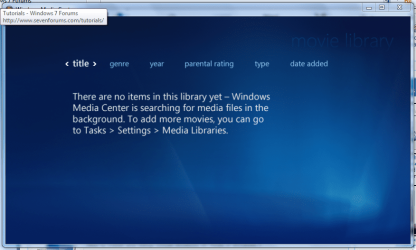
2. Open movie library, you should notice no movies shown 2 Media Center (Movie Library - Empty).PNG
3. Right-Click within the inner (empty area) and select Manage Library, you will be shown the 'Add folders' wizard. Select 'Add folders to the library' and click next 3 Media Center (Add folder to library).PNG
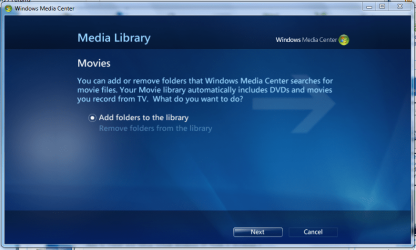
4. Select the location where your drive with the videos is stored, and click on next. 4 Media Center (Folder Selection 1).PNG
5. Navigate to the folder where your videos are stored (e.g. G:\MOVIES), and click next. 5 Media Center (Select Folder).PNG
6. On the final screen select 'Yes, use these locations' and click finish 6 Media Center (Finish Selection).PNG


Now your folder is added, Media Center will show the Video folders (with posters if you downloaded an image file for each movie).

   Note
If you wish to include metadata you will need to download Yammm. The meta data will download the DVDID.XML file which will allow for Media Center to download full synopsis information for each movie
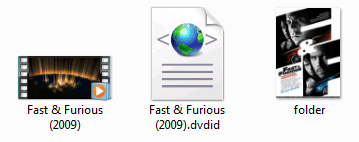

Example folder view.PNG

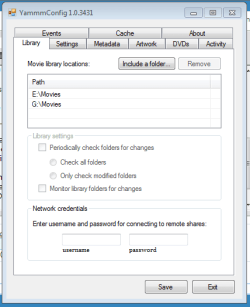
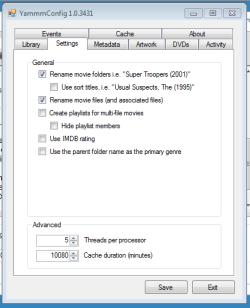
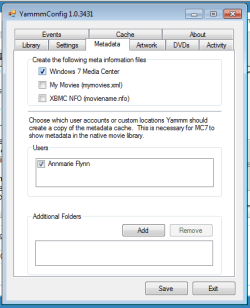
Recommended Yammm settings
1 yammm paths.PNG2 yammm settings.PNG
3 yammm metadata.PNG
   Note
These setting will automatically rename folders/files, download folder.jpg & DVDID.XML files for Media Center to read from.


Update

The Yammm application has been updated to include Image Resizing
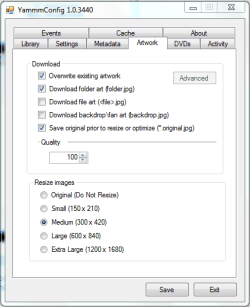
Yammm (Artwork).PNG

This will allow Media Center to use less memory when rendering folder images.

   Tip
It's recommended that you use a setting of 92 Quality & 300x420 medium size as this will greatly reduce the amount of memory used by 7MC when viewing a large movie library


Update 2: More Synopsis

I thought i'd include an example of how the DVDID.XML file works.

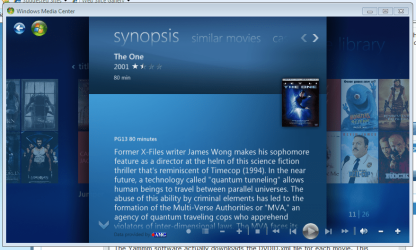
1, Full synopsis information Movie Library (Full Synopsis).PNG
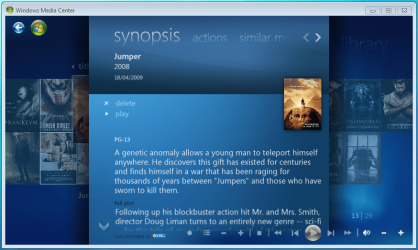
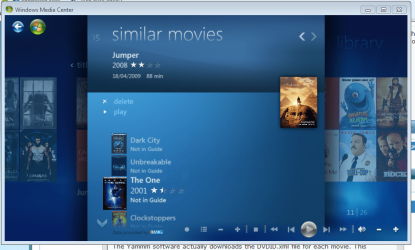
2, Similar Movies shown, with posters Movie Library (Similar Movies).PNG
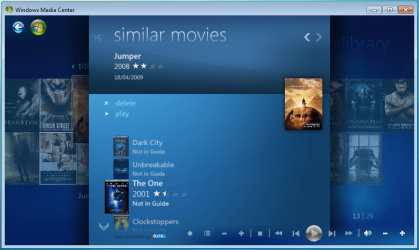
3, Click the similar movie to get full details of that movie Movie Library (Similar Movies - Synopsis).PNG
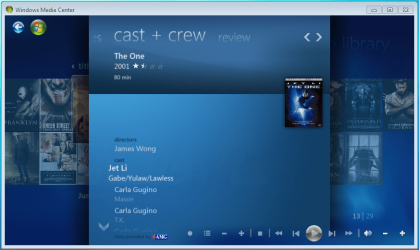
4, Cast & Crew information Movie Library (Cast & Crew).PNG
5, Click on a name to see a fimography (film list) relating to that actor/director Movie Library (Cast & Crew - Filmography).PNG

Enjoy
 

Attachments

  • file2folder.zip
    file2folder.zip
    230 bytes · Views: 22,835
  • synopsis.PNG
    synopsis.PNG
    127.1 KB · Views: 85
  • similar movies.PNG
    similar movies.PNG
    131.5 KB · Views: 66
  • similar movies detail.PNG
    similar movies detail.PNG
    140 KB · Views: 60
Last edited by a moderator:
So, what's better, YAMMM or MediaBrowser ??

Or is there something even better than those ??
 

My Computer My Computer

At a glance

Windows 7Atom 3304GbNvidia ION
Computer Manufacturer/Model Number
AsRock ION330
OS
Windows 7
CPU
Atom 330
Motherboard
ASRock ION
Memory
4Gb
Graphics Card(s)
Nvidia ION
Sound Card
Nvidia ION
Monitor(s) Displays
42" Pioneer Plasma
Screen Resolution
1920 x 1080
Hard Drives
300Gb SATA internal, and 2Tb in NAS on LAN.
PSU
Standard
Case
ASRock
Cooling
ASRock
Keyboard
Basic
Mouse
Basic
Internet Speed
50 Mb/s
Other Info
6" 4"", top lip, and walks about a lot !!
Personally, I prefer YAMMM, but both do a good job..
 

My Computer My Computer

At a glance

64-bit Windows 8.1 ProCore(TM) i5 CPU 4330 Haswell @ 3.20GHz12.00 GBIntel(R) HD Graphics
Computer type
PC/Desktop
Computer Manufacturer/Model Number
LENOVO K450 @3.0GHZ
OS
64-bit Windows 8.1 Pro
CPU
Core(TM) i5 CPU 4330 Haswell @ 3.20GHz
Motherboard
LENOVO
Memory
12.00 GB
Graphics Card(s)
Intel(R) HD Graphics
Sound Card
Intel HD integtrated
Monitor(s) Displays
HP 25' ISP Monitor
Screen Resolution
1900/1020
Hard Drives
(1) ST1000DM003-1CH162 (2) Generic STORAGE DEVICE USB Device (3) Generic STORAGE DEVICE USB Device
Internet Speed
100mb down/10mb up
I'm gonna agree and go wih Yamm.

-stang
 

My Computer My Computer

At a glance

Windows 7 Build 7229 x86Intel Core 2 Duo T7250 (2.0GHz/800Mhz FSB 2M ...4.00 GB DDR2, 667MHz 2 Dimm128MB NVIDIA GeForce 8400M G
Computer Manufacturer/Model Number
Dell XPS M1530
OS
Windows 7 Build 7229 x86
CPU
Intel Core 2 Duo T7250 (2.0GHz/800Mhz FSB 2M L2 Cache)
Memory
4.00 GB DDR2, 667MHz 2 Dimm
Graphics Card(s)
128MB NVIDIA GeForce 8400M G
Sound Card
SigmaTel High Definition Audio
Monitor(s) Displays
15.4 inch Wide Screen WSXGA+ TrueLife; 31.5'" HDTV
Screen Resolution
1680 X 1050
Hard Drives
200G 7200RPM SATA Hard Drive Free Fall Sensor
Keyboard
Logitech Cordless Desktop MX5500 Revolution Bluetooth
Mouse
Logitech Cordless Desktop MX5500 Revolution Bluetooth
Internet Speed
100 mbps
Both are very good apps. But they are very much different....

Yammm is a service that takes advantage of the 'Movie Library' introduced into 7MC (Win7 Media Center) with the downloading of DVDID & folder data.

MediaBrowser is a 3rd part VMC/7MC application for viewing and collecting MetaData and displaying in it's own style.

Both Yammm and MediaBrowser work well together too ;)
 

My Computer My Computer

At a glance

Windows 7 Ultimate x64AMD Sempron Dual Core3GBNVIDIA GeForce 6150SE nForce 430
Computer Manufacturer/Model Number
Compaq Desktop
OS
Windows 7 Ultimate x64
CPU
AMD Sempron Dual Core
Memory
3GB
Graphics Card(s)
NVIDIA GeForce 6150SE nForce 430
Screen Resolution
1024x768
Hard Drives
150GB Sata
With YAMMM you can get the SYNOPSIS whilst the movie is playing.

Can you do that with MB ??

I have both installed and set up, but they both have better points than the other.

MB is so customisable as to be too complex !!
 

My Computer My Computer

At a glance

Windows 7Atom 3304GbNvidia ION
Computer Manufacturer/Model Number
AsRock ION330
OS
Windows 7
CPU
Atom 330
Motherboard
ASRock ION
Memory
4Gb
Graphics Card(s)
Nvidia ION
Sound Card
Nvidia ION
Monitor(s) Displays
42" Pioneer Plasma
Screen Resolution
1920 x 1080
Hard Drives
300Gb SATA internal, and 2Tb in NAS on LAN.
PSU
Standard
Case
ASRock
Cooling
ASRock
Keyboard
Basic
Mouse
Basic
Internet Speed
50 Mb/s
Other Info
6" 4"", top lip, and walks about a lot !!
With YAMMM you can get the SYNOPSIS whilst the movie is playing.

Can you do that with MB ??

I have both installed and set up, but they both have better points than the other.

MB is so customisable as to be too complex !!

I'm not over-sure what you mean :p

Yammm runs as a service, meaning that it is always active and checking certain folders (movie folders) for changes and updating if needed. MediaBrowser is a stand-alone source that downloads data as you need it, meaning that if you have a particular folder/movie selected it will continue to recieve more information.
 

My Computer My Computer

At a glance

Windows 7 Ultimate x64AMD Sempron Dual Core3GBNVIDIA GeForce 6150SE nForce 430
Computer Manufacturer/Model Number
Compaq Desktop
OS
Windows 7 Ultimate x64
CPU
AMD Sempron Dual Core
Memory
3GB
Graphics Card(s)
NVIDIA GeForce 6150SE nForce 430
Screen Resolution
1024x768
Hard Drives
150GB Sata
Hi OS.

What I meant was, YAMMM is good as it seems to be more integrated with WMC and you can view the metadata about the video file whilst the file is playing via the i button on the remote.

MB gives a lot more information about the video file, as is way more customisable, which can be a bad thing as there are too many options, but, correct me if I'm wrong, you can't bring up the information via the i button when it's playing.

Also, it appears that you have to have additonal software to supplement MB's information, such as metabrowser, or Media Center Master, or both.

I like MB for the amount of information available, but it can be a bit of overkill, as chances are, you know what the film is about before yuo even watch it.

YAMMM is good, but I'm waiting or v1.2 so that it supports TV shows, then I'll decide on what I want to use.

Just my tuppence-worth !!
 

My Computer My Computer

At a glance

Windows 7Atom 3304GbNvidia ION
Computer Manufacturer/Model Number
AsRock ION330
OS
Windows 7
CPU
Atom 330
Motherboard
ASRock ION
Memory
4Gb
Graphics Card(s)
Nvidia ION
Sound Card
Nvidia ION
Monitor(s) Displays
42" Pioneer Plasma
Screen Resolution
1920 x 1080
Hard Drives
300Gb SATA internal, and 2Tb in NAS on LAN.
PSU
Standard
Case
ASRock
Cooling
ASRock
Keyboard
Basic
Mouse
Basic
Internet Speed
50 Mb/s
Other Info
6" 4"", top lip, and walks about a lot !!
You are correct :)

I'm also waiting for v1.2 as mikinho has hinted towards some hidden features within 7MC that he's wanting to take advantage of :shock:
 

My Computer My Computer

At a glance

Windows 7 Ultimate x64AMD Sempron Dual Core3GBNVIDIA GeForce 6150SE nForce 430
Computer Manufacturer/Model Number
Compaq Desktop
OS
Windows 7 Ultimate x64
CPU
AMD Sempron Dual Core
Memory
3GB
Graphics Card(s)
NVIDIA GeForce 6150SE nForce 430
Screen Resolution
1024x768
Hard Drives
150GB Sata
Hi all

Is there no way to manully add movie synopsis, I do not like putting 3rd party programs on my pc, as they genurally slow it down.

I have added cover using Folder.jpeg
 

My Computer My Computer

At a glance

windows 7 64bit HomeProcessor AMD Phenom(tm) 9500 Quad-Core Proce...4x 2 gig CORSAIR TWIN Memory Model : TWIN2X40...Asus EAH5770 Graphic Card
OS
windows 7 64bit Home
CPU
Processor AMD Phenom(tm) 9500 Quad-Core Processor, 2200 Mhz,
Motherboard
Asus M4A79 Deluxe Motherboard
Memory
4x 2 gig CORSAIR TWIN Memory Model : TWIN2X4096-6400C5DHX
Graphics Card(s)
Asus EAH5770 Graphic Card
Sound Card
Disabled(using ati built in)
Monitor(s) Displays
Main,Panasonic 42in Plasma/2nd Thermaltake touch screen
Hard Drives
2 x 1 tb drives and a Kingston 64 gig Solid state
SSDNOW V series hard drive for the OS
PSU
PSU,Kamariki4 650w
Case
Themaltake DH202 Touch screen
Keyboard
Keysonic ACK616RF
Mouse
Keysonic ACK616RF
Internet Speed
Virgin 10 meg
organizing movies

is there a way to organize the videos into soem higher form of organization

for example

Tv- shows
Kids Movies
Family Movies
Adult Movies

So on this way we are not flipping though 1200 Videos looking for one kid movie
 

My Computer My Computer

At a glance

windows 7 7420
OS
windows 7 7420
Hi all

Is there no way to manully add movie synopsis, I do not like putting 3rd party programs on my pc, as they genurally slow it down.

I have added cover using Folder.jpeg

If you use Yammm (mentioned in the first post) it automatically downloads the DVDID.XML file to allow synopsis, there should be no need for editing.

is there a way to organize the videos into soem higher form of organization

for example

Tv- shows
Kids Movies
Family Movies
Adult Movies

So on this way we are not flipping though 1200 Videos looking for one kid movie

The only way I can think of currently is to click 'genre' from the movies screen. There may be 'type' updates in v1.2 but it's not out yet. As soon as it is i'll make the neccessary changes to this tutorial.

P.S sorry for the late reply guys :o
 

My Computer My Computer

At a glance

Windows 7 Ultimate x64AMD Sempron Dual Core3GBNVIDIA GeForce 6150SE nForce 430
Computer Manufacturer/Model Number
Compaq Desktop
OS
Windows 7 Ultimate x64
CPU
AMD Sempron Dual Core
Memory
3GB
Graphics Card(s)
NVIDIA GeForce 6150SE nForce 430
Screen Resolution
1024x768
Hard Drives
150GB Sata
I am trying to get thumbnails to display rather than the colored blocks, however I as Win7 media center supports VOB that is how I am storing the files. Is it still possible to get the pictures to display?
I am also moving my TV box sets over. So my folder structure for those are Series>Season>Episodes. I cant get the pics to display.

Any help would be great.
 

My Computer My Computer

At a glance

Windows 7 x64
OS
Windows 7 x64
Hi Auptyk,

Have you got Yammm set up to download folder artwork? Appart from manually downloading the folder.jpg this is currently the easiest way to get the folder pics. You could try Meta <browser/> which, at present, has better TV support untill Yammm v1.2 is out.

Hope this helps :)

   Note
Sometimes it can take a few seconds for arwork to display in Media Center, this is an issue with 7MC and not the artwork. I find exiting the Movie library, then re-entering often helps


OS
 

My Computer My Computer

At a glance

Windows 7 Ultimate x64AMD Sempron Dual Core3GBNVIDIA GeForce 6150SE nForce 430
Computer Manufacturer/Model Number
Compaq Desktop
OS
Windows 7 Ultimate x64
CPU
AMD Sempron Dual Core
Memory
3GB
Graphics Card(s)
NVIDIA GeForce 6150SE nForce 430
Screen Resolution
1024x768
Hard Drives
150GB Sata
UPDATE:

New tip added to 1st update on the 1st page with recommended settings for best viewing.
 

My Computer My Computer

At a glance

Windows 7 Ultimate x64AMD Sempron Dual Core3GBNVIDIA GeForce 6150SE nForce 430
Computer Manufacturer/Model Number
Compaq Desktop
OS
Windows 7 Ultimate x64
CPU
AMD Sempron Dual Core
Memory
3GB
Graphics Card(s)
NVIDIA GeForce 6150SE nForce 430
Screen Resolution
1024x768
Hard Drives
150GB Sata
Loved the tutorial bro, you answered all my questions. But I am having issues with playing some files.

I can play a DVDRipped AVI (Encoded myself), but when I try to use anything else, it tells me it can't. Did I miss something? I didn't entirely understand the YAMMM program. Of course I did just wake up.
 

My Computer My Computer

At a glance

Windows 8 64bit ProfessionalIntel Q9400 Quad Core 2.66GhzG.Skill 4GB DDR3-1600NVidia GeForce 560GTX
Computer type
PC/Desktop
Computer Manufacturer/Model Number
Custom Built
OS
Windows 8 64bit Professional
CPU
Intel Q9400 Quad Core 2.66Ghz
Motherboard
Gigabyte
Memory
G.Skill 4GB DDR3-1600
Graphics Card(s)
NVidia GeForce 560GTX
Sound Card
On-board
Monitor(s) Displays
24" LCD
Screen Resolution
1920x1080
Hard Drives
160GB WD
WD Caviar Black 640GB
WD 500GB
WD 1TB
WD 1TB
PSU
Cooler Master 1300W Silent Pro
Case
Sunbeam Transformer Black
Cooling
Fans
Keyboard
Logitech G15 (Original Screen + 18G Keys)
Mouse
Logitech MX518
Internet Speed
10mbit up/down Fiber Optic
Browser
FireFox / Chrome
Other Info
SF is amazing!
Hi Dreadstar,

What other files are you trying to play? If they are AVI it could be due to how they're encoded. I would advise downloading the Windows 7 Codecs from Shark007.net as this has solved any/all my playback issues.

As far as understanding Yammm, you don't really need to ;) It runs as a service so you don't notice it running in the background. It checks for new folders within your movie folder & renames (if set) & adds FOLDER.JPG and DVDID.XML so you can view your movie files just like you can a DVD, with the added bonus of you don't need to have the movie playing in irder to access the SYOPSIS information :p

The 'recommended' settings for Yammm on the OP are what I use with no issues.
 

My Computer My Computer

At a glance

Windows 7 Ultimate x64AMD Sempron Dual Core3GBNVIDIA GeForce 6150SE nForce 430
Computer Manufacturer/Model Number
Compaq Desktop
OS
Windows 7 Ultimate x64
CPU
AMD Sempron Dual Core
Memory
3GB
Graphics Card(s)
NVIDIA GeForce 6150SE nForce 430
Screen Resolution
1024x768
Hard Drives
150GB Sata
Hi Dreadstar,

What other files are you trying to play? If they are AVI it could be due to how they're encoded. I would advise downloading the Windows 7 Codecs from Shark007.net as this has solved any/all my playback issues.

As far as understanding Yammm, you don't really need to ;) It runs as a service so you don't notice it running in the background. It checks for new folders within your movie folder & renames (if set) & adds FOLDER.JPG and DVDID.XML so you can view your movie files just like you can a DVD, with the added bonus of you don't need to have the movie playing in irder to access the SYOPSIS information :p

The 'recommended' settings for Yammm on the OP are what I use with no issues.
Here's the very funny part. I did exactly what you said, before you said it. I installed his codecs. I was having problems with MKV/MP4 Videos.


Just a quick tip, do you use encoded videos? I encode all my media into smaller formats, like MKV/MP4 using the x264 codecs. Saves space for me...
 

My Computer My Computer

At a glance

Windows 8 64bit ProfessionalIntel Q9400 Quad Core 2.66GhzG.Skill 4GB DDR3-1600NVidia GeForce 560GTX
Computer type
PC/Desktop
Computer Manufacturer/Model Number
Custom Built
OS
Windows 8 64bit Professional
CPU
Intel Q9400 Quad Core 2.66Ghz
Motherboard
Gigabyte
Memory
G.Skill 4GB DDR3-1600
Graphics Card(s)
NVidia GeForce 560GTX
Sound Card
On-board
Monitor(s) Displays
24" LCD
Screen Resolution
1920x1080
Hard Drives
160GB WD
WD Caviar Black 640GB
WD 500GB
WD 1TB
WD 1TB
PSU
Cooler Master 1300W Silent Pro
Case
Sunbeam Transformer Black
Cooling
Fans
Keyboard
Logitech G15 (Original Screen + 18G Keys)
Mouse
Logitech MX518
Internet Speed
10mbit up/down Fiber Optic
Browser
FireFox / Chrome
Other Info
SF is amazing!
Great tutorial, Orbital Shark! This is my first post in this awesome forum (after dwo days lurking), and I´m really impressed with the ammount of stuff and shared knowledge that we have here.

Well, even with the limitations of my pc (an ide hard drive, few ram, and an old graphics card), I used this tutorial yesterday to improve my media center (that, of course, is very slow, because of the reasons that I already pointed. :)).

All was good with the movies, but my series collection wasn´t altered (the same with the adults movie folder). Any idea if Yamm work with series?

P.S.: don´t be afraid, a new hard drive and another 1 gb ram (to use dual channel mode) are in my buy-lists to november-december. ^^
 

My Computer My Computer

At a glance

Windows 7 Ultimate x64Core 2Duo E8400 3.00Ghz2 Gb ddr2 667Mhz dual channelGeForce GT240 512MB GDDR5
Computer Manufacturer/Model Number
Homebrew PC - "Optimus_Prime"
OS
Windows 7 Ultimate x64
CPU
Core 2Duo E8400 3.00Ghz
Motherboard
Gigabyte 945GMC S2-C
Memory
2 Gb ddr2 667Mhz dual channel
Graphics Card(s)
GeForce GT240 512MB GDDR5
Monitor(s) Displays
Samsung SyncMaster 732N Plus
Hard Drives
Samsung 500Gb Sata II HD502HJ
Western Digital 500Gb Sata II WD500AAKS
Western Digital 160Gb IDE
Case
Leadership Gamer Blue Eye II
Hi Archmage, sorry for the late reply :(

Thanks for the + comments :p

Yammm does not yet fully support TV Series, I would advice Meta<Browser/> for that in the time being. There are some new releases due over the next week or 2 of Yammm which will have TV support. I'll keep everyone posted on when it appears :D

You might want to try your TV in the following format as i've heard rumors that it can sometimes work.....

Series name -> Season X -> sXXeXX

X = Season Number
sXX = Season Number (01 - 99 format)
eXX = Episode number (01 - 99 format)

Hope this helps :)


OS
 

My Computer My Computer

At a glance

Windows 7 Ultimate x64AMD Sempron Dual Core3GBNVIDIA GeForce 6150SE nForce 430
Computer Manufacturer/Model Number
Compaq Desktop
OS
Windows 7 Ultimate x64
CPU
AMD Sempron Dual Core
Memory
3GB
Graphics Card(s)
NVIDIA GeForce 6150SE nForce 430
Screen Resolution
1024x768
Hard Drives
150GB Sata
EDIT:
does anyone know why the extra info, such as synopsis, etc, does not show up on extenders?
 

My Computer My Computer

At a glance

windows 7
OS
windows 7
Back
Top