MediaBrowser

So Lets get some feed Back on Media Browser


  • Total voters
    137
@chrisuk01 Welcome to the forum.

Now on to your problems... Do you have the IBN located in the default location, C:\ProgramData\MediaBrowser\Imagesbyname ? If not do you have the MB Config xml pointed to your IBN location?

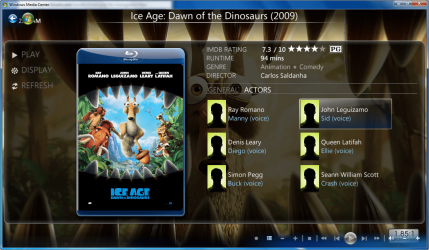
I can confirm the the Actor images are working in Diamond and Default themes.
1-4-2010%206-14-43%20PM.png
 

My Computer My Computer

Computer Manufacturer/Model Number
Custom Built Rig BY ME "My Baby"
OS
7 Ultimate x64
CPU
AMD Athlon 64X2 4600+ 2.51Ghz
Motherboard
ASUS M2N-E SLI
Memory
6GB DDR2 900 Kingston
Graphics Card(s)
2x BFG Nvidia 9600 GT-OC
Sound Card
SoundBlaster XF-I
Monitor(s) Displays
19"acer, 22"acer, 19"acer, 48" HITACHI HDTV
Screen Resolution
1400x900, 1680x1050, 1400x900, 1920x1080
Hard Drives
Seagate 500GB Sata
Seagate 500GB Sata
Seagate 500GB Sata
Seagate 500GB Sata
Seagate 320 Sata (Primary)
Western Digital 500GB IDE
Western Digital 300GB IDE
Maxter 720 Sata (USB)
PSU
BFG 800 Watt SLI Power Supply
Case
Game Master
Cooling
Thermotake
Keyboard
Logitech (Bluetooth)
Mouse
Logitech (Bluetooth)
Internet Speed
Turbo Cable
Other Info
ATI 650HD TV Tuner X2,
Samsung (Light scribe) DVD-R,
Sony (Dual Layer) DVD-R
Well as I stated before, I have my IBN folder in another location. And I have the MB xml.config pointing to it.
IBN Location- U:\mediabrowser\imagesbyname. Inside of the imagesbyname folder, I have a folder called people, then inside of the people folder, are the individual actors' folders, with a jpg file in each of them called folder. This is how my xml tag looks <imagebynamelocation>u:\mediabrowser\imagesbyname<imagebynamelocation/>
 

My Computer My Computer

Computer Manufacturer/Model Number
Gigabyte
OS
Windows 7 Ultimate
CPU
Intel Core(TM)2 Quad- Q9550, 2.83GHz
Motherboard
G31M-ES2L
Memory
4GB
Graphics Card(s)
ATI Radeon HD4600
Sound Card
On Board:
Monitor(s) Displays
Acer AL2223W, Acer AL1916
Screen Resolution
1680 x 1050, 1280 x 1024
Hard Drives
160GB
350GB
250GB
250GB
PSU
600W
Case
Cooler Master
Keyboard
Microsoft Laser 6000
Mouse
Logitech Optical Trackman
Internet Speed
1.5MB
Other Info
I am also running a quasar gamatron flux capacitor with twin pulse tronic phasers......jk, I have no such stuff.
Well as I stated before, I have my IBN folder in another location. And I have the MB xml.config pointing to it.
IBN Location- U:\mediabrowser\imagesbyname. Inside of the imagesbyname folder, I have a folder called people, then inside of the people folder, are the individual actors' folders, with a jpg file in each of them called folder. This is how my xml tag looks <imagebynamelocation>u:\mediabrowser\imagesbyname<imagebynamelocation/>

Does the folder name need to be cased correctly, such as ImagesByName instaed of imagesbyname ??

Can you put it where it is by default and see if it works, then we can work on the re-location ??
 

My Computer My Computer

Computer Manufacturer/Model Number
AsRock ION330
OS
Windows 7
CPU
Atom 330
Motherboard
ASRock ION
Memory
4Gb
Graphics Card(s)
Nvidia ION
Sound Card
Nvidia ION
Monitor(s) Displays
42" Pioneer Plasma
Screen Resolution
1920 x 1080
Hard Drives
300Gb SATA internal, and 2Tb in NAS on LAN.
PSU
Standard
Case
ASRock
Cooling
ASRock
Keyboard
Basic
Mouse
Basic
Internet Speed
50 Mb/s
Other Info
6" 4"", top lip, and walks about a lot !!

My Computer My Computer

Computer Manufacturer/Model Number
AsRock ION330
OS
Windows 7
CPU
Atom 330
Motherboard
ASRock ION
Memory
4Gb
Graphics Card(s)
Nvidia ION
Sound Card
Nvidia ION
Monitor(s) Displays
42" Pioneer Plasma
Screen Resolution
1920 x 1080
Hard Drives
300Gb SATA internal, and 2Tb in NAS on LAN.
PSU
Standard
Case
ASRock
Cooling
ASRock
Keyboard
Basic
Mouse
Basic
Internet Speed
50 Mb/s
Other Info
6" 4"", top lip, and walks about a lot !!

My Computer My Computer

Computer Manufacturer/Model Number
Custom Built Rig BY ME "My Baby"
OS
7 Ultimate x64
CPU
AMD Athlon 64X2 4600+ 2.51Ghz
Motherboard
ASUS M2N-E SLI
Memory
6GB DDR2 900 Kingston
Graphics Card(s)
2x BFG Nvidia 9600 GT-OC
Sound Card
SoundBlaster XF-I
Monitor(s) Displays
19"acer, 22"acer, 19"acer, 48" HITACHI HDTV
Screen Resolution
1400x900, 1680x1050, 1400x900, 1920x1080
Hard Drives
Seagate 500GB Sata
Seagate 500GB Sata
Seagate 500GB Sata
Seagate 500GB Sata
Seagate 320 Sata (Primary)
Western Digital 500GB IDE
Western Digital 300GB IDE
Maxter 720 Sata (USB)
PSU
BFG 800 Watt SLI Power Supply
Case
Game Master
Cooling
Thermotake
Keyboard
Logitech (Bluetooth)
Mouse
Logitech (Bluetooth)
Internet Speed
Turbo Cable
Other Info
ATI 650HD TV Tuner X2,
Samsung (Light scribe) DVD-R,
Sony (Dual Layer) DVD-R
Ho yeah guys... I forgot to tell you.

Multiple entry points is now a working part of MB.

Now, for each section created in the configuration tool MediaBrowser also creates an entry point. Using Media Center Studio you can add these new entry points to any start menu strip. Simply enter the start menu tab and expand the Entry Points at the bottom then drag and drop a point onto the strip. This is a great feature for those who prefer to browse recorded TV shows inside Media Browser or those who simply want to select HD/SD folders from the start menu.
 

My Computer My Computer

Computer Manufacturer/Model Number
Custom Built Rig BY ME "My Baby"
OS
7 Ultimate x64
CPU
AMD Athlon 64X2 4600+ 2.51Ghz
Motherboard
ASUS M2N-E SLI
Memory
6GB DDR2 900 Kingston
Graphics Card(s)
2x BFG Nvidia 9600 GT-OC
Sound Card
SoundBlaster XF-I
Monitor(s) Displays
19"acer, 22"acer, 19"acer, 48" HITACHI HDTV
Screen Resolution
1400x900, 1680x1050, 1400x900, 1920x1080
Hard Drives
Seagate 500GB Sata
Seagate 500GB Sata
Seagate 500GB Sata
Seagate 500GB Sata
Seagate 320 Sata (Primary)
Western Digital 500GB IDE
Western Digital 300GB IDE
Maxter 720 Sata (USB)
PSU
BFG 800 Watt SLI Power Supply
Case
Game Master
Cooling
Thermotake
Keyboard
Logitech (Bluetooth)
Mouse
Logitech (Bluetooth)
Internet Speed
Turbo Cable
Other Info
ATI 650HD TV Tuner X2,
Samsung (Light scribe) DVD-R,
Sony (Dual Layer) DVD-R
Can anyone tell what I am doing wrong. I downloaded ImagesByName, put it into the ProgramData/mediabrowser folder. I edited the xml file, but still no actor images? I dont use metadata, i use yammm does that matter? Thanks in advance.
 

My Computer My Computer

OS
Windows 7

My Computer My Computer

Computer Manufacturer/Model Number
AsRock ION330
OS
Windows 7
CPU
Atom 330
Motherboard
ASRock ION
Memory
4Gb
Graphics Card(s)
Nvidia ION
Sound Card
Nvidia ION
Monitor(s) Displays
42" Pioneer Plasma
Screen Resolution
1920 x 1080
Hard Drives
300Gb SATA internal, and 2Tb in NAS on LAN.
PSU
Standard
Case
ASRock
Cooling
ASRock
Keyboard
Basic
Mouse
Basic
Internet Speed
50 Mb/s
Other Info
6" 4"", top lip, and walks about a lot !!
OK, I've taken the plunge with 2.1.1 (FireStorm) on my TEST PC, but I have noticed that media info is not being displayed correctly for movies.

Take IRONMAN in 1080p. Before, in 2.1.3, I have have displayed with the film details, 1080P, AC3 and 2.39:1, but now all I get is 2.39:1 displayed. Am I missing something ??

I used the DIAMOND theme before and now.

TIA.
 

My Computer My Computer

Computer Manufacturer/Model Number
AsRock ION330
OS
Windows 7
CPU
Atom 330
Motherboard
ASRock ION
Memory
4Gb
Graphics Card(s)
Nvidia ION
Sound Card
Nvidia ION
Monitor(s) Displays
42" Pioneer Plasma
Screen Resolution
1920 x 1080
Hard Drives
300Gb SATA internal, and 2Tb in NAS on LAN.
PSU
Standard
Case
ASRock
Cooling
ASRock
Keyboard
Basic
Mouse
Basic
Internet Speed
50 Mb/s
Other Info
6" 4"", top lip, and walks about a lot !!
Yeah you will need to reinstall your plugins. Most of them were updated for this release.
 

My Computer My Computer

Computer Manufacturer/Model Number
Custom Built Rig BY ME "My Baby"
OS
7 Ultimate x64
CPU
AMD Athlon 64X2 4600+ 2.51Ghz
Motherboard
ASUS M2N-E SLI
Memory
6GB DDR2 900 Kingston
Graphics Card(s)
2x BFG Nvidia 9600 GT-OC
Sound Card
SoundBlaster XF-I
Monitor(s) Displays
19"acer, 22"acer, 19"acer, 48" HITACHI HDTV
Screen Resolution
1400x900, 1680x1050, 1400x900, 1920x1080
Hard Drives
Seagate 500GB Sata
Seagate 500GB Sata
Seagate 500GB Sata
Seagate 500GB Sata
Seagate 320 Sata (Primary)
Western Digital 500GB IDE
Western Digital 300GB IDE
Maxter 720 Sata (USB)
PSU
BFG 800 Watt SLI Power Supply
Case
Game Master
Cooling
Thermotake
Keyboard
Logitech (Bluetooth)
Mouse
Logitech (Bluetooth)
Internet Speed
Turbo Cable
Other Info
ATI 650HD TV Tuner X2,
Samsung (Light scribe) DVD-R,
Sony (Dual Layer) DVD-R

My Computer My Computer

Computer Manufacturer/Model Number
Gigabyte
OS
Windows 7 Ultimate
CPU
Intel Core(TM)2 Quad- Q9550, 2.83GHz
Motherboard
G31M-ES2L
Memory
4GB
Graphics Card(s)
ATI Radeon HD4600
Sound Card
On Board:
Monitor(s) Displays
Acer AL2223W, Acer AL1916
Screen Resolution
1680 x 1050, 1280 x 1024
Hard Drives
160GB
350GB
250GB
250GB
PSU
600W
Case
Cooler Master
Keyboard
Microsoft Laser 6000
Mouse
Logitech Optical Trackman
Internet Speed
1.5MB
Other Info
I am also running a quasar gamatron flux capacitor with twin pulse tronic phasers......jk, I have no such stuff.
What are you creating a playlist for. There is a tutorial over in the MediaBrowser forum on creating an easy playlist (I use that method for intro's).
 

My Computer My Computer

OS
Windows 7 RC 7100
I want to create a playist for my movies, especially for all my dragon ball series. I have them all from dragon ball to dragon ball gt. Thanks for the tip, I will check it out. Do you have a direct link by chance :D?
 

My Computer My Computer

Computer Manufacturer/Model Number
Gigabyte
OS
Windows 7 Ultimate
CPU
Intel Core(TM)2 Quad- Q9550, 2.83GHz
Motherboard
G31M-ES2L
Memory
4GB
Graphics Card(s)
ATI Radeon HD4600
Sound Card
On Board:
Monitor(s) Displays
Acer AL2223W, Acer AL1916
Screen Resolution
1680 x 1050, 1280 x 1024
Hard Drives
160GB
350GB
250GB
250GB
PSU
600W
Case
Cooler Master
Keyboard
Microsoft Laser 6000
Mouse
Logitech Optical Trackman
Internet Speed
1.5MB
Other Info
I am also running a quasar gamatron flux capacitor with twin pulse tronic phasers......jk, I have no such stuff.

My Computer My Computer

Computer Manufacturer/Model Number
Custom Built Rig BY ME "My Baby"
OS
7 Ultimate x64
CPU
AMD Athlon 64X2 4600+ 2.51Ghz
Motherboard
ASUS M2N-E SLI
Memory
6GB DDR2 900 Kingston
Graphics Card(s)
2x BFG Nvidia 9600 GT-OC
Sound Card
SoundBlaster XF-I
Monitor(s) Displays
19"acer, 22"acer, 19"acer, 48" HITACHI HDTV
Screen Resolution
1400x900, 1680x1050, 1400x900, 1920x1080
Hard Drives
Seagate 500GB Sata
Seagate 500GB Sata
Seagate 500GB Sata
Seagate 500GB Sata
Seagate 320 Sata (Primary)
Western Digital 500GB IDE
Western Digital 300GB IDE
Maxter 720 Sata (USB)
PSU
BFG 800 Watt SLI Power Supply
Case
Game Master
Cooling
Thermotake
Keyboard
Logitech (Bluetooth)
Mouse
Logitech (Bluetooth)
Internet Speed
Turbo Cable
Other Info
ATI 650HD TV Tuner X2,
Samsung (Light scribe) DVD-R,
Sony (Dual Layer) DVD-R
I found this, but I don't think those buttons or options are available anymore, unless I am missing something?
Creating a Playlist
 

My Computer My Computer

Computer Manufacturer/Model Number
Gigabyte
OS
Windows 7 Ultimate
CPU
Intel Core(TM)2 Quad- Q9550, 2.83GHz
Motherboard
G31M-ES2L
Memory
4GB
Graphics Card(s)
ATI Radeon HD4600
Sound Card
On Board:
Monitor(s) Displays
Acer AL2223W, Acer AL1916
Screen Resolution
1680 x 1050, 1280 x 1024
Hard Drives
160GB
350GB
250GB
250GB
PSU
600W
Case
Cooler Master
Keyboard
Microsoft Laser 6000
Mouse
Logitech Optical Trackman
Internet Speed
1.5MB
Other Info
I am also running a quasar gamatron flux capacitor with twin pulse tronic phasers......jk, I have no such stuff.
I'm working on a set of new icons to be used for movie boxset's, and was looking for some feedback.

Good\bad
Like \Dislike

Alien%20Bowset.png
AVP%20Boxset.png
Compleate%20Boxset.png
 

My Computer My Computer

Computer Manufacturer/Model Number
Custom Built Rig BY ME "My Baby"
OS
7 Ultimate x64
CPU
AMD Athlon 64X2 4600+ 2.51Ghz
Motherboard
ASUS M2N-E SLI
Memory
6GB DDR2 900 Kingston
Graphics Card(s)
2x BFG Nvidia 9600 GT-OC
Sound Card
SoundBlaster XF-I
Monitor(s) Displays
19"acer, 22"acer, 19"acer, 48" HITACHI HDTV
Screen Resolution
1400x900, 1680x1050, 1400x900, 1920x1080
Hard Drives
Seagate 500GB Sata
Seagate 500GB Sata
Seagate 500GB Sata
Seagate 500GB Sata
Seagate 320 Sata (Primary)
Western Digital 500GB IDE
Western Digital 300GB IDE
Maxter 720 Sata (USB)
PSU
BFG 800 Watt SLI Power Supply
Case
Game Master
Cooling
Thermotake
Keyboard
Logitech (Bluetooth)
Mouse
Logitech (Bluetooth)
Internet Speed
Turbo Cable
Other Info
ATI 650HD TV Tuner X2,
Samsung (Light scribe) DVD-R,
Sony (Dual Layer) DVD-R
Man those are AWESOME DS, I think I best I seen you done so far. I REALLY LIKE those.:D
 

My Computer My Computer

Computer Manufacturer/Model Number
Gigabyte
OS
Windows 7 Ultimate
CPU
Intel Core(TM)2 Quad- Q9550, 2.83GHz
Motherboard
G31M-ES2L
Memory
4GB
Graphics Card(s)
ATI Radeon HD4600
Sound Card
On Board:
Monitor(s) Displays
Acer AL2223W, Acer AL1916
Screen Resolution
1680 x 1050, 1280 x 1024
Hard Drives
160GB
350GB
250GB
250GB
PSU
600W
Case
Cooler Master
Keyboard
Microsoft Laser 6000
Mouse
Logitech Optical Trackman
Internet Speed
1.5MB
Other Info
I am also running a quasar gamatron flux capacitor with twin pulse tronic phasers......jk, I have no such stuff.
Hey DS :D

I'm not too proficient using Media Browser. I updated to 2.2.1.0 and so far, me no likey.

My DVD's are stored in K:\DVD's. I have the films split up into genres.
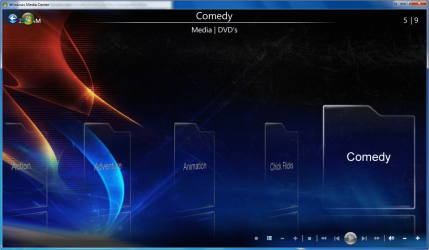
I'm currently using the Diamond theme in MB and the Genres will not show up when navigating. neither will my Actor images.

My ImagesByName folder has been set up correctly (i believe), yet MB refuses to show either of them.
View attachment Imagesbyname.txt

I'd actually prefer to go back to the previous version if anyone has a link, if not, some help in getting this setup would be greatly appreciated :)

1.png

2.png
 

My Computer My Computer

Computer Manufacturer/Model Number
HP Touchsmart IQ771.uk
OS
Windows 7 Ultimate x64
CPU
AMD Turion(tm) 64 X2 Mobile Technology TL-56
Motherboard
ASUS Pheonix
Memory
3GB Nanya PC2-6400 DDR2-SDRAM SO-DIM (400MHz)
Graphics Card(s)
NVIDIA GeForce Go 7600 256MB GDDR3 SDRAM
Sound Card
High Definition Intergrated NVIDIA MCP51
Monitor(s) Displays
46" Sony Bravia HDTV
Screen Resolution
1600x1200
Hard Drives
1.5TB Samsug
320GB Seagate ST3320820AS - SATA 3Gb/s 8MB
500GB Maxtor Basics STM305003EHD301-RK
Internet Speed
↓6.32 Mb/s ↑0.35 Mb/s ↔26ms
Other Info
BIOS - American Megatrends Inc. 5.07
Ethernet Port - NVIDIA nForce 10/100/1000 Mbps
DVD Drive - TSSTcorp DVDR/RW TS-T632L
If your using Vanilla 2.0 the actor images are broken and the author does know about it, and said a fix is on the way.

Also, you do know that the IBN has a new setup right?

imagesbyname\General <--- Podcasts, Film Trailers etc. icons go here
imagesbyname\Genre <- Says it all
imagesbyname\People <--- All Actor Images Now Go Here (must also redirect meta<browser/> to this)
imagesbyname\Studio <- Says it all
imagesbyname\Year <- Says it all

Go to your C:\Program Files\MediaBrowser\MediaBrowser\ and look and see if there is a Migrate IBN.exe

It should be there. As long as your IBN is in its default location, the exe will set up your IBN with it's NEW Sub-Folders and automatically sort all of your files out.
 

My Computer My Computer

Computer Manufacturer/Model Number
Custom Built Rig BY ME "My Baby"
OS
7 Ultimate x64
CPU
AMD Athlon 64X2 4600+ 2.51Ghz
Motherboard
ASUS M2N-E SLI
Memory
6GB DDR2 900 Kingston
Graphics Card(s)
2x BFG Nvidia 9600 GT-OC
Sound Card
SoundBlaster XF-I
Monitor(s) Displays
19"acer, 22"acer, 19"acer, 48" HITACHI HDTV
Screen Resolution
1400x900, 1680x1050, 1400x900, 1920x1080
Hard Drives
Seagate 500GB Sata
Seagate 500GB Sata
Seagate 500GB Sata
Seagate 500GB Sata
Seagate 320 Sata (Primary)
Western Digital 500GB IDE
Western Digital 300GB IDE
Maxter 720 Sata (USB)
PSU
BFG 800 Watt SLI Power Supply
Case
Game Master
Cooling
Thermotake
Keyboard
Logitech (Bluetooth)
Mouse
Logitech (Bluetooth)
Internet Speed
Turbo Cable
Other Info
ATI 650HD TV Tuner X2,
Samsung (Light scribe) DVD-R,
Sony (Dual Layer) DVD-R
Back
Top