Memory - Set Maximum Amount Used by Windows

How to Set Maximum Memory to be Used by Windows 7 and Windows 8


   Information
This will show you how to specify the maximum amount of physical memory (RAM) to be used by Windows to simulate a low memory configuration by using less RAM, or to make sure that you are using all of your installed RAM.

Windows uses all of your installed RAM memory by default.

You must be logged in as an administrator to be able to do this tutorial.

   Note
32-bit (x86) Windows 7/8 Maximum RAM Limit
  • All editions: 4GB
64-bit (x64) Windows 7 Maximum RAM Limit per Edition
  • Home Basic: 8GB
  • Home Premium: 16GB
  • Professional: 192GB
  • Enterprise: 192GB
  • Ultimate: 192GB
64-bit (x64) Windows 8 and 8.1 Maximum RAM Limit per Edition

  • (core): 128GB
  • Pro: 512GB
  • Enterprise: 512GB
   Warning

  • If you have a integrated/onboard graphics chip on your motherboard and are using a graphics card instead, then double check your BIOS settings to make sure that you do not have any memory allocated to the integrated/onboard graphics chip (ex:hardware reserved) so that it will be used by Windows instead.
  • If you are using a integrated/onboard graphics chip on your motherboard to display your monitor from, then part of your memory (RAM) will be allocated to it as set in the BIOS.
  • Double check to see if you have a memory mapping option in your BIOS settings. If you do, enable it.

CONTENTS:

  • Option One: Set Maximum Memory for Windows in System Configuration (msconfig)
  • Option Two: Set Maximum Memory for Windows in Command Prompt in Windows
  • Option Three: Set Maximum Memory for Windows in Command Prompt at Boot


OPTION ONE

Set Maximum Memory for Windows in System Configuration (msconfig)

1. Press the Windows + R keys to open the Run dialog, type msconfig, and click/tap on OK.

2. If prompted by UAC, then click/tap on Yes.

3. Under the Boot tab in System Configuration, click/tap on the Advanced options button, and do step 4 or step 5 below for what you would like to do. (see screenshot below)Step1.jpg4. To Have Windows Use All Installed Memory
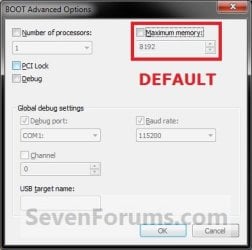
NOTE: This is the default setting.A) Uncheck the Maximum memory box, click/tap on OK, and go to step 6 below. (see screenshot below)
NOTE: If the box is not checked, then it does not matter what the selected number is since Windows will use all available RAM by default and ignore whatever value is in the box underneath.Default.jpg5. To Have Windows Use a Specified Maximum Amount of Memory
NOTE: Only when the box is checked, can you specify how much installed RAM you want to allow Windows to be able to use in the drop down box. A) Check the Maximum memory box, then type in how many MB of your installed Memory that you want Windows to only be able to use up to, click/tap on OK, and go to step 6 below. (see screenshot below)
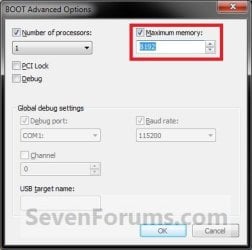
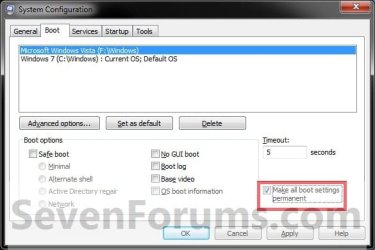
Set_Max_Memory.jpg6. Check the Make all boot settings permanent box, and click/tap on OK. (see screenshot below)
NOTE: You will still be able to come back and make changes again if you like.Step3.jpg
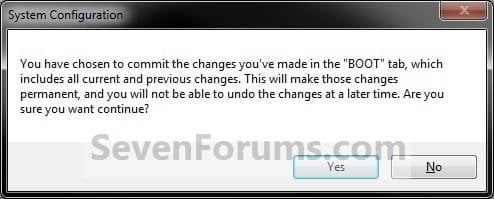
7. Click/tap on Yes. (see screenshot below)
NOTE: You will still be able to come back and make changes again if you like.Step4.jpg
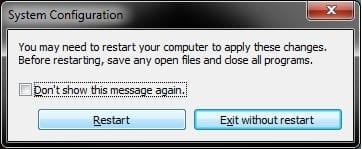
8. Click/tap on the Restart button. (see screenshot below)
WARNING: This will restart the computer immediately. Make sure you save and close anything open that you do not want to lose first.

   Tip
If you checked the Don't show this message again box and would like to restore this Restart box to display again, then see: How to Restore the System Configuration Restart Prompt in Vista or Windows 7
Step5.jpg
9. When Windows is finished restarting, it will now be using only the maximum amount of memory that you specified.
NOTE: You can look in Task Manager (CTRL+SHIFT+ESC) to confirm this amount of memory.Task_Manager.jpg


OPTION TWO

Set Maximum Memory for Windows in Command Prompt in Windows


1. Open an elevated command prompt in Windows 7 or Windows 8.

2. Do step 3 or step 4 below for what you would like to do.

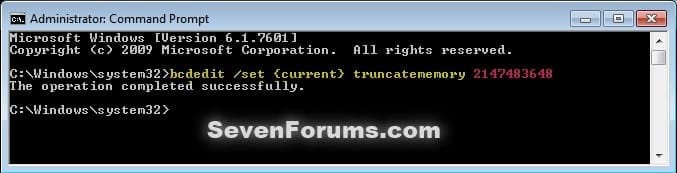
3. To Have Windows Use a Specified Maximum Amount of MemoryA) In the elevated command prompt, type the command below, press Enter, and go to step 5 below. (see screenshot below) bcdedit /set {current} truncatememory bytes
   Note
Substitute bytes in the command above with how many actual bytes of maximum memory you want Windows to be able to use.

1073741824 bytes = 1 GB

(1073741824 x GB = bytes you type in command)


For example: If I wanted to set Windows to use 2 GB of maximum memory, then 1073741824 bytes x 2 GB = 2147483648. I would type this command below exactly.

bcdedit /set {current} truncatememory 2147483648


bcedit_truncatememory.jpg4. To Have Windows Use All Installed Memory
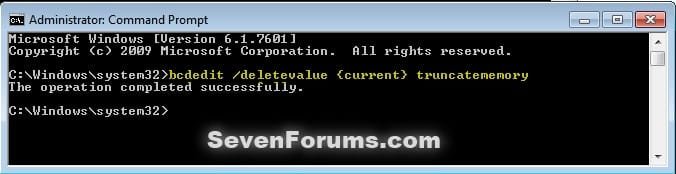
NOTE: This is the default setting.A) In the elevated command prompt, copy and paste the command below, press Enter, and go to step 5 below. (see screenshot below)

bcdedit /deletevalue {current} truncatememory

bcedit_deletevalue_truncatememory.jpg5. Restart the computer to apply.


OPTION THREE

Set Maximum Memory for Windows in Command Prompt at Boot


1. Open a command prompt at boot for Windows 7 or Windows 8.

2. Do step 3 or step 4 below for what you would like to do.

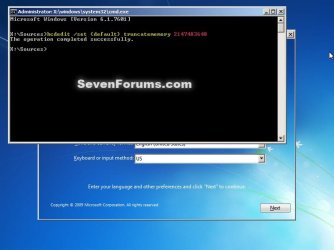
3. To Have Windows Use a Specified Maximum Amount of MemoryA) In the command prompt, type the command below, press Enter, and go to step 5 below. (see screenshot below)

bcdedit /set {default} truncatememory bytes


   Note
Substitute bytes in the command above with how many actual bytes of maximum memory you want Windows to be able to use.

1073741824 bytes = 1 GB

(1073741824 x GB = bytes you type in command)


For example: If I wanted to set Windows to use 2 GB of maximum memory, then 1073741824 bytes x 2 GB = 2147483648. I would type this command below exactly.

bcdedit /set {default} truncatememory 2147483648


boot_bcedit_truncatememory.jpg
4. To Have Windows Use All Installed Memory
NOTE: This is the default setting.A) In the command prompt, type the command below, press Enter, and go to step 5 below. (see screenshot below)

bcdedit /deletevalue {default} truncatememory
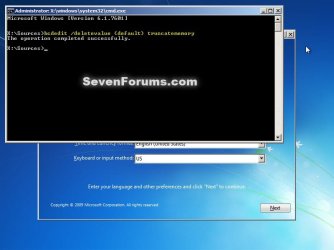

boot_bcedit_deletevalue_truncatememory.jpg
5. Restart the computer to apply.


That's it,
Shawn


Last edited:
Hello crashnbuen,

Nope. The Max Memory setting is used primarily for testing purposes only.

By default, it should remain unchecked to allow Windows to use all available memory.
 

My Computer

Computer type
PC/Desktop
Computer Manufacturer/Model Number
Self built custom
OS
64-bit Windows 11 Pro for Workstations
CPU
Intel i7-8700K OC'd to 5 GHz
Motherboard
ASUS ROG Maximus XI Formula Z390
Memory
64 GB (4x16GB) G.SKILL TridentZ RGB DDR4 3600 MHz
Graphics Card(s)
ASUS ROG-STRIX-GTX1080TI-O11G-GAMING
Sound Card
Integrated
Monitor(s) Displays
2 x Samsung Odyssey G7 27"
Screen Resolution
2560x1440
Hard Drives
1TB Samsung 990 PRO M.2,
4TB Samsung 990 PRO PRO M.2,
TerraMaster F8 SSD Plus NAS
PSU
Seasonic Prime Titanium 850W
Case
Thermaltake Core P3
Cooling
Corsair Hydro H115i
Keyboard
Logitech wireless K800
Mouse
Logitech MX Master 4
Internet Speed
2 Gb/s Download and 100 Mb/s Upload
Antivirus
Malwarebyte Anti-Malware Premium
Browser
Google Chrome
Other Info
Logitech Z625 speaker system,
Logitech BRIO 4K Pro webcam,
HP Color LaserJet Pro MFP M477fdn,
APC SMART-UPS RT 1000 XL - SURT1000XLI,
Galaxy S23 Plus phone
Hello sorry for the late reply but the CMOS reset didnt work, anything else?
 

My Computer

Computer type
PC/Desktop
OS
Arkansas
Hey Ben,

I must admit that I'm about stumped as well since everything else has checked out.

If you like, you might reinstall Windows to start fresh with it to see if that may sort it if it was something set inadvertently in Windows.
 

My Computer

Computer type
PC/Desktop
Computer Manufacturer/Model Number
Self built custom
OS
64-bit Windows 11 Pro for Workstations
CPU
Intel i7-8700K OC'd to 5 GHz
Motherboard
ASUS ROG Maximus XI Formula Z390
Memory
64 GB (4x16GB) G.SKILL TridentZ RGB DDR4 3600 MHz
Graphics Card(s)
ASUS ROG-STRIX-GTX1080TI-O11G-GAMING
Sound Card
Integrated
Monitor(s) Displays
2 x Samsung Odyssey G7 27"
Screen Resolution
2560x1440
Hard Drives
1TB Samsung 990 PRO M.2,
4TB Samsung 990 PRO PRO M.2,
TerraMaster F8 SSD Plus NAS
PSU
Seasonic Prime Titanium 850W
Case
Thermaltake Core P3
Cooling
Corsair Hydro H115i
Keyboard
Logitech wireless K800
Mouse
Logitech MX Master 4
Internet Speed
2 Gb/s Download and 100 Mb/s Upload
Antivirus
Malwarebyte Anti-Malware Premium
Browser
Google Chrome
Other Info
Logitech Z625 speaker system,
Logitech BRIO 4K Pro webcam,
HP Color LaserJet Pro MFP M477fdn,
APC SMART-UPS RT 1000 XL - SURT1000XLI,
Galaxy S23 Plus phone
well i appreciate the help you have given maybe you know anyone else on this forum who might help?
 

My Computer

Computer type
PC/Desktop
OS
Arkansas
HELP

.... I need help. I had no idea what I was doing and I clicked the maximum memory thing and it set it to 0 then I restarted my PC and now whenever I try to start windows it spends about 10 minutes saying "starting windows" then blue screens and repeats. I've tried everything I could think of to try and fix it, except system restore because I'm a dope who doesn't have any restore points. Any help wod b greatly appreciated thanks , also If you must know I am posting this via my phone
 

My Computer

Computer type
PC/Desktop
Computer Manufacturer/Model Number
Hp
OS
Windows 7 home premium x64
CPU
Intel i7 2600 3.4ghz
Memory
2x 4gb ddr3
Graphics Card(s)
Nvidia GeForce gt545
Hard Drives
1tb
Antivirus
Avast
Browser
Chrome
Hello Shroombo, and welcome to Seven Forums.

You might see if you may be able to boot to Safe Mode to be able to change this back.
 

My Computer

Computer type
PC/Desktop
Computer Manufacturer/Model Number
Self built custom
OS
64-bit Windows 11 Pro for Workstations
CPU
Intel i7-8700K OC'd to 5 GHz
Motherboard
ASUS ROG Maximus XI Formula Z390
Memory
64 GB (4x16GB) G.SKILL TridentZ RGB DDR4 3600 MHz
Graphics Card(s)
ASUS ROG-STRIX-GTX1080TI-O11G-GAMING
Sound Card
Integrated
Monitor(s) Displays
2 x Samsung Odyssey G7 27"
Screen Resolution
2560x1440
Hard Drives
1TB Samsung 990 PRO M.2,
4TB Samsung 990 PRO PRO M.2,
TerraMaster F8 SSD Plus NAS
PSU
Seasonic Prime Titanium 850W
Case
Thermaltake Core P3
Cooling
Corsair Hydro H115i
Keyboard
Logitech wireless K800
Mouse
Logitech MX Master 4
Internet Speed
2 Gb/s Download and 100 Mb/s Upload
Antivirus
Malwarebyte Anti-Malware Premium
Browser
Google Chrome
Other Info
Logitech Z625 speaker system,
Logitech BRIO 4K Pro webcam,
HP Color LaserJet Pro MFP M477fdn,
APC SMART-UPS RT 1000 XL - SURT1000XLI,
Galaxy S23 Plus phone
Hi, tried that, still does not work . Is there some way I can change the max memory setting remotely? Maybe through command prompt or something
 

My Computer

Computer type
PC/Desktop
Computer Manufacturer/Model Number
Hp
OS
Windows 7 home premium x64
CPU
Intel i7 2600 3.4ghz
Memory
2x 4gb ddr3
Graphics Card(s)
Nvidia GeForce gt545
Hard Drives
1tb
Antivirus
Avast
Browser
Chrome
Ok Shroombo, I have updated the tutorial with OPTION TWO and OPTION THREE. You can use step 4 in OPTION THREE to undo this and be the same as unchecking the Maximum memory box to let Windows use all available memory. :)
 

My Computer

Computer type
PC/Desktop
Computer Manufacturer/Model Number
Self built custom
OS
64-bit Windows 11 Pro for Workstations
CPU
Intel i7-8700K OC'd to 5 GHz
Motherboard
ASUS ROG Maximus XI Formula Z390
Memory
64 GB (4x16GB) G.SKILL TridentZ RGB DDR4 3600 MHz
Graphics Card(s)
ASUS ROG-STRIX-GTX1080TI-O11G-GAMING
Sound Card
Integrated
Monitor(s) Displays
2 x Samsung Odyssey G7 27"
Screen Resolution
2560x1440
Hard Drives
1TB Samsung 990 PRO M.2,
4TB Samsung 990 PRO PRO M.2,
TerraMaster F8 SSD Plus NAS
PSU
Seasonic Prime Titanium 850W
Case
Thermaltake Core P3
Cooling
Corsair Hydro H115i
Keyboard
Logitech wireless K800
Mouse
Logitech MX Master 4
Internet Speed
2 Gb/s Download and 100 Mb/s Upload
Antivirus
Malwarebyte Anti-Malware Premium
Browser
Google Chrome
Other Info
Logitech Z625 speaker system,
Logitech BRIO 4K Pro webcam,
HP Color LaserJet Pro MFP M477fdn,
APC SMART-UPS RT 1000 XL - SURT1000XLI,
Galaxy S23 Plus phone
Hi all, I run a lot of music software that is very ram hungry, I have win 7 pro 64, 32gb ram, intel i-core i5, geforce 520 graphics card. When loading my music software instruments it puts a strain on my system. I am planning to buy a Mac if and when I can afford it but until then I am just wondering would my ram improve on the music software side of things if I was to max out my memory as outline above-msconfig-boot-advanced options-max memory-4 processors? thanks all.
 

My Computer

Computer type
PC/Desktop
Computer Manufacturer/Model Number
custom
OS
windows 64bit professional
CPU
intelo icore i5
Motherboard
intel dh67cl
Memory
32gb
Graphics Card(s)
geforce gt520
The msconfig boot options are for testing and diagnostic purposes. For normal purposes all checkboxes should be unchecked.
 

My Computer

Computer type
PC/Desktop
Computer Manufacturer/Model Number
HP
OS
Windows 7 Pro 64 bit
CPU
Xeon W3520
Memory
8 GB
Graphics Card(s)
Nvidia Geforce 210
Step 6 was dangerous for me. My system did not boot. I had to do a lot and spend about 4-5 rebuilt boot rec through BCDRec. One website explained what exactly I needed. Not sure what went wrong in my case. Be careful folks.
 

My Computer

OS
Windows 7 Home Basic
CPU
Intel (R) Core i5-3330 CPU @ 2.00GHz
Memory
4 GB
Antivirus
Norton Internet Security
Step 6 was dangerous for me. My system did not boot. I had to do a lot and spend about 4-5 rebuilt boot rec through BCDRec. One website explained what exactly I needed. Not sure what went wrong in my case. Be careful folks.


Hello naveenpn, :-)

Step 6 in Option 1 is to make the change permanent instead of temporary.

What did you set your max memory to?

Normally, you want to leave the Maximum memory box unchecked (default) for Windows to use all installed memory.
 

My Computer

Computer type
PC/Desktop
Computer Manufacturer/Model Number
Self built custom
OS
64-bit Windows 11 Pro for Workstations
CPU
Intel i7-8700K OC'd to 5 GHz
Motherboard
ASUS ROG Maximus XI Formula Z390
Memory
64 GB (4x16GB) G.SKILL TridentZ RGB DDR4 3600 MHz
Graphics Card(s)
ASUS ROG-STRIX-GTX1080TI-O11G-GAMING
Sound Card
Integrated
Monitor(s) Displays
2 x Samsung Odyssey G7 27"
Screen Resolution
2560x1440
Hard Drives
1TB Samsung 990 PRO M.2,
4TB Samsung 990 PRO PRO M.2,
TerraMaster F8 SSD Plus NAS
PSU
Seasonic Prime Titanium 850W
Case
Thermaltake Core P3
Cooling
Corsair Hydro H115i
Keyboard
Logitech wireless K800
Mouse
Logitech MX Master 4
Internet Speed
2 Gb/s Download and 100 Mb/s Upload
Antivirus
Malwarebyte Anti-Malware Premium
Browser
Google Chrome
Other Info
Logitech Z625 speaker system,
Logitech BRIO 4K Pro webcam,
HP Color LaserJet Pro MFP M477fdn,
APC SMART-UPS RT 1000 XL - SURT1000XLI,
Galaxy S23 Plus phone
Back
Top