

I have created a menu driven batch script [program] that runs specific programs and performs specific tasks from a single source [the Menu]. The idea behind this is it will make it easier for SevenForums members who have been asked to perform one of the actions above [or both] in order to help them resolve their problems/issues.
Using this program saves time [and in some cases possible typing errors which could cause extra problems] by not having to navigate around the OS to get to the relevant program or task that they have been asked to run and to then upload the results us to look at.
I have also included some additional features that you might find useful on a daily basis.
When you click the .bat file link below it will ask if you want to Run it or Save it. Click Save and save it to the Desktop for example. The downloaded .bat file must be run as an administrator [right-click and select Run as administrator] in an elevated command prompt.
Click here [direct download] => View attachment Menu_Driven_Batch_File.bat.
Here is a screenshot of the menu itself which shows the options available and a brief description of what each one does.
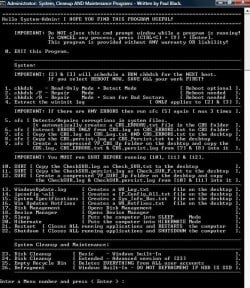
However, here is a more detailed description of the main options available . . .
chkdsk [Check Disk] - OPTIONS 1, 2, 3 & 4 . . .
chkdsk is a Windows utility program for detecting and repairing any corruptions of the file system [FAT16, FAT32, and NTFS drives]. The options available are . . .
[1] chkdsk [non-invasive read-only and detect mode].
This analyses the OS drive and reports any file system errors or corruptions, but doesn’t repair them.
[2] chkdsk C: /F [repair mode].
This does repair any file system errors or corruptions [well it tries too] on the OS drive but doesn’t scan for any bad sectors. This cannot be run while the HDD is in use [locked] and is therefore scheduled [displays a prompt] to run at the next reboot.
[3] chkdsk C: /R [repair mode].
This does repair any file system errors or corruptions [well it tries too] on the OS drive and does scan for any bad sectors. It then attempts to repair or recover any readable information [implies /F]. This cannot be run while the HDD is in use [locked] and is therefore scheduled [displays a prompt] to run at the next reboot.
[4] Extract the wininit log.
This Extracts the current status [output data] for either chkdsk C: /F or chkdsk C: /R [which MUST be run FIRST in order to have the current run data available!].
sfc [System File Checker] - OPTIONS 5, 6, 7, 8 & 9 . . .
SFC is a Windows utility program for detecting and repairing any corruptions in the protected system files of the OS. If any files are missing or corrupted, they are replaced with a cached copy stored in the compressed folder located at %SystemRoot%\System32\dllcache.
The scan results are shown in the cmd prompt window after this process has finished. If any errors are reported, then run SFC again two or three more times, rebooting in between. For some reason, this can make a difference. I think it has something to do with the settings.ini file sometimes showing false positives!
Running SFC creates two log files [CBS.log and CBS.Persist.log] in the CBS folder.
NOTE: OPTION [5] runs SFC. In this option I have also scripted it to automatically extract the ERRORS ONLY from the CBS.log. This makes it easier to perform the other options available within the SFC section.
SURT [System Update Readiness Tool] - OPTIONS 10, 11 & 12 . . .
IMPORTANT: These options ONLY apply if SURT has been run FIRST.
SURT is a self-installing utility that executes when you install it [this will take a while to complete so be patient!]. It is used because of an inconsistency found in the Windows servicing store that may prevent the successful installation of updates, service packs, and software. It checks for these inconsistencies [integrity] and tries to fix any issues found. It supports all versions of Windows 7 SP1.
Install [double-click] SURT [it will automatically run on installation].
SURT 32-bit download => SURT for Windows 7 x86-based Systems (KB947821) [October 2014].
SURT 64-bit download => SURT for Windows 7 x64-based Systems (KB947821) [October 2014].
Running SURT creates two log files [CheckSUR.log and CheckSUR.persist.log] in the CBS folder.
SUGGESTION: It is advisable to turn off the power options for sleep etc while running SURT because it could take a while [so be patient!].
Windows Update Log - OPTION 13 . . .
By default, the WU client records all the transaction information into the log file located at %SystemRoot%\WindowsUpdate.log. The information generated is useful for troubleshooting and investigating any problems/issues. This option extracts the WindowsUpdate.log information.
[1] Screenshots & Files - Upload & Post AND [2] How to Zip a File or Folder
[1] How to upload a screenshot or file => How to Upload & Post a Screenshot & File in SevenForums.
[2] How to zip & upload a file or folder => How To Zip (Compress) a File or Folder in Windows.
I hope you find the program useful!
NOTE: Special thanks to Snick for testing, it is appreciated .
.
See my signature below for other programs!
Using this program saves time [and in some cases possible typing errors which could cause extra problems] by not having to navigate around the OS to get to the relevant program or task that they have been asked to run and to then upload the results us to look at.
I have also included some additional features that you might find useful on a daily basis.
When you click the .bat file link below it will ask if you want to Run it or Save it. Click Save and save it to the Desktop for example. The downloaded .bat file must be run as an administrator [right-click and select Run as administrator] in an elevated command prompt.
Click here [direct download] => View attachment Menu_Driven_Batch_File.bat.
Here is a screenshot of the menu itself which shows the options available and a brief description of what each one does.
However, here is a more detailed description of the main options available . . .
chkdsk [Check Disk] - OPTIONS 1, 2, 3 & 4 . . .
chkdsk is a Windows utility program for detecting and repairing any corruptions of the file system [FAT16, FAT32, and NTFS drives]. The options available are . . .
[1] chkdsk [non-invasive read-only and detect mode].
This analyses the OS drive and reports any file system errors or corruptions, but doesn’t repair them.
[2] chkdsk C: /F [repair mode].
This does repair any file system errors or corruptions [well it tries too] on the OS drive but doesn’t scan for any bad sectors. This cannot be run while the HDD is in use [locked] and is therefore scheduled [displays a prompt] to run at the next reboot.
[3] chkdsk C: /R [repair mode].
This does repair any file system errors or corruptions [well it tries too] on the OS drive and does scan for any bad sectors. It then attempts to repair or recover any readable information [implies /F]. This cannot be run while the HDD is in use [locked] and is therefore scheduled [displays a prompt] to run at the next reboot.
[4] Extract the wininit log.
This Extracts the current status [output data] for either chkdsk C: /F or chkdsk C: /R [which MUST be run FIRST in order to have the current run data available!].
sfc [System File Checker] - OPTIONS 5, 6, 7, 8 & 9 . . .
SFC is a Windows utility program for detecting and repairing any corruptions in the protected system files of the OS. If any files are missing or corrupted, they are replaced with a cached copy stored in the compressed folder located at %SystemRoot%\System32\dllcache.
The scan results are shown in the cmd prompt window after this process has finished. If any errors are reported, then run SFC again two or three more times, rebooting in between. For some reason, this can make a difference. I think it has something to do with the settings.ini file sometimes showing false positives!
Running SFC creates two log files [CBS.log and CBS.Persist.log] in the CBS folder.
NOTE: OPTION [5] runs SFC. In this option I have also scripted it to automatically extract the ERRORS ONLY from the CBS.log. This makes it easier to perform the other options available within the SFC section.
SURT [System Update Readiness Tool] - OPTIONS 10, 11 & 12 . . .
IMPORTANT: These options ONLY apply if SURT has been run FIRST.
SURT is a self-installing utility that executes when you install it [this will take a while to complete so be patient!]. It is used because of an inconsistency found in the Windows servicing store that may prevent the successful installation of updates, service packs, and software. It checks for these inconsistencies [integrity] and tries to fix any issues found. It supports all versions of Windows 7 SP1.
Install [double-click] SURT [it will automatically run on installation].
SURT 32-bit download => SURT for Windows 7 x86-based Systems (KB947821) [October 2014].
SURT 64-bit download => SURT for Windows 7 x64-based Systems (KB947821) [October 2014].
Running SURT creates two log files [CheckSUR.log and CheckSUR.persist.log] in the CBS folder.
SUGGESTION: It is advisable to turn off the power options for sleep etc while running SURT because it could take a while [so be patient!].
Windows Update Log - OPTION 13 . . .
By default, the WU client records all the transaction information into the log file located at %SystemRoot%\WindowsUpdate.log. The information generated is useful for troubleshooting and investigating any problems/issues. This option extracts the WindowsUpdate.log information.
[1] Screenshots & Files - Upload & Post AND [2] How to Zip a File or Folder
[1] How to upload a screenshot or file => How to Upload & Post a Screenshot & File in SevenForums.
[2] How to zip & upload a file or folder => How To Zip (Compress) a File or Folder in Windows.
I hope you find the program useful!
NOTE: Special thanks to Snick for testing, it is appreciated
.See my signature below for other programs!
Last edited:
My Computer
At a glance
Win 7 HP SP1 64-bit Vista HB SP2 32-bit Linux...Intel(R) Pentium(R) CPU P6200 @ 2.13GHz4.00 GBIntel(R) Graphics Media Accelerator HD
- Computer type
- Laptop
- Computer Manufacturer/Model Number
- Fujitsu LIFEBOOK
- OS
- Win 7 HP SP1 64-bit Vista HB SP2 32-bit Linux Mint 18.3
- CPU
- Intel(R) Pentium(R) CPU P6200 @ 2.13GHz
- Motherboard
- FUJITSU FJNBB06
- Memory
- 4.00 GB
- Graphics Card(s)
- Intel(R) Graphics Media Accelerator HD
- Sound Card
- [1] Realtek High Definition Audio [2] Intel(R) Display Audio
- Screen Resolution
- 1366 x 768 x 32 bits (4294967296 colors) @ 59 Hz
- Hard Drives
- TOSHIBA MK5076GSX
- Antivirus
- AVG FREE


