
Message causing some concern.

richprice

New member
Local time
6:15 PM
Messages
12
Just recently, I was installing a few new apps. One of them seems to have snuck something in without me catching it. I don't know which app it could have been, and I usually block this sort of thing before it has a chance to do any harm or damage. Now I keep getting a message (screenshot included here) that a program is being blocked from changing my Search Settings.
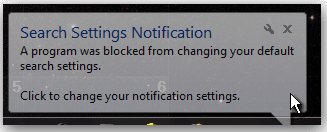
Snap_message_1.png

I have gone through HiJackThis and killed off anything that I didn't want (a few older apps I didn't need starting) and a couple of things I didn't recognize. MalwareBytes Pro (paid version) doesn't raise any alarms after a full scan. Nor does AdAware Pro. None of the protection and removal apps don't seem to think whatever it is, is malware. Still, I have missed whatever it is that is trying to change my settings and I keep getting the same message a few times every hour. Whatever it is seems to make 3 attempts at changing my search settings and then gives up for a while.

Does anybody here have any experience with something like this? I could sure use the help. Normally, I'm the one giving help, but today just isn't my day. I need to get rid of this bug, but I can't find it. Any help conquering this thing will be deeply appreciated.
 

My Computer

Computer Manufacturer/Model Number
Sony Vaio VPCEC290X
OS
Windows 7 Pro x64 SP1
CPU
Core i5 Quad-core M520 @2.4 GHz
Memory
8 GB
Graphics Card(s)
ATI Radeon
Hard Drives
500 GB Sata 5400rpm
Welcome

In the future download WinPatrol, it will tell you when a change is being made to your system and give you time to make the corrction.
Make a clean boot to find out what is causing this problem.
http://support.microsoft.com/kb/929135
 

My Computer

Computer type
PC/Desktop
Computer Manufacturer/Model Number
Dell XPS 420
OS
Windows 10, Home Clean Install
CPU
Intel Core2 processsor Q8200(2.33Ghz 1333FSB) Quad Core Tech
Motherboard
Dell
Memory
6 gb
Graphics Card(s)
ATI Radeon 256MB HD3650
Sound Card
Intergrated 7.1 Channel Audio
Monitor(s) Displays
Dell SP2009W 20"
Hard Drives
640 GB Serial ATA Hard drive
Cooling
Fan
Keyboard
Dell USB Keyboard
Mouse
Dell Premium Optical USB
Internet Speed
DSL 2.85

My Computer

Computer Manufacturer/Model Number
HP M9077c
OS
Windows 7 Home Premium 64bit
CPU
Intel(R)Core(TM)2 quad [email protected] 2.39GHz
Motherboard
ASUSeK
Memory
6GB DDR2 6400
Graphics Card(s)
GeForce 8500/512MB
Sound Card
Realtek High Def Audio
Monitor(s) Displays
HP w2408 LCD 24" widescreen
Screen Resolution
1920x1200
Cooling
6 pack of Bud
Keyboard
MS wireless Inteli
Mouse
MS wireless Inteli
Welcome

In the future download WinPatrol, it will tell you when a change is being made to your system and give you time to make the corrction.
Make a clean boot to find out what is causing this problem.
How to troubleshoot a problem by performing a clean boot in Windows Vista or in Windows 7

Between UAC, Returnil System Suite, Comodo Internet Security Suite 2011, AdAware and a couple others, I always get a notification when something changes. I'm just not able to find out WHICH program it is that's trying to make the change. I will try the WinPatrol, and maybe it will tell me which program is trying to make the change. Whatever it is (even if it is part of an app or utility that I'm using) I'll remove it when I find out what it is.

I'm using Win 7 Pro x64 SP1, just in case you need to know.
 

My Computer

Computer Manufacturer/Model Number
Sony Vaio VPCEC290X
OS
Windows 7 Pro x64 SP1
CPU
Core i5 Quad-core M520 @2.4 GHz
Memory
8 GB
Graphics Card(s)
ATI Radeon
Hard Drives
500 GB Sata 5400rpm
Just recently, I was installing a few new apps. One of them seems to have snuck something in without me catching it. I don't know which app it could have been, and I usually block this sort of thing before it has a chance to do any harm or damage. Now I keep getting a message (screenshot included here) that a program is being blocked from changing my Search Settings.

It might help to know what new apps you installed. It sounds as though one included a toolbar that is actually run by IAC/Ask. For example, Avira's AntiVir WebGuard is actually part of Ask, which will persistently try to change your search settings.

These are the security products that include the Ask Toolbar: Products with Ask Toolbar - Calendar Of Updates

Here's a long list of products with unwanted add-ons, many including the Ask Toolbar: Installers Hall of Shame (Unwanted add-on) - Calendar Of Updates
 

My Computer

OS
Windows 7 & Windows Vista Ultimate
If you want to take an in depth look at what's starting & running, there are some free tools available here:

Autoruns for Windows

This utility, which has the most comprehensive knowledge of auto-starting locations of any startup monitor, shows you what programs are configured to run during system bootup or login, and shows you the entries in the order Windows processes them. These programs include ones in your startup folder, Run, RunOnce, and other Registry keys. You can configure Autoruns to show other locations, including Explorer shell extensions, toolbars, browser helper objects, Winlogon notifications, auto-start services, and much more. Autoruns goes way beyond the MSConfig utility bundled with Windows Me and XP.
Autoruns' Hide Signed Microsoft Entries option helps you to zoom in on third-party auto-starting images that have been added to your system and it has support for looking at the auto-starting images configured for other accounts configured on a system. Also included in the download package is a command-line equivalent that can output in CSV format, Autorunsc.
You'll probably be surprised at how many executables are launched automatically!
Process Explorer

Ever wondered which program has a particular file or directory open? Now you can find out. Process Explorer shows you information about which handles and DLLs processes have opened or loaded.
The Process Explorer display consists of two sub-windows. The top window always shows a list of the currently active processes, including the names of their owning accounts, whereas the information displayed in the bottom window depends on the mode that Process Explorer is in: if it is in handle mode you'll see the handles that the process selected in the top window has opened; if Process Explorer is in DLL mode you'll see the DLLs and memory-mapped files that the process has loaded. Process Explorer also has a powerful search capability that will quickly show you which processes have particular handles opened or DLLs loaded.
The unique capabilities of Process Explorer make it useful for tracking down DLL-version problems or handle leaks, and provide insight into the way Windows and applications work.

Also, to see what's connecting to the web:

http://technet.microsoft.com/en-us/sysinternals/bb897437

TCPView is a Windows program that will show you detailed listings of all TCP and UDP endpoints on your system, including the local and remote addresses and state of TCP connections. On Windows Server 2008, Vista, and XP, TCPView also reports the name of the process that owns the endpoint. TCPView provides a more informative and conveniently presented subset of the Netstat program that ships with Windows. The TCPView download includes Tcpvcon, a command-line version with the same functionality.
 

My Computer

Computer type
PC/Desktop
Computer Manufacturer/Model Number
Dell Hell oh Well
OS
Win 7 32 Home Premium, Win 7 64 Pro, Win 8.1, Win 10
CPU
Intel Core 2 Duo 2.93GHz
Memory
Not much with my ADHD
Graphics Card(s)
ATI Radeon HD 4350
Monitor(s) Displays
24" HDTV/Monitor
Screen Resolution
Blurry after a Scotch or 2
Hard Drives
1 HDD 250 GB, 1 HDD 1 TB, 3 - 1 TB Externals
Case
Don't get on my case...man :D
Cooling
I have an Air Conditioner & Diet Pepsi
Keyboard
Saitek Cyborg
Mouse
10 yr old MS optical mouse that still works
Internet Speed
Never fast enough
Antivirus
Various
Browser
Various
Back
Top