Microsoft Firewall error/not working

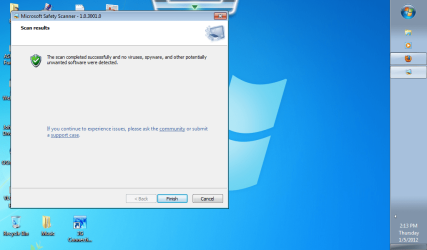
Attached is the screenshot of a good clean pc. When i went to process # 5-10 of step 1, when i get to process # 9 where it ask to turn on or off firewall- it will lead me to the screenshot in thread #11 above where it mentions to update firewall, with only the button to click is "Use Recommended Settings", so when i click that- that error comes up as in screenshot in thread 11. So i am moving on to STEP 2 now.
 

Attachments

  • MSS Scan.png
    MSS Scan.png
    359.4 KB · Views: 10

My Computer

Computer Manufacturer/Model Number
Gigabyte Tech. Co. Model-H55M-S2H
OS
Windows 7 Home Premium x64
CPU
Intel Core i3
Well, I am guessing this is bad news. No Windows Firewall listed as per mentioning in Step 2. I am guessing to proceed to Step 3?
 

Attachments

  • services W firewall.png
    services W firewall.png
    81.4 KB · Views: 14

My Computer

Computer Manufacturer/Model Number
Gigabyte Tech. Co. Model-H55M-S2H
OS
Windows 7 Home Premium x64
CPU
Intel Core i3
Yes, Step 3 will walk you through how to manually start all those Services.
 

My Computer

Computer Manufacturer/Model Number
Lenovo Desktop/Samsung Laptop
OS
Win7 & Win8 64bit
CPU
Intel i5
Internet Speed
Charter-20 Mbps
Antivirus
Avast
Browser
FF, IE9 and Chrome
Well step 3 made the internet which we got working to go back out. DANG IT, & to top it off, it still did not work. Gotta back track on ALL the work we did over the last 4 days. LOL
 

My Computer

Computer Manufacturer/Model Number
Gigabyte Tech. Co. Model-H55M-S2H
OS
Windows 7 Home Premium x64
CPU
Intel Core i3
Update.... I got the internet to work..But Firewall is still down.. Whatever it did was shut down everything in connection to internet & erased all ip info. Glad I screen saved the info I put in to fix it. LOL. I am trying to get it to do updates again on the Security & Microsoft Service Packs. But I may have to take a break from this pc for a while if they do not update correctly. It has failed on download the last 4 times I tried, so we will see how it plays out. It is still trying to download now. Still at 0% download complete after 5 mins. Will update soon.
 

My Computer

Computer Manufacturer/Model Number
Gigabyte Tech. Co. Model-H55M-S2H
OS
Windows 7 Home Premium x64
CPU
Intel Core i3

My Computer

Computer Manufacturer/Model Number
LAPTOP. HP Pavilion dv7-4010TX .
OS
Win 7 Ultimate 64-bit. SP1.
CPU
Intel i7 -720QM.[1.6GHz Turbo Boost 2.8GHz. 6MB Cache.]
Memory
8 DDR 3 RAM. 1066MHZ
Graphics Card(s)
ATI 1024 MB. DDR3. Radeon HD5650
Monitor(s) Displays
17.3" High Definition Brightview LCD. LED Backlit.
Screen Resolution
1600 x 900.
Hard Drives
640GB
Case
Laptop / notebook.
Mouse
Logitech Anywhere mouse. MX.
Internet Speed
ADSL [ but too slow ]
and...I second...Thanks JMH.
NO CLEAN INSTALL is going to be done. Anything else to hopefully work around.


I believe you have been working on your wider problem for 3 days thus far.

A reminder...
A Clean Install may indeed be the quickest, best & most efficient way to return your computer to working order.

Two links for you to peruse should you wish.

http://www.sevenforums.com/tutorials/1649-clean-install-windows-7-a.html

http://www.sevenforums.com/tutorials/3413-repair-install.html
 

My Computer

Computer Manufacturer/Model Number
Lenovo Desktop/Samsung Laptop
OS
Win7 & Win8 64bit
CPU
Intel i5
Internet Speed
Charter-20 Mbps
Antivirus
Avast
Browser
FF, IE9 and Chrome
So when I do a clean install - ALL SAVED INFO will be lost right?????
 
Last edited:

My Computer

Computer Manufacturer/Model Number
Gigabyte Tech. Co. Model-H55M-S2H
OS
Windows 7 Home Premium x64
CPU
Intel Core i3

My Computer

Computer Manufacturer/Model Number
LAPTOP. HP Pavilion dv7-4010TX .
OS
Win 7 Ultimate 64-bit. SP1.
CPU
Intel i7 -720QM.[1.6GHz Turbo Boost 2.8GHz. 6MB Cache.]
Memory
8 DDR 3 RAM. 1066MHZ
Graphics Card(s)
ATI 1024 MB. DDR3. Radeon HD5650
Monitor(s) Displays
17.3" High Definition Brightview LCD. LED Backlit.
Screen Resolution
1600 x 900.
Hard Drives
640GB
Case
Laptop / notebook.
Mouse
Logitech Anywhere mouse. MX.
Internet Speed
ADSL [ but too slow ]
All programs will also need to be reinstalled. Backup your important files before you do it. The Clean Install will get rid of all the nasties in your computer. :D
So when I do a clean install - ALL SAVED INFO will be lost right?????
 

My Computer

Computer Manufacturer/Model Number
Lenovo Desktop/Samsung Laptop
OS
Win7 & Win8 64bit
CPU
Intel i5
Internet Speed
Charter-20 Mbps
Antivirus
Avast
Browser
FF, IE9 and Chrome
Hi, bizzeb.

My apology for the delayed reply. As requested by 2xg, I had been following your other topic. When the connection issue was solved, I was watching for you new topic but, unfortunately, have been tied up elsewhere the past two days.

Please advise if you are proceeding with the clean install.
 

My Computer

OS
Windows 7 & Windows Vista Ultimate
Back
Top