Microsoft Mouse Meltdown!

jeffrkim

New member
Local time
10:34 AM
Messages
20
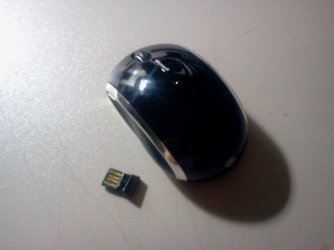
Hi, my girlfriend bout a Microsoft wireless mouse: Microsoft Wireless Mobile Mouse 6000.
She seemed to like the mouse, and used it for about two weeks for her desktop.
One day, she called me crying, saying she burned her hand by the "melted" mouse receiver. So I went down to her room and saw the receiver all melted down on her HP desktop. I had to pull out the metal part of usb receiver by tweezers.
I am so mad! :mad: How can this happen? Seems like short circuit or something... I want to even sue microsoft .. at least to get a refund or replacement. Can anybody tell me what I should do? Thank you, Jeff
 

Attachments

  • 2011-03-13 21.07.56.jpg
    2011-03-13 21.07.56.jpg
    185.4 KB · Views: 16

My Computer

OS
Windows 7 Ultimate 64bit
CPU
AMD Phenom II X4 940 3.0 GHz
"Get on the horn to MS and let them hear about it!" would be one answer. Another if you have the receipt is return for refund at the store it purchased from. Obviously it was due to a manufacturer's defect that got out.

Typically MS is a software company where other companies are under contracts to manufacture the hardwares they sell. Aparently some QC slipped up and missed that one!

It's a shame seeing that one since generally their hard wired models are durable as well as the keyboards.:( I would advise trying to get the refund if not exchange for it however.
 

My Computers

System One System Two

  • Computer type
    PC/Desktop
    Computer Manufacturer/Model Number
    Custom builds = 2
    OS
    W7 Ultimate x64/W10 Pro x64/W11 Pro Triple Boot - Main PC W7 Remote PC Micro ATX W7 Pro x64/W11 Pro
    CPU
    AMD Phenom II X4 975 Deneb 3.6ghz - 965 2nd remote pc
    Motherboard
    Gigabyte GA-790XTA-UD4-Gigabyte GA-880GM-D2H remote pc
    Memory
    Kingston Hyper X DDR3 1600 1.5v 16gb - Hyper X Fury 8gb 2nd
    Graphics Card(s)
    MSI HD Radeon 5750 1gb - MSI HD Radeon 6450 on mini tower
    Sound Card
    Creative Labs X-Fi Xtreme Audio P - Realtek onooard 2nd case
    Monitor(s) Displays
    ASUS VW199T-P 19" HP 2082a Main-HP 2082a 20" remote pc
    Screen Resolution
    Asus 1440x900 - HP 1600x900
    Hard Drives
    WD Black 1TB HD per OS W7, W10, and pending W11 presently on 500gb OS Drive - Pending Triple 1TB HDs for Spanned Storage/backup volume
    Single 2TB external USB enclosure, single 1TB System 7 Host/Boot drive, Pending 8TB external HD for system image b
    PSU
    Corsair 750TX - primary / Corsair CX600 - second
    Case
    Antec 900-2 - SSD compatible / NZXT Vulcan mini tower
    Cooling
    Zalman CNPS9900A
    Keyboard
    AZIO L70 Backlit Letters Gaming - ONN Cordless/USB
    Mouse
    MSI DS200 Programmable, Logitech Cordless
    Internet Speed
    30mbps upgrade - primary hard wired - mini tower usb WiFi
    Antivirus
    GFI VIPRE Internet Security 2014 on W7 2016 beta on W10,
    Browser
    Cyberfox, WaterFox 64bit FF variants, FireFox x64, Pale Moon
    Other Info
    Accomdata fan cooled usb 2.0 PIDE/Sata II, III external enclosure.
    Sambient usb/eSata PATA/Sata II, III external enclosure.
  • Computer type
    PC/Desktop
    System Manufacturer/Model Number
    CUSTOM ASSEMBLY
    OS
    W7 Pro x64/W11 Pro
    CPU
    AMD Deneb 3.6ghz - 965
    Motherboard
    Gigabyte GA-880GM-D2H remote pc
    Memory
    Kingston Hyper X Fury 8gb
    Graphics Card(s)
    MSI HD Radeon 6450 DVI Output
    Sound Card
    Realtek onooard Creative or Other separate PENDING
    Monitor(s) Displays
    VIZIO 32" LCD TV Separate LCD Pending
    Screen Resolution
    1600x1080
    Hard Drives
    WD 500GB OS Host/Boot WD Green 1TB Storage/Backup
    PSU
    Corsair 600W - THERMALTAKE 600W spare case
    Case
    NZXT Vulcan mini tower
    Cooling
    Twin 120mm Top Fans - 240mm Side Cover
    Keyboard
    ONN Cordless/USB Logitech Cordless
    Mouse
    ONN USB/Cordless - Logitech Cordless
    Internet Speed
    DSL 5G
    Browser
    MS Edge, FireFox, WaterFox x64, FireFox Nightly
    Other Info
    OS Testing-Remote Access to Main TeamViewer
Ive had two ARC keyboards, the USB keys get so hot that they stopped working, but when I pulled them out of my tower there were so hot I could barely touch them, One original purchased and a Replacement sent out from Mircosoft, The third one is on its way, but this time they upgraded me to a blue tooth keyboard. I dont know what to think about em.


Microsoft have been very good replacing them, and the service was very good, Id email the support centre they will give you a case # and a phone number to call.

by the way this has nothing to do with my hardware, cause everything else that go's in to the front ports USB memory keys etc has never had a problem
 

My Computer

Computer type
PC/Desktop
Computer Manufacturer/Model Number
Home Built Media Center PC
OS
Window pro 8 64bit
CPU
AMD PHENON 1090T 6 core
Motherboard
Gigabyte GA-890GPA-UD3H
Memory
16.00 GB mushkin 1333mhz
Graphics Card(s)
ATI RADEON HD 6850 1GB DDR5
Sound Card
On Board Realtec ALC880
Monitor(s) Displays
Samsung 27Inch IPS LED & LG 42 Inch Plasma
Screen Resolution
1920 - 1080
Hard Drives
C:/Windows Drive = Corsair Force III Series Solid State Drive, 240GB

2 X Hitachi 1TB Deskstar 7K1000.C SATA II Internal Drive Kit w/ 32MB Cache
2 X Hitachi 2TB Deskstar 7K1000.C SATA II Internal Drive Kit w/ 64MB Cache
LG Super-Multi 22x DVD Wri
PSU
Corsair 650
Case
Full Tower Antec ARMOR
Cooling
3 x 120 Fans
Keyboard
Microsoft Curve Keyboard
Mouse
Logitec T650 Touch pad
Internet Speed
Shaw 50 Mbs
Antivirus
Microsoft security Essentials
Browser
Crome
Other Info
A few updates March 2013
Back
Top