Microsoft Safety Scanner

How to Use the Microsoft Safety Scanner

   Information
The Microsoft Safety Scanner is a free portable downloadable standalone EXE security tool that provides on-demand scanning and helps remove viruses, spyware, and other malicious software. It works with your existing antivirus software.

The Microsoft Safety Scanner expires 10 days after being downloaded. To rerun a scan with the latest anti-malware definitions, download and run the Microsoft Safety Scanner again.

The Microsoft Safety Scanner is not a replacement for using an antivirus software program that provides ongoing protection.

For real-time protection that helps to guard your home or small business PCs against viruses, spyware, and other malicious software, download the free Microsoft Security Essentials in addition.

   Note
The release of the Microsoft Safety Scanner has resulted in confusion about the available anti-malware tools provided by Microsoft and questions about when they should be used.

Read more at: Understanding Microsoft Anti-Malware Software ~ Security Garden


   Warning
System Requirements:
  • Operating System: Windows 7; Windows Server 2003; Windows Vista; Windows XP.
  • A PC with a CPU clock speed of 500 MHz or higher, and 256 MB RAM or higher.
  • VGA display of 800 × 600 or higher.
  • 200 MB of available hard disk space.


Here's How:
1. If you have not already, you will need to download and save the Microsoft Safety Scanner to your computer.
   Note
Be sure that you click on the Select your version link at the site above to be able to select to download the same 32-bit or 64-bit version as the Windows you are going to run it on.

Download.jpg


2. Run the downloaded msert.exe file from where you saved it at.
NOTE: Microsoft Safety Scanner does not install on your computer, and is only a standalone EXE file.

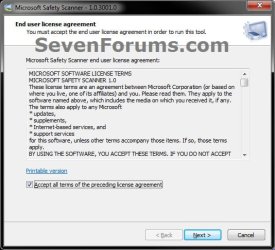
3. Check the Accept all terms.... box, and click on Next. (see screenshot below)
Step1.jpg
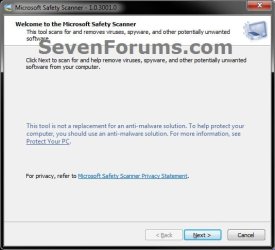
4. Click on Next. (see screenshot below)
Step2.jpg
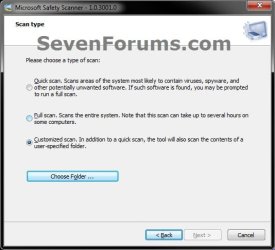
5. Select (dot) what type of scan you would like to run, and click on Next. (see screenshots below)
NOTE: If you select Customized scan, then you would need to click on Choose Folder first to select what folder and it's contents you want scanned.
Step3A.jpgStep3B.jpg
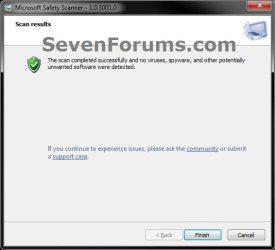
6. When the scan is finished and if nothing is found, then click on Finish. (see screenshot below)
NOTE: If something suspicious is found, it will give you an option of what to do with it.
Step4.jpg
   Note
The Microsoft Safety Scanner scan log results are located at:

C:\Windows\Debug\msert.log

Example msert.log file:
Code:
---------------------------------------------------------------------------------------
Microsoft Safety Scanner v1.0, (build 1.101.1492.0)
Started On Thu Apr 14 21:34:49 2011
->Scan ERROR: resource process://pid:952 (code 0x00000490 (1168))
->Scan ERROR: resource process://pid:4396 (code 0x00000005 (5))
->Scan ERROR: resource [URL="file:///C:/pagefile.sys"]file://C:\pagefile.sys[/URL] (code 0x00000020 (32))
->Scan ERROR: resource [URL="file:///C:/pagefile.sys"]file://C:\pagefile.sys[/URL] (code 0x0000054F (1359))
Results Summary:
----------------
No infection found.
Microsoft Safety Scanner Finished On Thu Apr 14 21:56:10 2011
 
Return code: 0 (0x0)
---------------------------------------------------------------------------------------
Microsoft Safety Scanner v1.0, (build 1.101.1492.0)
Started On Thu Apr 14 21:57:48 2011
Microsoft Safety Scanner Finished On Thu Apr 14 21:58:05 2011
 
Return code: 0 (0x0)
---------------------------------------------------------------------------------------
Microsoft Safety Scanner v1.0, (build 1.101.1492.0)
Started On Thu Apr 14 21:58:10 2011
Extended Scan Results : C:\Users
----------------
->Scan ERROR: resource process://pid:5476 (code 0x00000005 (5))
->Scan ERROR: resource [URL="file:///C:/pagefile.sys"]file://C:\pagefile.sys[/URL] (code 0x00000020 (32))
->Scan ERROR: resource [URL="file:///C:/pagefile.sys"]file://C:\pagefile.sys[/URL] (code 0x0000054F (1359))
No infection found as part of the extended scan
Results Summary:
----------------
No infection found.
Microsoft Safety Scanner Finished On Thu Apr 14 22:04:18 2011
 
Return code: 0 (0x0)

That's it,
Shawn


Last edited:
Great tutorial :)
I had never heard of this program before, just MSE! :)
 

My Computer

Computer type
PC/Desktop
Computer Manufacturer/Model Number
HP Pavilion p6565uk
OS
Windows 7 Home Premium 64bit
CPU
AMD Phenom II X6 1035T @2.6GHz (hexacore) (=15.6GHz)
Motherboard
FOXCONN (2AA9)
Memory
6GB DDR3-1333 (running at 1066)
Graphics Card(s)
NVIDIA/MSI GeForce GTX 770 (2GB)
Sound Card
Realtek HD Audio (with 5.1 surround sound always on)
Monitor(s) Displays
HP 2311x (secondary-workspace), Sharp LL-T1620-H (primary)
Screen Resolution
1924x1080
Hard Drives
480GB Crucial M500 SSD
1TB internal WD Caviar Black
3TB Seagate Barracude 7200rpm (for media storage)
4TB Seagate Desktop drive (mirrored backup)
2TB Apple AirPort Time Capsule
1TB Seagate FreeAgent Desk
500GB Seagate External Desktop Drive
PSU
XCase Dolphin, 700W
Case
Stock HP one that came with it, mid-size ATX
Cooling
Stock fans, they're fairly quiet.
Keyboard
Microsoft Wireless Keyboard 2000+ HP Media Centre Remote
Mouse
Microsoft Wireless Mouse 2000
Internet Speed
20 Mbps down, 50 Mbps up
Antivirus
MSE
Browser
Chrome Beta
Other Info
Also:
- 13" Apple MacBook Air, 2013, i7 @ 1.7GHz, 8GB DDR3, 256GB SSD
- HP Deskjet 3050A
- Two HP ZV5000 laptops (the better of the two recently broke)
- A Compaq Evo D310 (has 2GB RAM and a 2.53GHz P4 but is curiously extremely slow)
- A desk fan - this weather is warm ;)
- A fair few retro consoles
- Too many cables behind the desk, probably a fire hazard.
Another great tutorial Shawn :party:

I don't know how you do it, 7 has been RTM for more than 18 months, and yet you still manage to come up with ways to educate us.... I thought you'd have been running out of steam by now :roflmao:

I take my hat off to you sir, or I would if I owned a hat.
 

My Computer

Computer type
PC/Desktop
Computer Manufacturer/Model Number
Medion Erazer (note to self: insert model number) - with custom additions
OS
Windows 10 Pro x64
CPU
Intel Core i5 7400 @ 3.00GHz
Motherboard
OEM supllied with PC
Memory
8GB 2133Mhz DDR4 (OEM supplied)
Graphics Card(s)
Gygabyte Windforce GTX 1050Ti (Factory Overclocked)
Sound Card
Realtek
Monitor(s) Displays
Acer Al1980 + HKC
Screen Resolution
1360*768(HKC) / 1280*1024(Acer)
Hard Drives
1TB Toshiba
1TB WD Caviar Green
120GB Samsung Evo 840
PSU
OEM supplied (no power rating on case)
Case
OEM Supplied
Cooling
Stock
Keyboard
Logitech Wireless
Mouse
Logitect Wireless
Internet Speed
40Mb/s Down 10Mb/s Up
Antivirus
Defender
Browser
Firefox
Great idea, thanks :)
 
Last edited by a moderator:

My Computer

Computer type
PC/Desktop
Computer Manufacturer/Model Number
HP Pavilion p6565uk
OS
Windows 7 Home Premium 64bit
CPU
AMD Phenom II X6 1035T @2.6GHz (hexacore) (=15.6GHz)
Motherboard
FOXCONN (2AA9)
Memory
6GB DDR3-1333 (running at 1066)
Graphics Card(s)
NVIDIA/MSI GeForce GTX 770 (2GB)
Sound Card
Realtek HD Audio (with 5.1 surround sound always on)
Monitor(s) Displays
HP 2311x (secondary-workspace), Sharp LL-T1620-H (primary)
Screen Resolution
1924x1080
Hard Drives
480GB Crucial M500 SSD
1TB internal WD Caviar Black
3TB Seagate Barracude 7200rpm (for media storage)
4TB Seagate Desktop drive (mirrored backup)
2TB Apple AirPort Time Capsule
1TB Seagate FreeAgent Desk
500GB Seagate External Desktop Drive
PSU
XCase Dolphin, 700W
Case
Stock HP one that came with it, mid-size ATX
Cooling
Stock fans, they're fairly quiet.
Keyboard
Microsoft Wireless Keyboard 2000+ HP Media Centre Remote
Mouse
Microsoft Wireless Mouse 2000
Internet Speed
20 Mbps down, 50 Mbps up
Antivirus
MSE
Browser
Chrome Beta
Other Info
Also:
- 13" Apple MacBook Air, 2013, i7 @ 1.7GHz, 8GB DDR3, 256GB SSD
- HP Deskjet 3050A
- Two HP ZV5000 laptops (the better of the two recently broke)
- A Compaq Evo D310 (has 2GB RAM and a 2.53GHz P4 but is curiously extremely slow)
- A desk fan - this weather is warm ;)
- A fair few retro consoles
- Too many cables behind the desk, probably a fire hazard.
Great tip, and another good tool. Thanks.
 

My Computer

Computer Manufacturer/Model Number
Homebrew PC - "Optimus_Prime"
OS
Windows 7 Ultimate x64
CPU
Core 2Duo E8400 3.00Ghz
Motherboard
Gigabyte 945GMC S2-C
Memory
2 Gb ddr2 667Mhz dual channel
Graphics Card(s)
GeForce GT240 512MB GDDR5
Monitor(s) Displays
Samsung SyncMaster 732N Plus
Hard Drives
Samsung 500Gb Sata II HD502HJ
Western Digital 500Gb Sata II WD500AAKS
Western Digital 160Gb IDE
Case
Leadership Gamer Blue Eye II
Another great tutorial Shawn :party:

I don't know how you do it, 7 has been RTM for more than 18 months, and yet you still manage to come up with ways to educate us.... I thought you'd have been running out of steam by now :roflmao:

I take my hat off to you sir, or I would if I owned a hat.

Thank you Martin. I'll never run out of steam. ;)

Farting.gif
 

My Computer

Computer type
PC/Desktop
Computer Manufacturer/Model Number
Self built custom
OS
64-bit Windows 11 Pro for Workstations
CPU
Intel i7-8700K OC'd to 5 GHz
Motherboard
ASUS ROG Maximus XI Formula Z390
Memory
64 GB (4x16GB) G.SKILL TridentZ RGB DDR4 3600 MHz
Graphics Card(s)
ASUS ROG-STRIX-GTX1080TI-O11G-GAMING
Sound Card
Integrated
Monitor(s) Displays
2 x Samsung Odyssey G7 27"
Screen Resolution
2560x1440
Hard Drives
1TB Samsung 990 PRO M.2,
4TB Samsung 990 PRO PRO M.2,
TerraMaster F8 SSD Plus NAS
PSU
Seasonic Prime Titanium 850W
Case
Thermaltake Core P3
Cooling
Corsair Hydro H115i
Keyboard
Logitech wireless K800
Mouse
Logitech MX Master 4
Internet Speed
2 Gb/s Download and 100 Mb/s Upload
Antivirus
Malwarebyte Anti-Malware Premium
Browser
Google Chrome
Other Info
Logitech Z625 speaker system,
Logitech BRIO 4K Pro webcam,
HP Color LaserJet Pro MFP M477fdn,
APC SMART-UPS RT 1000 XL - SURT1000XLI,
Galaxy S23 Plus phone
Great tutorial Brink! I didn't know this tool. I'll try it. Thanks.
(I can't rep you.. :()
 

My Computer

Computer type
PC/Desktop
Computer Manufacturer/Model Number
Custom Build
OS
Windows 10 Pro x64
CPU
Intel Core i5 4440 @Stock
Motherboard
Gigabyte Z97 D3H
Memory
4 x 4GB HyperX Fury DDR3
Graphics Card(s)
Gigabyte GTX 1050Ti O4G
Sound Card
Integrated
Monitor(s) Displays
Dell P2417H
Screen Resolution
1920 x 1080
Hard Drives
Samsung EVO 850 120GB / Toshiba DT01ACA050 1TB 7200prm 32MB
PSU
Riotoro Onyx 750W
Case
NZXT H500 Black-Red
Cooling
Stock CPU + NZXT 120mm + 2x120mm red fans
Keyboard
Modecom Volcano Lanparty
Mouse
Asus ROG Gladius / DeepCool E-Pad Plus
Internet Speed
DOCSIS 50/3 Mbit
Browser
Google Chrome
Other Info
Asus K55VJ(i5 3210M, GT635M / 2GB, 8GB DDR3, 500GB HDD)

My Computer

Computer Manufacturer/Model Number
Homebrew PC - "Optimus_Prime"
OS
Windows 7 Ultimate x64
CPU
Core 2Duo E8400 3.00Ghz
Motherboard
Gigabyte 945GMC S2-C
Memory
2 Gb ddr2 667Mhz dual channel
Graphics Card(s)
GeForce GT240 512MB GDDR5
Monitor(s) Displays
Samsung SyncMaster 732N Plus
Hard Drives
Samsung 500Gb Sata II HD502HJ
Western Digital 500Gb Sata II WD500AAKS
Western Digital 160Gb IDE
Case
Leadership Gamer Blue Eye II
Microsoft Standalone System Sweeper

Thanks for the tutorial..I just hope after creating a 'sweeper' I never need it..
 

My Computer

Computer type
PC/Desktop
Computer Manufacturer/Model Number
Compaq Presario
OS
Windows 7 64 bit
Back
Top