Microsoft Sidewinder X8 Mouse wheel issues.

DxxS

New member
Power User
Local time
7:36 AM
Messages
112
I have a Microsoft Sidewinder X8 Mouse, I love it for the most part. The scroll wheel is frustrating me at the moment, when I roll it it is not very smooth, this doesnt really bother me, the issue is when I scroll down a web page etc the smallest movement on the wheel scrolls down most of the page. I have tried updating the software and have played with the settings but cant seem to work it out.
Does anyone else have an X8 or any ideas what could be causing it?

Thanks in advance.
 

My Computer

OS
Windows 7 Ultimate 64-bit
CPU
Intel Core 2 Duo E8400 3GHz
Motherboard
ASUS P5Q PRO Turbo
Memory
OCZ Gold DDR2 1066MHz/PC2-8500 8GB (4x2GB)
Graphics Card(s)
BFG GTS250 OC 1GB GDDR3
Monitor(s) Displays
Dual (x2) Samsung SM2033SW 20"TFT
Hard Drives
120GB OCZ Agility 3 SSD (OS Drive)
350GB - Internal (Storage)
500GB - Internal (Storage)
1TB - Internal (Storage)
500GB - External (Storage)
PSU
OCZ Stealth XStream 700W PSU
Case
Casecom KB-5510 Black/Silver Blue LED Mid Tower Case
Cooling
Zalman CNPS7500-ALCU LED
you have to clean the mouse roller inside
 

My Computer

OS
Windows 7 Ultimate 32bit
Have you changed scroll sensitivity settings in control panel>mouse>wheel
Intellipoint software ?
 

My Computer

Computer type
PC/Desktop
Computer Manufacturer/Model Number
Pauly Special
OS
Win7 Ultimate X64
CPU
Intel i5 3570K
Motherboard
Gigabyte Z77X-DS3H
Memory
8GB DDR3 1600
Graphics Card(s)
Onboard
Sound Card
Onboard
Screen Resolution
1280x1024
Hard Drives
Samsung 840 Evo SSD (OS)
1TB Spinner (Data)
PSU
800W Arctic
Case
Cooler Master
Cooling
3x120mm Fans
Keyboard
MS Wireless
Mouse
MS Wireless
Internet Speed
20M
I have, its set on almost the slowest setting. Have looked through every other setting but cant see anything that would affect it. Would the mouse dpi affect the scrolling?
 

My Computer

OS
Windows 7 Ultimate 64-bit
CPU
Intel Core 2 Duo E8400 3GHz
Motherboard
ASUS P5Q PRO Turbo
Memory
OCZ Gold DDR2 1066MHz/PC2-8500 8GB (4x2GB)
Graphics Card(s)
BFG GTS250 OC 1GB GDDR3
Monitor(s) Displays
Dual (x2) Samsung SM2033SW 20"TFT
Hard Drives
120GB OCZ Agility 3 SSD (OS Drive)
350GB - Internal (Storage)
500GB - Internal (Storage)
1TB - Internal (Storage)
500GB - External (Storage)
PSU
OCZ Stealth XStream 700W PSU
Case
Casecom KB-5510 Black/Silver Blue LED Mid Tower Case
Cooling
Zalman CNPS7500-ALCU LED
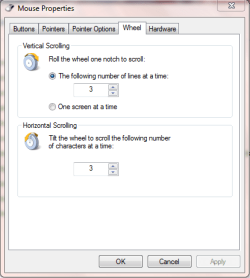
Only thing i can think of is, seeing as you say "almost the slowest setting" you must be adjusting the slider bar, this is part of the intellipoint software, if the intellipoint software is not installed the wheel tab page looks like this
Capture.PNG
you can then select number of lines to scroll for each wheel notch moved

Could try uninstalling intellipoint??
Not 100% sure just trying to suggest something, you can always re-install later (in fact i think windows update will prob try and install automatically when you reboot)
 

My Computer

Computer type
PC/Desktop
Computer Manufacturer/Model Number
Pauly Special
OS
Win7 Ultimate X64
CPU
Intel i5 3570K
Motherboard
Gigabyte Z77X-DS3H
Memory
8GB DDR3 1600
Graphics Card(s)
Onboard
Sound Card
Onboard
Screen Resolution
1280x1024
Hard Drives
Samsung 840 Evo SSD (OS)
1TB Spinner (Data)
PSU
800W Arctic
Case
Cooler Master
Cooling
3x120mm Fans
Keyboard
MS Wireless
Mouse
MS Wireless
Internet Speed
20M
Back
Top