Microsoft Word 2007

What happens? Please provide a clear description. We will resolve this issue.
Your posts are extremely difficult to decipher. I cannot even determine what you are trying to do.[/QUOTE]

I'm trying to take a Word document that I made in Office XP and bring it up in Office 2007. This is how I have done it. This is from my past post in detail.

Double click on an XP Word Document using Word 2007 which has no association (blank icon)
It auto goes to "Open With" and there is no Word or Excel program or any program from Office
Click other Documents and still no Word or Excel Program
Click Browse
It auto goes to program files which in Microsoft Office it has no files, just folders because I'm using a 64 bit Windows
I click on C:\Windows and go to program files (x86) where winword.exe is at
I double click on winword.exe and it does not appear in "Open With"
I go back and click on winword.exe and click "open" and still not in "Open With"
For some reason none of my Office programs are in "OPEN WITH" I have re-installed, un-installed, re-installed, put in two types of Office 2007 and spent all day on this and it still does not work. In the morning I'll re-install again and maybe after my computer has a nights rest it might work but I'm not going to bet on it.

I don't know how to be any more clear but if I left anything out or something that is not understandable please let me know and I will do the best I can to clear it up. Thank you for your patance.
 

My Computer

OS
Windows 7 x64 RC1, Vista Ultimate, XP Pro
CPU
AMD 955
Memory
4 gigs - 1333
Graphics Card(s)
5750
Monitor(s) Displays
i-inc 28"
Screen Resolution
1920x1200
Hard Drives
2 SATA2 750 GB - 1 SATA2 1TB - 1 SATA3 1TB - 1 USB3 2TB - 1 USB3 500 GB, SSD 60 GB
Internet Speed
7 Megs
There was (I'm sure there still is) a download on MS site, that allows you to open older versions. I know Office 14 has it built in...

Code:
Code:
[URL="http://www.microsoft.com/downloads/details.aspx?FamilyId=941b3470-3ae9-4aee-8f43-c6bb74cd1466"]Download details: Microsoft Office Compatibility Pack for Word ...[/URL][URL="http://www.microsoft.com/downloads/details.aspx?FamilyId=941b3470-3ae9-4aee-8f43-c6bb74cd1466"] 
Apr 22, 2009 ... Microsoft Word 2000 with Service Pack 3, Microsoft Excel 2000 with Service Pack 3, ... The 2007 Microsoft Office Suite Service Pack 2 (SP2) ...
www.microsoft.com/downloads/details.aspx?FamilyId... 
[/URL]

Actually Snuffy...I believe this compatibility pack allows older versions of office to open the new office 2007 file formats like docx, xlsx, etc. and not the other way around.
 

My Computer

Computer Manufacturer/Model Number
Systemax N2000 Gaming PC
OS
Windows 7 Ultimate x64
CPU
Q6600 @2.4ghz (G0 stepping)
Motherboard
XFX nforce 680i LT
Memory
8 gb OCZ vista essential sli PC-6400
Graphics Card(s)
Dual 9800gt in SLI mode
Sound Card
Integrated 8.1 High Definition Audio
Monitor(s) Displays
Dual Sceptre x246w 24 inch monitors
Screen Resolution
1920 x 1200 each monitor
Hard Drives
500 GB SATA II / 7500 rpm
PSU
Cooler Master Real Power Pro 1250W
Case
N2000 server tower
Cooling
Thermaltake Bigwater 760 is
Keyboard
MS Intelitype 6000 v2.0
Mouse
MS Intelipoint 6000
Internet Speed
Wi-power 1.5GB up / 512k down
Other Info
Windows 7 Ultimate x64, Windows 7 Pro x64, Windows Home Premium X86, Windows XP pro, Windows Home Server x86, Ubuntu 10.4 x86 and x64, Ubuntu server 10.4, SQL Server 2005, MySQL 5.0
@Golden039: I understand that you are having difficulty. You have posted this problem in numerous threads here at SF. Many knowledgeable, friendly people are trying to help you. After reviewing all of your 39 posts, I have determined that you may have to scrap your current install of Windows and start over with all program installations. To avoid this time consuming effort, let's try this:

FOLLOW INSTRUCTIONS.

Click Start
Type WINWORD in searchbar
Click OK.

Winword should appear at the the top of the box.
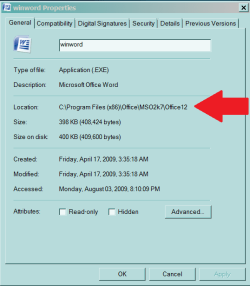
RIGHT Click Winword
Click Properties

There is an entry labeled "Location" - tell me what that entry is. Better yet, copy it and paste it in your reply. Look at the bottom of post for an example of exactly what I mean.

DO NOT DO ANYTHING ELSE... simple task, simple request.


...It keeps telling me it can't read memory at whatever address, then says to click OK to uninstall the program but after 50 times I just said "That won't work" and it just keeps trying to uninstall or whetever with the little circle at the end of the mouse pointer...

After 15 re-boots and deleting in the program files and a few other places it works...

Programs and Features is the first thing I tried. I downloaded Office 2007 trial and it would not load giving me error 1326. So I can't uninstall or install but I got excel to work but not Word. I go to properties and change from notepad which I did change a little while back to a program it does not show so I browse and go to wordicon.exe which isn't right so what is the right program for word?


How can I uninstall Office XP? Using the CD won't work.

I have Office XP Pro. I can bring up a Word Doc but when I save them they get saved in Wordpad. I can't change them. This is what I've done.

Went to a Save Word Document
Put my mouse pointer over the Document
Right click the mouse
Click on Properties
Click on Change
Word is not there
Go to Browse
I don't know where to go from here

...right-click on a document >> open with... >> if you see word on the list, select it, and make sure the 'always use...' box is ticked
if you can't see word on the list, youy have to use the 'browse...' button, and navigate to the word program (winword.exe), probably somewhere in your c:\program files\microsoft office folder...

Mickey, thank you that work. I now know that winword.exe is the program.

Still don't work. I uninstalled Office all together downloaded Home and student 2007 office trial and installed it and it works just fine except word doesn't work. I did a convert, repair, you name it I did it I think. I believe this is a easy fix I just don't know what it is. When I try and "open With" Word is not there so I go to browse and I have to enter the (x86 program files) and when I go to winword and double click or open it don't work. I can open a new word with no problem and can even open any old word doc but there is no connection (forgot the term) to my old word docs.
 

Attachments

  • Capture.PNG
    Capture.PNG
    11.5 KB · Views: 65

My Computer

Computer Manufacturer/Model Number
Gateway GT5056
OS
XP_Pro, W7_7201, W7RC.vhd, SciLinux5.3, Fedora12, Fedora9_2x, OpenSolaris_09-06
CPU
AMD 64x2
Motherboard
Yes
Memory
1 gig
Graphics Card(s)
Dunno
Sound Card
Realtek something
Monitor(s) Displays
Samsung SyncMaster 940MW w/TV
Screen Resolution
1280x1024
Hard Drives
250 GB WD, USB Seagate Freedesk 1.5 T
Internet Speed
Cable modem
Other Info
1 + 1 = 10b,
7 + 7 = 16o,
a + b = 15h.
C:\Program Files (x86)\Microsoft Office\Office12
 

My Computer

OS
Windows 7 x64 RC1, Vista Ultimate, XP Pro
CPU
AMD 955
Memory
4 gigs - 1333
Graphics Card(s)
5750
Monitor(s) Displays
i-inc 28"
Screen Resolution
1920x1200
Hard Drives
2 SATA2 750 GB - 1 SATA2 1TB - 1 SATA3 1TB - 1 USB3 2TB - 1 USB3 500 GB, SSD 60 GB
Internet Speed
7 Megs
C:\Program Files (x86)\Microsoft Office\Office12

This is what I said in my past posts
I am trying to eliminate almost everything you have typed in your earlier posts and help you solve this problem.

Loosely translated, your earlier posts seem to say one of two things -
"I have completely corrupted my operating system"
OR
"I have completely corrupted MS Office"

Using the method of
Click Start
Type WINWORD in searchbar
Click WINWORD in the result

Type "TEST" in a new document. Save that document as TEST.DOC on your desktop. Post back when complete.
 
Antman

Yes it worked just like I knew it would. My OS and Office work just fine. My old Excel files pop up just fine. I can convert my old word documents one at a time with no problem. This isn't much of an inconvenance to me but I just wanted to know what the problem is. I'm getting the real Office 2007 which I paid for in a couple of days and I will install it and see what happens. I have learned one thing form you and that is the next time I post I will try very hard to make a complete and clear post which I have a habit of not doing. Thank you for your help, you have been most kind.

Richard
 

My Computer

OS
Windows 7 x64 RC1, Vista Ultimate, XP Pro
CPU
AMD 955
Memory
4 gigs - 1333
Graphics Card(s)
5750
Monitor(s) Displays
i-inc 28"
Screen Resolution
1920x1200
Hard Drives
2 SATA2 750 GB - 1 SATA2 1TB - 1 SATA3 1TB - 1 USB3 2TB - 1 USB3 500 GB, SSD 60 GB
Internet Speed
7 Megs
I do not see how we are done. Installing a new copy of Office will not address anything - as you have posted that this has already been done.

To continue...

Can I reasonably conclude that you created a file named TEST and that file is placed on your desktop?

I need to go be Daddy for a few hours. I may have just has a flash of understanding about this issue "I can convert my old word documents"

Enjoy your day. Daddy has to go...
 
Other computer works

I put the Office 2007 on another computer using the same downloaded file. The other computer has XP Pro and everything works fine. I can go to any word document and it has the Word 2007 icon and fires up in Word 2007 and the same for Excel. Now Windows 7 Office 2007 all works fine except my XP Word Documents just don't have the Word 2007 icon and don't fire up when I click on them. When I get my Office 2007 in the mail I am going to delete all Office program files on my Computer with Windows 7 and load from scratch.
 

My Computer

OS
Windows 7 x64 RC1, Vista Ultimate, XP Pro
CPU
AMD 955
Memory
4 gigs - 1333
Graphics Card(s)
5750
Monitor(s) Displays
i-inc 28"
Screen Resolution
1920x1200
Hard Drives
2 SATA2 750 GB - 1 SATA2 1TB - 1 SATA3 1TB - 1 USB3 2TB - 1 USB3 500 GB, SSD 60 GB
Internet Speed
7 Megs
Ok golden039, lets see if we can't resolve this once and for all :)


you have wasted too much of your time and anyone elses who has cared to help. it is time to start from the beginning, so here goes.
  • COMPLETELY uninstall Office DO NOT REPAIR INSTALL
  • reboot
  • Download the Windows Installer Cleanup Utility
  • in Search programs and files type Windows Install Cleanup and click on it
  • Scroll down and select and Remove one at a time every Microsoft Office listing
  • reboot
  • Reinstall your Microsoft Office Product
Jump about and whoop! because with any luck your problem should now be solved and your file associations fixed :thumbsup:
I don't know if this is related to your problem but "by installing the MS Office Compatibility Pack in addition to Microsoft Office 2000, Office XP, or Office 2003, you will be able to open, edit, and save files using the file formats new to Word, Excel, and PowerPoint 2007. The Compatibility Pack can also be used in conjunction with the Microsoft Office Word Viewer 2003, Excel Viewer 2003, and PowerPoint Viewer 2003 to view files saved in these new formats."
 
Last edited:

My Computer

OS
Windows 7 Ultimate 64Bit
CPU
AMD Athlon x4 650 3Ghz
Motherboard
ASUS
Memory
4gb
Graphics Card(s)
ATI Radeon 3000 series Onboard
  • COMPLETELY uninstall Office DO NOT REPAIR INSTALL
  • reboot
  • Download the Windows Installer Cleanup Utility
  • in Search programs and files type Windows Install Cleanup and click on it
  • Scroll down and select and Remove one at a time every Microsoft Office listing
  • reboot
  • Reinstall your Microsoft Office Product
When I get my Office 2007 in the mail in a couple of days I will do just what you suggest. Right now I'm using a trial.
Thank You

Richard
 

My Computer

OS
Windows 7 x64 RC1, Vista Ultimate, XP Pro
CPU
AMD 955
Memory
4 gigs - 1333
Graphics Card(s)
5750
Monitor(s) Displays
i-inc 28"
Screen Resolution
1920x1200
Hard Drives
2 SATA2 750 GB - 1 SATA2 1TB - 1 SATA3 1TB - 1 USB3 2TB - 1 USB3 500 GB, SSD 60 GB
Internet Speed
7 Megs
Ye, well for now just follow my link for the Compatibility Pack, that will put you on for now.
 

My Computer

OS
Windows 7 Ultimate 64Bit
CPU
AMD Athlon x4 650 3Ghz
Motherboard
ASUS
Memory
4gb
Graphics Card(s)
ATI Radeon 3000 series Onboard
Uinstall office using revo uninstaller.. Then reinstall :)
 

My Computer

Computer type
PC/Desktop
Computer Manufacturer/Model Number
DELL VOSTRO 3650
OS
Windows 8.1 PRO
CPU
3rd Generation Intel Core i7‐3612QM CPU @ 2.10GHZ
Memory
8GB DDR3
Graphics Card(s)
NVIDIA GeForce GT 525M (128 bit), 1GB Grpahics
Screen Resolution
1920X1080
Hard Drives
750GB 5400RPM
Hey Golden039

It would be very helpful if you DIDN'T post this issue in two different posts. This post sould be closed / or linked to the other one which is "Word doesn't work" posted in the same Software forum.
 

My Computer

Computer Manufacturer/Model Number
Systemax N2000 Gaming PC
OS
Windows 7 Ultimate x64
CPU
Q6600 @2.4ghz (G0 stepping)
Motherboard
XFX nforce 680i LT
Memory
8 gb OCZ vista essential sli PC-6400
Graphics Card(s)
Dual 9800gt in SLI mode
Sound Card
Integrated 8.1 High Definition Audio
Monitor(s) Displays
Dual Sceptre x246w 24 inch monitors
Screen Resolution
1920 x 1200 each monitor
Hard Drives
500 GB SATA II / 7500 rpm
PSU
Cooler Master Real Power Pro 1250W
Case
N2000 server tower
Cooling
Thermaltake Bigwater 760 is
Keyboard
MS Intelitype 6000 v2.0
Mouse
MS Intelipoint 6000
Internet Speed
Wi-power 1.5GB up / 512k down
Other Info
Windows 7 Ultimate x64, Windows 7 Pro x64, Windows Home Premium X86, Windows XP pro, Windows Home Server x86, Ubuntu 10.4 x86 and x64, Ubuntu server 10.4, SQL Server 2005, MySQL 5.0
Hey Golden039

It would be VERY helpful if you didn't post the same problem in two different posts in the same Software forum. People are trying to help you and it makes it very hard for others with the same problem to get to the solution if you just jump to a new posting part way through trying to solve an issue. For those wondering what I am talking about see "Microsoft Word 2007" in this same "Software" forum.

Thanks for attempting to help him Antman, hope you are successful.
 

My Computer

Computer Manufacturer/Model Number
Systemax N2000 Gaming PC
OS
Windows 7 Ultimate x64
CPU
Q6600 @2.4ghz (G0 stepping)
Motherboard
XFX nforce 680i LT
Memory
8 gb OCZ vista essential sli PC-6400
Graphics Card(s)
Dual 9800gt in SLI mode
Sound Card
Integrated 8.1 High Definition Audio
Monitor(s) Displays
Dual Sceptre x246w 24 inch monitors
Screen Resolution
1920 x 1200 each monitor
Hard Drives
500 GB SATA II / 7500 rpm
PSU
Cooler Master Real Power Pro 1250W
Case
N2000 server tower
Cooling
Thermaltake Bigwater 760 is
Keyboard
MS Intelitype 6000 v2.0
Mouse
MS Intelipoint 6000
Internet Speed
Wi-power 1.5GB up / 512k down
Other Info
Windows 7 Ultimate x64, Windows 7 Pro x64, Windows Home Premium X86, Windows XP pro, Windows Home Server x86, Ubuntu 10.4 x86 and x64, Ubuntu server 10.4, SQL Server 2005, MySQL 5.0
can not associate .doc file with word 2007 in windows 7.....it just no show up after u click it or choose it in all proper way....
I facing the problem also...
 

My Computer

OS
windows 7
Back
Top