Microsoft Works Word Processor

Fridder

New member
Local time
5:39 PM
Messages
9
I bought my computer in 2008ish, maybe 2009, and it came with Windows Vista Home Premium 64-bit. It also came with pre-installed software, and of those pre-installed software included Microsoft Works Word Processor. I upgraded to Windows 7 Ultimate 64-bit last week, and I have been painstakingly installing my programs back after I messed up the installation. First, I installed Windows 7 Home Premium 32-bit, then I realized I put in the wrong disc so I then put in Windows 7 Home Premium 64-bit, then I upgraded to Ultimate 64-bit. All my programs got messed up in the process and I basically have a clean install of Windows 7 with a Windows.old folder containing my programs in a folder, which all need to be re-installed. I can see my Microsoft Works Word Processor, but it won't let me run the installation on it. I tried running it in compatibility modes for every available option, but nothing works. I also ran it as an administrator. How can I legally re-install these programs I purchased? I have tons and tons of .wps files that I want to be able to open with a program I purchased with my computer. Yes, I have heard of OpenOffice and it does not support .wps files. I do have Microsoft Office Professional 2013 installed, but it can't seem to open .wps files (unless I'm wrong).
 

My Computer

Computer type
PC/Desktop
Computer Manufacturer/Model Number
Gateway DX4860-UB33P
OS
Windows 7 Home Premium 64-bit
CPU
Intel i5-2320 @ 3.0GHz
Motherboard
Acer something
Memory
8GB DDR3
Graphics Card(s)
None atm, upgrading to EVGA GeForce 660 SuperClocked
Monitor(s) Displays
1x 23" LED screen
Screen Resolution
1920x1080
Hard Drives
1TB
PSU
300w, upgrading to 750w for a new GPU
Case
Gateway case
Cooling
Air cooling
Keyboard
Basic keyboard
Mouse
Basic mouse
Internet Speed
~45MBPS
Antivirus
Malwarebytes' Anti-Malware
Browser
Google Chrome
Microsoft Office 2013 is capable of opening Works 6-9 documents in a Compatibility mode.

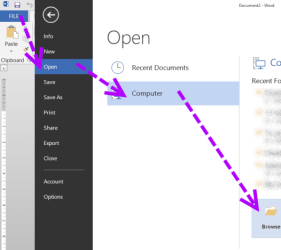
To do that in Word 2013 you need to go File - Open - Computer - Browse.
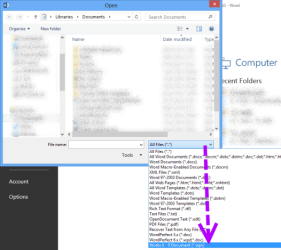
In Open window you have to select a filter:
All files (*.*) or Works 6 - 9 Document (*.wps)
 

My Computer

Computer type
PC/Desktop
OS
Windows 8.1 ; Windows 7 x86 (Dec2008-Jan2013)
Other Info
"The scale icon at the top right of a post or tutorial is how you can give rep to the member."
Microsoft Office 2013 is capable of opening Works 6-9 documents in a Compatibility mode.

To do that in Word 2013 you need to go File - Open - Computer - Browse.
In Open window you have to select a filter:
All files (*.*) or Works 6 - 9 Document (*.wps)

I tried several times to get the 'works 6-9' program to work, but it simply will not. I reinstalled it tons of times and tried repairing it. I even reinstalled the 2008 - 2010 Microsoft C++ things. I checked Windows Update for any updates (as I do every night), and nothing came up.

Any other suggestions?
 

My Computer

Computer type
PC/Desktop
Computer Manufacturer/Model Number
Gateway DX4860-UB33P
OS
Windows 7 Home Premium 64-bit
CPU
Intel i5-2320 @ 3.0GHz
Motherboard
Acer something
Memory
8GB DDR3
Graphics Card(s)
None atm, upgrading to EVGA GeForce 660 SuperClocked
Monitor(s) Displays
1x 23" LED screen
Screen Resolution
1920x1080
Hard Drives
1TB
PSU
300w, upgrading to 750w for a new GPU
Case
Gateway case
Cooling
Air cooling
Keyboard
Basic keyboard
Mouse
Basic mouse
Internet Speed
~45MBPS
Antivirus
Malwarebytes' Anti-Malware
Browser
Google Chrome
Please allow me to restate and add to what I have said.

IMHO, you have two options:
1. Find original disc with MS Works and reinstall.
2. Otherwise forget about MS Works and use Microsoft Office 2013 to open wps documents.

Trying to start old copy of MS Works from older installation of Windows won't work. Because it is missing registry settings, which can only be restored with original installer from original disc, which came with your computer and Windows Visa.

If you ever would like to use Office 2013 to open your files:
I have made a picture demonstration for you (I have used Word 2013 to open wps file)
 

Attachments

  • word_open1.png
    word_open1.png
    18.2 KB · Views: 22
  • word_open2.png
    word_open2.png
    58.5 KB · Views: 26

My Computer

Computer type
PC/Desktop
OS
Windows 8.1 ; Windows 7 x86 (Dec2008-Jan2013)
Other Info
"The scale icon at the top right of a post or tutorial is how you can give rep to the member."
Please allow me to restate and add to what I have said.

IMHO, you have two options:
1. Find original disc with MS Works and reinstall.
2. Otherwise forget about MS Works and use Microsoft Office 2013 to open wps documents.

Trying to start old copy of MS Works from older installation of Windows won't work. Because it is missing registry settings, which can only be restored with original installer from original disc, which came with your computer and Windows Visa.

If you ever would like to use Office 2013 to open your files:
I have made a picture demonstration for you (I have used Word 2013 to open wps file)

48790267.png


It won't open WPS files.


19950398.png
 

My Computer

Computer type
PC/Desktop
Computer Manufacturer/Model Number
Gateway DX4860-UB33P
OS
Windows 7 Home Premium 64-bit
CPU
Intel i5-2320 @ 3.0GHz
Motherboard
Acer something
Memory
8GB DDR3
Graphics Card(s)
None atm, upgrading to EVGA GeForce 660 SuperClocked
Monitor(s) Displays
1x 23" LED screen
Screen Resolution
1920x1080
Hard Drives
1TB
PSU
300w, upgrading to 750w for a new GPU
Case
Gateway case
Cooling
Air cooling
Keyboard
Basic keyboard
Mouse
Basic mouse
Internet Speed
~45MBPS
Antivirus
Malwarebytes' Anti-Malware
Browser
Google Chrome

My Computer

Computer type
PC/Desktop
OS
Windows 8.1 ; Windows 7 x86 (Dec2008-Jan2013)
Other Info
"The scale icon at the top right of a post or tutorial is how you can give rep to the member."
Strange. Please reinstall Microsoft Works 6–9 File Converter for MS Office.
Download Microsoft Works 6-9 Converter

I tried several times to get the 'works 6-9' program to work, but it simply will not. I reinstalled it tons of times and tried repairing it. I even reinstalled the 2008 - 2010 Microsoft C++ things. I checked Windows Update for any updates (as I do every night), and nothing came up.
 

My Computer

Computer type
PC/Desktop
Computer Manufacturer/Model Number
Gateway DX4860-UB33P
OS
Windows 7 Home Premium 64-bit
CPU
Intel i5-2320 @ 3.0GHz
Motherboard
Acer something
Memory
8GB DDR3
Graphics Card(s)
None atm, upgrading to EVGA GeForce 660 SuperClocked
Monitor(s) Displays
1x 23" LED screen
Screen Resolution
1920x1080
Hard Drives
1TB
PSU
300w, upgrading to 750w for a new GPU
Case
Gateway case
Cooling
Air cooling
Keyboard
Basic keyboard
Mouse
Basic mouse
Internet Speed
~45MBPS
Antivirus
Malwarebytes' Anti-Malware
Browser
Google Chrome
Strange. Please reinstall Microsoft Works 6–9 File Converter for MS Office.
Download Microsoft Works 6-9 Converter

I tried several times to get the 'works 6-9' program to work, but it simply will not. I reinstalled it tons of times and tried repairing it. I even reinstalled the 2008 - 2010 Microsoft C++ things. I checked Windows Update for any updates (as I do every night), and nothing came up.
Dear Fridder, there is not need to repeat yourself. When you say 'works 6-9' program you mean some old installation from your previous Windows' Program files folder? That is not going to work unless you find original discs which came with your PC at the time and completely reinstall MS Works.

The link I gave you is an extension for Microsoft Office, which helped me to open wps files in Word 2013.
Have you tried to download that file and install it?
 

My Computer

Computer type
PC/Desktop
OS
Windows 8.1 ; Windows 7 x86 (Dec2008-Jan2013)
Other Info
"The scale icon at the top right of a post or tutorial is how you can give rep to the member."
Strange. Please reinstall Microsoft Works 6–9 File Converter for MS Office.
Download Microsoft Works 6-9 Converter

I tried several times to get the 'works 6-9' program to work, but it simply will not. I reinstalled it tons of times and tried repairing it. I even reinstalled the 2008 - 2010 Microsoft C++ things. I checked Windows Update for any updates (as I do every night), and nothing came up.
Dear Fridder, there is not need to repeat yourself. When you say 'works 6-9' program you mean some old installation from your previous Windows' Program files folder? That is not going to work unless you find original discs which came with your PC at the time and completely reinstall MS Works.

The link I gave you is an extension for Microsoft Office, which helped me to open wps files in Word 2013.
Have you tried to download that file and install it?

The URL you provided is the 'works 6-9 program' I mentioned earlier. It doesn't work.
 

My Computer

Computer type
PC/Desktop
Computer Manufacturer/Model Number
Gateway DX4860-UB33P
OS
Windows 7 Home Premium 64-bit
CPU
Intel i5-2320 @ 3.0GHz
Motherboard
Acer something
Memory
8GB DDR3
Graphics Card(s)
None atm, upgrading to EVGA GeForce 660 SuperClocked
Monitor(s) Displays
1x 23" LED screen
Screen Resolution
1920x1080
Hard Drives
1TB
PSU
300w, upgrading to 750w for a new GPU
Case
Gateway case
Cooling
Air cooling
Keyboard
Basic keyboard
Mouse
Basic mouse
Internet Speed
~45MBPS
Antivirus
Malwarebytes' Anti-Malware
Browser
Google Chrome
Could please navigate to the folder
C:\Program Files\Common Files\microsoft shared\TextConv
find "Wks9Pxy.cnv"file, right click - Properties, Digital Signatures tab, Click on the sha1 and then Details button.

Is the digital signature okay?

Please also do the same for the file in subfolder
WksConv\Wkconv.exe
 

My Computer

Computer type
PC/Desktop
OS
Windows 8.1 ; Windows 7 x86 (Dec2008-Jan2013)
Other Info
"The scale icon at the top right of a post or tutorial is how you can give rep to the member."
Could please navigate to the folder
C:\Program Files\Common Files\microsoft shared\TextConv
find "Wks9Pxy.cnv"file, right click - Properties, Digital Signatures tab, Click on the sha1 and then Details button.

Is the digital signature okay?

Please also do the same for the file in subfolder
WksConv\Wkconv.exe

40555425.png
 

My Computer

Computer type
PC/Desktop
Computer Manufacturer/Model Number
Gateway DX4860-UB33P
OS
Windows 7 Home Premium 64-bit
CPU
Intel i5-2320 @ 3.0GHz
Motherboard
Acer something
Memory
8GB DDR3
Graphics Card(s)
None atm, upgrading to EVGA GeForce 660 SuperClocked
Monitor(s) Displays
1x 23" LED screen
Screen Resolution
1920x1080
Hard Drives
1TB
PSU
300w, upgrading to 750w for a new GPU
Case
Gateway case
Cooling
Air cooling
Keyboard
Basic keyboard
Mouse
Basic mouse
Internet Speed
~45MBPS
Antivirus
Malwarebytes' Anti-Malware
Browser
Google Chrome
okay. According to that error window you have posted, we are left with problems with registry or corrupted file itself.
Registry can be fixed by reinstalling Office 2013.

By the way, what is the Works version you had?
Do you still have Works installed from previous Windows?
 

My Computer

Computer type
PC/Desktop
OS
Windows 8.1 ; Windows 7 x86 (Dec2008-Jan2013)
Other Info
"The scale icon at the top right of a post or tutorial is how you can give rep to the member."
Hi there

just download trial version of office and use converter tool.

You might have to download Version 4 if you have a REALLY OLD version of Ms works.

Cheers
jimbo
 

My Computer

Computer type
PC/Desktop
Computer Manufacturer/Model Number
Custom built, several laptops HP/ASUS
OS
Linux CENTOS 7 / various Windows OS'es and servers
CPU
Intel i7 Intel i5
Memory
8GB, 16GB
Graphics Card(s)
On Motherboard
Sound Card
Realtek HD audio
Monitor(s) Displays
Apple Cinema display, Samsung LCD
Screen Resolution
1920 X 1080
Hard Drives
4 X 1TB SATA
Mouse
Toshiba wireless laser
Internet Speed
> 20MB up
Back
Top