Fridder
New member
- Local time
- 7:04 AM
- Messages
- 9
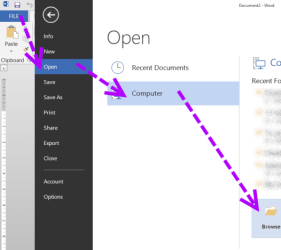
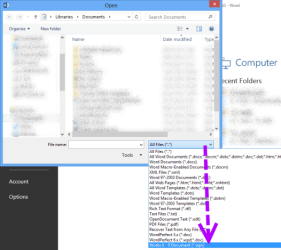
I bought my computer in 2008ish, maybe 2009, and it came with Windows Vista Home Premium 64-bit. It also came with pre-installed software, and of those pre-installed software included Microsoft Works Word Processor. I upgraded to Windows 7 Ultimate 64-bit last week, and I have been painstakingly installing my programs back after I messed up the installation. First, I installed Windows 7 Home Premium 32-bit, then I realized I put in the wrong disc so I then put in Windows 7 Home Premium 64-bit, then I upgraded to Ultimate 64-bit. All my programs got messed up in the process and I basically have a clean install of Windows 7 with a Windows.old folder containing my programs in a folder, which all need to be re-installed. I can see my Microsoft Works Word Processor, but it won't let me run the installation on it. I tried running it in compatibility modes for every available option, but nothing works. I also ran it as an administrator. How can I legally re-install these programs I purchased? I have tons and tons of .wps files that I want to be able to open with a program I purchased with my computer. Yes, I have heard of OpenOffice and it does not support .wps files. I do have Microsoft Office Professional 2013 installed, but it can't seem to open .wps files (unless I'm wrong).
My Computer
- Computer type
- PC/Desktop
- Computer Manufacturer/Model Number
- Gateway DX4860-UB33P
- OS
- Windows 7 Home Premium 64-bit
- CPU
- Intel i5-2320 @ 3.0GHz
- Motherboard
- Acer something
- Memory
- 8GB DDR3
- Graphics Card(s)
- None atm, upgrading to EVGA GeForce 660 SuperClocked
- Monitor(s) Displays
- 1x 23" LED screen
- Screen Resolution
- 1920x1080
- Hard Drives
- 1TB
- PSU
- 300w, upgrading to 750w for a new GPU
- Case
- Gateway case
- Cooling
- Air cooling
- Keyboard
- Basic keyboard
- Mouse
- Basic mouse
- Internet Speed
- ~45MBPS
- Antivirus
- Malwarebytes' Anti-Malware
- Browser
- Google Chrome