Solved Might be missing MBR & 100MB partition on Boot SSD

Phroneo

New member
Local time
9:11 AM
Messages
19
Greetings,

I want to transfer my C: drive, a 64GB SSD that contains my Win 7 Ultimate 64-bit and several Microsoft programs, to a new Intel 320 series 120GB SSD using an Acronis True Image Home 2011 backup of that drive. I went to the Acronis forum to get some information and it was suggested that I take a look at the 'alignment' of my SSD boot drive - in particular my MBR. Apparently, mine is missing although I do have a 'Boot' file folder and a 'bootmgr' file on my drive. I seem to be able to boot without problems and have been using this system configuration for about a year now.

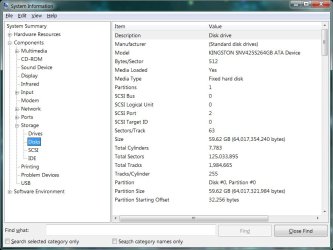
The three images I'm showing below are of this drive. The first is a screen shot of the Disk Management of Win 7, the second a screen shot of the Acronis Disk Director of the same drive, and the third a screen shot of Win 7 System Information/Disks.

A:
DiskPartitions.jpg

B:
DiskPartAcronis.jpg

C:
DiskPartSysInfo.jpg

I was told on the Acronis forum that I need to allocate 1MB of disk space for the MBR. Although no one on that forum mentioned this, I thought that I was supposed to have a 100MB Win 7 system partion on my OS boot drive. I cannot seem to find this.

So here are my questions:

1. Is my boot drive, C:, correctly partitioned as it now stands?

2. If it isn't, what do I have to do to make it correct prior to backing up and moving my boot drive to a new SSD?

3. There was no mention of me having to install the Intel 320 Series 120GB SSD prior to my transferring my old drive to it. In fact, I'm supposed to delete any partitons that are on the new drive prior to moving the system files over. Do I have to do anything with regards to 'installing' the Intel drive prior to or after I transfer my old drive to it?

4. Would making a Windows 7 system copy of my 64GB SSD and transferring that image to my new drive be a better option? (The Acronis program lets me resize my partitons either up or down. I don't know if I can do that with the Win 7 backup/transfer.)

The more I explore this, the more confused I get. Your help will be very much appreciated.

Peace,

Phroneo
 

My Computer My Computer

At a glance

Windows 7 Ultimate 64-biti7-93012GB DDR3 KensingtonnVidia GeForce 250 1GB DDR3 RAM
Computer Manufacturer/Model Number
Self Assembled
OS
Windows 7 Ultimate 64-bit
CPU
i7-930
Motherboard
ASUS P6x58D Premium
Memory
12GB DDR3 Kensington
Graphics Card(s)
nVidia GeForce 250 1GB DDR3 RAM
Sound Card
embedded
Monitor(s) Displays
Viewsonic VP2130b
Screen Resolution
1600*1200
Hard Drives
Western Digital Caviar Black 1TB WD1001FALS SATA 6.0GB/sec.
PSU
750 Watt PC Power & Cooling
Case
Antech Sonata
Cooling
Zalman Fans for CPU, GPU, System front and back
Keyboard
Logitech K350
Mouse
Logiteh Performance Mx
Internet Speed
20GB/10GB
Other Info
Kiplisch THx Speaker System
Your C: looks fine to me. You either have a 100MB separate system reserved partition or include it's booting in the OS partition. Your's is included in the OS partition (System, active, boot). Your Disk 1 looks a bit odd. Your 1st partition has a pagefile and the 2nd is active.

I don't know what the talk about 1MB in connection with the MBR is all about.
Have a look here
http://www.sevenforums.com/software/139658-reflect-updates-3.html#post1207608

Reimaging to a new HDD which is the same size or larger (like you) shouldn't be a problem. You can use Windows imaging if you like or Macrium. Windows will copy the MBR to the new HDD automatically. With Macrium you tick the box saying you want it to be copied. I don't know why Acronis would give you a problem - I don't use it.

NB: When using imaging do not have the old and the new HDDs connected at the same time.

Also, SSD specific alignment issues I'll leave to someone else to comment.
 

My Computer My Computer

At a glance

Windows 7x64 Home Premium SP1Intel i7 2600kG.Skill Ripjaws (DDR3-1600) 2x4GBNvidia GeForce GTS 450; Intel HD Graphics 300...
Computer type
PC/Desktop
Computer Manufacturer/Model Number
Own build
OS
Windows 7x64 Home Premium SP1
CPU
Intel i7 2600k
Motherboard
ASUS P8Z68 Deluxe
Memory
G.Skill Ripjaws (DDR3-1600) 2x4GB
Graphics Card(s)
Nvidia GeForce GTS 450; Intel HD Graphics 3000(GT2+)
Monitor(s) Displays
Dell Ultrasharp IPS panel U2311H, Samsung SyncMaster P2350
Screen Resolution
1920x1080
Hard Drives
Samsung 850 Pro SSD 256GB, Samsung SSD 840 120GB, Seagates 1TB Barracuda ST31000528AS x2
PSU
Seasonic M12II 520W
Case
Lian Li Lancool PC-K60
Cooling
Case: 1x120mm, 3x140mm CPU: Hyper 212+
Keyboard
Logitech MK520 (wireless)
Mouse
Logitech MK520
Internet Speed
6-7 Mbps
Antivirus
Norton Security Premium, Malwarebytes on 2 (MSE on 3rd PC)
Browser
FireFox
Other Info
Audio: Logitech Z523 2.1
Hello MJF and GregRocker,

Thank you for your suggestions.

As you suggested for DISK 1, I was able to mark the Active partition Inactive.

A little more information about the Program Files partition on DISK 1. This is my Program Files partition. It inlcludes almost all of the programs I am using except for those few Microsoft programs I placed on my SSD C: drive. There is nothing else (That I've placed) on this partition except for the Page File.

The Page File is on DISK 1 because of my SSD. When I set up this system, I had a printout list of things to do to maximize the life and performance of an SSD in Windows 7. (I think I got this off of the OCZ SSD forum.) If I remember correctly, it suggested NOT to have a Page File on the SSD because it would have a bad effect on the NAND and decrease the life of the drive. So I set up the Page File manually to match the 12GB of RAM I have on my system. I had forgotten about this until now. However, my system has been running well - at least I think it has - for the 14-months since I built it. So my question is:

If it's best to keep the Page File off the SSD, is there any harm in having the Page File where it is?

Thanks again for your help. I appreciate it.

Peace,

Phroneo


My Computer My Computer

At a glance

Windows 7 Ultimate 64-biti7-93012GB DDR3 KensingtonnVidia GeForce 250 1GB DDR3 RAM
Computer Manufacturer/Model Number
Self Assembled
OS
Windows 7 Ultimate 64-bit
CPU
i7-930
Motherboard
ASUS P6x58D Premium
Memory
12GB DDR3 Kensington
Graphics Card(s)
nVidia GeForce 250 1GB DDR3 RAM
Sound Card
embedded
Monitor(s) Displays
Viewsonic VP2130b
Screen Resolution
1600*1200
Hard Drives
Western Digital Caviar Black 1TB WD1001FALS SATA 6.0GB/sec.
PSU
750 Watt PC Power & Cooling
Case
Antech Sonata
Cooling
Zalman Fans for CPU, GPU, System front and back
Keyboard
Logitech K350
Mouse
Logiteh Performance Mx
Internet Speed
20GB/10GB
Other Info
Kiplisch THx Speaker System
You cut off the drive size listings in Disk Mgmt so we can't see how much unused space is on the SSD.

Normally I would leave the Programs on the OS HD since they write registry keys which integrate themselves into the OS, unless you have space problems. It's better to link the User data files to another HD: User Folders - Change Default Location

But if performance is fine and you're tight for space already on the SSD, then I'd just leave it the way it is and keep those ideas in mind for a reinstall.

Remember for reimaging that you need to include the Programs partition in the image. This will totally flummox the Win7 backup imaging utility when it comes time to reimaging since a second HD is involved, so I would use free Acronis premium imaging app if you have a WD or Seagate HD, or freeware like Macrium Reflect or Paragon 11.
 
Last edited:
You could alsao use the clone function in Acronis. I have used it several times. If the source drive is aligned and the destination drive is aligned and marked active, the cloned drive will be aligned.
 

My Computers My Computers

  • At a glance

    Windows 11 ProRyzen 9 5900X32GB G Skill DDR4-3600EVGA RTX 3080 FTW 3 Ultra
    Computer type
    PC/Desktop
    Computer Manufacturer/Model Number
    ALWAYS UNDER CONSTRUCTION
    OS
    Windows 11 Pro
    CPU
    Ryzen 9 5900X
    Motherboard
    Asus X570 Crosshair Viii Hero
    Memory
    32GB G Skill DDR4-3600
    Graphics Card(s)
    EVGA RTX 3080 FTW 3 Ultra
    Sound Card
    On Board/Sennheiser PC37X Headset
    Monitor(s) Displays
    3 X Asus 27"
    Screen Resolution
    2560x1440
    Hard Drives
    2 X 1 TB NVME drives
    PSU
    EVGA 850
    Case
    Phanteks Eclipse P400A
    Cooling
    EVGA 280 AIO
    Keyboard
    Logitech G510s/ Logitech G13
    Mouse
    Logitech G502
    Internet Speed
    24/1
    Antivirus
    ESET/MBAM Pro/SAS Pro
    Browser
    Chrome/ Firefox/ Edge
  • At a glance

    Windows 11 ProIntel Ultra 9 288V32 GB LPDDR5X 8533
    Computer type
    Laptop
    System Manufacturer/Model Number
    Dell 16 Plus
    OS
    Windows 11 Pro
    CPU
    Intel Ultra 9 288V
    Memory
    32 GB LPDDR5X 8533
    Monitor(s) Displays
    16" Mini-LED HDR600 Touch 90 Hz
    Screen Resolution
    2560X1600
    Hard Drives
    1 TB NVME
Greg and essenbe,

I only have 15GB of space left on my 64GB SSD C: drive. Although I have just enough space to put the rest of my program files on that disk, I would be left without enough room for disk maintenance.

You hit the nail on the head with the link to move the User data files to another HDD. Thanks for that information. I found it helpful.

My new SSD is an Intel 320 Series 120GB. I have been thinking about using the Intel/Acronis data migration feature, but that's basically a disk clone and leaves me with unallocated space on the new disk. So I'm going to use Acronis True Image Home 2011 backup and restore feature. This will permit me to 'align' - in Acronis terms - my SSD and to make the primary OS partition open to all available space. A person by the name of GroverH, along with PatL have been very helpful in my understanding as how to achieve this. Still, I've had a series of Windows 7 specific questions that have confused me and you have been very helpful in addressing those and putting me on the right track. This forum has filled in the gaps of my knowledge and will help to make this transfer actually work.

My new SSD will have enough space for my program files. I'm running Adobe Design Premium C4 (with plug-ins and updates) and I don't want to register an uninstall and reregister a new install and have to recreate my working environment. Is there a way to move all of my program files over to the new SSD C: drive without having to uninstall/install programs?

Once again, thanks for all of your help and advice. I'll let you know if this transfer is a success.

Peace,

Phroneo


My Computer My Computer

At a glance

Windows 7 Ultimate 64-biti7-93012GB DDR3 KensingtonnVidia GeForce 250 1GB DDR3 RAM
Computer Manufacturer/Model Number
Self Assembled
OS
Windows 7 Ultimate 64-bit
CPU
i7-930
Motherboard
ASUS P6x58D Premium
Memory
12GB DDR3 Kensington
Graphics Card(s)
nVidia GeForce 250 1GB DDR3 RAM
Sound Card
embedded
Monitor(s) Displays
Viewsonic VP2130b
Screen Resolution
1600*1200
Hard Drives
Western Digital Caviar Black 1TB WD1001FALS SATA 6.0GB/sec.
PSU
750 Watt PC Power & Cooling
Case
Antech Sonata
Cooling
Zalman Fans for CPU, GPU, System front and back
Keyboard
Logitech K350
Mouse
Logiteh Performance Mx
Internet Speed
20GB/10GB
Other Info
Kiplisch THx Speaker System
You may be able to find the registry entries and change the paths - quite fiddly I would imagine - the number of entries associated with Adobe.
 

My Computers My Computers

  • At a glance

    7 X64i5 84002x8gb 3200mhz
    Computer type
    PC/Desktop
    OS
    7 X64
    CPU
    i5 8400
    Motherboard
    gigabyte b365m ds3h
    Memory
    2x8gb 3200mhz
    Hard Drives
    various
    PSU
    pure power 11 400w cm
    Case
    Coolermaster
    Cooling
    cryorig m9i
  • At a glance

    7x64g54008gb ddr4 2400
    Computer type
    PC/Desktop
    OS
    7x64
    CPU
    g5400
    Motherboard
    ga b365m ds3h
    Memory
    8gb ddr4 2400
    PSU
    xfx pro 450w
SIW2, is there any reason he cannot clone the drive then extend the C drive in disk management? The clone feature would solve his problems of activating software.
 

My Computers My Computers

  • At a glance

    Windows 11 ProRyzen 9 5900X32GB G Skill DDR4-3600EVGA RTX 3080 FTW 3 Ultra
    Computer type
    PC/Desktop
    Computer Manufacturer/Model Number
    ALWAYS UNDER CONSTRUCTION
    OS
    Windows 11 Pro
    CPU
    Ryzen 9 5900X
    Motherboard
    Asus X570 Crosshair Viii Hero
    Memory
    32GB G Skill DDR4-3600
    Graphics Card(s)
    EVGA RTX 3080 FTW 3 Ultra
    Sound Card
    On Board/Sennheiser PC37X Headset
    Monitor(s) Displays
    3 X Asus 27"
    Screen Resolution
    2560x1440
    Hard Drives
    2 X 1 TB NVME drives
    PSU
    EVGA 850
    Case
    Phanteks Eclipse P400A
    Cooling
    EVGA 280 AIO
    Keyboard
    Logitech G510s/ Logitech G13
    Mouse
    Logitech G502
    Internet Speed
    24/1
    Antivirus
    ESET/MBAM Pro/SAS Pro
    Browser
    Chrome/ Firefox/ Edge
  • At a glance

    Windows 11 ProIntel Ultra 9 288V32 GB LPDDR5X 8533
    Computer type
    Laptop
    System Manufacturer/Model Number
    Dell 16 Plus
    OS
    Windows 11 Pro
    CPU
    Intel Ultra 9 288V
    Memory
    32 GB LPDDR5X 8533
    Monitor(s) Displays
    16" Mini-LED HDR600 Touch 90 Hz
    Screen Resolution
    2560X1600
    Hard Drives
    1 TB NVME
Especially with the larger SSD I would have the page file and installed programs on it even if it involved reinstalling all the programs. Around 120GB should be easily big enough to hold your programs and some data. Isn't program load time one the nice things about an SSD?
Certainly locate appropriate data off the SSD.

Maybe even consider a complete clean install OS & programs.
 

My Computer My Computer

At a glance

Windows 7x64 Home Premium SP1Intel i7 2600kG.Skill Ripjaws (DDR3-1600) 2x4GBNvidia GeForce GTS 450; Intel HD Graphics 300...
Computer type
PC/Desktop
Computer Manufacturer/Model Number
Own build
OS
Windows 7x64 Home Premium SP1
CPU
Intel i7 2600k
Motherboard
ASUS P8Z68 Deluxe
Memory
G.Skill Ripjaws (DDR3-1600) 2x4GB
Graphics Card(s)
Nvidia GeForce GTS 450; Intel HD Graphics 3000(GT2+)
Monitor(s) Displays
Dell Ultrasharp IPS panel U2311H, Samsung SyncMaster P2350
Screen Resolution
1920x1080
Hard Drives
Samsung 850 Pro SSD 256GB, Samsung SSD 840 120GB, Seagates 1TB Barracuda ST31000528AS x2
PSU
Seasonic M12II 520W
Case
Lian Li Lancool PC-K60
Cooling
Case: 1x120mm, 3x140mm CPU: Hyper 212+
Keyboard
Logitech MK520 (wireless)
Mouse
Logitech MK520
Internet Speed
6-7 Mbps
Antivirus
Norton Security Premium, Malwarebytes on 2 (MSE on 3rd PC)
Browser
FireFox
Other Info
Audio: Logitech Z523 2.1
Doesn't he currently have his programs installed on another partition?

If he wants to have them on the new SSD - it is either reinstall them, or copy them over and make the registry adjustments.
 

My Computers My Computers

  • At a glance

    7 X64i5 84002x8gb 3200mhz
    Computer type
    PC/Desktop
    OS
    7 X64
    CPU
    i5 8400
    Motherboard
    gigabyte b365m ds3h
    Memory
    2x8gb 3200mhz
    Hard Drives
    various
    PSU
    pure power 11 400w cm
    Case
    Coolermaster
    Cooling
    cryorig m9i
  • At a glance

    7x64g54008gb ddr4 2400
    Computer type
    PC/Desktop
    OS
    7x64
    CPU
    g5400
    Motherboard
    ga b365m ds3h
    Memory
    8gb ddr4 2400
    PSU
    xfx pro 450w
I guess I missed that part. You are correct.
 

My Computers My Computers

  • At a glance

    Windows 11 ProRyzen 9 5900X32GB G Skill DDR4-3600EVGA RTX 3080 FTW 3 Ultra
    Computer type
    PC/Desktop
    Computer Manufacturer/Model Number
    ALWAYS UNDER CONSTRUCTION
    OS
    Windows 11 Pro
    CPU
    Ryzen 9 5900X
    Motherboard
    Asus X570 Crosshair Viii Hero
    Memory
    32GB G Skill DDR4-3600
    Graphics Card(s)
    EVGA RTX 3080 FTW 3 Ultra
    Sound Card
    On Board/Sennheiser PC37X Headset
    Monitor(s) Displays
    3 X Asus 27"
    Screen Resolution
    2560x1440
    Hard Drives
    2 X 1 TB NVME drives
    PSU
    EVGA 850
    Case
    Phanteks Eclipse P400A
    Cooling
    EVGA 280 AIO
    Keyboard
    Logitech G510s/ Logitech G13
    Mouse
    Logitech G502
    Internet Speed
    24/1
    Antivirus
    ESET/MBAM Pro/SAS Pro
    Browser
    Chrome/ Firefox/ Edge
  • At a glance

    Windows 11 ProIntel Ultra 9 288V32 GB LPDDR5X 8533
    Computer type
    Laptop
    System Manufacturer/Model Number
    Dell 16 Plus
    OS
    Windows 11 Pro
    CPU
    Intel Ultra 9 288V
    Memory
    32 GB LPDDR5X 8533
    Monitor(s) Displays
    16" Mini-LED HDR600 Touch 90 Hz
    Screen Resolution
    2560X1600
    Hard Drives
    1 TB NVME
Reinstalling everything is likely to be the most robust way to go. It may even be the fastest if you take all the possible alternate fiddling into account.
 

My Computer My Computer

At a glance

Windows 7x64 Home Premium SP1Intel i7 2600kG.Skill Ripjaws (DDR3-1600) 2x4GBNvidia GeForce GTS 450; Intel HD Graphics 300...
Computer type
PC/Desktop
Computer Manufacturer/Model Number
Own build
OS
Windows 7x64 Home Premium SP1
CPU
Intel i7 2600k
Motherboard
ASUS P8Z68 Deluxe
Memory
G.Skill Ripjaws (DDR3-1600) 2x4GB
Graphics Card(s)
Nvidia GeForce GTS 450; Intel HD Graphics 3000(GT2+)
Monitor(s) Displays
Dell Ultrasharp IPS panel U2311H, Samsung SyncMaster P2350
Screen Resolution
1920x1080
Hard Drives
Samsung 850 Pro SSD 256GB, Samsung SSD 840 120GB, Seagates 1TB Barracuda ST31000528AS x2
PSU
Seasonic M12II 520W
Case
Lian Li Lancool PC-K60
Cooling
Case: 1x120mm, 3x140mm CPU: Hyper 212+
Keyboard
Logitech MK520 (wireless)
Mouse
Logitech MK520
Internet Speed
6-7 Mbps
Antivirus
Norton Security Premium, Malwarebytes on 2 (MSE on 3rd PC)
Browser
FireFox
Other Info
Audio: Logitech Z523 2.1
I just re-installed Windows not long ago on my 30GB OCZ drive. Once I got my Intel drive squared away:

I just made a Image of the OCZ drive with Acronis (I did disable the PageFile just before Imaging. Recreated once new drive was up and running)
Unplugged it, and hooked up the Intell Drive
Booted from Acronis CD, and restore the Image to the Intel Drive.

It Resized the Image to fit, and everything was fine. Even the alignment.

Boot to Windows and let it re-install drivers and reboot. Then you can hook up the old SSD, and format it.


In my case, I had several games installed on a mechanical HD. As well as Music Library etc on other drives.
Other than installing new drivers for the SSD, everything was normal, including the installed programs on mechanical drives.

BTW, I didnt have a 100MB reserved in my image either.
 

My Computer My Computer

At a glance

Windows 7 Home Premium 64bitIntel Core i7 2700k8GB Mushkin Redline Ridgebacks @1866EVGA GTX570 SC
Computer Manufacturer/Model Number
Custom (Self Build)
OS
Windows 7 Home Premium 64bit
CPU
Intel Core i7 2700k
Motherboard
eVGA P67 SLI
Memory
8GB Mushkin Redline Ridgebacks @1866
Graphics Card(s)
EVGA GTX570 SC
Sound Card
XiFi Titanium HD
Monitor(s) Displays
LG W2453V
Screen Resolution
1920x1080
Hard Drives
Intel 320 80GB -- Intel X25-V 40GB --WD Black 1TB x2 -- WD Blue 640GB
PSU
Seasonic x750
Case
Corsair 600T SE White
Cooling
eVGA Superclocked CPU Cooler
Keyboard
Saitek Cyborg
Antivirus
Kaspersky
Browser
IE
Other Info
LG BD/DVD
Greetings All,

The question by essenbe is interesting:

"... is there any reason he cannot clone the drive then extend the C drive in disk management? The clone feature would solve his problems of activating software."

If this is a doable, it would save me about 3-days of uninstalling, reinstalling, updating, and configuring my system and give me the benefit of having all of my programs on the SSD.

I'll keep checking back. Thanks again.

Peace,

Phroneo
 

My Computer My Computer

At a glance

Windows 7 Ultimate 64-biti7-93012GB DDR3 KensingtonnVidia GeForce 250 1GB DDR3 RAM
Computer Manufacturer/Model Number
Self Assembled
OS
Windows 7 Ultimate 64-bit
CPU
i7-930
Motherboard
ASUS P6x58D Premium
Memory
12GB DDR3 Kensington
Graphics Card(s)
nVidia GeForce 250 1GB DDR3 RAM
Sound Card
embedded
Monitor(s) Displays
Viewsonic VP2130b
Screen Resolution
1600*1200
Hard Drives
Western Digital Caviar Black 1TB WD1001FALS SATA 6.0GB/sec.
PSU
750 Watt PC Power & Cooling
Case
Antech Sonata
Cooling
Zalman Fans for CPU, GPU, System front and back
Keyboard
Logitech K350
Mouse
Logiteh Performance Mx
Internet Speed
20GB/10GB
Other Info
Kiplisch THx Speaker System
Phroneo, That would work if you had everything on the old SSD. I have 2 and do it all the time. However, with your programs on 2 different drives it won't work. You want all programs on one dive as I understand it. If that is the case you may be better off with a clean install since you are going to have to install those programs anyway. Wish I knew something better to tell you. Sorry.

Also, by doing a clean install, you can still work off your old disk until you get your new one set up. That would take some pressure off of having to do everything at once, and may give you better performance from the new SSD. I say a clean install is always best just not as convienent.
 

My Computers My Computers

  • At a glance

    Windows 11 ProRyzen 9 5900X32GB G Skill DDR4-3600EVGA RTX 3080 FTW 3 Ultra
    Computer type
    PC/Desktop
    Computer Manufacturer/Model Number
    ALWAYS UNDER CONSTRUCTION
    OS
    Windows 11 Pro
    CPU
    Ryzen 9 5900X
    Motherboard
    Asus X570 Crosshair Viii Hero
    Memory
    32GB G Skill DDR4-3600
    Graphics Card(s)
    EVGA RTX 3080 FTW 3 Ultra
    Sound Card
    On Board/Sennheiser PC37X Headset
    Monitor(s) Displays
    3 X Asus 27"
    Screen Resolution
    2560x1440
    Hard Drives
    2 X 1 TB NVME drives
    PSU
    EVGA 850
    Case
    Phanteks Eclipse P400A
    Cooling
    EVGA 280 AIO
    Keyboard
    Logitech G510s/ Logitech G13
    Mouse
    Logitech G502
    Internet Speed
    24/1
    Antivirus
    ESET/MBAM Pro/SAS Pro
    Browser
    Chrome/ Firefox/ Edge
  • At a glance

    Windows 11 ProIntel Ultra 9 288V32 GB LPDDR5X 8533
    Computer type
    Laptop
    System Manufacturer/Model Number
    Dell 16 Plus
    OS
    Windows 11 Pro
    CPU
    Intel Ultra 9 288V
    Memory
    32 GB LPDDR5X 8533
    Monitor(s) Displays
    16" Mini-LED HDR600 Touch 90 Hz
    Screen Resolution
    2560X1600
    Hard Drives
    1 TB NVME
If you need to wait to reinstall, you can always image both the Win7 and the programs partition to the new SSD using Acronis.

If it holds alignment you should get SSD performance now for your programs and decide if you like it enough to keep it that way.
 
Gregrocker & essenbe,

I think that I'm going to image my 64GB SSD to my 120 SSD for C: drive OS setup and then image my Program Files (F:) partition to my 64GB SSD and redirect the Users data to the 1TB WD HDD. That might be a interim answer.

I don't know if this is the forum to ask this next question but I'll try. I've got a simple network in our home with 3 systems on it. I don't yet have central network storage so most of the time we're saving in Network\System1\Users\Public. Because the network is using the Users path, I wondering if redirecting the Users folder will have any effect on this.

Peace,

Phroneo
 

My Computer My Computer

At a glance

Windows 7 Ultimate 64-biti7-93012GB DDR3 KensingtonnVidia GeForce 250 1GB DDR3 RAM
Computer Manufacturer/Model Number
Self Assembled
OS
Windows 7 Ultimate 64-bit
CPU
i7-930
Motherboard
ASUS P6x58D Premium
Memory
12GB DDR3 Kensington
Graphics Card(s)
nVidia GeForce 250 1GB DDR3 RAM
Sound Card
embedded
Monitor(s) Displays
Viewsonic VP2130b
Screen Resolution
1600*1200
Hard Drives
Western Digital Caviar Black 1TB WD1001FALS SATA 6.0GB/sec.
PSU
750 Watt PC Power & Cooling
Case
Antech Sonata
Cooling
Zalman Fans for CPU, GPU, System front and back
Keyboard
Logitech K350
Mouse
Logiteh Performance Mx
Internet Speed
20GB/10GB
Other Info
Kiplisch THx Speaker System

My Computer My Computer

At a glance

W 7 64-bit UltimateIntel Q9550 Yorkfield8GB Dominator 8500C5DATI : XFX 5870
Computer Manufacturer/Model Number
* BFK Customs *
OS
W 7 64-bit Ultimate
CPU
Intel Q9550 Yorkfield
Motherboard
ASUS P5Q Pro
Memory
8GB Dominator 8500C5D
Graphics Card(s)
ATI : XFX 5870
Sound Card
Realtek HD Audio 7-1
Monitor(s) Displays
1x 47" LCD HDMI & 3x 26" LCD HDMI
Screen Resolution
1920x1080P & 1920x1200
Hard Drives
1x 80GB Intel X25-M G2 SSD : 1x 500GB & 1x 640GB WD Caviar Black(s)
PSU
Corsair 620HX
Case
Cooler Master RC-690
Cooling
Tuniq Tower 120, 2x 140mm and 3x 120mm case fans
Keyboard
Microsoft 500
Mouse
Razer Diamondback 3G
Internet Speed
14 Mb/s
Other Info
1x Koutech 3Gb/s SATA HDD Hot Swap Rack
Thanks for that tutorial on how to move the User Files. It's easy to follow and I'll use it.
 

My Computer My Computer

At a glance

Windows 7 Ultimate 64-biti7-93012GB DDR3 KensingtonnVidia GeForce 250 1GB DDR3 RAM
Computer Manufacturer/Model Number
Self Assembled
OS
Windows 7 Ultimate 64-bit
CPU
i7-930
Motherboard
ASUS P6x58D Premium
Memory
12GB DDR3 Kensington
Graphics Card(s)
nVidia GeForce 250 1GB DDR3 RAM
Sound Card
embedded
Monitor(s) Displays
Viewsonic VP2130b
Screen Resolution
1600*1200
Hard Drives
Western Digital Caviar Black 1TB WD1001FALS SATA 6.0GB/sec.
PSU
750 Watt PC Power & Cooling
Case
Antech Sonata
Cooling
Zalman Fans for CPU, GPU, System front and back
Keyboard
Logitech K350
Mouse
Logiteh Performance Mx
Internet Speed
20GB/10GB
Other Info
Kiplisch THx Speaker System
Back
Top