Solved Might be missing MBR & 100MB partition on Boot SSD

Thanks for that tutorial on how to move the User Files. It's easy to follow and I'll use it.


You're welcome, I'm glad it is useful; you can also redirect any subsequent clean installs to the already setup files in future.
 

My Computer My Computer

At a glance

W 7 64-bit UltimateIntel Q9550 Yorkfield8GB Dominator 8500C5DATI : XFX 5870
Computer Manufacturer/Model Number
* BFK Customs *
OS
W 7 64-bit Ultimate
CPU
Intel Q9550 Yorkfield
Motherboard
ASUS P5Q Pro
Memory
8GB Dominator 8500C5D
Graphics Card(s)
ATI : XFX 5870
Sound Card
Realtek HD Audio 7-1
Monitor(s) Displays
1x 47" LCD HDMI & 3x 26" LCD HDMI
Screen Resolution
1920x1080P & 1920x1200
Hard Drives
1x 80GB Intel X25-M G2 SSD : 1x 500GB & 1x 640GB WD Caviar Black(s)
PSU
Corsair 620HX
Case
Cooler Master RC-690
Cooling
Tuniq Tower 120, 2x 140mm and 3x 120mm case fans
Keyboard
Microsoft 500
Mouse
Razer Diamondback 3G
Internet Speed
14 Mb/s
Other Info
1x Koutech 3Gb/s SATA HDD Hot Swap Rack
Greetings All,

I was able to get my OS moved over to the new SSD using Acronis TIH 2011 Backup Recovery. I'm going to format the 64GB SSD and move my program files to that and keep my User data on the WD HDD.

Thank you all for your so freely offering your experience, knowledge, and help. It's made all the difference.

Peace,

Phroneo
 

My Computer My Computer

At a glance

Windows 7 Ultimate 64-biti7-93012GB DDR3 KensingtonnVidia GeForce 250 1GB DDR3 RAM
Computer Manufacturer/Model Number
Self Assembled
OS
Windows 7 Ultimate 64-bit
CPU
i7-930
Motherboard
ASUS P6x58D Premium
Memory
12GB DDR3 Kensington
Graphics Card(s)
nVidia GeForce 250 1GB DDR3 RAM
Sound Card
embedded
Monitor(s) Displays
Viewsonic VP2130b
Screen Resolution
1600*1200
Hard Drives
Western Digital Caviar Black 1TB WD1001FALS SATA 6.0GB/sec.
PSU
750 Watt PC Power & Cooling
Case
Antech Sonata
Cooling
Zalman Fans for CPU, GPU, System front and back
Keyboard
Logitech K350
Mouse
Logiteh Performance Mx
Internet Speed
20GB/10GB
Other Info
Kiplisch THx Speaker System

My Computer My Computer

At a glance

W 7 64-bit UltimateIntel Q9550 Yorkfield8GB Dominator 8500C5DATI : XFX 5870
Computer Manufacturer/Model Number
* BFK Customs *
OS
W 7 64-bit Ultimate
CPU
Intel Q9550 Yorkfield
Motherboard
ASUS P5Q Pro
Memory
8GB Dominator 8500C5D
Graphics Card(s)
ATI : XFX 5870
Sound Card
Realtek HD Audio 7-1
Monitor(s) Displays
1x 47" LCD HDMI & 3x 26" LCD HDMI
Screen Resolution
1920x1080P & 1920x1200
Hard Drives
1x 80GB Intel X25-M G2 SSD : 1x 500GB & 1x 640GB WD Caviar Black(s)
PSU
Corsair 620HX
Case
Cooler Master RC-690
Cooling
Tuniq Tower 120, 2x 140mm and 3x 120mm case fans
Keyboard
Microsoft 500
Mouse
Razer Diamondback 3G
Internet Speed
14 Mb/s
Other Info
1x Koutech 3Gb/s SATA HDD Hot Swap Rack
Thanks for the secure erase and Clean-Clean All w/Diskpart links. I'm confused about something - actually, it's really not that hard at all to confuse me. I get confused in my confusion.

I want to remove the data from my 64gb SSD, set the intial offset, and have one partion on the disk. I've read several of your excellent tutorials about this but I'm not so certain as that they apply more to spinning platters than SSD NAND.

My confusion is in the Diskpart 'clean' command. I think that writes zeros to the media and I thought that one wants to avoid doing that. What does one do to erase/delete the data from an SSD? This is a Kingston SSDNow V series. (Unfortuneately, Kingston doesn't seem to offer maintenance software like Intel supplies with its SSD.)

If all I have to do is follow the same information as you wrote on your 'Optimize an SSD or HDD when You're Ready to Reinstall the OS' tutorial, I can do that. I just want to start with a disk that has no data on it if possible.

Peace,

Phroneo
 

My Computer My Computer

At a glance

Windows 7 Ultimate 64-biti7-93012GB DDR3 KensingtonnVidia GeForce 250 1GB DDR3 RAM
Computer Manufacturer/Model Number
Self Assembled
OS
Windows 7 Ultimate 64-bit
CPU
i7-930
Motherboard
ASUS P6x58D Premium
Memory
12GB DDR3 Kensington
Graphics Card(s)
nVidia GeForce 250 1GB DDR3 RAM
Sound Card
embedded
Monitor(s) Displays
Viewsonic VP2130b
Screen Resolution
1600*1200
Hard Drives
Western Digital Caviar Black 1TB WD1001FALS SATA 6.0GB/sec.
PSU
750 Watt PC Power & Cooling
Case
Antech Sonata
Cooling
Zalman Fans for CPU, GPU, System front and back
Keyboard
Logitech K350
Mouse
Logiteh Performance Mx
Internet Speed
20GB/10GB
Other Info
Kiplisch THx Speaker System
I'm sure if you look on Kingston's forums, there will be info on how to do a secure erase. However, If I am not mistaken, the Kingston V serise is a rebranded Intel V serise SSD. Also, with BFK's tutorial it will show you how to format and align the SSD.
 

My Computers My Computers

  • At a glance

    Windows 11 ProRyzen 9 5900X32GB G Skill DDR4-3600EVGA RTX 3080 FTW 3 Ultra
    Computer type
    PC/Desktop
    Computer Manufacturer/Model Number
    ALWAYS UNDER CONSTRUCTION
    OS
    Windows 11 Pro
    CPU
    Ryzen 9 5900X
    Motherboard
    Asus X570 Crosshair Viii Hero
    Memory
    32GB G Skill DDR4-3600
    Graphics Card(s)
    EVGA RTX 3080 FTW 3 Ultra
    Sound Card
    On Board/Sennheiser PC37X Headset
    Monitor(s) Displays
    3 X Asus 27"
    Screen Resolution
    2560x1440
    Hard Drives
    2 X 1 TB NVME drives
    PSU
    EVGA 850
    Case
    Phanteks Eclipse P400A
    Cooling
    EVGA 280 AIO
    Keyboard
    Logitech G510s/ Logitech G13
    Mouse
    Logitech G502
    Internet Speed
    24/1
    Antivirus
    ESET/MBAM Pro/SAS Pro
    Browser
    Chrome/ Firefox/ Edge
  • At a glance

    Windows 11 ProIntel Ultra 9 288V32 GB LPDDR5X 8533
    Computer type
    Laptop
    System Manufacturer/Model Number
    Dell 16 Plus
    OS
    Windows 11 Pro
    CPU
    Intel Ultra 9 288V
    Memory
    32 GB LPDDR5X 8533
    Monitor(s) Displays
    16" Mini-LED HDR600 Touch 90 Hz
    Screen Resolution
    2560X1600
    Hard Drives
    1 TB NVME
Hello again and thanks for the kind words.


The clean command only over-writes the format configuration data and the clean all command over-writes every sector on the SSD / HDD with zeroes, if you want to wipe secure erase the SSD you would want to use the clean all command.

I would suggest that you not do too many 'clean all' as it will shorten the overall life-span of the SSD but a few will be alright.

If you are referring to doing the align command to the SSD have a look at Step Two #4 of this tutorial.

SSD / HDD : Optimize for Windows Reinstallation


There's additional information in this tutorial at the link below.

Disk - Clean and Clean All with Diskpart Command
 

My Computer My Computer

At a glance

W 7 64-bit UltimateIntel Q9550 Yorkfield8GB Dominator 8500C5DATI : XFX 5870
Computer Manufacturer/Model Number
* BFK Customs *
OS
W 7 64-bit Ultimate
CPU
Intel Q9550 Yorkfield
Motherboard
ASUS P5Q Pro
Memory
8GB Dominator 8500C5D
Graphics Card(s)
ATI : XFX 5870
Sound Card
Realtek HD Audio 7-1
Monitor(s) Displays
1x 47" LCD HDMI & 3x 26" LCD HDMI
Screen Resolution
1920x1080P & 1920x1200
Hard Drives
1x 80GB Intel X25-M G2 SSD : 1x 500GB & 1x 640GB WD Caviar Black(s)
PSU
Corsair 620HX
Case
Cooler Master RC-690
Cooling
Tuniq Tower 120, 2x 140mm and 3x 120mm case fans
Keyboard
Microsoft 500
Mouse
Razer Diamondback 3G
Internet Speed
14 Mb/s
Other Info
1x Koutech 3Gb/s SATA HDD Hot Swap Rack
Hi essenbe & BFK,

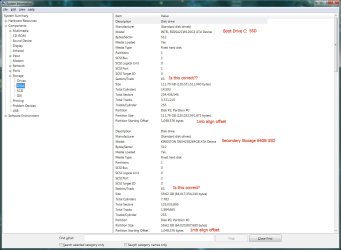
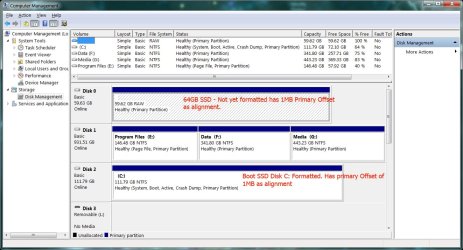
Ok, I ran the clean all command from the CMD Diskpart off of the Win7 sys boot disk. Rebooted into Windows from my new SSD, ran an elevated CMD Diskpart/ListDIsk and then made the 1mb primary offset. As you can see by the images, I did not format the 64GB SSD partition and won't until I determine exactly what and how I'm going to place data on that disk.

I'm showing you the images just in case I made some mistake and you want to direct me to fix it.

a: SysInfoPostInstall (I hope these show)

b: DiskMgmnt2SSds


Once again, thanks for your help.

Pax et bonum,

Phroneo
 

Attachments

  • SysInfoPostInstal.jpg
    SysInfoPostInstal.jpg
    116.8 KB · Views: 16
  • DiskMgmnt2SSDs.jpg
    DiskMgmnt2SSDs.jpg
    128.9 KB · Views: 27

My Computer My Computer

At a glance

Windows 7 Ultimate 64-biti7-93012GB DDR3 KensingtonnVidia GeForce 250 1GB DDR3 RAM
Computer Manufacturer/Model Number
Self Assembled
OS
Windows 7 Ultimate 64-bit
CPU
i7-930
Motherboard
ASUS P6x58D Premium
Memory
12GB DDR3 Kensington
Graphics Card(s)
nVidia GeForce 250 1GB DDR3 RAM
Sound Card
embedded
Monitor(s) Displays
Viewsonic VP2130b
Screen Resolution
1600*1200
Hard Drives
Western Digital Caviar Black 1TB WD1001FALS SATA 6.0GB/sec.
PSU
750 Watt PC Power & Cooling
Case
Antech Sonata
Cooling
Zalman Fans for CPU, GPU, System front and back
Keyboard
Logitech K350
Mouse
Logiteh Performance Mx
Internet Speed
20GB/10GB
Other Info
Kiplisch THx Speaker System
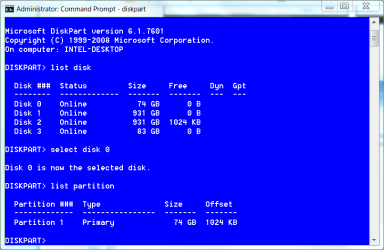
The alignment has to be divisible by 4. BFK wrote the tutorial and aligned the disk at 64 which is correct. I use 1024 which is also correct. To determine do diskpart, list disk, select disk # (number of your disk) list partition it will tell you the offset.
 

My Computers My Computers

  • At a glance

    Windows 11 ProRyzen 9 5900X32GB G Skill DDR4-3600EVGA RTX 3080 FTW 3 Ultra
    Computer type
    PC/Desktop
    Computer Manufacturer/Model Number
    ALWAYS UNDER CONSTRUCTION
    OS
    Windows 11 Pro
    CPU
    Ryzen 9 5900X
    Motherboard
    Asus X570 Crosshair Viii Hero
    Memory
    32GB G Skill DDR4-3600
    Graphics Card(s)
    EVGA RTX 3080 FTW 3 Ultra
    Sound Card
    On Board/Sennheiser PC37X Headset
    Monitor(s) Displays
    3 X Asus 27"
    Screen Resolution
    2560x1440
    Hard Drives
    2 X 1 TB NVME drives
    PSU
    EVGA 850
    Case
    Phanteks Eclipse P400A
    Cooling
    EVGA 280 AIO
    Keyboard
    Logitech G510s/ Logitech G13
    Mouse
    Logitech G502
    Internet Speed
    24/1
    Antivirus
    ESET/MBAM Pro/SAS Pro
    Browser
    Chrome/ Firefox/ Edge
  • At a glance

    Windows 11 ProIntel Ultra 9 288V32 GB LPDDR5X 8533
    Computer type
    Laptop
    System Manufacturer/Model Number
    Dell 16 Plus
    OS
    Windows 11 Pro
    CPU
    Intel Ultra 9 288V
    Memory
    32 GB LPDDR5X 8533
    Monitor(s) Displays
    16" Mini-LED HDR600 Touch 90 Hz
    Screen Resolution
    2560X1600
    Hard Drives
    1 TB NVME
This is what I am talking about

diskpart.PNG

offset is 1024​
 

My Computers My Computers

  • At a glance

    Windows 11 ProRyzen 9 5900X32GB G Skill DDR4-3600EVGA RTX 3080 FTW 3 Ultra
    Computer type
    PC/Desktop
    Computer Manufacturer/Model Number
    ALWAYS UNDER CONSTRUCTION
    OS
    Windows 11 Pro
    CPU
    Ryzen 9 5900X
    Motherboard
    Asus X570 Crosshair Viii Hero
    Memory
    32GB G Skill DDR4-3600
    Graphics Card(s)
    EVGA RTX 3080 FTW 3 Ultra
    Sound Card
    On Board/Sennheiser PC37X Headset
    Monitor(s) Displays
    3 X Asus 27"
    Screen Resolution
    2560x1440
    Hard Drives
    2 X 1 TB NVME drives
    PSU
    EVGA 850
    Case
    Phanteks Eclipse P400A
    Cooling
    EVGA 280 AIO
    Keyboard
    Logitech G510s/ Logitech G13
    Mouse
    Logitech G502
    Internet Speed
    24/1
    Antivirus
    ESET/MBAM Pro/SAS Pro
    Browser
    Chrome/ Firefox/ Edge
  • At a glance

    Windows 11 ProIntel Ultra 9 288V32 GB LPDDR5X 8533
    Computer type
    Laptop
    System Manufacturer/Model Number
    Dell 16 Plus
    OS
    Windows 11 Pro
    CPU
    Intel Ultra 9 288V
    Memory
    32 GB LPDDR5X 8533
    Monitor(s) Displays
    16" Mini-LED HDR600 Touch 90 Hz
    Screen Resolution
    2560X1600
    Hard Drives
    1 TB NVME
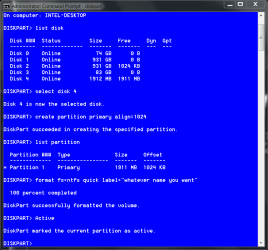
When I get ready to use a disk this is how I do it. Only use active if installing an OS.

Capture.PNG

In this case I did my usb drive. It is exactly the same for an SSD if you do not want the 100MB partition.
 

My Computers My Computers

  • At a glance

    Windows 11 ProRyzen 9 5900X32GB G Skill DDR4-3600EVGA RTX 3080 FTW 3 Ultra
    Computer type
    PC/Desktop
    Computer Manufacturer/Model Number
    ALWAYS UNDER CONSTRUCTION
    OS
    Windows 11 Pro
    CPU
    Ryzen 9 5900X
    Motherboard
    Asus X570 Crosshair Viii Hero
    Memory
    32GB G Skill DDR4-3600
    Graphics Card(s)
    EVGA RTX 3080 FTW 3 Ultra
    Sound Card
    On Board/Sennheiser PC37X Headset
    Monitor(s) Displays
    3 X Asus 27"
    Screen Resolution
    2560x1440
    Hard Drives
    2 X 1 TB NVME drives
    PSU
    EVGA 850
    Case
    Phanteks Eclipse P400A
    Cooling
    EVGA 280 AIO
    Keyboard
    Logitech G510s/ Logitech G13
    Mouse
    Logitech G502
    Internet Speed
    24/1
    Antivirus
    ESET/MBAM Pro/SAS Pro
    Browser
    Chrome/ Firefox/ Edge
  • At a glance

    Windows 11 ProIntel Ultra 9 288V32 GB LPDDR5X 8533
    Computer type
    Laptop
    System Manufacturer/Model Number
    Dell 16 Plus
    OS
    Windows 11 Pro
    CPU
    Intel Ultra 9 288V
    Memory
    32 GB LPDDR5X 8533
    Monitor(s) Displays
    16" Mini-LED HDR600 Touch 90 Hz
    Screen Resolution
    2560X1600
    Hard Drives
    1 TB NVME
essenbe,

Thank you for all that work and information. It is helpful. In fact, I'm going to take my 32gb usb thumb drive and make it a bootable drive just in case my system ever completely crashes.

My 64gb SSD has the correct offset so it's ready for whatever I'm going to put on it. Thanks again for everyone's help. I have very much appreciated it.

Peace,

Phroneo
 

My Computer My Computer

At a glance

Windows 7 Ultimate 64-biti7-93012GB DDR3 KensingtonnVidia GeForce 250 1GB DDR3 RAM
Computer Manufacturer/Model Number
Self Assembled
OS
Windows 7 Ultimate 64-bit
CPU
i7-930
Motherboard
ASUS P6x58D Premium
Memory
12GB DDR3 Kensington
Graphics Card(s)
nVidia GeForce 250 1GB DDR3 RAM
Sound Card
embedded
Monitor(s) Displays
Viewsonic VP2130b
Screen Resolution
1600*1200
Hard Drives
Western Digital Caviar Black 1TB WD1001FALS SATA 6.0GB/sec.
PSU
750 Watt PC Power & Cooling
Case
Antech Sonata
Cooling
Zalman Fans for CPU, GPU, System front and back
Keyboard
Logitech K350
Mouse
Logiteh Performance Mx
Internet Speed
20GB/10GB
Other Info
Kiplisch THx Speaker System
You are welcome and I'm glad you found what you were looking for.
 

My Computer My Computer

At a glance

W 7 64-bit UltimateIntel Q9550 Yorkfield8GB Dominator 8500C5DATI : XFX 5870
Computer Manufacturer/Model Number
* BFK Customs *
OS
W 7 64-bit Ultimate
CPU
Intel Q9550 Yorkfield
Motherboard
ASUS P5Q Pro
Memory
8GB Dominator 8500C5D
Graphics Card(s)
ATI : XFX 5870
Sound Card
Realtek HD Audio 7-1
Monitor(s) Displays
1x 47" LCD HDMI & 3x 26" LCD HDMI
Screen Resolution
1920x1080P & 1920x1200
Hard Drives
1x 80GB Intel X25-M G2 SSD : 1x 500GB & 1x 640GB WD Caviar Black(s)
PSU
Corsair 620HX
Case
Cooler Master RC-690
Cooling
Tuniq Tower 120, 2x 140mm and 3x 120mm case fans
Keyboard
Microsoft 500
Mouse
Razer Diamondback 3G
Internet Speed
14 Mb/s
Other Info
1x Koutech 3Gb/s SATA HDD Hot Swap Rack
You are very welcome. I am glad that we could help. That's what we are here for.
 

My Computers My Computers

  • At a glance

    Windows 11 ProRyzen 9 5900X32GB G Skill DDR4-3600EVGA RTX 3080 FTW 3 Ultra
    Computer type
    PC/Desktop
    Computer Manufacturer/Model Number
    ALWAYS UNDER CONSTRUCTION
    OS
    Windows 11 Pro
    CPU
    Ryzen 9 5900X
    Motherboard
    Asus X570 Crosshair Viii Hero
    Memory
    32GB G Skill DDR4-3600
    Graphics Card(s)
    EVGA RTX 3080 FTW 3 Ultra
    Sound Card
    On Board/Sennheiser PC37X Headset
    Monitor(s) Displays
    3 X Asus 27"
    Screen Resolution
    2560x1440
    Hard Drives
    2 X 1 TB NVME drives
    PSU
    EVGA 850
    Case
    Phanteks Eclipse P400A
    Cooling
    EVGA 280 AIO
    Keyboard
    Logitech G510s/ Logitech G13
    Mouse
    Logitech G502
    Internet Speed
    24/1
    Antivirus
    ESET/MBAM Pro/SAS Pro
    Browser
    Chrome/ Firefox/ Edge
  • At a glance

    Windows 11 ProIntel Ultra 9 288V32 GB LPDDR5X 8533
    Computer type
    Laptop
    System Manufacturer/Model Number
    Dell 16 Plus
    OS
    Windows 11 Pro
    CPU
    Intel Ultra 9 288V
    Memory
    32 GB LPDDR5X 8533
    Monitor(s) Displays
    16" Mini-LED HDR600 Touch 90 Hz
    Screen Resolution
    2560X1600
    Hard Drives
    1 TB NVME
Back
Top