Migration to Win Live Mail, how to transfer files ?

Topaz505

New member
Local time
8:26 PM
Messages
4
Location
Nr Brussels, Belgium
I have spent most this weekend trying to transfer a large set of mail files, with many "user defined folders", from a Vista Windows Mail PC to a Win7 Windows Live Mail PC.

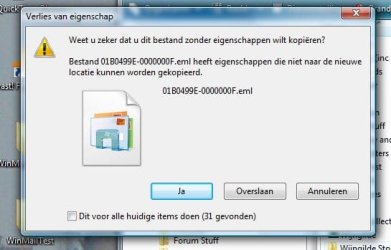
A USB memory stick seemed the obvious way to get the files from one PC to another but this failed with the well-Internet-documented "cannot copy properties" error.
There are several threads about this type of migration on this site but most are rather old.
Reformatting a memory stick to NTFS (an oft proposed solution) is also not trivial.

What is the latest thinking?
Just how do Microsoft expects us to do it (perhaps they don't want us to upgrade . . .;)
Thanks in advance.
 

My Computer My Computer

At a glance

Windows 7 Ultimate x64
OS
Windows 7 Ultimate x64
Hi RodeRunner,
Thanks for your welcome and the response.
In that document you(?) say "You can now move the Saved Mail folder to anywhere you want." but that is just the action that does not work very well. As soon as you try to copy that file to the most obvious inter-PC media Windows complains with the "will you copy without properties" error/warning about the eml files. [Wording may not be exact.]
I attach a Dutch-language version of the message.
Of course you can ignore the warning but which "standard user" knows the consequences ?

Another problem I believe exists is that the Export mechanism cannot handle nested user-defined folders; perhaps other readers can confirm this ?
In all, moving email from one PC to another is far more dicey than it should be.
Not your fault, RodeRunner ;) that lies somewhere else !
Topaz505
 

Attachments

  • eml error.jpg
    eml error.jpg
    28 KB · Views: 4

My Computer My Computer

At a glance

Windows 7 Ultimate x64
OS
Windows 7 Ultimate x64
On the vista machine, install Windows live Mail. Once you install it, it will ask you to import all the email and settings to Windows live mail. Once it does this you can do a export of the emails and account settings. There is a tutorial in here on backing up windows live mail. It will show you how to export and import the emails onto Windows 7 once you have installed Windows Live Mail on that one

here is the tutorial http://www.sevenforums.com/tutorials/115976-windows-live-mail-export-import-email-accounts.html

then look at my next post below
 

My Computer My Computer

At a glance

Windows 7 Pro 32/64 bit and Windows 10 Pro 32...4gigsAMD Radeon HD and Nvidia
Computer type
PC/Desktop
Computer Manufacturer/Model Number
Dell Computers
OS
Windows 7 Pro 32/64 bit and Windows 10 Pro 32 Bit/64bit
Memory
4gigs
Graphics Card(s)
AMD Radeon HD and Nvidia
Monitor(s) Displays
Samsung 24". INC 19". Dell 22 ". Dell 17" & 19"
I suggest that you make a folder in My Documents in Vista to put the export in. Call it Windows Live Mail and make a subfolder and call it BackupWLM
Put the export in the backup wlm folder
Now once you have done the export, right click on the folders and click Properties
On the General Tab it will tell you how big it is
This will determine if you can put it on a an USB Drive or external HD
Once you have done this, then insert the external drive or USB drive and copy and paste this folder
Put it into your Downloads folder on Windows 7
Open WLM in Windows 7
When you follow the instructions on how to import the folder ( the BackupWLM) it will put all the emails into a folder called Storage
You can leave them there or move them into the main folders
 

My Computer My Computer

At a glance

Windows 7 Pro 32/64 bit and Windows 10 Pro 32...4gigsAMD Radeon HD and Nvidia
Computer type
PC/Desktop
Computer Manufacturer/Model Number
Dell Computers
OS
Windows 7 Pro 32/64 bit and Windows 10 Pro 32 Bit/64bit
Memory
4gigs
Graphics Card(s)
AMD Radeon HD and Nvidia
Monitor(s) Displays
Samsung 24". INC 19". Dell 22 ". Dell 17" & 19"
Hi Topaz505,

To test what happened to you, I exported my messages as described in my DOCX file. I moved it from the desktop to an external hdd. Moved back to the desktop. I then moved it to my Laptop. I was able to do it without any warning appearing and was able to read any of my messages. Here are some of my folders.

1.JPG

2.JPG
 

My Computer My Computer

At a glance

Win7 H.Prem. 32bit+SP1
Computer Manufacturer/Model Number
Look in my Signature.
OS
Win7 H.Prem. 32bit+SP1
Back
Top