Mirror's Edge black screen on WIndows 7 64 bit

Dreamcube017

New member
Local time
11:49 PM
Messages
11
Hi guys. I'm having a problem running Mirror's Edge on my computer. I got it through steam and when I run it, I can hear all the sound, but there's no video.

I've seen similar cases where the game would crash, but it seems to be working fine aside from no video output.

I'm running on Windows 7 64 bit with an NVIDIA GTX 260 graphics card. I just updated the drivers this morning.

I checked around and people were saying to change the tdEngine.ini's resolution. There is no tdEngine.ini. There's only a defaultEngine.ini like in most Unreal made ames. Changing anything in that causes the game not to work period.

i CAN'T FIGURE OUT WHY IT WONT' WORK.

i HAVE A LAPTOP RUNNING AN ati GRAPHICS CARD (4550 MAYBE?) aND IT'S RUNNING WINDOWS 7 32 BIT AND WORKS FINE. iT HAS THE SAME RESLOLUTION (1360X768)

i CAN'T FIGURE OUT WHY THE GAME WON'T SHOW ANY VIDEO.

aNY SUGGESTIONS? tHANKS.
 

My Computer My Computer

OS
Windows 7
Make sure your video card drivers and your DirectX files are up to date. I have Mirror's Edge through steam on my machine and it's running great. No ini tweaks neccessary.

See my post here for other tips as well -Tips on Troubleshooting Game Issues
 

My Computer My Computer

Computer type
PC/Desktop
Computer Manufacturer/Model Number
Custom built by me.
OS
Windows 10 Pro
CPU
Intel Core i7-4770K (3.5Ghz)
Motherboard
Gigabyte G1 Sniper 5 (F10 Bios)
Memory
32 gig Corsair Dominator Platinum (4x8Gig)
Graphics Card(s)
Sapphire Tri-X R9 Fury
Sound Card
Soundblaster ZXR
Monitor(s) Displays
NEC PA242W 24" LCD Monitor
Screen Resolution
1920 x 1200
Hard Drives
Primary - Samsung 850 Pro (512gig), Samsung 840 Pro (256gig), 2TB WD Caviar Black.
PSU
EVGA Supernova 1000 G2
Case
Cooler Master HAF X
Cooling
Corsair H100i with Corsair Air Series SP120 Quiet Fans
Keyboard
Logitech Wireless Wave
Mouse
Logitech Performance MX
Internet Speed
High Speed Cable
Antivirus
Norton Security
Browser
IE11
Other Info
Memory Timings - 1866MHz @ 9-9-9-27-1T @ 1.5 volts
make sure u r not using 3GB ram on a 64BIT system
 

My Computer My Computer

OS
Windows 7 Ultimate
CPU
Intel Core 2 Duo E4500
Motherboard
Gigabyte
Memory
2GB DDR2
Graphics Card(s)
ATI HD 4850 512MB
Monitor(s) Displays
IBM LCD
PSU
Cooler Master
make sure u r not using 3GB ram on a 64BIT system

That's not really an issue. Sure it's better to have at least 4gig on a 64-bit, but you can conceivably run it on 2, so 3 isn't a show stopper.

Anyway....

i HAVE A LAPTOP RUNNING AN ati GRAPHICS CARD (4550 MAYBE?) aND IT'S RUNNING WINDOWS 7 32 BIT AND WORKS FINE. iT HAS THE SAME RESLOLUTION (1360X768)
 

My Computer My Computer

Computer type
PC/Desktop
Computer Manufacturer/Model Number
Custom built by me.
OS
Windows 10 Pro
CPU
Intel Core i7-4770K (3.5Ghz)
Motherboard
Gigabyte G1 Sniper 5 (F10 Bios)
Memory
32 gig Corsair Dominator Platinum (4x8Gig)
Graphics Card(s)
Sapphire Tri-X R9 Fury
Sound Card
Soundblaster ZXR
Monitor(s) Displays
NEC PA242W 24" LCD Monitor
Screen Resolution
1920 x 1200
Hard Drives
Primary - Samsung 850 Pro (512gig), Samsung 840 Pro (256gig), 2TB WD Caviar Black.
PSU
EVGA Supernova 1000 G2
Case
Cooler Master HAF X
Cooling
Corsair H100i with Corsair Air Series SP120 Quiet Fans
Keyboard
Logitech Wireless Wave
Mouse
Logitech Performance MX
Internet Speed
High Speed Cable
Antivirus
Norton Security
Browser
IE11
Other Info
Memory Timings - 1866MHz @ 9-9-9-27-1T @ 1.5 volts
Firstly, sorry for writing in all caps. I didn't realize I had capslock on.

Like I said, I updated my gfx drivers the morning of that post. I'll run the DX redist again, but I'm pretty sure I updated that as other games work just fine. (games such as portal and what not)

I have 4 gigs of RAM, not 3.

I'll try some more tests when I get back home. Thanks.
 

My Computer My Computer

OS
Windows 7
I checked around and people were saying to change the tdEngine.ini's resolution. There is no tdEngine.ini. There's only a defaultEngine.ini like in most Unreal made ames.


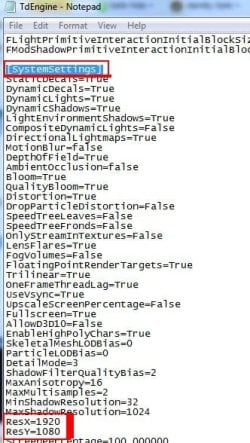
tdengine.ini is located in the Documents Folder.

By Default:
My Documents / EA Games / Mirrors Edge / Tdgame / Config / tdengine.ini


I have no clue if it even works but ...

Open the ini with Notepad.
Press CTRL+F and do a Search for System
It should jump you down to System Settings ... then in that section look for the resolution part and change it to whatever your native resolution is.

Heres a snip of mine so you can see.
 

Attachments

  • Capture.JPG
    Capture.JPG
    45.1 KB · Views: 403

My Computer My Computer

Computer Manufacturer/Model Number
Custom (Self Build)
OS
Windows 7 Home Premium 64bit
CPU
Intel Core i7 2700k
Motherboard
eVGA P67 SLI
Memory
8GB Mushkin Redline Ridgebacks @1866
Graphics Card(s)
EVGA GTX570 SC
Sound Card
XiFi Titanium HD
Monitor(s) Displays
LG W2453V
Screen Resolution
1920x1080
Hard Drives
Intel 320 80GB -- Intel X25-V 40GB --WD Black 1TB x2 -- WD Blue 640GB
PSU
Seasonic x750
Case
Corsair 600T SE White
Cooling
eVGA Superclocked CPU Cooler
Keyboard
Saitek Cyborg
Antivirus
Kaspersky
Browser
IE
Other Info
LG BD/DVD
Back
Top