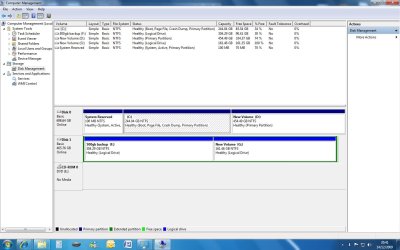
Missing 176gb on my 500gb internal drive.

psionguy

New member
Local time
1:35 PM
Messages
11
I had a 500gb sata 2 Maxtor drive in my old XP machine, so decided to put it into my new Windows 7 computer for backups.

After instalation windows 7 found the drive, and all seemed OK, then when I check it out it only had 324gb missing 176 gb.

Using Windows 7 Pro, foxconn board.

Update

I have found the missing space, but have only managed to get access by allocating a drive letter, I would like to bring all back to just the one 500gb drive. I assume this can be done in drive management, but not sure how to do it.
 

My Computer My Computer

At a glance

windows 7 pro
OS
windows 7 pro
I had a 500gb sata 2 Maxtor drive in my old XP machine, so decided to put it into my new Windows 7 computer for backups.

After instalation windows 7 found the drive, and all seemed OK, then when I check it out it only had 324gb missing 176 gb.

Using Windows 7 Pro, foxconn board.

Can anyone offer any help or suggestions? :(

Right click my computer, click manage, click disk management then post a screenshot of what you see
 

My Computer My Computer

At a glance

Win7 Ultimate X64Intel i5 3570K8GB DDR3 1600Onboard
Computer type
PC/Desktop
Computer Manufacturer/Model Number
Pauly Special
OS
Win7 Ultimate X64
CPU
Intel i5 3570K
Motherboard
Gigabyte Z77X-DS3H
Memory
8GB DDR3 1600
Graphics Card(s)
Onboard
Sound Card
Onboard
Screen Resolution
1280x1024
Hard Drives
Samsung 840 Evo SSD (OS)
1TB Spinner (Data)
PSU
800W Arctic
Case
Cooler Master
Cooling
3x120mm Fans
Keyboard
MS Wireless
Mouse
MS Wireless
Internet Speed
20M
I had a 500gb sata 2 Maxtor drive in my old XP machine, so decided to put it into my new Windows 7 computer for backups.

After instalation windows 7 found the drive, and all seemed OK, then when I check it out it only had 324gb missing 176 gb.

Using Windows 7 Pro, foxconn board.

Can anyone offer any help or suggestions? :(

Right click my computer, click manage, click disk management then post a screenshot of what you see

Not sure how to do a screenshot, but to explain more clearly. My 500gb drive which is a spare drive (no OS) is now partioned into 2 drives. (Drive F) 304.29gb & (drive G) 161.46 gb. I would like to bring it back to just the one drive whithout the partition.

Thanks for your help.
 

My Computer My Computer

At a glance

windows 7 pro
OS
windows 7 pro

My Computer My Computer

At a glance

Windows 7 Home Premium 64bitIntel Core i3-2310M8GBIntel HD3000
Computer Manufacturer/Model Number
Acer Aspire 5750
OS
Windows 7 Home Premium 64bit
CPU
Intel Core i3-2310M
Motherboard
Acer OEM
Memory
8GB
Graphics Card(s)
Intel HD3000
Screen Resolution
1366x768
Hard Drives
320GB Toshiba
Hope this works
 

Attachments

  • screen print.jpg
    screen print.jpg
    116 KB · Views: 67

My Computer My Computer

At a glance

windows 7 pro
OS
windows 7 pro
Looks like you got plenty of space on D drive
Empty your data on there then you can simply delete the two partitions and create one new one
 
Last edited:

My Computer My Computer

At a glance

Win7 Ultimate X64Intel i5 3570K8GB DDR3 1600Onboard
Computer type
PC/Desktop
Computer Manufacturer/Model Number
Pauly Special
OS
Win7 Ultimate X64
CPU
Intel i5 3570K
Motherboard
Gigabyte Z77X-DS3H
Memory
8GB DDR3 1600
Graphics Card(s)
Onboard
Sound Card
Onboard
Screen Resolution
1280x1024
Hard Drives
Samsung 840 Evo SSD (OS)
1TB Spinner (Data)
PSU
800W Arctic
Case
Cooler Master
Cooling
3x120mm Fans
Keyboard
MS Wireless
Mouse
MS Wireless
Internet Speed
20M
If you can empty the disk of any important info you can simply delete the two partitions and then create one new one the size of the disk
THIS WILL BLANK ALL DATA ON HDD

If here is data on the disks you do not want to lose or cannot fit on to another disk then you may need to get some partition software that can remove/resize
paritions without losing data on the disks

Just be careful if you have important data on there

Thanks, thought that may be the case, yes I have data on one of the partition which I don't want to lose, so no easy solution.


Anyhow thanks for your help.
 

My Computer My Computer

At a glance

windows 7 pro
OS
windows 7 pro
you should be able to right click the smaller 'new' volume that does not have any data (if it does, move it to the other volume.), delete the logical volume, then right click the other partition and select 'extend' to resize it without losing any data on it, if there is any.

make an image backup (of the volume with data) first justincase.
 

My Computer My Computer

At a glance

Win 7 ultimate x64 sp1Intel i7 4 core 3770k ivy bridge o/c to 4.2ghz16 GBNvidia geforce GTX650
Computer type
PC/Desktop
Computer Manufacturer/Model Number
Custom build Nanu by 3SX
OS
Win 7 ultimate x64 sp1
CPU
Intel i7 4 core 3770k ivy bridge o/c to 4.2ghz
Motherboard
Asus p8z77-i Deluxe
Memory
16 GB
Graphics Card(s)
Nvidia geforce GTX650
Sound Card
Realtek on mb
Monitor(s) Displays
24in. lcd/led
Screen Resolution
1920x1080
Hard Drives
128GB Kingston SSD
500GB seagate maximus xt hybrid
500GB hitachi HD
500GB external WD Passport usb3
PSU
Silverstone 450 watt
Case
Silverstone FT03 Black Fortress
Cooling
Water cooler
Keyboard
Logitech wireless kbd/mouse mk300
Mouse
Logitech wireless kbd/mouse mk300
Internet Speed
8mb adsl (actuall speed is around 6mb)
Other Info
Asus DSL-N55U wireless router
SONY BC-5850H 6X BLURAY writer
OUTPOST Security Suite
Back
Top