Solved Missing drive letter in Windows 7 Disk Management

Sxcd1

New member
Member
VIP
Local time
4:56 AM
Messages
141
I installed a new 2tb hard drive to replace a 500gig (D:). I need the data from Drive G: to be moved to the new drive and change the drive letter to D: making the new larger drive G:
I changed the drive letter of old G: to Z: temporarily. After formatting the new drive I used Acronis 2012 to clone the old G: to the new drive. I made the new drive G: and it appears in my system. Instead of saying Primary Partition like my other data drives it says Active, Primary Partition. Is that a problem? What does that mean that it is active?

I want to change the old G: now called Z: to D: (the removed drive) but that letter is missing from the list of available drive letters. How do I get it back?
 

My Computer My Computer

Computer type
PC/Desktop
Computer Manufacturer/Model Number
Custom Build
OS
Windows 7 Pro 64Bit
CPU
i7 5820K
Motherboard
MSI X99A SLI KRAIT EDITION LGA 2011-v3
Memory
CORSAIR Vengeance LPX 16GB 288-Pin DDR4 SDRAM
Graphics Card(s)
MSI GeForce GTX 970 100ME 4GB
PSU
Corsair RM850X 850W
Antivirus
Microsoft Security Essentials
Hello Sxcd1,

Can you please upload and post a screenshot of your Disk management window:-

HOW TO POST A SNAPSHOT OF DISK MANAGEMENT DISPLAY

Run disk management:
WIN | type DISKMGMT.MSC | ENTER
This method gives you a display without the unneeded navigation pane.
WIN=key with Microsoft logo on top.


Maximize the output of Disk Management:
ALT-Spacebar key combo | X key (selects Maximize) |
Drag the field separators (such as between Status and Capacity) to show entire field.


Make a snapshot:
WIN | type SNIPPING | ENTER | New
Drag the cursor around the area you want to snip.
File | Save as | select save location and name | Save


Post the snapshot:

http://www.sevenforums.com/tutorials/9733-screenshots-files-upload-post-seven-forums.html

Thanks for your cooperation!
 

My Computer My Computer

Computer Manufacturer/Model Number
DELL SXPS 1640
OS
Windows 7 x64 Professional SP1
CPU
Intel C2D T9550 2.66 GHz @ 2.793 GHz (Thanks ThrottleStop!!)
Motherboard
Intel PM45
Memory
8 GB DDR3
Graphics Card(s)
ATI MOBILITY RADEON 4670
Sound Card
CREATIVE XFI AUDIO NOTEBOOK
Monitor(s) Displays
16.1 WLED
Screen Resolution
1920x1080
Hard Drives
Seagate ST9500420AS 500GB (465GiBi) 7200 RPM Drive

External Drives:-
2 TB WD Essentials x 3
1 TB WD Mybook Gen 1
1 TB WD Mybook Gen 2
1 TB Seagate
1 TB Seagate
320 GB WD Scorpio Black (enclosed)
PSU
90W Dell Power Brick
Case
Dell Chassis
Cooling
Coolermaster Cooling Pad
Keyboard
Built-in backlighted Keyboard
Mouse
Logitech Wireless Mini Mouse
Internet Speed
4/0.5
I reinstalled the D: drive that I removed and renamed it to Y:. I was then able to rename the Z: drive to D: as it was now available. I guess you have to release the drive letter before removing the drive or replacing it.

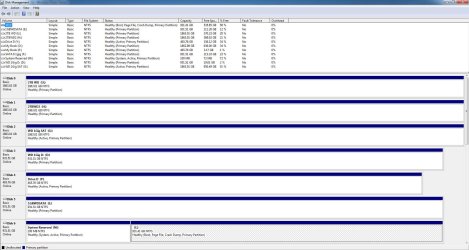
Here is a pic of my drive manager.
1)Why is my G: drive active?
2) What is the M: drive system reserved?
3) What is the best way to copy the old 500 GIG drive (old Drive D:) to the old 1 TB drive (new drive D:) erasing all the old data on it?
 

Attachments

  • disk management.JPG
    disk management.JPG
    203.1 KB · Views: 150
Last edited:

My Computer My Computer

Computer type
PC/Desktop
Computer Manufacturer/Model Number
Custom Build
OS
Windows 7 Pro 64Bit
CPU
i7 5820K
Motherboard
MSI X99A SLI KRAIT EDITION LGA 2011-v3
Memory
CORSAIR Vengeance LPX 16GB 288-Pin DDR4 SDRAM
Graphics Card(s)
MSI GeForce GTX 970 100ME 4GB
PSU
Corsair RM850X 850W
Antivirus
Microsoft Security Essentials
"Active" means it can boot from it. Only for partitions that have a boot manager and bootmenu.
Mark G as inactive!

"system reserved" is the boot partition (status system in screenshot). It has the win7 bootmanager and bootmenu
 

My Computer My Computer

Computer type
Laptop
Computer Manufacturer/Model Number
ACER ASPIRE 5742G
OS
Microsoft Windows 7 Home Premium 64-bits 7601 Multiprocessor Free Service Pack 1
CPU
Intel(R) Core(TM) i3 CPU M 370 @ 2.40GHz
Motherboard
Acer Aspire 5742G
Memory
4,00 GB
Graphics Card(s)
ATI Mobility Radeon HD 5400 Series
Sound Card
(1) AMD High Definition Audio Device (2) Realtek High Defi
Screen Resolution
1366 x 768 x 32 bits (4294967296 colors) @ 60 Hz
Hard Drives
WDC WD5000BEVT-22ZAT0
How do you change it to inactive?
Is it a problem to leave it as active?
 

My Computer My Computer

Computer type
PC/Desktop
Computer Manufacturer/Model Number
Custom Build
OS
Windows 7 Pro 64Bit
CPU
i7 5820K
Motherboard
MSI X99A SLI KRAIT EDITION LGA 2011-v3
Memory
CORSAIR Vengeance LPX 16GB 288-Pin DDR4 SDRAM
Graphics Card(s)
MSI GeForce GTX 970 100ME 4GB
PSU
Corsair RM850X 850W
Antivirus
Microsoft Security Essentials

My Computer My Computer

Computer type
PC/Desktop
Computer Manufacturer/Model Number
Custom Build
OS
Windows 7 Pro 64Bit
CPU
i7 5820K
Motherboard
MSI X99A SLI KRAIT EDITION LGA 2011-v3
Memory
CORSAIR Vengeance LPX 16GB 288-Pin DDR4 SDRAM
Graphics Card(s)
MSI GeForce GTX 970 100ME 4GB
PSU
Corsair RM850X 850W
Antivirus
Microsoft Security Essentials
http://www.sevenforums.com/tutorials/197157-partition-mark-inactive.html
explains the process and the reason to make the drive inactive.

What is the fastest (best) way to copy a smaller drive to a larger one erasing all the data from the target drive before copying.
Is the old drive just 1 partition or more? Is it just data or a win7 OS?

Erasing the target drive is quite easy. Goto "disk management" right click on partition on target drive. Then click on delete. Do it for all partitions you want.
 

My Computer My Computer

Computer type
Laptop
Computer Manufacturer/Model Number
ACER ASPIRE 5742G
OS
Microsoft Windows 7 Home Premium 64-bits 7601 Multiprocessor Free Service Pack 1
CPU
Intel(R) Core(TM) i3 CPU M 370 @ 2.40GHz
Motherboard
Acer Aspire 5742G
Memory
4,00 GB
Graphics Card(s)
ATI Mobility Radeon HD 5400 Series
Sound Card
(1) AMD High Definition Audio Device (2) Realtek High Defi
Screen Resolution
1366 x 768 x 32 bits (4294967296 colors) @ 60 Hz
Hard Drives
WDC WD5000BEVT-22ZAT0
Used Mini Tool Partition Wizard to clone the data drive and change the drive letters. Thanks to all that helped.
 

My Computer My Computer

Computer type
PC/Desktop
Computer Manufacturer/Model Number
Custom Build
OS
Windows 7 Pro 64Bit
CPU
i7 5820K
Motherboard
MSI X99A SLI KRAIT EDITION LGA 2011-v3
Memory
CORSAIR Vengeance LPX 16GB 288-Pin DDR4 SDRAM
Graphics Card(s)
MSI GeForce GTX 970 100ME 4GB
PSU
Corsair RM850X 850W
Antivirus
Microsoft Security Essentials
Used Mini Tool Partition Wizard to clone the data drive and change the drive letters. Thanks to all that helped.
Glad you solved it. Was quite easy with Partition Wizard. Very handy tool
 

My Computer My Computer

Computer type
Laptop
Computer Manufacturer/Model Number
ACER ASPIRE 5742G
OS
Microsoft Windows 7 Home Premium 64-bits 7601 Multiprocessor Free Service Pack 1
CPU
Intel(R) Core(TM) i3 CPU M 370 @ 2.40GHz
Motherboard
Acer Aspire 5742G
Memory
4,00 GB
Graphics Card(s)
ATI Mobility Radeon HD 5400 Series
Sound Card
(1) AMD High Definition Audio Device (2) Realtek High Defi
Screen Resolution
1366 x 768 x 32 bits (4294967296 colors) @ 60 Hz
Hard Drives
WDC WD5000BEVT-22ZAT0
Back
Top