
Solved Use Win 7 disk management to set up new HD with boot record

loninappleton

New member
Member
VIP
Local time
10:07 PM
Messages
892
The HD I have has been low level formated.
After that I went into Win 7 Disk management to install the Simple Volume in the usual way.

I failed to get the boot record installed and do not know if this has to do with Active Partition.
The disk is ready for any wipes needed.. How can I start over on this and why is the boot loader
(no giving an error) tricky to get installed?

Again. I have all the materials for disk management printed out.
What did I miss?

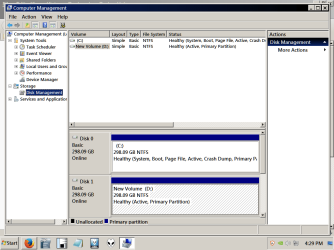
Here's a screen shot of the C: drive and the one with errors:
 

Attachments
  • bootloadererror.png
    bootloadererror.png
    30.6 KB · Views: 1

My Computer My Computer

At a glance

Windows 7 x64 UltimateAMD Athlon II x3 4502 GB
Computer type
PC/Desktop
Computer Manufacturer/Model Number
custom
OS
Windows 7 x64 Ultimate
CPU
AMD Athlon II x3 450
Motherboard
MSI 880GM
Memory
2 GB
Hard Drives
various
Browser
Firefox, Opera
The mbr boot record is installed by the o/s if its a bootable drive other than that the drive is ready to go it has a drive letter and healthy.

What exactly are you trying to do
 

My Computer My Computer

At a glance

win 8 32 bit
Computer type
PC/Desktop
OS
win 8 32 bit
Why are you trying to install a boot record on Disk 1 ???


D should not be marked Active. You can use Diskpart to mark it inactive, but installing and using Partition Wizard may be safer and easier for you.

Partition - Mark as Inactive

Best Free Partition Manager for Windows | MiniTool Partition Free

Or you can delete Disk 1 to unallocated space and try again. ( Practice makes perfect )

I would remove the New Volume label too :) Label it for what it`s purpose will be, Data, Images, etc.
 
Last edited:

My Computer My Computer

At a glance

Windows 10 Pro x64Intel Core i7 6700KGSkill TridentZ RGB 16GB 3600 16-16-16-36EVGA GTX 980 Ti SC x2
Computer type
PC/Desktop
Computer Manufacturer/Model Number
Skylake Special #666
OS
Windows 10 Pro x64
CPU
Intel Core i7 6700K
Motherboard
Asus Sabertooth Z170 Mark 1
Memory
GSkill TridentZ RGB 16GB 3600 16-16-16-36
Graphics Card(s)
EVGA GTX 980 Ti SC x2
Sound Card
Realtek High Definition
Monitor(s) Displays
AOC G2460PG
Screen Resolution
1920 x 1080 144Hz
Hard Drives
Samsung 860 Pro 256GB, Seagate Barracuda 4TB x2
PSU
EVGA 1000 P2, EVGA White Custom Braided Cables
Case
Corsair Vengeance C70 Gunmetal Black
Cooling
Corsair H100i v2, Corsair ML120 x2, Thermal Grizzly Kryonaut
Keyboard
Logitech G910 Orion Spectrum
Mouse
Logitech G700s
Internet Speed
Verizon Fios Quantum Gateway 75/75
Antivirus
Windows Defender, Malwarebytes Free 3.8.3
Browser
Chrome
Other Info
Corsair SP120 x4, LG Blu-ray Drive, Durabrand HT-395 100 Watt Dolby Digital Amp, Corsair H2100 Wireless 7.1 Headset
All I'm after is to prepare a disk that was low level formatted, initialized and formatted to NTFS Simple Volume ready to run the Win7 setup disk. There's all sorts of things stopping this simple procedure.

I had given up on using the Sysprep routine discussed in a related thread. Doing that makes the HD useless. At that point I used a Low Level routine from HDD Guru-- a product I've used before.

Perhaps it's all too old to fool with and cause sevenforums more grief.

I try the delete routine and start again using my good rig to do a new prep.
 

My Computer My Computer

At a glance

Windows 7 x64 UltimateAMD Athlon II x3 4502 GB
Computer type
PC/Desktop
Computer Manufacturer/Model Number
custom
OS
Windows 7 x64 Ultimate
CPU
AMD Athlon II x3 450
Motherboard
MSI 880GM
Memory
2 GB
Hard Drives
various
Browser
Firefox, Opera
If you are trying to install Windows 7 on Disk #1, just unhook Disk #0 and do a normal Windows 7 installation on Disk #1.
I'm not sure why one would want two Windows 7 installation on two drives on the same computer.

Jack
 

My Computer My Computer

At a glance

Windows 10 Pro. 64/ version 1709 Windows 7 Pr...Intel i7-6800K @ 4.3Corsair Platinum 16 gig @2400EVGA GTX 1070 OC
Computer type
PC/Desktop
Computer Manufacturer/Model Number
Home made Desktop
OS
Windows 10 Pro. 64/ version 1709 Windows 7 Pro/64
CPU
Intel i7-6800K @ 4.3
Motherboard
ASUS X-99 Deluxe II
Memory
Corsair Platinum 16 gig @2400
Graphics Card(s)
EVGA GTX 1070 OC
Monitor(s) Displays
Asus 27" LED LCD/VE278Q
Screen Resolution
1920-1080 or 1280-720 HDMI
Hard Drives
INTEL SSD 730-240 Gb Sata 3.0/
PSU
EVGA Platium 1200W
Case
Phanteks Luxe Tempered Glass 8 fans/ one radiator
Cooling
XSPC/ Water Cooled CPU
Keyboard
Das 4 Professional
Mouse
Logitech M705/MX Anywhere 2-S
Internet Speed
100 mbits
Antivirus
Microsoft Security Essentials/ Malwarebytes Premium 3.0/ SAS
Browser
I.E. 11 default/Firefox/ ISP Time Warner Cable/Spectrum
Other Info
LG BluRay Burner/
Sound system-KLipsch-THX/
Icy Dock ssd Hot Swap bays.
As already mentioned, if you want to install win 7 on disk 1:
- Detach disk 0 from the MoBo (very important)
- Boot from the Win 7 installation disk, go to install - advanced - Delete all partitions - create new - choose the big NTFS partition and proceed.
Clean Install Windows 7
 

My Computers My Computers

  • At a glance

    Windows 7 HP 64i5 6600K - 800MHz to 4200MHz4+4G GSkill DDR4 3000IG - Intel 530
    Computer type
    PC/Desktop
    Computer Manufacturer/Model Number
    custom build
    OS
    Windows 7 HP 64
    CPU
    i5 6600K - 800MHz to 4200MHz
    Motherboard
    GA-Z170-HD3P
    Memory
    4+4G GSkill DDR4 3000
    Graphics Card(s)
    IG - Intel 530
    Monitor(s) Displays
    Samsung 226BW
    Screen Resolution
    1680x1050
    Hard Drives
    (1) -1 SM951 – 128GB M.2 AHCI PCIe SSD drive for Windows 7 and Lubuntu
    (2) -1 WD SATA 3 - 1T for Data
    (3) -1 WD SATA 3 - 1T for backup
    PSU
    Thermaltake 450W TR2 gold
    Keyboard
    Old and good Chicony mechanical keyboard
    Mouse
    Logitech mX performance - 9 buttons (had to disable some)
    Internet Speed
    500Mb/s
    Browser
    Firefox 64
    Other Info
    TinyWall firewall
  • At a glance

    Windows 7 Proi7-4500U 800MHz to 3.0GHz(4+4)G DDR3 1600IG intel 4400 + NVIDIA GeForce GT 745M
    Computer type
    Laptop
    System Manufacturer/Model Number
    Asus Q550LF
    OS
    Windows 7 Pro
    CPU
    i7-4500U 800MHz to 3.0GHz
    Motherboard
    Asus Q550LF
    Memory
    (4+4)G DDR3 1600
    Graphics Card(s)
    IG intel 4400 + NVIDIA GeForce GT 745M
    Sound Card
    Realtek
    Monitor(s) Displays
    LG Display LP156WF4-SPH1
    Screen Resolution
    1920 x 1080
    Hard Drives
    BX500 120G SSD for Windows and programs +
    1T HDD for data
    Internet Speed
    500 Mb/s
    Browser
    Firefox
    Other Info
    TinyWall firewall
Continuing,

The picture you are looking at is one of my working rigs with the problem disk
as D. It should be prepped and moved to a backup motherboard I'm
'rejuvenating' as a spare

I checked for BIOS updates on the old K8M800 and it doesn't show any
upgrades past XP. This whole exercise could be futile.

Anyway, today as suggested I deleted the volume-- very brief. Then an option
screen asks New Simple Volume and I say yes.

The new D: is Healthy (Primary Partition.)

That's as far as I am.

Since the disk fails to get recognized I wanted to run the fix boot routines from
a repair CD. I'm going to at least look at accessing this problem HD from the
Repair CD now that the Health Primary Partition (with no active status indication) is in place.

I also will make a guide for myself on that disk part Inactivate link above.

Thanks for your patience.
 

My Computer My Computer

At a glance

Windows 7 x64 UltimateAMD Athlon II x3 4502 GB
Computer type
PC/Desktop
Computer Manufacturer/Model Number
custom
OS
Windows 7 x64 Ultimate
CPU
AMD Athlon II x3 450
Motherboard
MSI 880GM
Memory
2 GB
Hard Drives
various
Browser
Firefox, Opera
"Since the disk fails to get recognized..."
Recognized by...?

There is no need to prepare the disk in one computer to install win 7 on another. You're making it complicated.
If you want to install win 7 on the old MB, just attach the disk to the old MB and detach any other HDD,
- See if the disk is recognized by BIOS.
- Boot from the Win 7 installation disk, go to install - advanced - Delete all partitions - create new - choose the big NTFS partition and proceed.
- Clean Install Windows 7
 

My Computers My Computers

  • At a glance

    Windows 7 HP 64i5 6600K - 800MHz to 4200MHz4+4G GSkill DDR4 3000IG - Intel 530
    Computer type
    PC/Desktop
    Computer Manufacturer/Model Number
    custom build
    OS
    Windows 7 HP 64
    CPU
    i5 6600K - 800MHz to 4200MHz
    Motherboard
    GA-Z170-HD3P
    Memory
    4+4G GSkill DDR4 3000
    Graphics Card(s)
    IG - Intel 530
    Monitor(s) Displays
    Samsung 226BW
    Screen Resolution
    1680x1050
    Hard Drives
    (1) -1 SM951 – 128GB M.2 AHCI PCIe SSD drive for Windows 7 and Lubuntu
    (2) -1 WD SATA 3 - 1T for Data
    (3) -1 WD SATA 3 - 1T for backup
    PSU
    Thermaltake 450W TR2 gold
    Keyboard
    Old and good Chicony mechanical keyboard
    Mouse
    Logitech mX performance - 9 buttons (had to disable some)
    Internet Speed
    500Mb/s
    Browser
    Firefox 64
    Other Info
    TinyWall firewall
  • At a glance

    Windows 7 Proi7-4500U 800MHz to 3.0GHz(4+4)G DDR3 1600IG intel 4400 + NVIDIA GeForce GT 745M
    Computer type
    Laptop
    System Manufacturer/Model Number
    Asus Q550LF
    OS
    Windows 7 Pro
    CPU
    i7-4500U 800MHz to 3.0GHz
    Motherboard
    Asus Q550LF
    Memory
    (4+4)G DDR3 1600
    Graphics Card(s)
    IG intel 4400 + NVIDIA GeForce GT 745M
    Sound Card
    Realtek
    Monitor(s) Displays
    LG Display LP156WF4-SPH1
    Screen Resolution
    1920 x 1080
    Hard Drives
    BX500 120G SSD for Windows and programs +
    1T HDD for data
    Internet Speed
    500 Mb/s
    Browser
    Firefox
    Other Info
    TinyWall firewall
I can mark this solved since the HD was now formatted correctly and I ran the
fix mbr just to make sure the old disk wasn't in a fail mode.

After all that I continue to get blue screened at an install attempt of
both Win7 and my old XP. It just won't go and I've done everything as stated
including the low level format. I took down the setup and am saving that
Ebay special Athlon for something else.

Thanks for the help given and I'm saving all the notes and guides made.
 

My Computer My Computer

At a glance

Windows 7 x64 UltimateAMD Athlon II x3 4502 GB
Computer type
PC/Desktop
Computer Manufacturer/Model Number
custom
OS
Windows 7 x64 Ultimate
CPU
AMD Athlon II x3 450
Motherboard
MSI 880GM
Memory
2 GB
Hard Drives
various
Browser
Firefox, Opera
There is no reason to low level format a hard drive, that is done at the factory.

Maybe the drive is trash, as you said it`s old.

Hard drives of that size are a dime a dozen, just buy a new one.
 

My Computer My Computer

At a glance

Windows 10 Pro x64Intel Core i7 6700KGSkill TridentZ RGB 16GB 3600 16-16-16-36EVGA GTX 980 Ti SC x2
Computer type
PC/Desktop
Computer Manufacturer/Model Number
Skylake Special #666
OS
Windows 10 Pro x64
CPU
Intel Core i7 6700K
Motherboard
Asus Sabertooth Z170 Mark 1
Memory
GSkill TridentZ RGB 16GB 3600 16-16-16-36
Graphics Card(s)
EVGA GTX 980 Ti SC x2
Sound Card
Realtek High Definition
Monitor(s) Displays
AOC G2460PG
Screen Resolution
1920 x 1080 144Hz
Hard Drives
Samsung 860 Pro 256GB, Seagate Barracuda 4TB x2
PSU
EVGA 1000 P2, EVGA White Custom Braided Cables
Case
Corsair Vengeance C70 Gunmetal Black
Cooling
Corsair H100i v2, Corsair ML120 x2, Thermal Grizzly Kryonaut
Keyboard
Logitech G910 Orion Spectrum
Mouse
Logitech G700s
Internet Speed
Verizon Fios Quantum Gateway 75/75
Antivirus
Windows Defender, Malwarebytes Free 3.8.3
Browser
Chrome
Other Info
Corsair SP120 x4, LG Blu-ray Drive, Durabrand HT-395 100 Watt Dolby Digital Amp, Corsair H2100 Wireless 7.1 Headset
Back
Top