Solved Missing Ethernet Controller

JWelk

New member
Local time
8:57 AM
Messages
16
I have an Acer 603G "upgraded" to Win 7 Pro thanks to this forum.
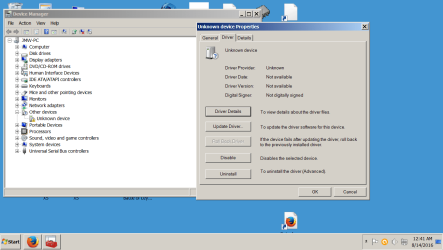
My current issue involves my ethernet controller. It is missing, when I go to Device Manager (DM) the statement where the ethernet controller once existed now reads "Unknown Device". This started when I unsubscribed from software I discontinued. At first the ethernet controller was disabled, I was able to re-enable it from DM. More recently it disappeared from DM and I was able to re load the BIOS and it would work as of two days ago that doesn't help. The BIOS is P11._B2_A. I have downloaded new BIOS onto a pen drive and this still does not correct bring it back.
Any help will be greatly appreciated.
 

My Computer

Computer type
Laptop
Computer Manufacturer/Model Number
Acer
OS
Windows 7 Home Premium 64 bit
Hard Drives
Western Digital
Antivirus
Avast
Browser
Mozilla

My Computers

System One System Two

  • Computer type
    PC/Desktop
    Computer Manufacturer/Model Number
    HP Pavilion 6751c
    OS
    Win7, Win10, Win11
    Internet Speed
    100 Mbps
    Antivirus
    Norton 360
    Browser
    IE 11
  • Computer type
    PC/Desktop
    System Manufacturer/Model Number
    HP ENVY 750-514 & Dell XPS 8960
    OS
    Win7, Win10, Win11
    Antivirus
    Norton 360
Thank you. When I did the upgrade someone suggested Driver Easy. I've sent them the information and will let you know the outcome.
BTW, I've contacted the software provider I deleted. I can no longer access their chat room and am relegated to online support. It makes little difference as I'm still trying to get the computer back on line. At that point and depending upon what I discover, I'll get back to them. I had to reinstall their software, but of course could not activate, as I'm not online. So we'll see. I really can't pin it on them, but I don't like coincidences, and I certainly don't like seeing their log in screen as an option to access the internet, especially after I "uninstalled" there software.
 

My Computer

Computer type
Laptop
Computer Manufacturer/Model Number
Acer
OS
Windows 7 Home Premium 64 bit
Hard Drives
Western Digital
Antivirus
Avast
Browser
Mozilla
What happened is when you upgraded to Windows 7, from Windows Vista. Windows was unable to find a generic Driver to install for you Ethernet. When this happens, you need to go to another PC, go to, in this case, the Acer Website. Find Driver downloads, look for a Windows 7 Ethernet driver. If you find one, download it to a USB stick. Take the USB stick and plug into the PC without Ethernet and save the file to the Desktop. Right click on it and unzip the file. Now open the unzipped file and the Driver will install. Reboot and check in Device Manager. Note: you may also need to download a driver for you Wi-Fi at the same time.

For now look into getting your missing driver/s. I'll look into your other issues shortly.

Are you saying your Browser Home Page got Hijacked? What Browser do you use?

John
 
Last edited:

My Computers

System One System Two

  • Computer type
    PC/Desktop
    Computer Manufacturer/Model Number
    HP Pavilion 6751c
    OS
    Win7, Win10, Win11
    Internet Speed
    100 Mbps
    Antivirus
    Norton 360
    Browser
    IE 11
  • Computer type
    PC/Desktop
    System Manufacturer/Model Number
    HP ENVY 750-514 & Dell XPS 8960
    OS
    Win7, Win10, Win11
    Antivirus
    Norton 360

My Computer

Computer type
PC/Desktop
Computer Manufacturer/Model Number
medionl/Aspire 6930G/acer x55a
OS
W7 home premium 32bit/W7HP 64bit/w10 tp insider ring
CPU
E5300 dual core
Motherboard
medion MS7366
Memory
3gb
Graphics Card(s)
Nvidia Geforce 7100 Nforce 630i
Monitor(s) Displays
avixc
Internet Speed
n (isp resticted to 72)
Antivirus
mse/pands
Browser
palemoon
Other Info
Belkin Fd7050 n USB using Railink RT2870 drivers, more upto date
I think you misunderstood. I upgraded to 7 Pro from 8.1 about a year ago. It has worked great for almost a yr. 10 days ago I was unable to go online, I discovered the Ethernet controller to be disabled. I turned it on and thought no more about it. On the 4th, it happened again. This time it was not disabled, but no longer listed in DM. I searched this forum, someone else suggested to reload the BIOS, again that worked. At this point I uninstalled the suspect software. Since the 4th I've had to reload the BIOS 2 or 3 times. Until Sunday, NADA. Imagine my surprise when I clicked on the redX in the Internet box and saw the login from the deleted software company. Since then I've trying to find answers in fact even to frame the proper question to get an answer. For what its worth I use Mozilla and Duckduckgo. American Pharoah, bless his little heart seems to have pointed me in the right direction. Even his example was in the same area as my missing controller. Easy driver hasrequested screen shots of the areas in question, im just awaiting a response. Hope this clears it up a bit. Best, Jim W
 

My Computer

Computer type
Laptop
Computer Manufacturer/Model Number
Acer
OS
Windows 7 Home Premium 64 bit
Hard Drives
Western Digital
Antivirus
Avast
Browser
Mozilla
Easy Driver will post a link somewhat like mine.

The link i posted goes directly to the W7 Ethernet driver for that comp.

IF your old DELETED software still appears then you will also have to REMOVE the Network listing for it as well,
I would also look in Computer >> C >> programes/programs(x86) see if that software is listed, if so DELETE.

to check driver please go DM >> unknown device >> properties >> Details >> Hardware ID's
post the xx&VEN xxxx&DEV detail.

Roy
 

My Computer

Computer type
PC/Desktop
Computer Manufacturer/Model Number
medionl/Aspire 6930G/acer x55a
OS
W7 home premium 32bit/W7HP 64bit/w10 tp insider ring
CPU
E5300 dual core
Motherboard
medion MS7366
Memory
3gb
Graphics Card(s)
Nvidia Geforce 7100 Nforce 630i
Monitor(s) Displays
avixc
Internet Speed
n (isp resticted to 72)
Antivirus
mse/pands
Browser
palemoon
Other Info
Belkin Fd7050 n USB using Railink RT2870 drivers, more upto date
@AmericanPharoah, @Torchwood and the 1423 other viewers. Guess which computer I'm responding on. I was able to download a Realtech driver from the Acer site. D.M. still lists it as an unknown device but at least it is back on line. I'll dig further and get the correct one.
See the attachment:
Thanks again to all..........
 

Attachments

  • Unk Dev SS.png
    Unk Dev SS.png
    38.1 KB · Views: 0

My Computer

Computer type
Laptop
Computer Manufacturer/Model Number
Acer
OS
Windows 7 Home Premium 64 bit
Hard Drives
Western Digital
Antivirus
Avast
Browser
Mozilla
Back
Top