Solved Missing Link in Control Panel

bowler285

New member
Local time
5:50 PM
Messages
3
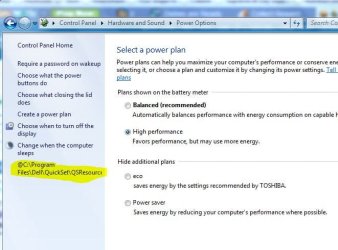
I went into control panel then hardware&sound then power management. Now on the left sidebar where the options are, there is a missing link that Easy Transfer moved from my old computer but the file it links to is not there. I just got a toshiba notebook and the invalid option says @C:\Program Files\Dell\Quickset\Battery.exe which obviously shouldn't be there. I have tried a registry cleaner to no avail. Any tips on how to get rid of it???
 

My Computer

Computer Manufacturer/Model Number
Toshiba
OS
Windows 7 Home Premium x64
CPU
Intel Core i3
Memory
4 GB
Monitor(s) Displays
15.6 inch
Hard Drives
640 GB
bowler285, Please post a screenshot of this window.
Also, please indicate from which model of computer you moved that settings from.
And currently you are not using Quickset and are not planning to use it?

Technically you can download that Quickset, install it, and then uninstall it. It should pick up and delete that setting too.
 

My Computer

Computer type
PC/Desktop
OS
Windows 8.1 ; Windows 7 x86 (Dec2008-Jan2013)
Other Info
"The scale icon at the top right of a post or tutorial is how you can give rep to the member."
That won't work

I have a Toshiba Satellite and I transfered from a Dell Studio 1737. So uninstall reinstall won't work because quickset only installs on dell computers.
 

Attachments

  • Capture.JPG
    Capture.JPG
    50.8 KB · Views: 28

My Computer

Computer Manufacturer/Model Number
Toshiba
OS
Windows 7 Home Premium x64
CPU
Intel Core i3
Memory
4 GB
Monitor(s) Displays
15.6 inch
Hard Drives
640 GB
Please check this thread in the Registry
HKEY_LOCAL_MACHINE\SOFTWARE\Microsoft\Windows\CurrentVersion\Applets\SysTray\BattMeter\ContextMenu\1
that menu should be there.

Change menu values to nothing, but do not delete keys themselves.
Or you can apply the reg file attached.
 

Attachments

My Computer

Computer type
PC/Desktop
OS
Windows 8.1 ; Windows 7 x86 (Dec2008-Jan2013)
Other Info
"The scale icon at the top right of a post or tutorial is how you can give rep to the member."
thank you the first option fixed it
 

My Computer

Computer Manufacturer/Model Number
Toshiba
OS
Windows 7 Home Premium x64
CPU
Intel Core i3
Memory
4 GB
Monitor(s) Displays
15.6 inch
Hard Drives
640 GB
Back
Top