
Missing 'users' subdirectory in eruNT/AUTOBACKUP Registry backups

RonCam

New member
Local time
8:53 PM
Messages
21
I followed A Guy's tutorial on how to get this to work in Windows 7, by way of Task Manager. Yes, it does work as advertised and I am now filling the autobackup directory with Registry backups, one for each day.

However, I just noticed that 'users', a sub-directory, is missing from each backup's directory, and I can't figure out why.

It's possible it doesn't matter, of course, but in checking eruNT individual forced backups in Windows 7, and all of them (both forced and daily automatic), in Windows 2000 Professional ... the users sub-directory was always there.

Anyone have any ideas on how I can get it back? And, anyone else who's making daily automatic backups on Windows 7, please check and see whether or not your setup is producing these subdirectories.

My concern is that when I have to restore, something in Windows won't work right afterwards.
? How do I get AUTOBACKUP.exe to write this subdirectory, as it has in the past?
 
Last edited:

My Computer My Computer

OS
Windows 2000 Pro SP4+ / Windows 7 Pro SP1 (both 32-bit)
Bump ...

Isn't anyone doing Registry backups with eruNT's AUTOBACK.exe?

Please take a look at Windows\erdnt\autobackup and let me know if your daily backups include a users directory.

It's always been there with previous installations and so I assumed it should be, now. Any opinions on this?

Much appreciated! :)
 
Last edited:

My Computer My Computer

OS
Windows 2000 Pro SP4+ / Windows 7 Pro SP1 (both 32-bit)
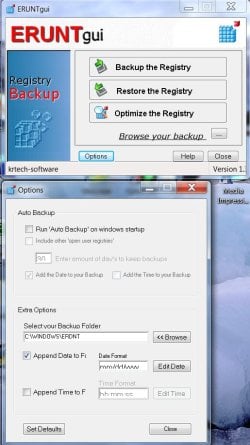
Please check my post http://www.sevenforums.com/backup-r...ore-cuz-restore-not-workin-2.html#post1792641 on ERUNT GUI.

I am inputting the screenshot here again for ease of reference.

ERUNT GUI.jpg

Use it and check whatever you want.:)

( I am not using the auto backup but taking only occasional backups. For the backup I took today, I checked "include other "open user Registries" " in the options. There are three ntuser.dat files and one UserClass.dat file in the Users folder.)
 

My Computer My Computer

OS
Windows 7 Home Premium 32 bit
I guess everyone else's backups must have the users folder ...

... [In my Registry backups t]here are three ntuser.dat files and one UserClass.dat file in the Users folder.)
Hi and thanks for confirming. I suspect the GUI is running eruNT.exe and that does, and always had, given me a backup with the second directory. Unless someone has information to the contrary, I would have to guess ... these backups are incomplete and could fail.

I really do like the automatic backups, however, as a safeguard against unexpected, undesirable Registry changes.

A Guy's
procedure to do this in Windows 7, through Task Scheduler, was working well, for several days, and I thought everything was going fine, until I looked at the individual daily backups more closely and noticed the Users directory (including of course any file(s) it should contain) was missing from each!

But it seems I am the only one having this problem, when AUTOBACK.exe is run through Task Scheduler, as described in A Guy's tutorial.

:)Thanks for the link. I will study that and see if I'm missing anything.
 

My Computer My Computer

OS
Windows 2000 Pro SP4+ / Windows 7 Pro SP1 (both 32-bit)
I'll just add that ERUNT's AUTOBACK.EXE, run from Task Scheduler with settings similar to those from A Guy, does provide me with a Users directory (with two subfolders, one for ntuser.dat and one for UsrClass.dat) each time.

Supposedly, I think this is the default, but I explicitly use command line parameters/arguments of "sysreg" and "curuser" in "%SystemRoot%\ERDNT\#Date# sysreg curuser /alwayscreate /noconfirmdelete /days:7" anyway.
 

My Computer My Computer

Computer Manufacturer/Model Number
Lenovo ThinkPad T420s
OS
Windows 7 Professional x64 SP1
CPU
Intel Core i5-2540M CPU @ 2.60 GHz
Memory
8 GB
Screen Resolution
1600x900 running at 1366x768
Hard Drives
120 GB SSD
Other Info
Use XP Mode virtual OS for VC6 only
If you have configured an automated backup via the Task Scheduler - and set it to run as a System process at Startup - then you can find that the Users folder is missing altogether - or has some folders but doesn't contain the folder for the Current_User. The notes below explain this:

To backup a users registry files ERUNT needs that user to be logged onto the computer.
Run as a SYSTEM process at Startup the task normally runs before a user has logged on.
This results in a registry backup with only the internal "generic" user accounts.
Running the backup at LOGON allows the Current_User registry files to be identified.

This is an extract from my install notes for ERUNT on Win7 systems.
My install notes for ERUNT are posted on-line at the following location http://www.stargateuk.info/upload/ERUNT_Tweaks_Win7.txt
 

My Computer My Computer

OS
Windows 7 Home Premium 32bit
My task for autobackups with ERUNT is set up similarly, but not identically. Here's what I've been using:

General tab :
Task Name : $_Run_EruNT (You'll want your own name here)
User Account : FRED-T420S\fred (ComputerName\UserName) (You'll need ~your~ names here)
Check : Run only when user is logged on
Check : Run with highest privileges
Configure for : Windows 7 [...]

Triggers tab : (You likely will want to change when the task runs for ~your~ own preferences)
Check : Daily
Start : [Date] 8:01:00 AM
Recur every : 1 day(s)
Check : Enabled

Actions tab :
Action : Start a program
Program : C:\Programs\EruNTPortable\AUTOBACK.EXE (you'll need your own path here)
Arguments : %SystemRoot%\ERDNT\#Date# sysreg curuser /alwayscreate /noconfirmdelete /days:7
(You likely will want to modify the above arguments for ~your~ own preferences)

Conditions tab : (Nothing checked)

Settings tab :
Check : Allow task to be run on demand
Check : Run task as soon as possible after a scheduled task is missed
Check : Stop the task if it runs longer than : 1 hour
Check : If the running task does not end when requested, force it to stop
 
Last edited:

My Computer My Computer

Computer Manufacturer/Model Number
Lenovo ThinkPad T420s
OS
Windows 7 Professional x64 SP1
CPU
Intel Core i5-2540M CPU @ 2.60 GHz
Memory
8 GB
Screen Resolution
1600x900 running at 1366x768
Hard Drives
120 GB SSD
Other Info
Use XP Mode virtual OS for VC6 only
Backup User Registry

I have just started using ERUNT to backup the registry, and have set up a scheduled task under the SYSTEM account to run at start up. As experienced by others, this does not create the User folder, which makes sense, since the User is not logged on when the task runs.
After messing about with different settings, I finally managed to successfully backup the User registry settings by doing the following:

  1. Set the task to run under the User account.
  2. Click the "Trigger" tab and edit the task.
  3. Place a check mark in the "Delay task for" check-box, and set a delay time.
  4. Save everything and exit Task Scheduler.
The User folder should now be created the next time you startup and logon.
 

My Computer My Computer

OS
Windows 7 Pro x64
Back
Top