Monitor + HDD shuts off, CPU still running

Dj SharK

New member
Member
Local time
7:02 AM
Messages
93
Location
S.E.A
I have no idea what's going on. This has never happened throughout my years of using computers.

About a few hours back, my monitor shuts off (turns from blue to orange light - as though i turn off my PC but not my monitor). I looked at my CPU and the HDD lights doesn't turn on (the red that flickers when HDD is 'working', etc). CPU is still running though.

What might have caused this? I opened up my side panel about 12 hours ago because my HDD temp was 53C (after opening the side panel, it went down to 43-45C while watching a HD video). Could it be because of my GPU? If it is, would a new graphic card fix this?

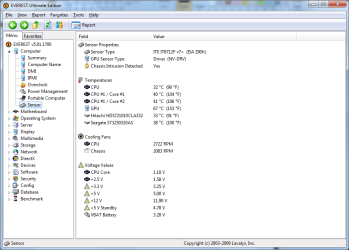
Attached is a snapshot of Everest taken 5 minutes upon turning on my PC (after 3 hours of shut down). At the point of the snapshot, no softwares are in-use except for AV - Eset Smart Security).

Going to bed now. Will check on replies, etc when i get up. ;)


Thank you!
 

Attachments

  • Untitled.png
    Untitled.png
    37.3 KB · Views: 105

My Computer My Computer

Computer Manufacturer/Model Number
DIY
OS
Windows 7 Ultimate x86 7600
CPU
Intel Pentium Dual CPU E2180 @ 2.00 GHz
Motherboard
Gigabyte G41M Combo (rev 1.3)
Memory
1 x 2GB | 1 x 1GB Kingston 667
Graphics Card(s)
512MB Nvidia GeForce EN8500GT Silent Magic
Sound Card
Onboard HD 7.1 Audio
Monitor(s) Displays
22" LG W2242T
Screen Resolution
1680 X 1050
Hard Drives
1 x 500GB SATA Hitachi ( Internal )
1 x 1TB SATA Hitachi ( Internal )
1 x 320GB Western Digital ( External )
PSU
500W
Case
Coolermaster
Cooling
Coolermaster
Keyboard
Logitech Media Wireless Keyboard
Mouse
A4Tech G6 Wireless Mouse
Internet Speed
DL : 12MB/s | UL : 1.2MB/s
Other Info
I'm not a gamer. I don't overclock. I use my PC for web browsing, listening to music and watching HD movies.
I'm not sure I quite understand the question. Are you asking about heat affecting your GPU, causing a black screen? Or are you worried about just heat in general?

You left your computer for a few hours, and came back to a black screen, and your HDD was shut down, but your CPU was still running?
 

My Computer My Computer

Computer Manufacturer/Model Number
Pugh Technologies
OS
W7 Professional x64
CPU
AMD Athlon II X3 445 Rana 3.10 GHz
Motherboard
MSI 870A-G54
Memory
PNY XLR DDR3 1600 4x2GB
Graphics Card(s)
NVIDIA GeForce GTS 450 (fermi) 1GB GDDR5
Sound Card
Realtek ALC892 onboard
Monitor(s) Displays
ASUS VE205t, Viewsonic VX2035WM
Screen Resolution
1600x900, 1600x1050
Hard Drives
977GB Hitachi Hitachi HDS721010CLA332
244GB Western Digital WDC WD2500AAJS-65B4A0
488GB Western Digital WDC WD5000AAJS-00A8B0
488GB Western Digital WDC WD5000AAKS-00UU3A0
PSU
Antec EarthWatts EA650 650W
Case
ThermalTake Armor A90 Mid Tower
Cooling
3x 120mm in, 1x 120mm & 200mm out, self built hydro-cooler
Keyboard
Logitec 55
Mouse
Razer Deathadder
Internet Speed
20 Mbps D/L, 9 Mbps U/L
Basically, i want to know what causes my monitor to shut off (and HDD too) without any warning. Was wondering if it's because of my graphic card temp or maybe it's something else that i overlooked.

When it first shut down for the first time earlier, i have nothing open except for Winamp and i was downloading windows update (about 300+ MB worth - MS office and a few others). PC doesn't respond when i move my mouse or pressed the keys on my keyboard. So i did a hard reset and when it turned back on again, it died immediately after logging into windows.

I've since turned off Windows Update (no idea if it would fix it though).
 

My Computer My Computer

Computer Manufacturer/Model Number
DIY
OS
Windows 7 Ultimate x86 7600
CPU
Intel Pentium Dual CPU E2180 @ 2.00 GHz
Motherboard
Gigabyte G41M Combo (rev 1.3)
Memory
1 x 2GB | 1 x 1GB Kingston 667
Graphics Card(s)
512MB Nvidia GeForce EN8500GT Silent Magic
Sound Card
Onboard HD 7.1 Audio
Monitor(s) Displays
22" LG W2242T
Screen Resolution
1680 X 1050
Hard Drives
1 x 500GB SATA Hitachi ( Internal )
1 x 1TB SATA Hitachi ( Internal )
1 x 320GB Western Digital ( External )
PSU
500W
Case
Coolermaster
Cooling
Coolermaster
Keyboard
Logitech Media Wireless Keyboard
Mouse
A4Tech G6 Wireless Mouse
Internet Speed
DL : 12MB/s | UL : 1.2MB/s
Other Info
I'm not a gamer. I don't overclock. I use my PC for web browsing, listening to music and watching HD movies.
Heat could definitely be a culprit. Is it running better now that you have the side panel open?
 

My Computer My Computer

Computer Manufacturer/Model Number
Pugh Technologies
OS
W7 Professional x64
CPU
AMD Athlon II X3 445 Rana 3.10 GHz
Motherboard
MSI 870A-G54
Memory
PNY XLR DDR3 1600 4x2GB
Graphics Card(s)
NVIDIA GeForce GTS 450 (fermi) 1GB GDDR5
Sound Card
Realtek ALC892 onboard
Monitor(s) Displays
ASUS VE205t, Viewsonic VX2035WM
Screen Resolution
1600x900, 1600x1050
Hard Drives
977GB Hitachi Hitachi HDS721010CLA332
244GB Western Digital WDC WD2500AAJS-65B4A0
488GB Western Digital WDC WD5000AAJS-00A8B0
488GB Western Digital WDC WD5000AAKS-00UU3A0
PSU
Antec EarthWatts EA650 650W
Case
ThermalTake Armor A90 Mid Tower
Cooling
3x 120mm in, 1x 120mm & 200mm out, self built hydro-cooler
Keyboard
Logitec 55
Mouse
Razer Deathadder
Internet Speed
20 Mbps D/L, 9 Mbps U/L
Edited my message above yours by adding more infos.

Anyways, i opened up the side panel about 12 hours back. HDD and CPU temp is wayyyyy better. But the issue (monitor+hdd shutting down) started only about 4 hours back. GPU (i believe that is my graphic card) temp seems to go up i believe. Never really monitored GPU temp before.
 

My Computer My Computer

Computer Manufacturer/Model Number
DIY
OS
Windows 7 Ultimate x86 7600
CPU
Intel Pentium Dual CPU E2180 @ 2.00 GHz
Motherboard
Gigabyte G41M Combo (rev 1.3)
Memory
1 x 2GB | 1 x 1GB Kingston 667
Graphics Card(s)
512MB Nvidia GeForce EN8500GT Silent Magic
Sound Card
Onboard HD 7.1 Audio
Monitor(s) Displays
22" LG W2242T
Screen Resolution
1680 X 1050
Hard Drives
1 x 500GB SATA Hitachi ( Internal )
1 x 1TB SATA Hitachi ( Internal )
1 x 320GB Western Digital ( External )
PSU
500W
Case
Coolermaster
Cooling
Coolermaster
Keyboard
Logitech Media Wireless Keyboard
Mouse
A4Tech G6 Wireless Mouse
Internet Speed
DL : 12MB/s | UL : 1.2MB/s
Other Info
I'm not a gamer. I don't overclock. I use my PC for web browsing, listening to music and watching HD movies.
If the GPU temp is still going up, maybe you can increase the fan speed to a higher %?

If you don't have a cooled GPU, I would invest in some better case fans. I'm about to go from 50CFM fans up to 70, even though my processor is a chilly 15*C at mild use.
 

My Computer My Computer

Computer Manufacturer/Model Number
Pugh Technologies
OS
W7 Professional x64
CPU
AMD Athlon II X3 445 Rana 3.10 GHz
Motherboard
MSI 870A-G54
Memory
PNY XLR DDR3 1600 4x2GB
Graphics Card(s)
NVIDIA GeForce GTS 450 (fermi) 1GB GDDR5
Sound Card
Realtek ALC892 onboard
Monitor(s) Displays
ASUS VE205t, Viewsonic VX2035WM
Screen Resolution
1600x900, 1600x1050
Hard Drives
977GB Hitachi Hitachi HDS721010CLA332
244GB Western Digital WDC WD2500AAJS-65B4A0
488GB Western Digital WDC WD5000AAJS-00A8B0
488GB Western Digital WDC WD5000AAKS-00UU3A0
PSU
Antec EarthWatts EA650 650W
Case
ThermalTake Armor A90 Mid Tower
Cooling
3x 120mm in, 1x 120mm & 200mm out, self built hydro-cooler
Keyboard
Logitec 55
Mouse
Razer Deathadder
Internet Speed
20 Mbps D/L, 9 Mbps U/L
Back
Top