
Monitor refuses to recognize new graphics card. BIOS help?

Dr Blahson

New member
Local time
6:10 PM
Messages
8
I recently bought and installed a new EVGA750ti. But, It refuses to work with either my tv or my computer monitor. The only thing I ever see is something that say "cannot find signal" or some such nonsense. I've tried messing with the Bios and I'm writing this in safe mode as we speak. I know it's a software issue and not a hardware one. Ideas?

I have a gigabyte AMD Athalon x4 640 motherboard.And I think I may need to update it. How will I know which update to use?
 

My Computer My Computer

Computer type
PC/Desktop
OS
Microsoft Windows 7 Enterprise 64-bit 7601 Multiprocessor Free Service Pack 1
CPU
AMD Athlon(tm) II X4 640 Processor
Motherboard
Gigabyte Technology Co., Ltd. GA-MA770T-UD3
Memory
12.00 GB
Graphics Card(s)
NVIDIA GeForce GT 430
Sound Card
(1) NVIDIA High Definition Audio (2) NVIDIA Virtual Audio
Screen Resolution
1768 x 992 x 32 bits (4294967296 colors) @ 60 Hz
Hard Drives
(1) ST3320418AS ATA Device (2) Seagate FreeAgentDesktop USB Device
Obvious I know but have you tried the usual stuff like reseating the card and checking all the connections.

Now another obvious thing is to update the driver try this EVGA Download Center
 

My Computer My Computer

Computer type
PC/Desktop
Computer Manufacturer/Model Number
Own build (new) Desk1 / Asus ROG Win 7 / Desk2 1st build
OS
Desk1 7 Home Prem / Desk2 10 Pro / Main lap Asus ROG 10 Pro 2 laptop Toshiba 7 Pro Asus P2520 7 & 10
CPU
Desk1 i5 3750K / Laptop i7 GTX 860M / Desk2 i5 2500
Motherboard
Desk1 Asus P877-V / Desk2 Gigabyte H67 UD3H / Laptop ?
Memory
Desk1 8GB (1866) / Desk2 16GB (1333) / Laptop 8Gb DDR3
Graphics Card(s)
Desk 1& 2NVidia GTX 650 & Laptops on board Intel
Sound Card
Desk 1 & 2 -XONAR DG Realtek High Def audio Laptop
Monitor(s) Displays
Desk 1 Benq HD 2450 / Desk2 Philips 24" / Laptop 17.5"
Screen Resolution
1920x1080 D1 & D2 & Laptop 1
Hard Drives
Desk1 Samsung 120GB 830 SSD
Asus ROG 256GB 850 Pro SSD
Desk2 Samsung 840 256 SSD
Toshiba 120GB EVO
PSU
Desk 1 Corsair HX 1050/ Laptop ? / Desk 2 Corsair HX 650
Case
Desk 1 Cooler HAF XM ? Toshiba laptop / Desk2 Coolermaster
Cooling
Fans on all Desk1 -2 Desk2 - all Coolermasters 5 Laptop ?
Keyboard
Desk 1 MS Sidewinder X6 Desk 2 MS Sidewinder X 4
Mouse
Desk 1&2 - Gigabyte MS 900 gamer - laptop - Logitec wireless
Internet Speed
ADSL2+
Other Info
One other Desktop (tester) and spare Toshba laptop both with SSD's
Running Kaspersky 2016 ISS on all machines config'd identically
Logitec audio stereo systems on each machine (x3)
Canon MG5250MFC
Router/modem TP-Link running WPA2SK
Here's an update:

After talking to a tech guy for a couple of hours. We flashed the bios to the latest version and downloaded the latest graphics driver and....

nothing. Still no signal. Am I up a creek without a paddle?
 

My Computer My Computer

Computer type
PC/Desktop
OS
Microsoft Windows 7 Enterprise 64-bit 7601 Multiprocessor Free Service Pack 1
CPU
AMD Athlon(tm) II X4 640 Processor
Motherboard
Gigabyte Technology Co., Ltd. GA-MA770T-UD3
Memory
12.00 GB
Graphics Card(s)
NVIDIA GeForce GT 430
Sound Card
(1) NVIDIA High Definition Audio (2) NVIDIA Virtual Audio
Screen Resolution
1768 x 992 x 32 bits (4294967296 colors) @ 60 Hz
Hard Drives
(1) ST3320418AS ATA Device (2) Seagate FreeAgentDesktop USB Device
And now it's doing the same thing with the old graphics card
 

My Computer My Computer

Computer type
PC/Desktop
OS
Microsoft Windows 7 Enterprise 64-bit 7601 Multiprocessor Free Service Pack 1
CPU
AMD Athlon(tm) II X4 640 Processor
Motherboard
Gigabyte Technology Co., Ltd. GA-MA770T-UD3
Memory
12.00 GB
Graphics Card(s)
NVIDIA GeForce GT 430
Sound Card
(1) NVIDIA High Definition Audio (2) NVIDIA Virtual Audio
Screen Resolution
1768 x 992 x 32 bits (4294967296 colors) @ 60 Hz
Hard Drives
(1) ST3320418AS ATA Device (2) Seagate FreeAgentDesktop USB Device
Does your motherboard BIOS have a setting which disables a discrete graphics card and only uses some onboard built-in Intel or AMD graphics?

Normally "AUTO" would look for the presence of a graphics card in the PCIe slots, and only if not finding one would it revert to built-in onboard graphics. If your BIOS shows "AUTO" or something meaning the same thing, you might have a problem with your board.

How can you run in SAFE mode at all (to do this posting), if it's a hardware issue? Are you saying you CAN use the monitor in SAFE mode (which doesn't load the SVGA driver, but instead uses standard Windows VGA driver)? What cable are you using to connect to the monitor, and is it from the graphics card connectors or from the motherboard's video connector?

And now you also say the same problem is occurring when you revert to your older video card, that it too no longer runs in SVGA mode but only in VGA mode?

Sounds like a problem with the motherboard and chipset, or BIOS settings on the motherboard. Can you investigate? Can you "reset" the BIOS on the motherboard to "factory", and then re-cusomize if you need to? Does that help you video problem?
 

My Computer My Computer

Computer type
PC/Desktop
Computer Manufacturer/Model Number
Home-built, two systems (1) and (2)
OS
Windows 7 Pro x64 (1), Win7 Pro X64 (2)
CPU
i5-3350p 3.1Ghz/6MB-cache (1); E8400 3.0Ghz/6MB-cache (2)
Motherboard
ASUS P8Z77-V Pro (1); ASUS P5Q3 (2)
Memory
8GB PC3-12800 DDR3 (1); 4GB PC3-10600 DDR3 (2)
Graphics Card(s)
ATI HD7750 (1), (see TV cards); ATI R7 250 (2)
Sound Card
Realtek ALC892 HD Audio (1); Realtek ALC1200 HD Audio (2)
Monitor(s) Displays
Eizo HD2441W LCD, Eizo S2433W (1); Eizo 24" S2433W (2)
Screen Resolution
1920x1200, 1920x1200 (1); 1920x1200 (2)
Hard Drives
(1) 1TB SATA-II (7200RPM), 2x2TB SATA-III (7200RPM), 250GB SATA-III (10000RPM) for OS; 2x2TB external USB 3.0

(2) 320GB SATA-II (7200RPM), 750GB SATA-II (7200RPM), 150GB SATA-II (10000RPM) for OS; 2TB external USB 3.0
PSU
Nesteq ECS-6001 600W (1); Nesteq ECS-5001 500W (2)
Case
Acousti-Case 360 (1) and (2)
Cooling
Noctua NH-U12P SE2 for CPU, 2x120mm case fans (1) and (2)
Keyboard
IBM PS/2 (1) and (2)
Mouse
Logitech MX Revolution wireless (1); Microsoft wired (2)
Internet Speed
100mbps down / 10mbps up
Antivirus
Microsoft Security Essentials; Malwarebyte Anti-Malware Pro
Browser
Firefox
Other Info
Ceton InfiniTV 4-tuner cablecard-enabled TV card as well as Hauppauge HVR-2250 OTA/ATSC 2-tuner TV card in (1), running under Win7 WMC
To answer your first question, I couldn't find something that disabled a discrete graphics card in my bios.

I have tried setting my bios to load from my PEG (pci express) slot. And, I tried the other way too.

I was saying it is NOT a hardware issue. Obviously it is getting something from my graphics card.

How would I return my bios to factory defaults?
 

My Computer My Computer

Computer type
PC/Desktop
OS
Microsoft Windows 7 Enterprise 64-bit 7601 Multiprocessor Free Service Pack 1
CPU
AMD Athlon(tm) II X4 640 Processor
Motherboard
Gigabyte Technology Co., Ltd. GA-MA770T-UD3
Memory
12.00 GB
Graphics Card(s)
NVIDIA GeForce GT 430
Sound Card
(1) NVIDIA High Definition Audio (2) NVIDIA Virtual Audio
Screen Resolution
1768 x 992 x 32 bits (4294967296 colors) @ 60 Hz
Hard Drives
(1) ST3320418AS ATA Device (2) Seagate FreeAgentDesktop USB Device
I was saying it is NOT a hardware issue. Obviously it is getting something from my graphics card.
Well all PCs and graphics cards and monitors are designed to run in VGA mode, using standard default MS Windows capabilities. They don't need official "drivers" from the graphics card manufacturers to run in VGA mode, if they're standard PNP devices (which they all are nowadays).

That's how you always see BIOS output on your monitor screen when you boot... it's in VGA mode. Of course it also does indicate that most things are working well.

But to actually get a "cannot find signal", that is a problem with SVGA mode. You normally hear a "click" when the graphics card is swapped into that state from VGA when the graphics card drivers get loaded and launch, and the monitor now sees the different SVGA connection to the graphics card through the video cable and switches its own electronic circuitry to conform, and you're now capable of the higher resolutions and quality that SVGA mode affords.

So getting BIOS output, and basic Windows "safe mode" capability (without vendor graphics drivers loaded), that says the hardware is basically working properly... in VGA mode. But it doesn't say that everything is working properly in SVGA mode.


How would I return my bios to factory defaults?
Don't know. It's generally an option somewhere in the BIOS itself to return to factory defaults. Or, it might be a hardware jumper pin on the motherboard that you pick up and put down on the other two pins for 10 seconds, and then pick it up and put it back on the original pins for normal operation.

Check your motherboard owner's manual (or search online).

I'm just speculating that this might have a beneficial effect, not that it's guaranteed to fix anything. If there's actually a hardware problem coming from the motherboard chipset dealing with SVGA mode, I suspect resetting the BIOS won't have any effect.


You've said that even trying to go back to your original graphics card also no longer works. But did you remove the drivers for that card when you installed the new drivers for the new card? Might there just not be suitable drivers available yet for your old card when you re-tried it?

Don't know what to say.
 

My Computer My Computer

Computer type
PC/Desktop
Computer Manufacturer/Model Number
Home-built, two systems (1) and (2)
OS
Windows 7 Pro x64 (1), Win7 Pro X64 (2)
CPU
i5-3350p 3.1Ghz/6MB-cache (1); E8400 3.0Ghz/6MB-cache (2)
Motherboard
ASUS P8Z77-V Pro (1); ASUS P5Q3 (2)
Memory
8GB PC3-12800 DDR3 (1); 4GB PC3-10600 DDR3 (2)
Graphics Card(s)
ATI HD7750 (1), (see TV cards); ATI R7 250 (2)
Sound Card
Realtek ALC892 HD Audio (1); Realtek ALC1200 HD Audio (2)
Monitor(s) Displays
Eizo HD2441W LCD, Eizo S2433W (1); Eizo 24" S2433W (2)
Screen Resolution
1920x1200, 1920x1200 (1); 1920x1200 (2)
Hard Drives
(1) 1TB SATA-II (7200RPM), 2x2TB SATA-III (7200RPM), 250GB SATA-III (10000RPM) for OS; 2x2TB external USB 3.0

(2) 320GB SATA-II (7200RPM), 750GB SATA-II (7200RPM), 150GB SATA-II (10000RPM) for OS; 2TB external USB 3.0
PSU
Nesteq ECS-6001 600W (1); Nesteq ECS-5001 500W (2)
Case
Acousti-Case 360 (1) and (2)
Cooling
Noctua NH-U12P SE2 for CPU, 2x120mm case fans (1) and (2)
Keyboard
IBM PS/2 (1) and (2)
Mouse
Logitech MX Revolution wireless (1); Microsoft wired (2)
Internet Speed
100mbps down / 10mbps up
Antivirus
Microsoft Security Essentials; Malwarebyte Anti-Malware Pro
Browser
Firefox
Other Info
Ceton InfiniTV 4-tuner cablecard-enabled TV card as well as Hauppauge HVR-2250 OTA/ATSC 2-tuner TV card in (1), running under Win7 WMC
Sorry late reply but the BIOS well you have a dual one on that board - in case you should brick one I wouldn't have thought it was a BIOS problem in any case because no cards work with it changed.
I ma more inclined to say update the chipset for starters GIGABYTE - Motherboard - Socket AM3 - GA-MA770T-UD3 (rev. 1.4)

and I would be having a go at the RAM too

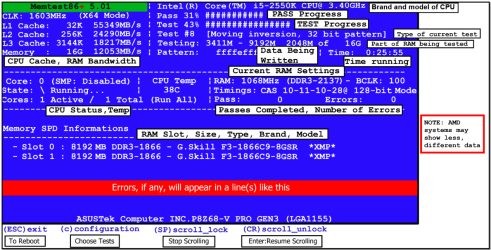
MEMTEST

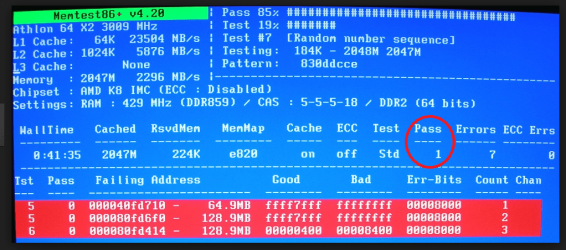
http://www.sevenforums.com/tutorials/105647-ram-test-memtest86.html this one you will need to make a bootabledisk set the BIOS to optical (or USB ifpreferred) boot the machine and let it run for at LEAST 8 passes unless the errors come up straight away. Takesfair time to complete and some leave itrunning overnight.

NB

When you run the memtest if the errorscome up straight away a in my pic then you will need to test each stick if you have more than one and if it isonly one then test again in anotherslot because it could also be a fault on the board.

So for example two slots A & B / sticks 1 &2 if the errors come up remove all sticks

Then try stick 1 in slot A if no errors install stick1 in slot B if no errors then install tick 2 in slot A if no errors then install stick 2 in slot B. If there wereerrors to start with one of these combinations will have to show errors.

Doing this will narrow down the problem slot as itcould be the slot and not the stick or even a specific slot and stickcombination. A lengthy process but only necessary if you get errors.

As an afterthought -


SLOT CLEANING

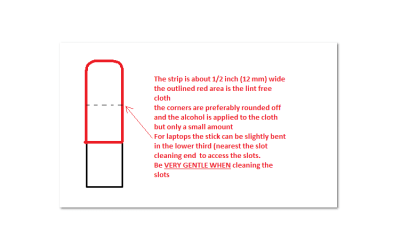
Now as for the slots toclean them use a strip of old credit card about 1/2 inch wide nip the cornersoff one end - preferably round them off hold a piece of thin lint free clothover the end dab on some form of alcohol - iso propyl alcohol (what we swab theskin with before an injection) is good and GENTLYswipe along the slots.

This can also be done forthe GPU slot/s and do not forget to clean the contacts on the cards / stickseither.
It is an idea to clean the contacts on the sticks / cards while you areat it but be VERY gentle when doing this


Attachments

  • MEMTEST INFO.PNG
    MEMTEST INFO.PNG
    108.1 KB · Views: 0
  • MEMTEST-ERROR.PNG
    MEMTEST-ERROR.PNG
    237.1 KB · Views: 0
  • STICK.PNG
    STICK.PNG
    6 KB · Views: 0

My Computer My Computer

Computer type
PC/Desktop
Computer Manufacturer/Model Number
Own build (new) Desk1 / Asus ROG Win 7 / Desk2 1st build
OS
Desk1 7 Home Prem / Desk2 10 Pro / Main lap Asus ROG 10 Pro 2 laptop Toshiba 7 Pro Asus P2520 7 & 10
CPU
Desk1 i5 3750K / Laptop i7 GTX 860M / Desk2 i5 2500
Motherboard
Desk1 Asus P877-V / Desk2 Gigabyte H67 UD3H / Laptop ?
Memory
Desk1 8GB (1866) / Desk2 16GB (1333) / Laptop 8Gb DDR3
Graphics Card(s)
Desk 1& 2NVidia GTX 650 & Laptops on board Intel
Sound Card
Desk 1 & 2 -XONAR DG Realtek High Def audio Laptop
Monitor(s) Displays
Desk 1 Benq HD 2450 / Desk2 Philips 24" / Laptop 17.5"
Screen Resolution
1920x1080 D1 & D2 & Laptop 1
Hard Drives
Desk1 Samsung 120GB 830 SSD
Asus ROG 256GB 850 Pro SSD
Desk2 Samsung 840 256 SSD
Toshiba 120GB EVO
PSU
Desk 1 Corsair HX 1050/ Laptop ? / Desk 2 Corsair HX 650
Case
Desk 1 Cooler HAF XM ? Toshiba laptop / Desk2 Coolermaster
Cooling
Fans on all Desk1 -2 Desk2 - all Coolermasters 5 Laptop ?
Keyboard
Desk 1 MS Sidewinder X6 Desk 2 MS Sidewinder X 4
Mouse
Desk 1&2 - Gigabyte MS 900 gamer - laptop - Logitec wireless
Internet Speed
ADSL2+
Other Info
One other Desktop (tester) and spare Toshba laptop both with SSD's
Running Kaspersky 2016 ISS on all machines config'd identically
Logitec audio stereo systems on each machine (x3)
Canon MG5250MFC
Router/modem TP-Link running WPA2SK
Back
Top