
Solved Monitor Suddenly Shut Off

JackALope52x

New member
Power User
Local time
5:43 PM
Messages
259
Location
Los Angeles
Hey guys,

So I came across a problem earlier today and I can't fix it so I decided it is time to ask for some help. When I was playing a casual video game earlier in the day, the game suddenly froze and my monitor went black. The monitor was still on but it just went into standby mode. After fiddling with cords and failing at trying to pin down the problem, I decided to restart the computer. When it started up again I could hear all of the Windows boot sounds, but the monitor was still in standby mode. I again started plugging cords in and out and inspecting things to find the problem. After a swearing match with the computer and plenty of frustration I decided to unhook the beast and take the side panel off to peak inside. It was pretty dusty inside and my GPU was caked up badly so I figured it overheated and caused the original crash. I cleaned everything with compressed air and put her back together. I booted it up again and still the same problem, I can hear Windows booting normally but the monitor is black and on standby mode.

Does anyone know what the problem is? I feel like there is something real simple that I am overlooking. Just take note that my monitor is connected to my GPU via a VGA cable. I also have a TV connected to the GPU, but that is using an HDMI cable. Oh and the same problem is happening with the TV, black screen on standby mode. Please let me know if you have any ideas on what is going on as soon as possible and let me know if anymore information is needed.

Thanks,
JackALope
 

My Computer

Computer type
PC/Desktop
Computer Manufacturer/Model Number
Custom Build
OS
Windows 7 Ultimate x64
CPU
Intel Core i7-2700K Sandy Bridge 3.5GHz
Motherboard
Asus P8Z68-V Pro
Memory
Corsair Vengeance 16GB DDR3 1600Mhz
Graphics Card(s)
Asus GeForce GTX 670 2GB
Sound Card
Creative Sound Blaster X-Fi Xtreme 7.1
Monitor(s) Displays
Samsung 24" LED Monitor
Screen Resolution
1920 x 1080
Hard Drives
Corsair Force GT 240GB SSD
Western Digital 3TB HDD
PSU
Corsair AX860i Fully-Modular
Case
Cooler Master HAF 922 Powder Coated White
Cooling
Noctua NH-U12S
Keyboard
Razer BlackWidow Ultimate Stealth Edition
Mouse
Razer Mamba
Internet Speed
Verizon FiOS 20Mbps
Antivirus
Microsoft Security Essentials
Browser
Internet Explorer
Other Info
Razer Tiamat 7.1 Surround Sound Headset
Hello Jack mate how old is this machine because just cleaning dust off doesn't mean the GPU thermal compound has not had it which is what it sounds like to me.

Does the monitor work on another machine assuming of course you have access to one.

Can you take out the card and see if the monitor works off the back I/O port?
 

My Computer

Computer type
PC/Desktop
Computer Manufacturer/Model Number
Own build (new) Desk1 / Asus ROG Win 7 / Desk2 1st build
OS
Desk1 7 Home Prem / Desk2 10 Pro / Main lap Asus ROG 10 Pro 2 laptop Toshiba 7 Pro Asus P2520 7 & 10
CPU
Desk1 i5 3750K / Laptop i7 GTX 860M / Desk2 i5 2500
Motherboard
Desk1 Asus P877-V / Desk2 Gigabyte H67 UD3H / Laptop ?
Memory
Desk1 8GB (1866) / Desk2 16GB (1333) / Laptop 8Gb DDR3
Graphics Card(s)
Desk 1& 2NVidia GTX 650 & Laptops on board Intel
Sound Card
Desk 1 & 2 -XONAR DG Realtek High Def audio Laptop
Monitor(s) Displays
Desk 1 Benq HD 2450 / Desk2 Philips 24" / Laptop 17.5"
Screen Resolution
1920x1080 D1 & D2 & Laptop 1
Hard Drives
Desk1 Samsung 120GB 830 SSD
Asus ROG 256GB 850 Pro SSD
Desk2 Samsung 840 256 SSD
Toshiba 120GB EVO
PSU
Desk 1 Corsair HX 1050/ Laptop ? / Desk 2 Corsair HX 650
Case
Desk 1 Cooler HAF XM ? Toshiba laptop / Desk2 Coolermaster
Cooling
Fans on all Desk1 -2 Desk2 - all Coolermasters 5 Laptop ?
Keyboard
Desk 1 MS Sidewinder X6 Desk 2 MS Sidewinder X 4
Mouse
Desk 1&2 - Gigabyte MS 900 gamer - laptop - Logitec wireless
Internet Speed
ADSL2+
Other Info
One other Desktop (tester) and spare Toshba laptop both with SSD's
Running Kaspersky 2016 ISS on all machines config'd identically
Logitec audio stereo systems on each machine (x3)
Canon MG5250MFC
Router/modem TP-Link running WPA2SK
Hello Jack mate how old is this machine because just cleaning dust off doesn't mean the GPU thermal compound has not had it which is what it sounds like to me.

Does the monitor work on another machine assuming of course you have access to one.

Can you take out the card and see if the monitor works off the back I/O port?

Hey thanks for the reply man. The card is about 3 years old and yes the monitor works on other machines.

I ended up removing the card and putting in a old Nvidia 8500 GT I had lying around and boom it works. So I am guessing my 6870 finally died. I don't know if it was my doing because how dirty it was or if it was just its time. It isn't a big deal either way because I was planning on getting a new card next week anyways.
 

My Computer

Computer type
PC/Desktop
Computer Manufacturer/Model Number
Custom Build
OS
Windows 7 Ultimate x64
CPU
Intel Core i7-2700K Sandy Bridge 3.5GHz
Motherboard
Asus P8Z68-V Pro
Memory
Corsair Vengeance 16GB DDR3 1600Mhz
Graphics Card(s)
Asus GeForce GTX 670 2GB
Sound Card
Creative Sound Blaster X-Fi Xtreme 7.1
Monitor(s) Displays
Samsung 24" LED Monitor
Screen Resolution
1920 x 1080
Hard Drives
Corsair Force GT 240GB SSD
Western Digital 3TB HDD
PSU
Corsair AX860i Fully-Modular
Case
Cooler Master HAF 922 Powder Coated White
Cooling
Noctua NH-U12S
Keyboard
Razer BlackWidow Ultimate Stealth Edition
Mouse
Razer Mamba
Internet Speed
Verizon FiOS 20Mbps
Antivirus
Microsoft Security Essentials
Browser
Internet Explorer
Other Info
Razer Tiamat 7.1 Surround Sound Headset
Hello Jack mate how old is this machine because just cleaning dust off doesn't mean the GPU thermal compound has not had it which is what it sounds like to me.

Does the monitor work on another machine assuming of course you have access to one.

Can you take out the card and see if the monitor works off the back I/O port?

Hey thanks for the reply man. The card is about 3 years old and yes the monitor works on other machines.

I ended up removing the card and putting in a old Nvidia 8500 GT I had lying around and boom it works. So I am guessing my 6870 finally died. I don't know if it was my doing because how dirty it was or if it was just its time. It isn't a big deal either way because I was planning on getting a new card next week anyways.
Ok Jack as long as it is resolved. Now you can do what you like with the old card but me I am a tinkerer and I would be pulling the cooler/s off and re applying some fresh thermal -if it works you have a spare if it doesn't well it's only cost a few dollars to try.

Oh and I suppose in a way this is a good prompt to have the occasional look inside the machine mate and save yourself this hassle again. I suppose the machine sits on the floor? if so I reckon it is a good idea to make yourself up a small board on castors to a) keep it a little way from the deck and b) makes for easy access. Just a piece of MDF or that Melamine board would be ideal.:)
 

My Computer

Computer type
PC/Desktop
Computer Manufacturer/Model Number
Own build (new) Desk1 / Asus ROG Win 7 / Desk2 1st build
OS
Desk1 7 Home Prem / Desk2 10 Pro / Main lap Asus ROG 10 Pro 2 laptop Toshiba 7 Pro Asus P2520 7 & 10
CPU
Desk1 i5 3750K / Laptop i7 GTX 860M / Desk2 i5 2500
Motherboard
Desk1 Asus P877-V / Desk2 Gigabyte H67 UD3H / Laptop ?
Memory
Desk1 8GB (1866) / Desk2 16GB (1333) / Laptop 8Gb DDR3
Graphics Card(s)
Desk 1& 2NVidia GTX 650 & Laptops on board Intel
Sound Card
Desk 1 & 2 -XONAR DG Realtek High Def audio Laptop
Monitor(s) Displays
Desk 1 Benq HD 2450 / Desk2 Philips 24" / Laptop 17.5"
Screen Resolution
1920x1080 D1 & D2 & Laptop 1
Hard Drives
Desk1 Samsung 120GB 830 SSD
Asus ROG 256GB 850 Pro SSD
Desk2 Samsung 840 256 SSD
Toshiba 120GB EVO
PSU
Desk 1 Corsair HX 1050/ Laptop ? / Desk 2 Corsair HX 650
Case
Desk 1 Cooler HAF XM ? Toshiba laptop / Desk2 Coolermaster
Cooling
Fans on all Desk1 -2 Desk2 - all Coolermasters 5 Laptop ?
Keyboard
Desk 1 MS Sidewinder X6 Desk 2 MS Sidewinder X 4
Mouse
Desk 1&2 - Gigabyte MS 900 gamer - laptop - Logitec wireless
Internet Speed
ADSL2+
Other Info
One other Desktop (tester) and spare Toshba laptop both with SSD's
Running Kaspersky 2016 ISS on all machines config'd identically
Logitec audio stereo systems on each machine (x3)
Canon MG5250MFC
Router/modem TP-Link running WPA2SK
Yeah I will probably end up pulling it apart and trying to fix it because I was planning on using it in another computer. Do you think just some fresh thermal paste will do the trick? Seems a little too simple.

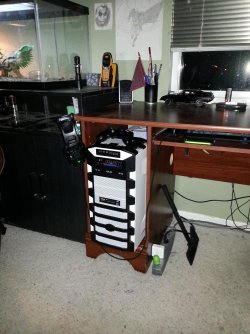
And actually the machine is off the floor and tucked away so I don't know how it got so bad. I do have dogs so that probably played a major roll. I will attach a picture just for the heck of it, it looks cramped but there is plenty of air flow and my temps are normal.
 

Attachments

  • IMG_20130412_213102.jpg
    IMG_20130412_213102.jpg
    712.9 KB · Views: 6

My Computer

Computer type
PC/Desktop
Computer Manufacturer/Model Number
Custom Build
OS
Windows 7 Ultimate x64
CPU
Intel Core i7-2700K Sandy Bridge 3.5GHz
Motherboard
Asus P8Z68-V Pro
Memory
Corsair Vengeance 16GB DDR3 1600Mhz
Graphics Card(s)
Asus GeForce GTX 670 2GB
Sound Card
Creative Sound Blaster X-Fi Xtreme 7.1
Monitor(s) Displays
Samsung 24" LED Monitor
Screen Resolution
1920 x 1080
Hard Drives
Corsair Force GT 240GB SSD
Western Digital 3TB HDD
PSU
Corsair AX860i Fully-Modular
Case
Cooler Master HAF 922 Powder Coated White
Cooling
Noctua NH-U12S
Keyboard
Razer BlackWidow Ultimate Stealth Edition
Mouse
Razer Mamba
Internet Speed
Verizon FiOS 20Mbps
Antivirus
Microsoft Security Essentials
Browser
Internet Explorer
Other Info
Razer Tiamat 7.1 Surround Sound Headset
Sorry late reply mate yep I have pulled a few apart now not really large or recent models but I don't think there would be much difference in the basics.

All I ever do is take apart what can be like the fan and cowling off usually held on by clips or screws or both. I clean them all up and where possible I re - lube the fan bearings and generally make sure the blades etc are real clean. I even go to the extent of applying (not a huge amount) of that material that you put on car interior vinyl and rubber surfaces to make them look new and brings out the colour.
This make them not only cleaner but the surfaces I rather like to think is smoother and therefore less friction with the air passing over the surfaces. You can go the extra mile an apply some anti static fluid - again just lightly that slows down the sticking of dust and particulate to the fan and cowling surfaces.
The heatsink is usually held on by either screws or push through pins that have small locking tabs on the underside of the circuit board. Just squeeze those together (long nosed pliers or medical artery forceps) and gently push them back out toward the circuit board. Do that to any fitting pins they usually stay at that point and you will find the heatsink will lift away from the chip. Be careful not to lose the small springs that create a downward tension onto the heatsink.

Then it is just a matter of cleaning up the old compound thoroughly cleaning the chip and heatsink apply the compound - don't slather it on you only need a thin film.
Then it is just a reverse of the dismantle process.
Sounds real fiddly but truly it is quite easy.

I use Arctic cleaning fluids and compound for this and it works real well. If ever you do the compound on the CPU - same thing only different fitting of course. Some links for the compound etc
Arctic Silver Incorporated - ArctiClean & Arctic Silver Incorporated - Céramique 2
 

My Computer

Computer type
PC/Desktop
Computer Manufacturer/Model Number
Own build (new) Desk1 / Asus ROG Win 7 / Desk2 1st build
OS
Desk1 7 Home Prem / Desk2 10 Pro / Main lap Asus ROG 10 Pro 2 laptop Toshiba 7 Pro Asus P2520 7 & 10
CPU
Desk1 i5 3750K / Laptop i7 GTX 860M / Desk2 i5 2500
Motherboard
Desk1 Asus P877-V / Desk2 Gigabyte H67 UD3H / Laptop ?
Memory
Desk1 8GB (1866) / Desk2 16GB (1333) / Laptop 8Gb DDR3
Graphics Card(s)
Desk 1& 2NVidia GTX 650 & Laptops on board Intel
Sound Card
Desk 1 & 2 -XONAR DG Realtek High Def audio Laptop
Monitor(s) Displays
Desk 1 Benq HD 2450 / Desk2 Philips 24" / Laptop 17.5"
Screen Resolution
1920x1080 D1 & D2 & Laptop 1
Hard Drives
Desk1 Samsung 120GB 830 SSD
Asus ROG 256GB 850 Pro SSD
Desk2 Samsung 840 256 SSD
Toshiba 120GB EVO
PSU
Desk 1 Corsair HX 1050/ Laptop ? / Desk 2 Corsair HX 650
Case
Desk 1 Cooler HAF XM ? Toshiba laptop / Desk2 Coolermaster
Cooling
Fans on all Desk1 -2 Desk2 - all Coolermasters 5 Laptop ?
Keyboard
Desk 1 MS Sidewinder X6 Desk 2 MS Sidewinder X 4
Mouse
Desk 1&2 - Gigabyte MS 900 gamer - laptop - Logitec wireless
Internet Speed
ADSL2+
Other Info
One other Desktop (tester) and spare Toshba laptop both with SSD's
Running Kaspersky 2016 ISS on all machines config'd identically
Logitec audio stereo systems on each machine (x3)
Canon MG5250MFC
Router/modem TP-Link running WPA2SK
Wow thanks. I just took it apart and it was pretty easy. Just four screws on the bottom and four more connecting the fan cowling to the heat sink. I will get it cleaned up tomorrow and have some thermal paste lying around from my most recent build so I know how to use it. :p I have just never used it on a GPU before. Anyways thanks again for the help.
 

My Computer

Computer type
PC/Desktop
Computer Manufacturer/Model Number
Custom Build
OS
Windows 7 Ultimate x64
CPU
Intel Core i7-2700K Sandy Bridge 3.5GHz
Motherboard
Asus P8Z68-V Pro
Memory
Corsair Vengeance 16GB DDR3 1600Mhz
Graphics Card(s)
Asus GeForce GTX 670 2GB
Sound Card
Creative Sound Blaster X-Fi Xtreme 7.1
Monitor(s) Displays
Samsung 24" LED Monitor
Screen Resolution
1920 x 1080
Hard Drives
Corsair Force GT 240GB SSD
Western Digital 3TB HDD
PSU
Corsair AX860i Fully-Modular
Case
Cooler Master HAF 922 Powder Coated White
Cooling
Noctua NH-U12S
Keyboard
Razer BlackWidow Ultimate Stealth Edition
Mouse
Razer Mamba
Internet Speed
Verizon FiOS 20Mbps
Antivirus
Microsoft Security Essentials
Browser
Internet Explorer
Other Info
Razer Tiamat 7.1 Surround Sound Headset
Wow thanks. I just took it apart and it was pretty easy. Just four screws on the bottom and four more connecting the fan cowling to the heat sink. I will get it cleaned up tomorrow and have some thermal paste lying around from my most recent build so I know how to use it. :p I have just never used it on a GPU before. Anyways thanks again for the help.
No probs Jack just be careful taking that heatsink off sometimes they can be really stuck tight on and the compound real hard - you may have to give it a little "soak" to make it soft.
Again make sure it is thoroughly clean and don't slap too much compound on mate it just makes a real mess if you do:)
 

My Computer

Computer type
PC/Desktop
Computer Manufacturer/Model Number
Own build (new) Desk1 / Asus ROG Win 7 / Desk2 1st build
OS
Desk1 7 Home Prem / Desk2 10 Pro / Main lap Asus ROG 10 Pro 2 laptop Toshiba 7 Pro Asus P2520 7 & 10
CPU
Desk1 i5 3750K / Laptop i7 GTX 860M / Desk2 i5 2500
Motherboard
Desk1 Asus P877-V / Desk2 Gigabyte H67 UD3H / Laptop ?
Memory
Desk1 8GB (1866) / Desk2 16GB (1333) / Laptop 8Gb DDR3
Graphics Card(s)
Desk 1& 2NVidia GTX 650 & Laptops on board Intel
Sound Card
Desk 1 & 2 -XONAR DG Realtek High Def audio Laptop
Monitor(s) Displays
Desk 1 Benq HD 2450 / Desk2 Philips 24" / Laptop 17.5"
Screen Resolution
1920x1080 D1 & D2 & Laptop 1
Hard Drives
Desk1 Samsung 120GB 830 SSD
Asus ROG 256GB 850 Pro SSD
Desk2 Samsung 840 256 SSD
Toshiba 120GB EVO
PSU
Desk 1 Corsair HX 1050/ Laptop ? / Desk 2 Corsair HX 650
Case
Desk 1 Cooler HAF XM ? Toshiba laptop / Desk2 Coolermaster
Cooling
Fans on all Desk1 -2 Desk2 - all Coolermasters 5 Laptop ?
Keyboard
Desk 1 MS Sidewinder X6 Desk 2 MS Sidewinder X 4
Mouse
Desk 1&2 - Gigabyte MS 900 gamer - laptop - Logitec wireless
Internet Speed
ADSL2+
Other Info
One other Desktop (tester) and spare Toshba laptop both with SSD's
Running Kaspersky 2016 ISS on all machines config'd identically
Logitec audio stereo systems on each machine (x3)
Canon MG5250MFC
Router/modem TP-Link running WPA2SK
Be mindful that a GPU takes a lot less compound than a CPU does. I've done this too and even washed the cooling radiator in the sink with soap and water. Let it dry thoroughly before reassembly. :D
 

My Computer

Computer type
PC/Desktop
Computer Manufacturer/Model Number
Home Built Desktop By DataTech
OS
Windows 7 Ultimate X64 SP1
CPU
Intel i5-2550K, Differing ~4.4-4.8GHz No built in GPU
Motherboard
ASUS P8Z68-V PRO/GEN3
Memory
16GB G.Skill Sniper 1866MHz @ 2133MHz 2x8GB
Graphics Card(s)
ASUS GTX650TIB-DC2OC-2GD5, (650TI Boost)
Sound Card
Onboard Realtek 5-1
Monitor(s) Displays
Samsung P2570HD
Screen Resolution
1920x1080
Hard Drives
Samsung 840 Pro 256GB SSD for OS, 500GB Seagate Constellation (Enterprise drive) for Data
PSU
Corsair HX650W
Case
Inwin Dragon Rider
Cooling
Hyper 212 EVO w/two Noctua fans, push-pull, @1300 RPM
Keyboard
E-Z Eyes, bright yellow keys with large characters
Mouse
steelseries SENSEI Laser Pro Gaming
Internet Speed
48-51Mbs Mbs down, 11 Mbs up Xfinity Cable
Antivirus
Norton Internet Security 2013
Browser
IE 10, Opera, Pale Moon if needed
Other Info
4 case fans, LG BluRay-RE, ASUS DVD-RW, Mr. Fusion power supply, 1.21 gigawatts.
Be mindful that a GPU takes a lot less compound than a CPU does. I've done this too and even washed the cooling radiator in the sink with soap and water. Let it dry thoroughly before reassembly. :D
Hum haven't done one wit a rad on it yet so handy to know cos I would have spent hours cleaning it out with those chenille wires and making a real mess out of it.;)

The compound yep I have seen the original manufacturer absolutely smother the chip and consequently the board with compound and that rubbery stuff is the pits to get off too.
 

My Computer

Computer type
PC/Desktop
Computer Manufacturer/Model Number
Own build (new) Desk1 / Asus ROG Win 7 / Desk2 1st build
OS
Desk1 7 Home Prem / Desk2 10 Pro / Main lap Asus ROG 10 Pro 2 laptop Toshiba 7 Pro Asus P2520 7 & 10
CPU
Desk1 i5 3750K / Laptop i7 GTX 860M / Desk2 i5 2500
Motherboard
Desk1 Asus P877-V / Desk2 Gigabyte H67 UD3H / Laptop ?
Memory
Desk1 8GB (1866) / Desk2 16GB (1333) / Laptop 8Gb DDR3
Graphics Card(s)
Desk 1& 2NVidia GTX 650 & Laptops on board Intel
Sound Card
Desk 1 & 2 -XONAR DG Realtek High Def audio Laptop
Monitor(s) Displays
Desk 1 Benq HD 2450 / Desk2 Philips 24" / Laptop 17.5"
Screen Resolution
1920x1080 D1 & D2 & Laptop 1
Hard Drives
Desk1 Samsung 120GB 830 SSD
Asus ROG 256GB 850 Pro SSD
Desk2 Samsung 840 256 SSD
Toshiba 120GB EVO
PSU
Desk 1 Corsair HX 1050/ Laptop ? / Desk 2 Corsair HX 650
Case
Desk 1 Cooler HAF XM ? Toshiba laptop / Desk2 Coolermaster
Cooling
Fans on all Desk1 -2 Desk2 - all Coolermasters 5 Laptop ?
Keyboard
Desk 1 MS Sidewinder X6 Desk 2 MS Sidewinder X 4
Mouse
Desk 1&2 - Gigabyte MS 900 gamer - laptop - Logitec wireless
Internet Speed
ADSL2+
Other Info
One other Desktop (tester) and spare Toshba laptop both with SSD's
Running Kaspersky 2016 ISS on all machines config'd identically
Logitec audio stereo systems on each machine (x3)
Canon MG5250MFC
Router/modem TP-Link running WPA2SK
Be mindful that a GPU takes a lot less compound than a CPU does. I've done this too and even washed the cooling radiator in the sink with soap and water. Let it dry thoroughly before reassembly. :D

Hey thanks for the tip Gary, that's good information. I will keep it in mind.

The compound yep I have seen the original manufacturer absolutely smother the chip and consequently the board with compound and that rubbery stuff is the pits to get off too.

Yeah I can believe that because mine honestly looks like it was applied by a 4 year old with a tube of tooth paste. I don't know how they get away with this stuff because it's pretty ridiculous.
 

My Computer

Computer type
PC/Desktop
Computer Manufacturer/Model Number
Custom Build
OS
Windows 7 Ultimate x64
CPU
Intel Core i7-2700K Sandy Bridge 3.5GHz
Motherboard
Asus P8Z68-V Pro
Memory
Corsair Vengeance 16GB DDR3 1600Mhz
Graphics Card(s)
Asus GeForce GTX 670 2GB
Sound Card
Creative Sound Blaster X-Fi Xtreme 7.1
Monitor(s) Displays
Samsung 24" LED Monitor
Screen Resolution
1920 x 1080
Hard Drives
Corsair Force GT 240GB SSD
Western Digital 3TB HDD
PSU
Corsair AX860i Fully-Modular
Case
Cooler Master HAF 922 Powder Coated White
Cooling
Noctua NH-U12S
Keyboard
Razer BlackWidow Ultimate Stealth Edition
Mouse
Razer Mamba
Internet Speed
Verizon FiOS 20Mbps
Antivirus
Microsoft Security Essentials
Browser
Internet Explorer
Other Info
Razer Tiamat 7.1 Surround Sound Headset
Just to let you guys know, I pulled the graphics card apart and cleaned it out. I washed the heat sink, cleaned off all the old thermal compound, cleaned the fan and re-oiled the bearing and I even brightened it up with some plastics cleaner. I reapplied new thermal compound and put it back together and it still isn't working. The fan spins fine but I am not getting any video from it.

Thanks again for all the help, it was worth the try. I can just mount it on the wall or use it as a paperweight now. :D

Cheers!
 

My Computer

Computer type
PC/Desktop
Computer Manufacturer/Model Number
Custom Build
OS
Windows 7 Ultimate x64
CPU
Intel Core i7-2700K Sandy Bridge 3.5GHz
Motherboard
Asus P8Z68-V Pro
Memory
Corsair Vengeance 16GB DDR3 1600Mhz
Graphics Card(s)
Asus GeForce GTX 670 2GB
Sound Card
Creative Sound Blaster X-Fi Xtreme 7.1
Monitor(s) Displays
Samsung 24" LED Monitor
Screen Resolution
1920 x 1080
Hard Drives
Corsair Force GT 240GB SSD
Western Digital 3TB HDD
PSU
Corsair AX860i Fully-Modular
Case
Cooler Master HAF 922 Powder Coated White
Cooling
Noctua NH-U12S
Keyboard
Razer BlackWidow Ultimate Stealth Edition
Mouse
Razer Mamba
Internet Speed
Verizon FiOS 20Mbps
Antivirus
Microsoft Security Essentials
Browser
Internet Explorer
Other Info
Razer Tiamat 7.1 Surround Sound Headset
Man, sorry to hear that, but you do have a nice piece of wall art now. :p
 

My Computer

Computer type
PC/Desktop
Computer Manufacturer/Model Number
Home Built Desktop By DataTech
OS
Windows 7 Ultimate X64 SP1
CPU
Intel i5-2550K, Differing ~4.4-4.8GHz No built in GPU
Motherboard
ASUS P8Z68-V PRO/GEN3
Memory
16GB G.Skill Sniper 1866MHz @ 2133MHz 2x8GB
Graphics Card(s)
ASUS GTX650TIB-DC2OC-2GD5, (650TI Boost)
Sound Card
Onboard Realtek 5-1
Monitor(s) Displays
Samsung P2570HD
Screen Resolution
1920x1080
Hard Drives
Samsung 840 Pro 256GB SSD for OS, 500GB Seagate Constellation (Enterprise drive) for Data
PSU
Corsair HX650W
Case
Inwin Dragon Rider
Cooling
Hyper 212 EVO w/two Noctua fans, push-pull, @1300 RPM
Keyboard
E-Z Eyes, bright yellow keys with large characters
Mouse
steelseries SENSEI Laser Pro Gaming
Internet Speed
48-51Mbs Mbs down, 11 Mbs up Xfinity Cable
Antivirus
Norton Internet Security 2013
Browser
IE 10, Opera, Pale Moon if needed
Other Info
4 case fans, LG BluRay-RE, ASUS DVD-RW, Mr. Fusion power supply, 1.21 gigawatts.
Just to let you guys know, I pulled the graphics card apart and cleaned it out. I washed the heat sink, cleaned off all the old thermal compound, cleaned the fan and re-oiled the bearing and I even brightened it up with some plastics cleaner. I reapplied new thermal compound and put it back together and it still isn't working. The fan spins fine but I am not getting any video from it.

Thanks again for all the help, it was worth the try. I can just mount it on the wall or use it as a paperweight now. :D

Cheers!
Sorry for late reply Jack. Mate worth a try it is probably a cap or two or the chip may have been taking a bit too much heat for a long periods - could even be something as simple as the cap like I said to even a diode in power circuitry to just one dry joint on the printed circuit board (PCB) somewhere who knows.

But all credit to you for having a go many would have just trashed it without second thought - full marks inmy book:thumbsup:

John
 

My Computer

Computer type
PC/Desktop
Computer Manufacturer/Model Number
Own build (new) Desk1 / Asus ROG Win 7 / Desk2 1st build
OS
Desk1 7 Home Prem / Desk2 10 Pro / Main lap Asus ROG 10 Pro 2 laptop Toshiba 7 Pro Asus P2520 7 & 10
CPU
Desk1 i5 3750K / Laptop i7 GTX 860M / Desk2 i5 2500
Motherboard
Desk1 Asus P877-V / Desk2 Gigabyte H67 UD3H / Laptop ?
Memory
Desk1 8GB (1866) / Desk2 16GB (1333) / Laptop 8Gb DDR3
Graphics Card(s)
Desk 1& 2NVidia GTX 650 & Laptops on board Intel
Sound Card
Desk 1 & 2 -XONAR DG Realtek High Def audio Laptop
Monitor(s) Displays
Desk 1 Benq HD 2450 / Desk2 Philips 24" / Laptop 17.5"
Screen Resolution
1920x1080 D1 & D2 & Laptop 1
Hard Drives
Desk1 Samsung 120GB 830 SSD
Asus ROG 256GB 850 Pro SSD
Desk2 Samsung 840 256 SSD
Toshiba 120GB EVO
PSU
Desk 1 Corsair HX 1050/ Laptop ? / Desk 2 Corsair HX 650
Case
Desk 1 Cooler HAF XM ? Toshiba laptop / Desk2 Coolermaster
Cooling
Fans on all Desk1 -2 Desk2 - all Coolermasters 5 Laptop ?
Keyboard
Desk 1 MS Sidewinder X6 Desk 2 MS Sidewinder X 4
Mouse
Desk 1&2 - Gigabyte MS 900 gamer - laptop - Logitec wireless
Internet Speed
ADSL2+
Other Info
One other Desktop (tester) and spare Toshba laptop both with SSD's
Running Kaspersky 2016 ISS on all machines config'd identically
Logitec audio stereo systems on each machine (x3)
Canon MG5250MFC
Router/modem TP-Link running WPA2SK
Back
Top