
padreelephante
New member
- Local time
- 12:31 PM
- Messages
- 3
I'm in the same boat as nearly everyone here. I have computer in the "office" and a computer in the LR, attached to the TV and stereo. It acts as sort of media server for the other things in the house (with external drive attached when needed). It has a 40gb partition for Win7 (C:system) drive, and then the rest of the hard drive is pieced out into other drives - 500GB total, pre-formatting. Problem is i'm pushing the limit of the C drive - i now have just under 4GB free, and it gets dangerously close to full - I hate to look at MyComputer and see that red bar underneath the C drive icon!! I can temporarily stave off the inevitable by doing a disk cleanup, but that doesn't last long.
I tend to over research and over think a lot of decisions for the computer. I also tend to know just enough to get myself into trouble, and since we recently had a baby, i cant afford the time to fix an error i made because i did something stupid.
My questions on the issue are:
1.) any harm in reducing the page file a bit? the system is rarely ever taxed. basically this thing a giant storage tank for photos and music that only gets accessed once or twice a week.
1a.)is it worth the potential performance reduction just to gain a GB or two?
2.) any harm in turning off hibernation? looks like that bad boy is taking 5gb, and i have never, ever hibernated any computer i've owned. probably not the best practice, but.......i"m too old to change?
3.) i used space sniffer, and the only other "large" file is the itunes mobilesync file - i've read that i can move this and make a junction point to re-direct. this would give another 1 .5 gb or so - is that worth the trouble?
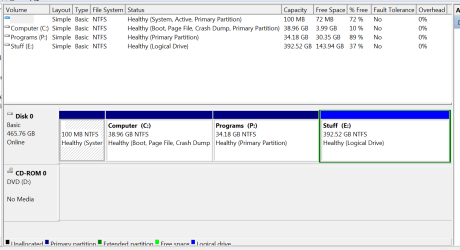
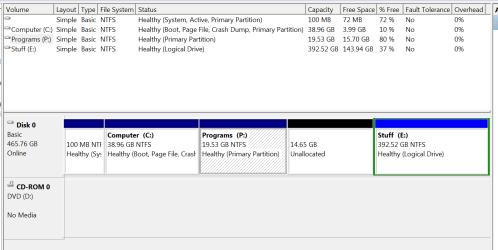
All in all, i could stand to gain about 6gb - 8gb if i take the above actions. the other option is to take some of the extra, never going to be used space on my P: drive (all non-windows programs,various install files, etc) and use that space to expand my C: drive and be done with it. I've uploaded 2 pics - one from when i started this, showing the 3 drives i have on this beast. C: - system, P: - programs, E: - everything else (text, images, etc) The other pic is from when i started to undergo hard-drive surgery, and i had removed a portion of the P: drive, creating the unallocated space in quesiton. problem is, the space is to the right of the P: drive, not to the right of the C: drive.
From what I've read, i could use a 3rd party (have used Gparted to manage a dual boot system for a while) or i could find a way to get the unallocated over to the left in order to give it to the C: drive, using built in capabilities.
My revised plan was to take the contents of the P: drive and move them to an external drive, delete the current P: drive, give space to the C: drive and then remake a P: drive and move the stuff back from the external. In theory, no programs should be harmed, because they were never "uninstalled", they just took a small trip.
I also just had a thought - could i turn the current unallocated space into a D: drive (thus placing it before the P: drive) and then remove that drive, creating new, but "relocated" unallocated space? Then I could get the new unallocated space to merge with the C: drive, right?
That's it - in a rather long-winded way. Any thoughts?
Thanks!!
I tend to over research and over think a lot of decisions for the computer. I also tend to know just enough to get myself into trouble, and since we recently had a baby, i cant afford the time to fix an error i made because i did something stupid.
My questions on the issue are:
1.) any harm in reducing the page file a bit? the system is rarely ever taxed. basically this thing a giant storage tank for photos and music that only gets accessed once or twice a week.
1a.)is it worth the potential performance reduction just to gain a GB or two?
2.) any harm in turning off hibernation? looks like that bad boy is taking 5gb, and i have never, ever hibernated any computer i've owned. probably not the best practice, but.......i"m too old to change?
3.) i used space sniffer, and the only other "large" file is the itunes mobilesync file - i've read that i can move this and make a junction point to re-direct. this would give another 1 .5 gb or so - is that worth the trouble?
All in all, i could stand to gain about 6gb - 8gb if i take the above actions. the other option is to take some of the extra, never going to be used space on my P: drive (all non-windows programs,various install files, etc) and use that space to expand my C: drive and be done with it. I've uploaded 2 pics - one from when i started this, showing the 3 drives i have on this beast. C: - system, P: - programs, E: - everything else (text, images, etc) The other pic is from when i started to undergo hard-drive surgery, and i had removed a portion of the P: drive, creating the unallocated space in quesiton. problem is, the space is to the right of the P: drive, not to the right of the C: drive.
From what I've read, i could use a 3rd party (have used Gparted to manage a dual boot system for a while) or i could find a way to get the unallocated over to the left in order to give it to the C: drive, using built in capabilities.
My revised plan was to take the contents of the P: drive and move them to an external drive, delete the current P: drive, give space to the C: drive and then remake a P: drive and move the stuff back from the external. In theory, no programs should be harmed, because they were never "uninstalled", they just took a small trip.
I also just had a thought - could i turn the current unallocated space into a D: drive (thus placing it before the P: drive) and then remove that drive, creating new, but "relocated" unallocated space? Then I could get the new unallocated space to merge with the C: drive, right?
That's it - in a rather long-winded way. Any thoughts?
Thanks!!
Attachments
My Computer
At a glance
Windows 7 Ultimate x64 / windows XP professionalintel i36gbna
- Computer type
- PC/Desktop
- Computer Manufacturer/Model Number
- cusom
- OS
- Windows 7 Ultimate x64 / windows XP professional
- CPU
- intel i3
- Motherboard
- Asus M-Pro series
- Memory
- 6gb
- Graphics Card(s)
- na
- Hard Drives
- (1) 250 gb WD
(1) 650 gb WD
- Antivirus
- comodo / MSE
- Browser
- Firefox


