
Solved More SFC /SCANNOW Issues

timw128

New member
Member
VIP
Local time
7:31 AM
Messages
294
Location
Michigan, USA
Hello-

I have run 'sfc /scannow' 4 consecutive times and there are corruption and missing file errors Windows can't fix. I have done 2 Recovery's in the last 2 weeks and I am fed up with doing that. I have no way, to the best of my knowledge, of extracting any replacement files for installation.

Here is the 'CBS.log' for analysis- I have zipped it for attachment:

View attachment 364351

I would appreciate any and all help with this- Thanks in advance.

Regards-

tim
 

My Computer

Computer type
PC/Desktop
Computer Manufacturer/Model Number
HP ENVY 700-515xt CTO, with more cam, headers, and 4.11 gears.
OS
Windows 7 Pro SP1 x64
CPU
Intel Haswell i7-4770 3.4GHz
Motherboard
OEM Kaili2 (MSI MS-7826 v2.0)
Memory
G. SKILLS 32GB Ripjaws X Series DDR3 1600 SDRAM
Graphics Card(s)
Integrated HD4600- upgrade coming!
Sound Card
Integrated...for now.
Monitor(s) Displays
Dell ST-2310 Digital
Screen Resolution
I like 1920x1080
Hard Drives
C\:-Samsung 850PRO SSD-256gb, D:\-SG Barracuda 7200 HDD 1 TB (Storage)
PSU
350w OEM (About to become a display in the aquarium!)
Case
ENVY OEM
Cooling
FANS
Keyboard
Logitech and HP- USB.
Mouse
Logitech LS1 (Alltime favorite of mine!) and HP- both USB
Internet Speed
65Mbps Down (min)/4.5Mbps UP- Charter Comm HS cable
Antivirus
avast! Internet Security 2015/MBAM
Browser
Opera, at present. Love that Chromium horsepower!
UPDATE-

The first .zip logs, posted prior, are not entirely accurate. The .zip logs here appear to have done some repairs, after running the scan/restart sequence 3 times. Yet 'sfc /scannow' still indicates some unrepairable corruption- 4th run. Also, I noticed that VSC in 'services.msc' was set to manual, so we reset to automatic start up.

View attachment 364424

Thank you.

tim
 

My Computer

Computer type
PC/Desktop
Computer Manufacturer/Model Number
HP ENVY 700-515xt CTO, with more cam, headers, and 4.11 gears.
OS
Windows 7 Pro SP1 x64
CPU
Intel Haswell i7-4770 3.4GHz
Motherboard
OEM Kaili2 (MSI MS-7826 v2.0)
Memory
G. SKILLS 32GB Ripjaws X Series DDR3 1600 SDRAM
Graphics Card(s)
Integrated HD4600- upgrade coming!
Sound Card
Integrated...for now.
Monitor(s) Displays
Dell ST-2310 Digital
Screen Resolution
I like 1920x1080
Hard Drives
C\:-Samsung 850PRO SSD-256gb, D:\-SG Barracuda 7200 HDD 1 TB (Storage)
PSU
350w OEM (About to become a display in the aquarium!)
Case
ENVY OEM
Cooling
FANS
Keyboard
Logitech and HP- USB.
Mouse
Logitech LS1 (Alltime favorite of mine!) and HP- both USB
Internet Speed
65Mbps Down (min)/4.5Mbps UP- Charter Comm HS cable
Antivirus
avast! Internet Security 2015/MBAM
Browser
Opera, at present. Love that Chromium horsepower!
This is the only corruption:
Code:
2015-06-29 22:00:08, Info                  CSI    00000338 [SR] Cannot repair member file [l:26{13}]"iesysprep.dll" of Microsoft-Windows-IE-Sysprep, Version = 11.2.9600.16428, pA = PROCESSOR_ARCHITECTURE_IA32_ON_WIN64 (10), Culture neutral, VersionScope = 1 nonSxS, PublicKeyToken = {l:8 b:31bf3856ad364e35}, Type neutral, TypeName neutral, PublicKey neutral in the store, hash mismatch

Unfortunately I don't know how to fix it.
 

My Computer

Computer type
PC/Desktop
Computer Manufacturer/Model Number
Custom Build
OS
Windows 7 Ultimate x64 SP1
CPU
AMD Phenom 2 1090T
Motherboard
Gigabyte GA-890FXA-UD5
Memory
2x8GB Kingston HyperX Fury Black 1600Mhz Unganged
Graphics Card(s)
MSI GTX 970 Gaming 4G
Sound Card
Realtek On-Board HD 7.1 Audio / Logitech G35
Monitor(s) Displays
3xAcer GD245HQ
Screen Resolution
1920x1080
Hard Drives
Samsung 850 Pro 512GB SSD - OS /
WD Caviar Black SATA 3 - 1 TBx2 - Dynamic RAID 0 /
WD Caviar Green SATA 2 - 640GBx2 - Dynamic RAID 0 /
WD Caviar Green SATA 2 - 640GB - Internal Backup /
Seagate Barracude SATA 3 - 3TB - External Backup/ Sync
PSU
HighPower 1000W
Case
Cooler Master HAF 932
Cooling
Noctua NH-D14
Keyboard
Logitech G19
Mouse
Logitech G500
Internet Speed
100/4 Mbit Cable (100GB quota)
Antivirus
ZoneAlarm Extreme Security / MBAM Pro / MBAE Free / SAS Free
Browser
IE 11 - Firefox - Chrome
Other Info
Logitech F710/ G27/ G940/ Z5500 // TrackIR 5 // Nvidia 3D Surround Vision
Well, further research has led us to an issue with KB3022345, however, I had already uninstalled that because of System Restore issues.

It seems like the issue has to do with IE 10 and something with symbols and punctuation. So, we ran CMD-
'Dism /Online /Cleanup-Image /restorehealth' and received an Error 87. Then, CMD- 'Dism / Online /Cleanup-Image /scanhealth' and got the following log from %windir%\Windows\Logs\CBS\CheckSUR.log

View attachment CheckSUR.log

Showing 2 errors

I have a thread going on over at Sysnative where I am expecting an answer from a particular guru. Anyway, I'll keep this thread updated so that, perhaps, when this issue is solved, it'll help someone else down the road.

Thanks-

tim
 

My Computer

Computer type
PC/Desktop
Computer Manufacturer/Model Number
HP ENVY 700-515xt CTO, with more cam, headers, and 4.11 gears.
OS
Windows 7 Pro SP1 x64
CPU
Intel Haswell i7-4770 3.4GHz
Motherboard
OEM Kaili2 (MSI MS-7826 v2.0)
Memory
G. SKILLS 32GB Ripjaws X Series DDR3 1600 SDRAM
Graphics Card(s)
Integrated HD4600- upgrade coming!
Sound Card
Integrated...for now.
Monitor(s) Displays
Dell ST-2310 Digital
Screen Resolution
I like 1920x1080
Hard Drives
C\:-Samsung 850PRO SSD-256gb, D:\-SG Barracuda 7200 HDD 1 TB (Storage)
PSU
350w OEM (About to become a display in the aquarium!)
Case
ENVY OEM
Cooling
FANS
Keyboard
Logitech and HP- USB.
Mouse
Logitech LS1 (Alltime favorite of mine!) and HP- both USB
Internet Speed
65Mbps Down (min)/4.5Mbps UP- Charter Comm HS cable
Antivirus
avast! Internet Security 2015/MBAM
Browser
Opera, at present. Love that Chromium horsepower!
I have a list of updates you could go over, PM me if you want it.

Uninstall and hide KB3068708 and try again.
 

My Computer

Computer type
PC/Desktop
Computer Manufacturer/Model Number
Skylake Special #666
OS
Windows 10 Pro x64
CPU
Intel Core i7 6700K
Motherboard
Asus Sabertooth Z170 Mark 1
Memory
GSkill TridentZ RGB 16GB 3600 16-16-16-36
Graphics Card(s)
EVGA GTX 980 Ti SC x2
Sound Card
Realtek High Definition
Monitor(s) Displays
AOC G2460PG
Screen Resolution
1920 x 1080 144Hz
Hard Drives
Samsung 860 Pro 256GB, Seagate Barracuda 4TB x2
PSU
EVGA 1000 P2, EVGA White Custom Braided Cables
Case
Corsair Vengeance C70 Gunmetal Black
Cooling
Corsair H100i v2, Corsair ML120 x2, Thermal Grizzly Kryonaut
Keyboard
Logitech G910 Orion Spectrum
Mouse
Logitech G700s
Internet Speed
Verizon Fios Quantum Gateway 75/75
Antivirus
Windows Defender, Malwarebytes Free 3.8.3
Browser
Chrome
Other Info
Corsair SP120 x4, LG Blu-ray Drive, Durabrand HT-395 100 Watt Dolby Digital Amp, Corsair H2100 Wireless 7.1 Headset
It is not due to KB3068708 as far as I can tell.
 

My Computer

Computer type
PC/Desktop
Computer Manufacturer/Model Number
Custom Build
OS
Windows 7 Ultimate x64 SP1
CPU
AMD Phenom 2 1090T
Motherboard
Gigabyte GA-890FXA-UD5
Memory
2x8GB Kingston HyperX Fury Black 1600Mhz Unganged
Graphics Card(s)
MSI GTX 970 Gaming 4G
Sound Card
Realtek On-Board HD 7.1 Audio / Logitech G35
Monitor(s) Displays
3xAcer GD245HQ
Screen Resolution
1920x1080
Hard Drives
Samsung 850 Pro 512GB SSD - OS /
WD Caviar Black SATA 3 - 1 TBx2 - Dynamic RAID 0 /
WD Caviar Green SATA 2 - 640GBx2 - Dynamic RAID 0 /
WD Caviar Green SATA 2 - 640GB - Internal Backup /
Seagate Barracude SATA 3 - 3TB - External Backup/ Sync
PSU
HighPower 1000W
Case
Cooler Master HAF 932
Cooling
Noctua NH-D14
Keyboard
Logitech G19
Mouse
Logitech G500
Internet Speed
100/4 Mbit Cable (100GB quota)
Antivirus
ZoneAlarm Extreme Security / MBAM Pro / MBAE Free / SAS Free
Browser
IE 11 - Firefox - Chrome
Other Info
Logitech F710/ G27/ G940/ Z5500 // TrackIR 5 // Nvidia 3D Surround Vision
Uninstall and hide KB3068708 and try again.

Thanks, AddRAM- I have already uninstalled KB3068708 (at same time we did KB3022345) per your
recommendation on my System Restore Issue query thread.

Will PM after this post- Thanks for that, too.

Regards-

tim
 

My Computer

Computer type
PC/Desktop
Computer Manufacturer/Model Number
HP ENVY 700-515xt CTO, with more cam, headers, and 4.11 gears.
OS
Windows 7 Pro SP1 x64
CPU
Intel Haswell i7-4770 3.4GHz
Motherboard
OEM Kaili2 (MSI MS-7826 v2.0)
Memory
G. SKILLS 32GB Ripjaws X Series DDR3 1600 SDRAM
Graphics Card(s)
Integrated HD4600- upgrade coming!
Sound Card
Integrated...for now.
Monitor(s) Displays
Dell ST-2310 Digital
Screen Resolution
I like 1920x1080
Hard Drives
C\:-Samsung 850PRO SSD-256gb, D:\-SG Barracuda 7200 HDD 1 TB (Storage)
PSU
350w OEM (About to become a display in the aquarium!)
Case
ENVY OEM
Cooling
FANS
Keyboard
Logitech and HP- USB.
Mouse
Logitech LS1 (Alltime favorite of mine!) and HP- both USB
Internet Speed
65Mbps Down (min)/4.5Mbps UP- Charter Comm HS cable
Antivirus
avast! Internet Security 2015/MBAM
Browser
Opera, at present. Love that Chromium horsepower!
My Computer

Computer type
Laptop
OS
Win 7 Home Premium x64/Linux Lite 2.6 x64
Try running SFCFix.exe by Niemero with windows disk in drive http://www.sysnative.com/niemiro/apps/SFCFix.exe

Sorry, no can do. This machine is an OEM machine, and HP doesn't provide Windows disks- only a Recovery Partition and a 4 DVD set of Recovery Disks. I have a Windows 7 Professional SP1 x64 disk, however the System Files have a different hash value than the Sys Files on the machine.

Thanks-

tim
 

My Computer

Computer type
PC/Desktop
Computer Manufacturer/Model Number
HP ENVY 700-515xt CTO, with more cam, headers, and 4.11 gears.
OS
Windows 7 Pro SP1 x64
CPU
Intel Haswell i7-4770 3.4GHz
Motherboard
OEM Kaili2 (MSI MS-7826 v2.0)
Memory
G. SKILLS 32GB Ripjaws X Series DDR3 1600 SDRAM
Graphics Card(s)
Integrated HD4600- upgrade coming!
Sound Card
Integrated...for now.
Monitor(s) Displays
Dell ST-2310 Digital
Screen Resolution
I like 1920x1080
Hard Drives
C\:-Samsung 850PRO SSD-256gb, D:\-SG Barracuda 7200 HDD 1 TB (Storage)
PSU
350w OEM (About to become a display in the aquarium!)
Case
ENVY OEM
Cooling
FANS
Keyboard
Logitech and HP- USB.
Mouse
Logitech LS1 (Alltime favorite of mine!) and HP- both USB
Internet Speed
65Mbps Down (min)/4.5Mbps UP- Charter Comm HS cable
Antivirus
avast! Internet Security 2015/MBAM
Browser
Opera, at present. Love that Chromium horsepower!
Your win pro x64 disk has all the necessary file included. Microsoft places a text file on the disk to designate a specific version ie Pro, Home Premium, etc. SFCFix.exe will determine which files are appropriate and copy them to the correct system folder. If you open your win7 pro disk with 7-zip and double-click on SOURCES, wait for files to appear,(ei.cfg file is the one that designates widows version) scroll down to install.wim and double-click you will find 4 folders, in order 1st, Basic, 2nd Home Premium, 3rd Professional, and 4th Ultimate. You can make your windows 7 all in one by renaming ei.cfg or deleting it, your preference.

I have windows 7 x64 aio (all in one) ISO if you need a windows disk. You can download it, and burn it to DVD with ImageBurn. Pop it back in the drive and run SFCFix.exe I have a compaq laptop and HP desktop both running windows 7 (OEM). ISO is from DigitalRiver before Microsoft dismantled the site. Let me know and I'll send you the link.
 

My Computer

Computer type
Laptop
OS
Win 7 Home Premium x64/Linux Lite 2.6 x64
Hey, wben353, thank you... Yes, I have the same disk that you refer to. I ran ei.cfg removal utility on it, opened in 7-zip-as you mentioned- found the Pro variant, extracted the file in question, 'iesysprep.dll', checked the SHA-1 against the same file in the system at present. They do not match. (the Digital River download build is the same as mine-7601)
It appears to me that the 'iesysprep.dll' is tied to IE10. I very rarely use IE10, as my browser of choice is Opera. Now, back to the SFCFix.exe...I'd have to go and review my notes, but I entered past the pane regarding disk requisition, and it ran. Then, we ran the SURT utility and created a 'CheckSUR.log' and a 'CheckSUR.persist.log' and they indicated there wasn't any issues!
I suppose I could set a restore point, go back and run SFCFix.exe as you suggested utilizing the all in one disk. What I don't understand is how to get rid of the other Windows 7 versions on that disk, keeping just the Pro version. Is SP1 included on that disk, also?...
Certainly appreciate your help- Thank you!

tim
 

My Computer

Computer type
PC/Desktop
Computer Manufacturer/Model Number
HP ENVY 700-515xt CTO, with more cam, headers, and 4.11 gears.
OS
Windows 7 Pro SP1 x64
CPU
Intel Haswell i7-4770 3.4GHz
Motherboard
OEM Kaili2 (MSI MS-7826 v2.0)
Memory
G. SKILLS 32GB Ripjaws X Series DDR3 1600 SDRAM
Graphics Card(s)
Integrated HD4600- upgrade coming!
Sound Card
Integrated...for now.
Monitor(s) Displays
Dell ST-2310 Digital
Screen Resolution
I like 1920x1080
Hard Drives
C\:-Samsung 850PRO SSD-256gb, D:\-SG Barracuda 7200 HDD 1 TB (Storage)
PSU
350w OEM (About to become a display in the aquarium!)
Case
ENVY OEM
Cooling
FANS
Keyboard
Logitech and HP- USB.
Mouse
Logitech LS1 (Alltime favorite of mine!) and HP- both USB
Internet Speed
65Mbps Down (min)/4.5Mbps UP- Charter Comm HS cable
Antivirus
avast! Internet Security 2015/MBAM
Browser
Opera, at present. Love that Chromium horsepower!
SHA is a component of an SSL certificate used to ensure that data has not been modified. SHA accomplishes this by computing acryptographic function and any change to a given piece of data will result in a different hash value. As a result, differing hash values are key to determining if data has been altered. (like corrupt file)

SFCFix.exe will locate the correct windows version you have on your computer and find that file on the disk. copy the file from the disk to the required location and make a backup copy if one does not exist. There is no need to delete any other files from the disk. I use a digital river ISO windows 7 that I also deleted the ei.cfg. I have win7 Home Premium on my laptop and desktop. I ran SFCFix.exe and SFCFix.zip on both machines without issue.

I did have to replace some of the files that SFCFix.exe didn't. via placing the correct files in SFCFix.zip and then dragging the zip folder on top of the exe (shouldn't try if you're not sure what you're doin'). Everything from there takes place via SFCFix.zip POWERCOPY file. Takes ownership, delete corrupt file, replaces file with file in zip, restores ownership and posts results in text file.

Windows 7 ISO from digital river contains all versions BASIC, HOME, PRO, ULTIMATE, and will download appropriate sp1 from Microsoft (when doing a repair install {in place upgrade} or fresh install). Repair Install doesn't delete your programs, documents, files, folders, video, music, it just replaces windows 7. If you have all the Microsoft updates SP-1 is installed on your computer. One thing I did notice when doing repair install. Magic Jellybean and Belarc-Advisor decrypted key albeit incorrect. This caused a "Windows Not Genuine" error. Took a little brainstorming to figure out issue. Had to contact Dell with computer specs for their OEM key for that laptop. After I entered that key, windows then indicated genuine. Pain in backside having to go through all the updates back to sp1
 
Last edited:

My Computer

Computer type
Laptop
OS
Win 7 Home Premium x64/Linux Lite 2.6 x64
Ah-hah!... so, 'sfc /scannow' discovers that my 'iesysprep.dll' is corrupt, as is the stored copy and can't repair, and running HashTab on it is, of course, going to show the mismatch due to modification/corruption.
I am going to reread your post and study and contemplate it for a spell. My engineering curiosity has been aroused!
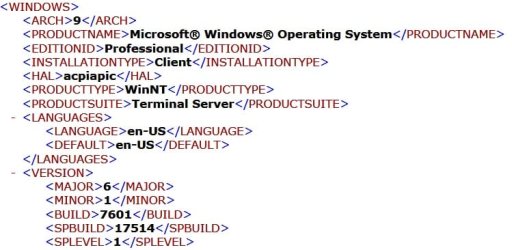
OK, I notice the Digital River .iso has SP1 already incorporated. (See image) This is the exact version of Windows 7 that came installed on my machine- 6.1.7601- which I understand to be the final build. (Final edition SP1 is inclusive, however, Updates would have to be applied) If I were to do a clean install from this disk, I am assuming that the option will be presented as to which version (1-4) I want to install. Also, I find your comment regarding Belarc and Magic Jellybean interesting. I have used Magic Jellybean in the past on my XP Pro Full Retail disk and found it in disagreement with the COA. I ran Belarc Advisor on THIS machine, and it, too, disagreed with the Windows COA sticker on the case. Go figure!

7.1.jpg

I feel confident that I can work through this, and it will add to my knowledge base. On a slightly different note, I have uninstalled 15 MS Updates that are known to wreak havoc on the File System.

The whole objective on this matter has been to present a clean OS to migrate to SSD. This will be my first foray into the world of SSD's. Of course, after all that you have presented it would seem that I can just do a fresh clean install to the SSD via the Digital River media, and either clean install or migrate the programs. There are some HP installed features that I like and maybe those could be added to a clean install.

I sure appreciate this basic tutorial you've provided for me. Thank you for taking the time to do so.

Kind Regards-

tim
 

My Computer

Computer type
PC/Desktop
Computer Manufacturer/Model Number
HP ENVY 700-515xt CTO, with more cam, headers, and 4.11 gears.
OS
Windows 7 Pro SP1 x64
CPU
Intel Haswell i7-4770 3.4GHz
Motherboard
OEM Kaili2 (MSI MS-7826 v2.0)
Memory
G. SKILLS 32GB Ripjaws X Series DDR3 1600 SDRAM
Graphics Card(s)
Integrated HD4600- upgrade coming!
Sound Card
Integrated...for now.
Monitor(s) Displays
Dell ST-2310 Digital
Screen Resolution
I like 1920x1080
Hard Drives
C\:-Samsung 850PRO SSD-256gb, D:\-SG Barracuda 7200 HDD 1 TB (Storage)
PSU
350w OEM (About to become a display in the aquarium!)
Case
ENVY OEM
Cooling
FANS
Keyboard
Logitech and HP- USB.
Mouse
Logitech LS1 (Alltime favorite of mine!) and HP- both USB
Internet Speed
65Mbps Down (min)/4.5Mbps UP- Charter Comm HS cable
Antivirus
avast! Internet Security 2015/MBAM
Browser
Opera, at present. Love that Chromium horsepower!
UPDATE!
Hello- We have solved the dilemma with 'sfc /scannow' corruption... The culprit was Internet Explorer 11 and a subsequent Security Patch Update. The 'iesysprep.dll' in the 'winsxs\wow64' folder is what I couldn't fix. So, we uninstalled IE11 and downgraded to the default IE8, ran 'sfc /scannow' and there are NO issues.
Thanks to all who put up with me through this.

Regards-

tim
 

My Computer

Computer type
PC/Desktop
Computer Manufacturer/Model Number
HP ENVY 700-515xt CTO, with more cam, headers, and 4.11 gears.
OS
Windows 7 Pro SP1 x64
CPU
Intel Haswell i7-4770 3.4GHz
Motherboard
OEM Kaili2 (MSI MS-7826 v2.0)
Memory
G. SKILLS 32GB Ripjaws X Series DDR3 1600 SDRAM
Graphics Card(s)
Integrated HD4600- upgrade coming!
Sound Card
Integrated...for now.
Monitor(s) Displays
Dell ST-2310 Digital
Screen Resolution
I like 1920x1080
Hard Drives
C\:-Samsung 850PRO SSD-256gb, D:\-SG Barracuda 7200 HDD 1 TB (Storage)
PSU
350w OEM (About to become a display in the aquarium!)
Case
ENVY OEM
Cooling
FANS
Keyboard
Logitech and HP- USB.
Mouse
Logitech LS1 (Alltime favorite of mine!) and HP- both USB
Internet Speed
65Mbps Down (min)/4.5Mbps UP- Charter Comm HS cable
Antivirus
avast! Internet Security 2015/MBAM
Browser
Opera, at present. Love that Chromium horsepower!
Tim,

Thank you for your efforts to resolve the integrity errors you encountered. I too was having the same errors and removing the update to IE 11 resolved mine as well.

I have been trying to figure out how to fix this since I purchased this system back in May of this year. When I started it for the first time I ran a SFC scan and the errors appeared. Thinking that some how I broke it by starting it I tried doing a System recovery from the Factory partition. Still the errors appeared.

I contacted HP and after much conversation back and forth they elected to do a remote connect to the my computer. This did not fix it with them telling me that I needed their Recovery DVD's for which they wanted to charge me. After a bit of escalation through several supervisors they sent me the Recovery DVD's at no charge. I ran the recovery and still suffered the errors. At this point HP told me it was normal and to ignore it.

I suffer from No Error OCD on my systems and could not believe it was normal. I called and wrote letters to them and they refused to deal with the issue.

After all this time I ran across your post and decided that I have nothing to lose so I imaged the drive and went for it. I don't use IE and haven't for years. In fact it's bloced from any form of Internet access through Eset Smart Security now.

The interesting thing is that IE rolled back to V8 just as yours did. This makes me think that something is dramatically wrong with the HP Recovery kit as it installs IE10.

Again, thank you for pursuing this and posting your resolution.
 

My Computer

Computer type
PC/Desktop
Computer Manufacturer/Model Number
1. HP p6733w Desktop 2. HP Envy 700-515xt Desktop
OS
1. Windows 7 Home Premium sp1 - 64bit 2. Windows 7 Pro sp1 - 64bit
CPU
1. AMD Phenom II x2 511 3.4GHz 2. Intel i7-4790 Quad 4.0GHz
Motherboard
1. N-Alvorix-RS880-uATX 2. Kaili2
Memory
1. 5 GB - DDR3 2. 8GB DDR3-1600MHz
Graphics Card(s)
Integrated 1. ATI Radeon 4200 2. Intel HD Graphics 4600
Sound Card
1. Realtek High Definition Audio 2. Realtek (Neutered Beats)
Monitor(s) Displays
1. Acer V193L 2. HP 2311 Series Wide LCD
Screen Resolution
1. 1280 x 1024 2. 1920 x 1080
Hard Drives
1. 750 GB - 7200 RPM SATA 2. 1TB 7200 RPM SATA
PSU
1. 250w 2. 300w
Cooling
Stock
Keyboard
Logitech USB keyboard
Mouse
Logitech USB optical mouse
Internet Speed
1.0 - 2.0 mbps
Antivirus
Eset Smart Security v9.0.349.0
Browser
Pale Moon
Thanks for the response. I have absolutely no luck with HP Support. I will not let anyone take remote control over my machine, as I've had nothing but nightmares in doing so.
You don't need to buy their Recovery CD's... you can make your own from within Windows 7, as I did. Better yet, get a copy of Windows 7 from somewhere and you can use your OEM license key with it. Someone here gave me a link to the Windows 7 download.
I upgraded IE to version 10 with no issues, but will not go to 11. I hardly use IE, except when I have to uninstall Opera and do a clean install, due to some sort of corruption.
I am in the process of installing an SSD and using the HDD as simply storage for Documents?My Documents. We'll make sure the File System is intact first, though. SFC /SCANNOW doesn't find any integrity issues as of now. I think we'll use the Paragon software to do so- it's very simple and reliable. The only drawback is the $19.95 price, but really, that's far less stress than another headache.
We spent an awful lot of time figuring that original SFC /SCANNOW issue out. Once we found the corruption and interpreted it correctly, it was downhill from there.
 

My Computer

Computer type
PC/Desktop
Computer Manufacturer/Model Number
HP ENVY 700-515xt CTO, with more cam, headers, and 4.11 gears.
OS
Windows 7 Pro SP1 x64
CPU
Intel Haswell i7-4770 3.4GHz
Motherboard
OEM Kaili2 (MSI MS-7826 v2.0)
Memory
G. SKILLS 32GB Ripjaws X Series DDR3 1600 SDRAM
Graphics Card(s)
Integrated HD4600- upgrade coming!
Sound Card
Integrated...for now.
Monitor(s) Displays
Dell ST-2310 Digital
Screen Resolution
I like 1920x1080
Hard Drives
C\:-Samsung 850PRO SSD-256gb, D:\-SG Barracuda 7200 HDD 1 TB (Storage)
PSU
350w OEM (About to become a display in the aquarium!)
Case
ENVY OEM
Cooling
FANS
Keyboard
Logitech and HP- USB.
Mouse
Logitech LS1 (Alltime favorite of mine!) and HP- both USB
Internet Speed
65Mbps Down (min)/4.5Mbps UP- Charter Comm HS cable
Antivirus
avast! Internet Security 2015/MBAM
Browser
Opera, at present. Love that Chromium horsepower!
  • Like
Reactions: scr
Tim, I assume you will get Paragon to migrate to the SSD? Macrium free can do that, I have used it to migrate the HDD to SSD for a friend. And many more here have used and still are using it.
 

My Computer

Computer type
PC/Desktop
Computer Manufacturer/Model Number
Custom Build
OS
Windows 7 Ultimate x64 SP1
CPU
AMD Phenom 2 1090T
Motherboard
Gigabyte GA-890FXA-UD5
Memory
2x8GB Kingston HyperX Fury Black 1600Mhz Unganged
Graphics Card(s)
MSI GTX 970 Gaming 4G
Sound Card
Realtek On-Board HD 7.1 Audio / Logitech G35
Monitor(s) Displays
3xAcer GD245HQ
Screen Resolution
1920x1080
Hard Drives
Samsung 850 Pro 512GB SSD - OS /
WD Caviar Black SATA 3 - 1 TBx2 - Dynamic RAID 0 /
WD Caviar Green SATA 2 - 640GBx2 - Dynamic RAID 0 /
WD Caviar Green SATA 2 - 640GB - Internal Backup /
Seagate Barracude SATA 3 - 3TB - External Backup/ Sync
PSU
HighPower 1000W
Case
Cooler Master HAF 932
Cooling
Noctua NH-D14
Keyboard
Logitech G19
Mouse
Logitech G500
Internet Speed
100/4 Mbit Cable (100GB quota)
Antivirus
ZoneAlarm Extreme Security / MBAM Pro / MBAE Free / SAS Free
Browser
IE 11 - Firefox - Chrome
Other Info
Logitech F710/ G27/ G940/ Z5500 // TrackIR 5 // Nvidia 3D Surround Vision
Yes, I have used Macrium before with Windows XP Professional. Worked good. Since I have never messed with an SSD before, I went to the Tutorial section here and one of the authors had used Paragon as their example. I still have to figure out in my mind the correct way to do this. My existing HDD has 2 partitions- 'C:\' has the Windows install, programs, etc., and 'D:\' is the HP Recovery partition. I really don't need the 'D:\' partition, as I have a 4 CD set of Recovery Disks, plus I have a copy of Windows 7 on disk that has ALL editions. As soon as I purchase the SDD, I'll be pursuing this further here. On the subject of SSD's, I am looking at the SAMSUNG 850 PRO MZ-7KE256BW 2.5" 256GB SATA III 3-D Vertical unit.
Just not sure if there's any prep work with the SSD before transfer, or if I can just plug it in, run the migration software and transfer just the 'C:\' partition. After that's done, I would like to completely wipe the HDD, name it 'D:\' and move Documents>My Documents, Downloads, Pictures, Videos, etc. over to that drive.
Hey, thanks for responding 'GokAy'.
 

My Computer

Computer type
PC/Desktop
Computer Manufacturer/Model Number
HP ENVY 700-515xt CTO, with more cam, headers, and 4.11 gears.
OS
Windows 7 Pro SP1 x64
CPU
Intel Haswell i7-4770 3.4GHz
Motherboard
OEM Kaili2 (MSI MS-7826 v2.0)
Memory
G. SKILLS 32GB Ripjaws X Series DDR3 1600 SDRAM
Graphics Card(s)
Integrated HD4600- upgrade coming!
Sound Card
Integrated...for now.
Monitor(s) Displays
Dell ST-2310 Digital
Screen Resolution
I like 1920x1080
Hard Drives
C\:-Samsung 850PRO SSD-256gb, D:\-SG Barracuda 7200 HDD 1 TB (Storage)
PSU
350w OEM (About to become a display in the aquarium!)
Case
ENVY OEM
Cooling
FANS
Keyboard
Logitech and HP- USB.
Mouse
Logitech LS1 (Alltime favorite of mine!) and HP- both USB
Internet Speed
65Mbps Down (min)/4.5Mbps UP- Charter Comm HS cable
Antivirus
avast! Internet Security 2015/MBAM
Browser
Opera, at present. Love that Chromium horsepower!
Tim, You're welcome and well deserved.I spent five months looking for a solution. I made the HP recovery disks the first time I started the system up. Then I ran SFC as I was preparing to start removing all the bloatware and wanted to make sure I started with a clean factory system. It was then that the issue popped up. The computer came with the usual load of crap that all HP's come with. This one came with the bonus crap feature of having McAfee Internet Security on it. It failed and generated an error on start up. That was another one of the reasons I ran SFC and the error about iesysprep showed itself.

I decided to run the recovery from the partition and same story. I created recovery media, same problems. That's why I contacted HP and how I ended up with the Recovery DVD's direct from HP. Restored from those and again same problem.

Like you I don't normally allow connections of that type. However, they insisted so I figured I had nothing to lose. That's when they said it was normal to have Integrity Errors like I had. I went on a letter writing campaign and spoke to a dozen or so supervisors of supervisors but in the end they said "it's normal." I've seen several posts on the HP forums with similar issues and the response being "it's nothing to worry about."

Normally I try to fix my own systems by reading and searching, I call it learning. I was about at the end of my rope when I found your post.

I have a Win7 sp1 install iso that I downloaded from Digital River back when I got the other HP that has Premium on it. It was just recently that I learned, in this thread, that I could use it to install both Pro and Premium. I have every intention of doing so once I get a SSD for each system. I've been dropping hints to Santa (My Wife) that sound like sonic booms so maybe I'll find them under the tree. Santa says that I got a new computer why do I need a SSD? My response is "Because."

Be well and thanks again.
 

My Computer

Computer type
PC/Desktop
Computer Manufacturer/Model Number
1. HP p6733w Desktop 2. HP Envy 700-515xt Desktop
OS
1. Windows 7 Home Premium sp1 - 64bit 2. Windows 7 Pro sp1 - 64bit
CPU
1. AMD Phenom II x2 511 3.4GHz 2. Intel i7-4790 Quad 4.0GHz
Motherboard
1. N-Alvorix-RS880-uATX 2. Kaili2
Memory
1. 5 GB - DDR3 2. 8GB DDR3-1600MHz
Graphics Card(s)
Integrated 1. ATI Radeon 4200 2. Intel HD Graphics 4600
Sound Card
1. Realtek High Definition Audio 2. Realtek (Neutered Beats)
Monitor(s) Displays
1. Acer V193L 2. HP 2311 Series Wide LCD
Screen Resolution
1. 1280 x 1024 2. 1920 x 1080
Hard Drives
1. 750 GB - 7200 RPM SATA 2. 1TB 7200 RPM SATA
PSU
1. 250w 2. 300w
Cooling
Stock
Keyboard
Logitech USB keyboard
Mouse
Logitech USB optical mouse
Internet Speed
1.0 - 2.0 mbps
Antivirus
Eset Smart Security v9.0.349.0
Browser
Pale Moon
Tim, I assume you will get Paragon to migrate to the SSD? Macrium free can do that, I have used it to migrate the HDD to SSD for a friend. And many more here have used and still are using it.

GokAy, That's good to know I have Macrium v5 that I purchased some time back...Thanks
 

My Computer

Computer type
PC/Desktop
Computer Manufacturer/Model Number
1. HP p6733w Desktop 2. HP Envy 700-515xt Desktop
OS
1. Windows 7 Home Premium sp1 - 64bit 2. Windows 7 Pro sp1 - 64bit
CPU
1. AMD Phenom II x2 511 3.4GHz 2. Intel i7-4790 Quad 4.0GHz
Motherboard
1. N-Alvorix-RS880-uATX 2. Kaili2
Memory
1. 5 GB - DDR3 2. 8GB DDR3-1600MHz
Graphics Card(s)
Integrated 1. ATI Radeon 4200 2. Intel HD Graphics 4600
Sound Card
1. Realtek High Definition Audio 2. Realtek (Neutered Beats)
Monitor(s) Displays
1. Acer V193L 2. HP 2311 Series Wide LCD
Screen Resolution
1. 1280 x 1024 2. 1920 x 1080
Hard Drives
1. 750 GB - 7200 RPM SATA 2. 1TB 7200 RPM SATA
PSU
1. 250w 2. 300w
Cooling
Stock
Keyboard
Logitech USB keyboard
Mouse
Logitech USB optical mouse
Internet Speed
1.0 - 2.0 mbps
Antivirus
Eset Smart Security v9.0.349.0
Browser
Pale Moon
Back
Top