Most videos will play... some will not.

stevieray

New member
Guru
VIP
Local time
12:32 AM
Messages
632
Location
manasquan, nj
(I am not sure which forum to ask this question so I put it here in General. Feel free to move it, Mr. Mod)

I have an odd, site-specific flash video problem. On a handful of sites, videos will not play. They work fine on YouTube, Live Leak, Hulu, etc. They work fine embedded in most news sites and blogs. They don't work on ESPN, where all I can see is a blank black box.


  • At first I thought it was a browser issue (Firefox), so I uninstalled/reinstalled Flash. No go.
  • I then reset flash settings to default. No help.
  • I toggled hardware acceleration. Nope.
  • I then uninstalled Ghostery. No go.
  • I disabled Ad Block Plus. Nope.
  • I ran Firefox with add-ons disabled. Still nothing.
  • I allowed third-party cookies. Nada.
  • I changed dom.ipc.plugins. No good.

I began to suspect it wasn't the browser. I opened IE and tried that... still no videos on ESPN. Just a black box. So my attention turned to my ISP or modem. I fired up my laptop. Lo and behold, the videos on ESPN played fine... so I guess it's not the modem or ISP, it's an issue with my Desktop.

I thought I would check out ABC News (they are a business partner of ESPN and might use similar video technology) and I got a clue -- the videos would play, but flashed an error message first. It read:

Error saving localized settings
Application is unable to access your file system
So I turned to a more generalized, whole-PC approach.


  • First I updated my graphics drivers. No go.
  • I reset my Hosts file. Nope.
  • I reset the permissions of Macromedia folder with subinacl and a bat file. No good.

Then I set up a new Win 7 user account and tried to view ESPN videos in there. They worked fine!

So that is my problem. Something in my Win 7 admin account is screwed up, but I don't quite know what. A corrupted AppData folder? A permissions issue? Something else entirely?
 
Last edited:

My Computer My Computer

At a glance

windows 7 x64 Home Premiumintel q6600g.skill 8gb ddr2 1066 (pc2 8500)evga geforce 9800 gtx 512 mb
Computer Manufacturer/Model Number
me / #1
OS
windows 7 x64 Home Premium
CPU
intel q6600
Motherboard
gigbyte ga ep45 ud3l
Memory
g.skill 8gb ddr2 1066 (pc2 8500)
Graphics Card(s)
evga geforce 9800 gtx 512 mb
Screen Resolution
1680 x 1050
Hard Drives
wd caviar black 500 gb
wd caviar black 1tb
wd elements 1tb external hd x2
PSU
raidmax 500w
Case
smilodon (yes, t'was the pretty blue lites that got me!)
Flash most likely.

I used to have a similar issue when my flash version was ''too updated'' for the sites old flash coding to play videos.

I don't know it may be influenced by the accounts given the unknown possibility that flash version might/might not be shared across accounts?
 

My Computer My Computer

At a glance

Windows 7 professional X64AMD A10-5800K OC@ 4.4Ghz.8GB Kingston HyperX Blu 1333mhzXFX HD7870 2GB Core Edition
Computer type
PC/Desktop
OS
Windows 7 professional X64
CPU
AMD A10-5800K OC@ 4.4Ghz.
Motherboard
Gigabyte F2A85X-UP4
Memory
8GB Kingston HyperX Blu 1333mhz
Graphics Card(s)
XFX HD7870 2GB Core Edition
Monitor(s) Displays
Acer AL2216W
Screen Resolution
1680x1050
Hard Drives
Seagate Barracuda 500gb 7200rpm
Seagate Barracuda 1.5TB 7200rpm
PSU
Cooler Master Silent Pro M 850W
Case
Thermaltake Commander MS-I
Cooling
Cooler Master N520
Mouse
Logitech M504
Internet Speed
10Mbps
Hi stevieray,

You may want to try using the system in 'Safe Mode' to see what happens. Since the 'new user account' works fine, the 'flash player version' appears to be apt; however I would still check the current version and look for an update. You may even try re-installing the 'flash player'.

A corrupt firewall may also be instrumental; try to temporarily disable the firewall and check results. If it produces positive results, re-install the 'anti-virus/firewall'.

You may also try http://www.sevenforums.com/tutorials/1538-sfc-scannow-command-system-file-checker.html and try isolating the culprit.
 

My Computer My Computer

At a glance

Windows 7 64bit
OS
Windows 7 64bit
Thanks for the answers, guys. I updated the flash player for both FF and IE only two days ago, ran SFC /SCANNOW and did a Repair Install less than a week ago. I hadn't tried the firewall yet (Win 7 built-in firewall) so I tried that. Didn't help.

I just tried manually resetting all of the permissions for appdata (icacls * /t /c /reset). It restored 66,000+ files to default, but it failed to find and/or restore nearly 10,000. I'd like to see which files failed. Does anyone know how to get the icacls function to list only the failures? And maybe even save that list for me?
 

My Computer My Computer

At a glance

windows 7 x64 Home Premiumintel q6600g.skill 8gb ddr2 1066 (pc2 8500)evga geforce 9800 gtx 512 mb
Computer Manufacturer/Model Number
me / #1
OS
windows 7 x64 Home Premium
CPU
intel q6600
Motherboard
gigbyte ga ep45 ud3l
Memory
g.skill 8gb ddr2 1066 (pc2 8500)
Graphics Card(s)
evga geforce 9800 gtx 512 mb
Screen Resolution
1680 x 1050
Hard Drives
wd caviar black 500 gb
wd caviar black 1tb
wd elements 1tb external hd x2
PSU
raidmax 500w
Case
smilodon (yes, t'was the pretty blue lites that got me!)
Hi stevieray,

Thank you for the reply.

Apologies; tried but was was unable to find the failures. You may want to use a 'New Account' if nothing else works.
 

My Computer My Computer

At a glance

Windows 7 64bit
OS
Windows 7 64bit
Finally got it working. It was a "third party content" issue.

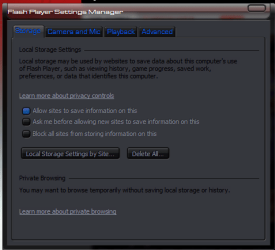
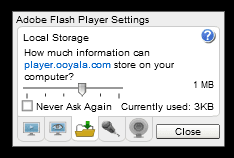
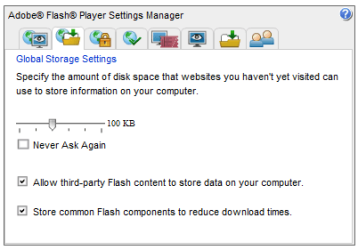
I set my browser to allow third party cookies, but not my flash player. It turns out you can't set third party cookies from the Flash Control Panel that comes up when you right-click on a flash video in your browser... the option isn't offered there (see snip #1). I had to go to my master Flash Control Panel on the Macromedia website in order to get the "allow third party flash content" option to appear (see snip #2). Nor was this option available on the right-click "global settings panel" either (see snip # 3)... I guess it's only available at the source.

my flash panel.PNG

correct flash panel.PNG

global flash settings.PNG

I wish they had made this distinction clear before I went through all these steps... I thought the right-click Flash Control Panel was the same as the Flash Control Panel on Macromedia's site.
Adobe - Flash Player : Settings Manager - Global Storage Settings Panel
(Note: The control panel you see at this address is your own, fully functional panel... it is not just an image of a control panel.)
 

My Computer My Computer

At a glance

windows 7 x64 Home Premiumintel q6600g.skill 8gb ddr2 1066 (pc2 8500)evga geforce 9800 gtx 512 mb
Computer Manufacturer/Model Number
me / #1
OS
windows 7 x64 Home Premium
CPU
intel q6600
Motherboard
gigbyte ga ep45 ud3l
Memory
g.skill 8gb ddr2 1066 (pc2 8500)
Graphics Card(s)
evga geforce 9800 gtx 512 mb
Screen Resolution
1680 x 1050
Hard Drives
wd caviar black 500 gb
wd caviar black 1tb
wd elements 1tb external hd x2
PSU
raidmax 500w
Case
smilodon (yes, t'was the pretty blue lites that got me!)
Thanks for the answers, guys. I updated the flash player for both FF and IE only two days ago, ran SFC /SCANNOW and did a Repair Install less than a week ago. I hadn't tried the firewall yet (Win 7 built-in firewall) so I tried that. Didn't help.

I just tried manually resetting all of the permissions for appdata (icacls * /t /c /reset). It restored 66,000+ files to default, but it failed to find and/or restore nearly 10,000. I'd like to see which files failed. Does anyone know how to get the icacls function to list only the failures? And maybe even save that list for me?

Perhaps you're looking in the wrong place, or applying unnecessary fixes. If something in the AppData folder is the problem, then a complete clean re-install of Firefox might do the trick.

EDIT: Ah, there we go, you beat me to it lol
 

My Computer My Computer

At a glance

Windows 7 Home Premium x64Intel Core i5 2500K8GB DDR3nVidia GeForce GTX650 Ti BOOST
Computer type
Laptop
Computer Manufacturer/Model Number
Custom
OS
Windows 7 Home Premium x64
CPU
Intel Core i5 2500K
Motherboard
MSI MS-7750
Memory
8GB DDR3
Graphics Card(s)
nVidia GeForce GTX650 Ti BOOST
Sound Card
Realtek
Monitor(s) Displays
21' Philips
Screen Resolution
Full HD
Hard Drives
1TB
PSU
500W
Perhaps you're looking in the wrong place, or applying unnecessary fixes.

Heh. The story of my life. :p
I swear... the more I play with this infernal machine, the less I know about it! I'm goin' backwards!
 

My Computer My Computer

At a glance

windows 7 x64 Home Premiumintel q6600g.skill 8gb ddr2 1066 (pc2 8500)evga geforce 9800 gtx 512 mb
Computer Manufacturer/Model Number
me / #1
OS
windows 7 x64 Home Premium
CPU
intel q6600
Motherboard
gigbyte ga ep45 ud3l
Memory
g.skill 8gb ddr2 1066 (pc2 8500)
Graphics Card(s)
evga geforce 9800 gtx 512 mb
Screen Resolution
1680 x 1050
Hard Drives
wd caviar black 500 gb
wd caviar black 1tb
wd elements 1tb external hd x2
PSU
raidmax 500w
Case
smilodon (yes, t'was the pretty blue lites that got me!)
Hi stevieray,

Glad that the issue is fixed :)
 

My Computer My Computer

At a glance

Windows 7 64bit
OS
Windows 7 64bit
Back
Top