Mount Drives or Partitions as a Folder

How to Mount a Hard Drive or Partition as a Folder in Windows 7

   Information
This will show you how to mount an existing NTFS drive or partition as a VHD folder in Windows 7. By doing so, this will allow you to use a hard-drive as a normal folder on your main system drive.

This method comes in handy if you made your original system drive too small for your growing software needs or if you just want to be able to access multiple drives via one single drive letter.


Here's How:
1. Create a new folder in 'Drive C' with an appropriate name.
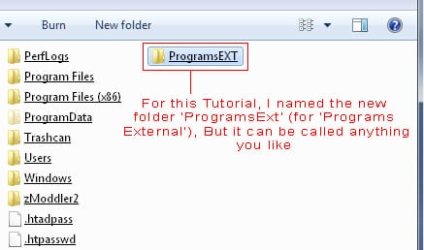
NewFolderDriveC.jpg
2. Right click on Computer on Desktop or Start-Menu and click on Manage.


3. Click on Disk Management in the left hand pane.


4. Right click on the drive you wish to mount in the middle pane, and click on Change Drive Letter and Paths...
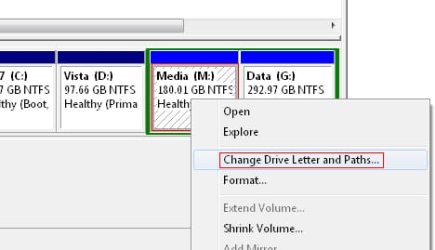
ChangeDriveLetters.jpg
5. In the dialog that pops up click on the add... button.
AddPathButton.jpg
6. In the new window that pops up click on Browse...

7. In this new dialog navigate to the new folder you created earlier.
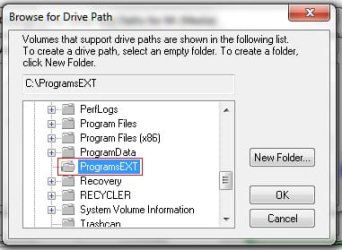
BrowseForDrivePath.jpg
8. Click on OK on all of the windows that opened during this tutorial.


This is how my drive space looked before...
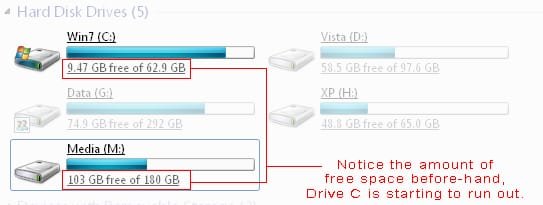
Before.jpg
This is how my drives free space looks now after installing Test Drive Unlimited which is 6Gb big to the location C:\ProgramsEXT\TDU.
NOTE: Notice how the 6Gb has been added to my drive M instead of drive C.
PostTDU_6Gb.jpg
   Information
If you delete the newly created folder with stuff inside it, the 'virtual' folder is all you delete. any programs or data placed in seperate drives via this method remain in the other drives after deleting the folder.


Last edited by a moderator:
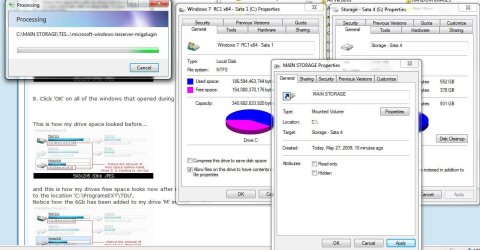
Seems to work well here! In fact I just changed the attributes from read only in order to be allowed to copy to as well as from the main storage drive separated from the C drive entirely. It will be interesting to see how that works oiut as well. :)
 

Attachments

  • CHANGE ATTRIBUTES FOR MOUNTED DRIVE.jpg
    CHANGE ATTRIBUTES FOR MOUNTED DRIVE.jpg
    105.1 KB · Views: 1,630

My Computers

System One System Two

  • Computer type
    PC/Desktop
    Computer Manufacturer/Model Number
    Custom builds = 2
    OS
    W7 Ultimate x64/W10 Pro x64/W11 Pro Triple Boot - Main PC W7 Remote PC Micro ATX W7 Pro x64/W11 Pro
    CPU
    AMD Phenom II X4 975 Deneb 3.6ghz - 965 2nd remote pc
    Motherboard
    Gigabyte GA-790XTA-UD4-Gigabyte GA-880GM-D2H remote pc
    Memory
    Kingston Hyper X DDR3 1600 1.5v 16gb - Hyper X Fury 8gb 2nd
    Graphics Card(s)
    MSI HD Radeon 5750 1gb - MSI HD Radeon 6450 on mini tower
    Sound Card
    Creative Labs X-Fi Xtreme Audio P - Realtek onooard 2nd case
    Monitor(s) Displays
    ASUS VW199T-P 19" HP 2082a Main-HP 2082a 20" remote pc
    Screen Resolution
    Asus 1440x900 - HP 1600x900
    Hard Drives
    WD Black 1TB HD per OS W7, W10, and pending W11 presently on 500gb OS Drive - Pending Triple 1TB HDs for Spanned Storage/backup volume
    Single 2TB external USB enclosure, single 1TB System 7 Host/Boot drive, Pending 8TB external HD for system image b
    PSU
    Corsair 750TX - primary / Corsair CX600 - second
    Case
    Antec 900-2 - SSD compatible / NZXT Vulcan mini tower
    Cooling
    Zalman CNPS9900A
    Keyboard
    AZIO L70 Backlit Letters Gaming - ONN Cordless/USB
    Mouse
    MSI DS200 Programmable, Logitech Cordless
    Internet Speed
    30mbps upgrade - primary hard wired - mini tower usb WiFi
    Antivirus
    GFI VIPRE Internet Security 2014 on W7 2016 beta on W10,
    Browser
    Cyberfox, WaterFox 64bit FF variants, FireFox x64, Pale Moon
    Other Info
    Accomdata fan cooled usb 2.0 PIDE/Sata II, III external enclosure.
    Sambient usb/eSata PATA/Sata II, III external enclosure.
  • Computer type
    PC/Desktop
    System Manufacturer/Model Number
    CUSTOM ASSEMBLY
    OS
    W7 Pro x64/W11 Pro
    CPU
    AMD Deneb 3.6ghz - 965
    Motherboard
    Gigabyte GA-880GM-D2H remote pc
    Memory
    Kingston Hyper X Fury 8gb
    Graphics Card(s)
    MSI HD Radeon 6450 DVI Output
    Sound Card
    Realtek onooard Creative or Other separate PENDING
    Monitor(s) Displays
    VIZIO 32" LCD TV Separate LCD Pending
    Screen Resolution
    1600x1080
    Hard Drives
    WD 500GB OS Host/Boot WD Green 1TB Storage/Backup
    PSU
    Corsair 600W - THERMALTAKE 600W spare case
    Case
    NZXT Vulcan mini tower
    Cooling
    Twin 120mm Top Fans - 240mm Side Cover
    Keyboard
    ONN Cordless/USB Logitech Cordless
    Mouse
    ONN USB/Cordless - Logitech Cordless
    Internet Speed
    DSL 5G
    Browser
    MS Edge, FireFox, WaterFox x64, FireFox Nightly
    Other Info
    OS Testing-Remote Access to Main TeamViewer
Very nice tutorial. Now if they would just let you mount ISO's and other disc image standard natively without 3rd party software, they will be fairly close to Linux functionality. They did give us native ISO burning and that is a huge step in the right direction, so if I nag and send enough feedback, they might even listen. ;)
 

My Computer

OS
Windows 7 64bit
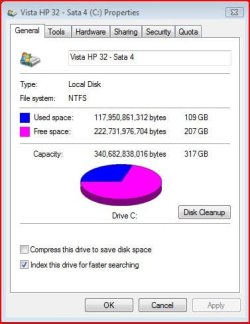
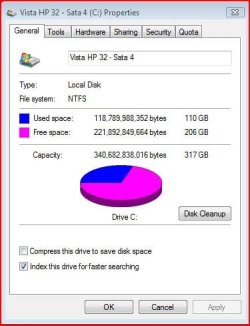
I just saw the 1tb storage mounted on Vista Home Premium 32bit as well. The difference seen in the total drive space used was only 1gb! :shock: It works for those still running both! :D
 

Attachments

  • VISTA BEFORE.jpg
    VISTA BEFORE.jpg
    34.8 KB · Views: 19,753
  • VISTA AFTER.jpg
    VISTA AFTER.jpg
    34.5 KB · Views: 19,562

My Computers

System One System Two

  • Computer type
    PC/Desktop
    Computer Manufacturer/Model Number
    Custom builds = 2
    OS
    W7 Ultimate x64/W10 Pro x64/W11 Pro Triple Boot - Main PC W7 Remote PC Micro ATX W7 Pro x64/W11 Pro
    CPU
    AMD Phenom II X4 975 Deneb 3.6ghz - 965 2nd remote pc
    Motherboard
    Gigabyte GA-790XTA-UD4-Gigabyte GA-880GM-D2H remote pc
    Memory
    Kingston Hyper X DDR3 1600 1.5v 16gb - Hyper X Fury 8gb 2nd
    Graphics Card(s)
    MSI HD Radeon 5750 1gb - MSI HD Radeon 6450 on mini tower
    Sound Card
    Creative Labs X-Fi Xtreme Audio P - Realtek onooard 2nd case
    Monitor(s) Displays
    ASUS VW199T-P 19" HP 2082a Main-HP 2082a 20" remote pc
    Screen Resolution
    Asus 1440x900 - HP 1600x900
    Hard Drives
    WD Black 1TB HD per OS W7, W10, and pending W11 presently on 500gb OS Drive - Pending Triple 1TB HDs for Spanned Storage/backup volume
    Single 2TB external USB enclosure, single 1TB System 7 Host/Boot drive, Pending 8TB external HD for system image b
    PSU
    Corsair 750TX - primary / Corsair CX600 - second
    Case
    Antec 900-2 - SSD compatible / NZXT Vulcan mini tower
    Cooling
    Zalman CNPS9900A
    Keyboard
    AZIO L70 Backlit Letters Gaming - ONN Cordless/USB
    Mouse
    MSI DS200 Programmable, Logitech Cordless
    Internet Speed
    30mbps upgrade - primary hard wired - mini tower usb WiFi
    Antivirus
    GFI VIPRE Internet Security 2014 on W7 2016 beta on W10,
    Browser
    Cyberfox, WaterFox 64bit FF variants, FireFox x64, Pale Moon
    Other Info
    Accomdata fan cooled usb 2.0 PIDE/Sata II, III external enclosure.
    Sambient usb/eSata PATA/Sata II, III external enclosure.
  • Computer type
    PC/Desktop
    System Manufacturer/Model Number
    CUSTOM ASSEMBLY
    OS
    W7 Pro x64/W11 Pro
    CPU
    AMD Deneb 3.6ghz - 965
    Motherboard
    Gigabyte GA-880GM-D2H remote pc
    Memory
    Kingston Hyper X Fury 8gb
    Graphics Card(s)
    MSI HD Radeon 6450 DVI Output
    Sound Card
    Realtek onooard Creative or Other separate PENDING
    Monitor(s) Displays
    VIZIO 32" LCD TV Separate LCD Pending
    Screen Resolution
    1600x1080
    Hard Drives
    WD 500GB OS Host/Boot WD Green 1TB Storage/Backup
    PSU
    Corsair 600W - THERMALTAKE 600W spare case
    Case
    NZXT Vulcan mini tower
    Cooling
    Twin 120mm Top Fans - 240mm Side Cover
    Keyboard
    ONN Cordless/USB Logitech Cordless
    Mouse
    ONN USB/Cordless - Logitech Cordless
    Internet Speed
    DSL 5G
    Browser
    MS Edge, FireFox, WaterFox x64, FireFox Nightly
    Other Info
    OS Testing-Remote Access to Main TeamViewer
Once attached XP Mode wouldn't start

I found this very helpful and I was able to access the folders on the VHD in Windows File Manager. However, when I went to restart the Virtual Machine XP Mode it gave me an error. Detaching the VHD allowed me to run the VM again.

Is there a way to "have my cake and eat it too?" I have one critical application that only runs under VM and would like to be able to access the files on the VHD in Windows 7 without having to attach & reattach.

If this is not the correct place for this question, please advise.

Many thanks!
 

My Computer

OS
Windows 7
Check drive space on drive

How do you check the space usage and use disk tools on a drive that is *only* mounted as a folder? I don't see a way to do this, so I have to add drive letters to the partition as well to know when they are filling up.
 

My Computer

Computer Manufacturer/Model Number
EEE PC 1015PN
OS
Windows 7 Ultimate
CPU
Intel Atom 1.5 GHz
Motherboard
Integrated
Memory
2GB Corsair DDR3
Graphics Card(s)
GMA350/Invidia Ion
Sound Card
Integrated
Monitor(s) Displays
LCD Screen
Screen Resolution
1024x600
Hard Drives
Seagate 500GB SATA3
PSU
Integrated
Case
Integrated
Cooling
Integrated Fan
Keyboard
Integrated
Mouse
Microsoft USB Optical for Notebooks
Internet Speed
Fiber
How do you check the space usage and use disk tools on a drive that is *only* mounted as a folder? I don't see a way to do this, so I have to add drive letters to the partition as well to know when they are filling up.

right click on the folder and open Properties. On the general tab next to Mounted Volume press the Properties button.
 

My Computer

Computer type
Laptop
Computer Manufacturer/Model Number
Hewlett-Packard/G62-107SA Notebook
OS
Microsoft Windows 7 Home Premium 64-bit Service Pack 1
CPU
Intel(R) Core(TM) i3 CPU M 330 @ 2.13GHz
Motherboard
Hewlett-Packard 1425
Memory
8 GB DDR3
Graphics Card(s)
Intel(R) HD Graphics
Sound Card
Realtek High Definition Audio
Monitor(s) Displays
Builtin
Screen Resolution
1366 x 768 x 32 bits (4294967296 colors) @ 60 Hz
Hard Drives
250 GB SATA Hard Disk Drive 7200 rpm
2TB Seagate GoFlex USB 2 Drive
1TB Iomega Prestige USB 2 Drive
1.5TB Iomega Prestige USB 2 Drive (Samsung)
2TB WD MyBook Live NAS.
Mouse
Logitech Anywhere MX
Internet Speed
152 Mbs download 10 Mbs upload
Antivirus
Norton 360
Browser
Chrome
Back
Top