
Mouse Hover Time - Change

How to Change Mouse Hover Time before Pop-up Displays in Windows 7 and Windows 8

   Information
This will show you how to change the delay time, in milliseconds, that the mouse pointer has to stay hovered on a item before tooltip popups display in Windows 7 and Windows 8.

Special thanks to Aaron (Airbot) for pointing this out here.

   Warning

  • This may also override your MenuShowDelay setting.
  • If you have the Animations in the taskbar and Start Menu option checked in Visual Effects, then you may not see much or any difference. You should uncheck this option first before doing the tutorial below for the maximum effect.
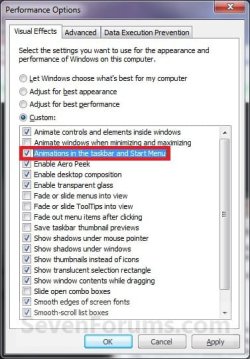
Visual_Effects.jpg


OPTION ONE

Change Mouse Hover Time using a REG File Download


1. To Have a Fast Mouse Hover Time
NOTE: This changes the mouse hover delay time to 30 milliseconds.
A) Click on the download button below to download the file below.
30ms_Mouse_Hover_Time.zip


Download


B) Go to step 3.
2. To Restore the Default Mouse Hover Time
NOTE: This changes the mouse hover delay time back to 400 milliseconds.
A) Click on the download button below to download the file below.
Default_Mouse_Hover_Time.zip

Download


3. Click on Save, and save the .zip file to the Desktop.

4. Open the downloaded .zip file and extract the .reg file to the Desktop.

5. Right click the extracted .reg file and click on Merge.

6. Click on Run, Yes, Yes, and OK when prompted.

7. Log off and log on, or restart the computer to apply the changes.

8. When done, you can delete the .zip and .reg files if you like.


OPTION TWO

Change Mouse Hover Time Manually Through Registry Editor


1. Open the Start Menu, then type regedit in the search box and press Enter.

2. If prompted by UAC, then click on Yes.

3. In regedit, navigate to the location below:
HKEY_CURRENT_USER\Control Panel\Mouse
4. In the right pane, right click MouseHoverTime and click on Modify. (See screenshot below)
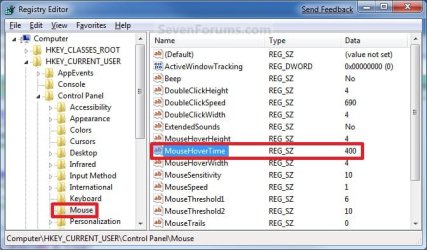
Reg1.jpg
5. Type in a number between 0 to 4000 (400 is default, I use 30) for how many milliseconds, and click on OK. (See screenshot below)
NOTE: The lower the number, the faster the response time. If you use an entry of 0, there is no delay before the tooltip opens.
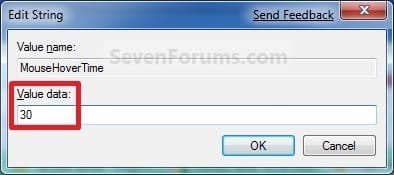
Modify.jpg
6. Close regedit.

7. Log off and log on, or restart the computer to apply the changes.
NOTE: As a test, hover the mouse pointer over a tooltip or Start Menu All Programs and see how much faster it opens.
That's it,
Shawn


Attachments

Last edited:
Hello Chrysalis,

I'm sorry, but I'm not able to reproduce what you described. I have MouseHoverTime set at 400 (default), then set MenuShowDelay to 100 and logged off and on to apply. The MouseHoverTime is still set at 400 for me, and MenuShowDelay to 100. :confused:
 

My Computer

Computer type
PC/Desktop
Computer Manufacturer/Model Number
Self built custom
OS
64-bit Windows 11 Pro for Workstations
CPU
Intel i7-8700K OC'd to 5 GHz
Motherboard
ASUS ROG Maximus XI Formula Z390
Memory
64 GB (4x16GB) G.SKILL TridentZ RGB DDR4 3600 MHz
Graphics Card(s)
ASUS ROG-STRIX-GTX1080TI-O11G-GAMING
Sound Card
Integrated
Monitor(s) Displays
2 x Samsung Odyssey G7 27"
Screen Resolution
2560x1440
Hard Drives
1TB Samsung 990 PRO M.2,
4TB Samsung 990 PRO PRO M.2,
TerraMaster F8 SSD Plus NAS
PSU
Seasonic Prime Titanium 850W
Case
Thermaltake Core P3
Cooling
Corsair Hydro H115i
Keyboard
Logitech wireless K800
Mouse
Logitech MX Master 4
Internet Speed
2 Gb/s Download and 100 Mb/s Upload
Antivirus
Malwarebyte Anti-Malware Premium
Browser
Google Chrome
Other Info
Logitech Z625 speaker system,
Logitech BRIO 4K Pro webcam,
HP Color LaserJet Pro MFP M477fdn,
APC SMART-UPS RT 1000 XL - SURT1000XLI,
Galaxy S23 Plus phone
yes it stays set but the actual delay is 400.

I remember fixing this a few months back on my old install and then I reinstalled windows again after I built my i5, imported my reg tweaks but menu's were lagged, I thought was weird.

Checked my registry and found the mouse hover time is there by default to 400ms hence my problem, I renamed it to disabled and rebooted and problem fixed. I dont know if it is a bug or by design, quite possibly a bug since the name indicates it should be for tooltips only.

Try renaming or removing the key and leaving the menu show delay at 100ms, reboot and you will notice the difference.
 

My Computer

Computer type
PC/Desktop
Computer Manufacturer/Model Number
home built
OS
windows 8.1 Pro x64
CPU
intel i5 4670k @ 4.3ghz
Motherboard
asus z87-plus
Memory
16 gig ram ddr3 @ 1600 corsair vengeance
Graphics Card(s)
evga 970 GTX 4 GIG FTW ACX 2.0
Sound Card
asus xonar D2X
Monitor(s) Displays
benq gw2765ht
Screen Resolution
2560x1440
Hard Drives
Samsung 850 pro SSD 512gig - boot device wooosh
WD black cavalier 640gig WD6401AALS
Seagate 500gig ST3500630AS
WD 2TB Green WDC20EARS
2 x WD Red 3TB WD30EFRX
Samsung 750gig HD753LG - on asmedia controller
PSU
coolermaster silent pro 600watt modular
Case
fractal define R4
Cooling
artic freezer i30, 3 case fans
Keyboard
microsoft business ps2 keyboard
Mouse
microsoft optical black mouse
Internet Speed
80/20 FTTC SkyBB
Antivirus
Nod32 AV v8, HitmanProAlert, SRP, System Hardening
Browser
Chrome x64
Other Info
Intel controller is in AHCI mode currently using IaSTOR 12.8.0.1016 drivers
Hi. I have auto-hide set on my task bar. Which of these tweaks might get either the delay to be longer or the mouse hover to be less sensitive to it? It always gets in the way no matter where I put it, and I want the screen real estate. BUT I'd prefer my menus and tooltips be faster than default (if possible.) This has been a question of mine for years. Any ideas?:geek:
 

My Computer

Computer Manufacturer/Model Number
HP Pavillion DV2000 Notebook
OS
Windows 7/ Ubuntu
CPU
AMD Turion X2 1.6ghz
Motherboard
Wistron 30B5
Memory
1.5Gb
Graphics Card(s)
Nvidia Geforce Go 6150
Sound Card
Conexant HD/ Creative Xmod USB
Monitor(s) Displays
Laptop Built in
Hard Drives
Fujitsu 120Gb
Cooling
GPU Runs Hot! Using NHC to cycle down cpu and keep cool.
Hello Melaney,

I'm sorry, but this tutorial doesn't apply to the amount of time it take for the taskbar to auto-hide when the mouse pointer hovers over it. It only applies towards the time it takes to open the taskbar icon's preview windows, and tooltip pop-ups. :(

You should go ahead and post this issue in the Customization forum to see if you may be able to get a solution for this though.
 

My Computer

Computer type
PC/Desktop
Computer Manufacturer/Model Number
Self built custom
OS
64-bit Windows 11 Pro for Workstations
CPU
Intel i7-8700K OC'd to 5 GHz
Motherboard
ASUS ROG Maximus XI Formula Z390
Memory
64 GB (4x16GB) G.SKILL TridentZ RGB DDR4 3600 MHz
Graphics Card(s)
ASUS ROG-STRIX-GTX1080TI-O11G-GAMING
Sound Card
Integrated
Monitor(s) Displays
2 x Samsung Odyssey G7 27"
Screen Resolution
2560x1440
Hard Drives
1TB Samsung 990 PRO M.2,
4TB Samsung 990 PRO PRO M.2,
TerraMaster F8 SSD Plus NAS
PSU
Seasonic Prime Titanium 850W
Case
Thermaltake Core P3
Cooling
Corsair Hydro H115i
Keyboard
Logitech wireless K800
Mouse
Logitech MX Master 4
Internet Speed
2 Gb/s Download and 100 Mb/s Upload
Antivirus
Malwarebyte Anti-Malware Premium
Browser
Google Chrome
Other Info
Logitech Z625 speaker system,
Logitech BRIO 4K Pro webcam,
HP Color LaserJet Pro MFP M477fdn,
APC SMART-UPS RT 1000 XL - SURT1000XLI,
Galaxy S23 Plus phone
THANK YOU ! I have been searching for a registry tweak for hours now to allow me to change my pop up hover time. This did it ! Thanks again...
 

My Computer

Computer Manufacturer/Model Number
Dell Vostro 1500
OS
Windows 7 Professional
Memory
2GB
You're most welcome Shodan, and welcome to Seven Forums. :)
 

My Computer

Computer type
PC/Desktop
Computer Manufacturer/Model Number
Self built custom
OS
64-bit Windows 11 Pro for Workstations
CPU
Intel i7-8700K OC'd to 5 GHz
Motherboard
ASUS ROG Maximus XI Formula Z390
Memory
64 GB (4x16GB) G.SKILL TridentZ RGB DDR4 3600 MHz
Graphics Card(s)
ASUS ROG-STRIX-GTX1080TI-O11G-GAMING
Sound Card
Integrated
Monitor(s) Displays
2 x Samsung Odyssey G7 27"
Screen Resolution
2560x1440
Hard Drives
1TB Samsung 990 PRO M.2,
4TB Samsung 990 PRO PRO M.2,
TerraMaster F8 SSD Plus NAS
PSU
Seasonic Prime Titanium 850W
Case
Thermaltake Core P3
Cooling
Corsair Hydro H115i
Keyboard
Logitech wireless K800
Mouse
Logitech MX Master 4
Internet Speed
2 Gb/s Download and 100 Mb/s Upload
Antivirus
Malwarebyte Anti-Malware Premium
Browser
Google Chrome
Other Info
Logitech Z625 speaker system,
Logitech BRIO 4K Pro webcam,
HP Color LaserJet Pro MFP M477fdn,
APC SMART-UPS RT 1000 XL - SURT1000XLI,
Galaxy S23 Plus phone
I noticed,that i have to have the same numbers for both tweaks,or else the largest number will preveal:sarc:
 

My Computer

Computer Manufacturer/Model Number
Custom: Self-Build
OS
Windows 7 Ultimate 64bits
CPU
Core i7 920 4 x 3,9 Mhz.
Motherboard
MSI Pro-E socket 1366,2 x usb 3.0
Memory
6 gb ddr3 1333mhz
Graphics Card(s)
XFX/ATI HD5770 1GB gddr5,overclocked
Sound Card
Creative (under construction)
Monitor(s) Displays
Acer X243HQ 24 inch
Screen Resolution
1920x1080
Hard Drives
SAMSUNG HD103SJ ATA Device 1TB,
Hitachi 7220 2TB
PSU
500Watt,Coolermaster
Case
Cooler Master,work in progress.
Cooling
Scythe Mugen rev. 2b + 4 case-fans + Northbridge Fan 8000 re
Keyboard
Logitech K340
Mouse
Logitech M705 Marathon Mouse
Internet Speed
16 MB/s down 1 up
Other Info
e-Sata ports + external:
WDS 1 TB X 2 , Medion 1,5 TB,Medion 1 TB USB 3.0,500GB Medion 3.0 USB
Thank you Shawn your good tutorial allowed me to change my Mouse Hover Time within reg edit and its working brilliant ! :)

Ciara ... X
 

My Computer

Computer Manufacturer/Model Number
Home Built
OS
Windows 7 Professional 64-bit SP1
CPU
Intel E8400
Motherboard
MSI P35 Neo
Memory
4GB Crucial Ballistix
Graphics Card(s)
ATI ASUS Radeon HD 4830
Sound Card
Realtek ALC888 on Board
Monitor(s) Displays
Asus 22-inch VH226H Widescreen
Screen Resolution
1920 x 1080
Hard Drives
Two Western Digital 500GB
PSU
Hiper HPU-4M 530W
Case
Thermaltake Tsunami Dream Black
Cooling
Air/Fans
Keyboard
Saitek Eclipse
Mouse
Razer
Internet Speed
Sky Broadband
Other Info
USB Hub/Card Reader - 2 Pen Drives, 1 Phone Dock
You're most welcome Ciara. I'm glad that it helped. :)
 

My Computer

Computer type
PC/Desktop
Computer Manufacturer/Model Number
Self built custom
OS
64-bit Windows 11 Pro for Workstations
CPU
Intel i7-8700K OC'd to 5 GHz
Motherboard
ASUS ROG Maximus XI Formula Z390
Memory
64 GB (4x16GB) G.SKILL TridentZ RGB DDR4 3600 MHz
Graphics Card(s)
ASUS ROG-STRIX-GTX1080TI-O11G-GAMING
Sound Card
Integrated
Monitor(s) Displays
2 x Samsung Odyssey G7 27"
Screen Resolution
2560x1440
Hard Drives
1TB Samsung 990 PRO M.2,
4TB Samsung 990 PRO PRO M.2,
TerraMaster F8 SSD Plus NAS
PSU
Seasonic Prime Titanium 850W
Case
Thermaltake Core P3
Cooling
Corsair Hydro H115i
Keyboard
Logitech wireless K800
Mouse
Logitech MX Master 4
Internet Speed
2 Gb/s Download and 100 Mb/s Upload
Antivirus
Malwarebyte Anti-Malware Premium
Browser
Google Chrome
Other Info
Logitech Z625 speaker system,
Logitech BRIO 4K Pro webcam,
HP Color LaserJet Pro MFP M477fdn,
APC SMART-UPS RT 1000 XL - SURT1000XLI,
Galaxy S23 Plus phone
Mouse Hover Time

Hello. You suggest changing this value at one location. When I apply this tweak, I do a registry search for MouseHoverTime and find several matches and change all of them. Why do you not apply this tweak to all of the matches for MouseHoverTime in the registry?
 

My Computer

Computer Manufacturer/Model Number
xFx AMD Nvidia #1
OS
Windows 7 Ultimate x64 SP1
CPU
AMD Phenom(tm) II X4 945 Processor 3.00 Ghz
Motherboard
xFx MD-A72P-7509 Ver 1.1 750a
Memory
OCZ Platinum XTC 8GB DDR2 PC2-8900 (555 MHz)
Graphics Card(s)
Nvidia GeForce GTX 560 Ti, Nvidia nForce 750a SLI
Sound Card
internal
Monitor(s) Displays
HP w2408 24", ViewSonic VX910 19", Panasonic TC-P50GT25 55"
Screen Resolution
1920 x 1200
Hard Drives
Revo SSD PCI-E 120GB Boot Drive,
SeaGate Barracuda HDD SATA-3G 1TB Drive 7200.12
PSU
Corsair 650W
Case
Coolermaster Elite 334 Nvidia Edition
Cooling
stock cpu fan & case fan
Keyboard
Microsoft Natural Multimedia Keyboard 1.0A
Mouse
Microsoft blue laser
Internet Speed
10 Mb/s cable-modem
Other Info
My computer built by me on a budget.
Hello. You suggest changing this value at one location. When I apply this tweak, I do a registry search for MouseHoverTime and find several matches and change all of them. Why do you not apply this tweak to all of the matches for MouseHoverTime in the registry?

Hello Edat, and welcome to Seven Forums.

It's only required to be changed at the location in the tutorial for it to be applied to the current user account.

Plus, the other MouseHoverTime locations may not be for the same thing.
 
Last edited:

My Computer

Computer type
PC/Desktop
Computer Manufacturer/Model Number
Self built custom
OS
64-bit Windows 11 Pro for Workstations
CPU
Intel i7-8700K OC'd to 5 GHz
Motherboard
ASUS ROG Maximus XI Formula Z390
Memory
64 GB (4x16GB) G.SKILL TridentZ RGB DDR4 3600 MHz
Graphics Card(s)
ASUS ROG-STRIX-GTX1080TI-O11G-GAMING
Sound Card
Integrated
Monitor(s) Displays
2 x Samsung Odyssey G7 27"
Screen Resolution
2560x1440
Hard Drives
1TB Samsung 990 PRO M.2,
4TB Samsung 990 PRO PRO M.2,
TerraMaster F8 SSD Plus NAS
PSU
Seasonic Prime Titanium 850W
Case
Thermaltake Core P3
Cooling
Corsair Hydro H115i
Keyboard
Logitech wireless K800
Mouse
Logitech MX Master 4
Internet Speed
2 Gb/s Download and 100 Mb/s Upload
Antivirus
Malwarebyte Anti-Malware Premium
Browser
Google Chrome
Other Info
Logitech Z625 speaker system,
Logitech BRIO 4K Pro webcam,
HP Color LaserJet Pro MFP M477fdn,
APC SMART-UPS RT 1000 XL - SURT1000XLI,
Galaxy S23 Plus phone
Thank-you. ( im JUST upgrading from Vista to 7.. rofls )..
 

My Computer

OS
win 7 64bit
You're welcome ossjzb. I hope that you'll enjoy Windows 7. :)
 

My Computer

Computer type
PC/Desktop
Computer Manufacturer/Model Number
Self built custom
OS
64-bit Windows 11 Pro for Workstations
CPU
Intel i7-8700K OC'd to 5 GHz
Motherboard
ASUS ROG Maximus XI Formula Z390
Memory
64 GB (4x16GB) G.SKILL TridentZ RGB DDR4 3600 MHz
Graphics Card(s)
ASUS ROG-STRIX-GTX1080TI-O11G-GAMING
Sound Card
Integrated
Monitor(s) Displays
2 x Samsung Odyssey G7 27"
Screen Resolution
2560x1440
Hard Drives
1TB Samsung 990 PRO M.2,
4TB Samsung 990 PRO PRO M.2,
TerraMaster F8 SSD Plus NAS
PSU
Seasonic Prime Titanium 850W
Case
Thermaltake Core P3
Cooling
Corsair Hydro H115i
Keyboard
Logitech wireless K800
Mouse
Logitech MX Master 4
Internet Speed
2 Gb/s Download and 100 Mb/s Upload
Antivirus
Malwarebyte Anti-Malware Premium
Browser
Google Chrome
Other Info
Logitech Z625 speaker system,
Logitech BRIO 4K Pro webcam,
HP Color LaserJet Pro MFP M477fdn,
APC SMART-UPS RT 1000 XL - SURT1000XLI,
Galaxy S23 Plus phone
Hello there. I'm looking for a way to delay the info/tooltips that display almost instantly on hovering of the cursor, like that for the applets in the Control Panel. I haven't looked for such items elsewhere but, according to our friend quoted below, these would be system items.
I was hoping that someone could verify this tutorial also works for such items and, if it does not, point me to the correct fix.


One thing I notice about tooltip notices, popups, whatever one should call them (for desktop icons, systems tray icons, and of course, start menu items, is that by default (even though I've unticked/deselected "Animations in the taskbar and Start Menu" and have yet to tweak the hover timing), I've noticed a difference in hover time for my desktop icons, etc., (about a full second) and the sys tray icons (which instantly display the tooltip 'pop-ups')...
 

My Computer

OS
Seven Home Premium x64
CPU
Intel Core i3 330M
Internet Speed
2Mbps
wguru wrote: 'One thing I notice about tooltip notices, popups, whatever one should call them (for desktop icons, systems tray icons, and of course, start menu items, is that by default (even though I've unticked/deselected "Animations in the taskbar and Start Menu" and have yet to tweak the hover timing), I've noticed a difference in hover time for my desktop icons, etc., (about a full second) and the sys tray icons (which instantly display the tooltip 'pop-ups'). Maybe users might appreciate knowing why there are differences in hovered icon timings (between sys tray icons and all other hovered Windows items) eg; I suspect sys tray icons can't have their timing changed.'

Bingo. I did all the registry edits for Mouse Hover Time, etc. but none of that worked. What worked, was to change which toolbars house the icons. Desktop and QuickLaunch icons get almost immediate tooltips, whereas Taskbar and Notification tooltips are very slow to appear, no matter how you change the settings or edit the registry.

So how do you get the Quick Launch? Click here for a link in the forum where I first found it. Changed my life, oh boy.

So thank you, wguru!
 

My Computer

Computer type
PC/Desktop
Computer Manufacturer/Model Number
Dell Dimension Optiplex and Latitude
OS
Win7 Pro 32-bit and XP Pro (17 windows machines)
CPU
Core 2 Duo i7 quad 1st gen i5 3rd gen Pentium 4
Motherboard
I don't know, Go by Dell brand name
Memory
1.5 GB to 8 GB in quad core
Graphics Card(s)
varies nVidia in the quad core laptop
Sound Card
varies
Monitor(s) Displays
Dell FP several models
Screen Resolution
Dell FP 1280 x 1024, 1600x900, 1920x1080
Hard Drives
Varies from 80 GB to 1TB
PSU
don't know what that is, sorry
Case
Dell chassis
Cooling
none
Keyboard
Dell
Mouse
Dell wireless and wired and many others
Internet Speed
XFINITY 1 GIG
Antivirus
varies
Browser
Firefox
Other Info
XP die-hard just starting into Win7.
Back
Top