mouse pointer size increase problem...

takuro1103

New member
Local time
9:02 PM
Messages
44
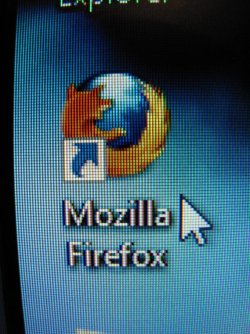
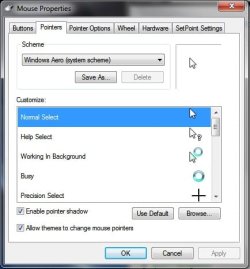
hi everyone, i have got some problem on the mouse pointer, after start the windows, and run few minutes, the size of the pointer just changed bigger itself, i haven't do anything, just use my PC as normal (e.g. after restart just open firefox and get onto internet), but few minutes later it just become bigger, i have try to go to system to set the Scheme but it just stay the same. can anyone help?

p.s. i'm not sure about this, but seems this happened when i use firefox when i scroll up and down on it, it was fine yesterday, but today i had few changing on my PC, first is i have change my display card from 2600 pro to 5700, second is firefox updated to 3.5.5, i'm not sure whether those effect anything.

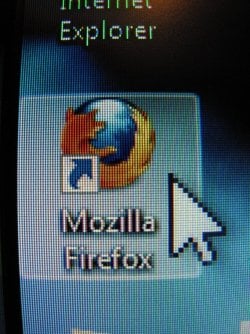
p.p.s. my mouse is logitech MX1000 on ps2 port, with installed logitech setpoint 4.80, here are some picture for reference, hope someone can help my with this issue, i just want it to be small..:cry:, thanks alot~

more information, after the mouse pointer size increased, when i hold the left click on the top bar of the open box to move it, the size of the pointer will back to normal (just when i hold it to move something), but when i release the mouse, the size of the pointer will change back to bigger....-____-""
 

Attachments
  • IMG_2553.JPG
    IMG_2553.JPG
    169.4 KB · Views: 125
  • IMG_2554.JPG
    IMG_2554.JPG
    167.6 KB · Views: 63
  • Untitled.jpg
    Untitled.jpg
    28 KB · Views: 121
Last edited:

My Computer

OS
windows 7
hi everyone, i have got some problem on the mouse pointer, after start the windows, and run few minutes, the size of the pointer just changed bigger itself, i haven't do anything, just use my PC as normal (e.g. after restart just open firefox and get onto internet), but few minutes later it just become bigger, i have try to go to system to set the Scheme but it just stay the same. can anyone help?

p.s. i'm not sure about this, but seems this happened when i use firefox when i scroll up and down on it, it was fine yesterday, but today i had few changing on my PC, first is i have change my display card from 2600 pro to 5700, second is firefox updated to 3.5.5, i'm not sure whether those effect anything.

p.p.s. my mouse is logitech MX1000 on ps2 port, with installed logitech setpoint 4.80, here are some picture for reference, hope someone can help my with this issue, i just want it to be small..:cry:, thanks alot~

more information, after the mouse pointer size increased, when i hold the left click on the top bar of the open box to move it, the size of the pointer will back to normal (just when i hold it to move something), but when i release the mouse, the size of the pointer will change back to bigger....-____-""

Hi Takuro! My guess is that your accessibility settings are wrong. To fix this go to: Control Panel ---> Ease of Access ---> Change How Your Mouse Works and then Select Regular White.

This should fix it.

ZeshanA

If a user helps you,click the scales above their post and give them some rep!
 
thanks for your reply ZeshanA, i have check the Ease of Access of the mouse, but it is already on the Regular white side, after i go through some pages, i found that someone have the same problem, it might be caused by the ATI driver of 5800 and 5700 series display card, i'm not sure about that..
 

My Computer

OS
windows 7
I have a similar problem. I use two ati 4670 display cards and once in a while the mouse will change shape when its the monitors driven by the secondary 4670, but when I move the mouse to the other two monitors (driven by the primary 4670) the mouse appears normal
 

My Computer

Computer type
PC/Desktop
Computer Manufacturer/Model Number
diy
OS
Win7 pro x64
CPU
stock i7 7700k
Motherboard
Gigabyte Z270N-WIFI mini-ITX
Memory
Corsair Vengeance LPX 16GB (2x8GB) DDR4 @ 3200MHz
Graphics Card(s)
integrated Intel HD 630
Sound Card
onboard Realtek ALC1220
Monitor(s) Displays
two vertically mounted samsung 55" 4k un55mu8000
Screen Resolution
1920x1280
Hard Drives
256GB Samsung EVO 960 M.2 pci-e NVMe SSD
PSU
SilverStone Nightjar ST45NF 450Watt Fanless
Case
No case. Motherboard is mounted directly onto power supply
Cooling
Evercool low profile 815EP with Panaflow 12L fan at 7v
Keyboard
Ortek MCK-86 mini
Mouse
Belkin 5-button USB
Internet Speed
spectrum 400mbps
I have the same problem as ZeshanA, except I have not noticed when it happens. Got to go now, but will study the problem further later.
 

My Computer

Computer Manufacturer/Model Number
Scorptec Redback Gold
OS
Windows 7 Home Premium 64bit
CPU
i7 860
Motherboard
Gigabyte GA-P55-UD3P-P55
Memory
Corsair 8GB PC-10600 (1333MHz)
Graphics Card(s)
PowerColor Radeon HD5850
Sound Card
none
Monitor(s) Displays
Samsung 305T-plus
Hard Drives
WD 1TB
PSU
Antec 650W
Case
Antec 200
The Cure?

* My ATI Radeon 5800 series driver was dated Nov 2009 (I think).
* I went to ATI site - Graphics Drivers & Software - and downloaded and ran the two latest components (driver and Catalyst ver 9.12). I probably should have downloaded the 'suite' for a smaller download, but no matter.
* I found a link to a hotfix on techreport.com - http://support.amd.com/us/kbarticles/Pages/ATICatalyst912Hotfix.aspx - and downloaded (120MB!) and ran this.
* Halfway through the hotfix installation my pointer reverted back to normal size! :D

I just hope it stays fixed.
 

My Computer

Computer Manufacturer/Model Number
Scorptec Redback Gold
OS
Windows 7 Home Premium 64bit
CPU
i7 860
Motherboard
Gigabyte GA-P55-UD3P-P55
Memory
Corsair 8GB PC-10600 (1333MHz)
Graphics Card(s)
PowerColor Radeon HD5850
Sound Card
none
Monitor(s) Displays
Samsung 305T-plus
Hard Drives
WD 1TB
PSU
Antec 650W
Case
Antec 200
I'm also having this mouse pointer problem. Did you receive a solution to this problem.
 

My Computer

OS
Windows 7 ultimate 64-bit
CPU
Inte Core i5 750
Motherboard
lInte Hs55hc
Memory
Kingston 2gb
Graphics Card(s)
MSI HD R5550
Sound Card
onboarg
Monitor(s) Displays
Samsung crt
Hard Drives
Samsung 500gb
I have not had the problem come back....:)
 

My Computer

Computer Manufacturer/Model Number
Scorptec Redback Gold
OS
Windows 7 Home Premium 64bit
CPU
i7 860
Motherboard
Gigabyte GA-P55-UD3P-P55
Memory
Corsair 8GB PC-10600 (1333MHz)
Graphics Card(s)
PowerColor Radeon HD5850
Sound Card
none
Monitor(s) Displays
Samsung 305T-plus
Hard Drives
WD 1TB
PSU
Antec 650W
Case
Antec 200
pls help me to solve this matter.
 

My Computer

OS
Windows 7 ultimate 64-bit
CPU
Inte Core i5 750
Motherboard
lInte Hs55hc
Memory
Kingston 2gb
Graphics Card(s)
MSI HD R5550
Sound Card
onboarg
Monitor(s) Displays
Samsung crt
Hard Drives
Samsung 500gb

My Computer

Computer Manufacturer/Model Number
Toshiba Satellite S875D-S7239 laptop
OS
MS Windows 7 Ultimate SP1 64-bit
CPU
AMD A10-4600M
Motherboard
AMD Pumori (Socket FT1)
Memory
6.00 GB Dual-Channel DDR3 @ 798MHz (11-11-12-28)
Graphics Card(s)
AMD Radeon HD 7660G
Sound Card
High Definition Audio Device
Monitor(s) Displays
Generic PnP Monitor (1600x900@60Hz)
Screen Resolution
1600x900@60Hz
Hard Drives
SSD 119GB Corsair CSSD-V128GB2 ATA Device
Keyboard
Standard PS/2 Keyboard
Mouse
HP Wireless Optical Mobile Mouse Model FHA-3410
Internet Speed
What the local pub, local coffee shop offers.
Other Info
Optical Drive:MATSHITA BD-CMB UJ160B ATA Device


Also have an Asus ha1002xp netbook with Win 7 Ultimate installed.
pls help me to solve this matter
 

My Computer

OS
Windows 7 ultimate 64-bit
CPU
Inte Core i5 750
Motherboard
lInte Hs55hc
Memory
Kingston 2gb
Graphics Card(s)
MSI HD R5550
Sound Card
onboarg
Monitor(s) Displays
Samsung crt
Hard Drives
Samsung 500gb
please read the entire thread over and apply the procedures used by calypso to solve his problem.

Let us know the results.
 

My Computer

Computer Manufacturer/Model Number
Toshiba Satellite S875D-S7239 laptop
OS
MS Windows 7 Ultimate SP1 64-bit
CPU
AMD A10-4600M
Motherboard
AMD Pumori (Socket FT1)
Memory
6.00 GB Dual-Channel DDR3 @ 798MHz (11-11-12-28)
Graphics Card(s)
AMD Radeon HD 7660G
Sound Card
High Definition Audio Device
Monitor(s) Displays
Generic PnP Monitor (1600x900@60Hz)
Screen Resolution
1600x900@60Hz
Hard Drives
SSD 119GB Corsair CSSD-V128GB2 ATA Device
Keyboard
Standard PS/2 Keyboard
Mouse
HP Wireless Optical Mobile Mouse Model FHA-3410
Internet Speed
What the local pub, local coffee shop offers.
Other Info
Optical Drive:MATSHITA BD-CMB UJ160B ATA Device


Also have an Asus ha1002xp netbook with Win 7 Ultimate installed.
* My ATI Radeon 5800 series driver was dated Nov 2009 (I think).
* I went to ATI site - Graphics Drivers & Software - and downloaded and ran the two latest components (driver and Catalyst ver 9.12). I probably should have downloaded the 'suite' for a smaller download, but no matter.
* I found a link to a hotfix on techreport.com - http://support.amd.com/us/kbarticles/Pages/ATICatalyst912Hotfix.aspx - and downloaded (120MB!) and ran this.
* Halfway through the hotfix installation my pointer reverted back to normal size! :D

I just hope it stays fixed.

Hi - I tried the link but I just get a request for login details. How do I get past this?
PS I have the same problem with the mouse! :(
 

My Computer

OS
Windows 7 Home Premium 64bit
Hi Trev, which link does not work? I just tried the top one - it works and there is no sign of me being logged in.

The second one opens a hotfix page (also nothing about log-ins) - but now the links to the downloads give "File not found". I'm guessing this is not a problem - because it was a hotfix for version 9.12 (and maybe a few following versions). Now we are up to Catalyst version 10.9 .... so it probably no longer needs a hotfix (or you could say it is "built in").

Good Luck
 

My Computer

Computer Manufacturer/Model Number
Scorptec Redback Gold
OS
Windows 7 Home Premium 64bit
CPU
i7 860
Motherboard
Gigabyte GA-P55-UD3P-P55
Memory
Corsair 8GB PC-10600 (1333MHz)
Graphics Card(s)
PowerColor Radeon HD5850
Sound Card
none
Monitor(s) Displays
Samsung 305T-plus
Hard Drives
WD 1TB
PSU
Antec 650W
Case
Antec 200
Problem Solved!

Thanks Calypso3. It was the 2nd link that didn't work - but, as you say that is not relevant now.

I had previously visited the 1st link & downloaded & installed the driver from 'Option 2 Individual Downloads' so this time I went for 'Option 1 Full Software Suite' (which is a much smaller download for some reason I don't understand). Both are revision number 10.8.

This was just over a week ago & so far the big pointer has not returned! :D

Thanks again for your help - I was finding the problem very irritating!
 

My Computer

OS
Windows 7 Home Premium 64bit
Hi, I also have this problem, I have downloaded the latest ATI software and it is still happening!!!

Does anyone have any other ideas????
 

My Computer

OS
Windows 7 64bit
Did you go for 'Option 1 Full Software Suite'? This worked for me but the 'Option 2 Individual Downloads' did not.

The problem has not returned for me after 3 months.
 

My Computer

OS
Windows 7 Home Premium 64bit

My Computer

Computer Manufacturer/Model Number
HP
OS
Windows 7 64
CPU
i7
Motherboard
HP
Memory
6 GB
Graphics Card(s)
ATI HD 4550
Sound Card
no sound
Monitor(s) Displays
HP LA2405wg
Hard Drives
seagate 1TB
PSU
n/a
Case
n/a
Cooling
n/a
This is a know problem in certain AMD/ATI video drivers. Make sure you have the latest ATI device driver.
 

My Computer

Computer type
PC/Desktop
Computer Manufacturer/Model Number
Home built (GeneO industries)/Model 4
OS
Windows 10 Pro. EFI boot partition, full EFI boot
CPU
i7 4770k 4.4GHz (44-44-43-43 turbo) @ 1.248V
Motherboard
ASUS Maximus VI Hero
Memory
16GB (8GBx2) @2200 MHz G.skill Sniper 10-11-10-30-1, 1.6V
Graphics Card(s)
MSI GTX 970 Gaming 4G
Sound Card
Onboard SupremeFX Audio
Monitor(s) Displays
NEC Spectraview 2490WUXi-SV
Screen Resolution
1920 x 1200
Hard Drives
Samsung 850 Pro 256GB (OS), Samsung 2x 128GB 840 Pro SSD in RAID0, 3x WD Blue 6Gb/s 1TB RAID0, WD 2TB Black external USB 3.0, 2TB WD20EARS Green external USB 3.0, 2x 500GB Seagate and 1 750 GB external USB, 1x 350GB external USB3
PSU
Seasonic X-850 (2012 KM3 model)
Case
Fractal Design Define R4
Cooling
NH-D14, NF-F12, NF-A15; NF-P14, NF-P12,NF-A14, S12A PWM
Keyboard
Cooler Master Storm Quickfire Rapid - Brown
Mouse
Logitech G602
Internet Speed
126.4 Mb/s down, 24.3 Mb/s up
Other Info
USB 3.0 x8 , SATA III x8, eSATA, USB 2.0 x6. Samsung DVD R/W drive.

WEI: CPU 7.8, Memory 7.9, Graphics 7.9, Disk 7.9
Back
Top