Moving directory tree doesn't delete folders?

rashkavar

New member
Local time
10:39 PM
Messages
7
I've been using Windows 7 for quite some time now (though admittedly I'm only just getting around to understanding the whole Libraries thing - I always keep my stuff on a separate HD from my OS/programs, and have only recently realized that Libraries are not constrained the way the XP My Documents system was.)

Anyway, I have occasionally had a minor issue with moving folders - particular those with subfolders that contain the actual files. When I move a folder, I generally want it gone from where it currently is (otherwise I'd copy). However, I find Windows Explorer, or perhaps TeraCopy, sometimes seems to forget to delete the directory tree after having created a duplicate directory tree at the target and moving the files over. It's a bizarre and totally minor problem, though it does get tiresome if I fail to notice it for a while and leave extraneous directory trees sitting around. (I'm a bit of a control freak; I like my files and folders to be neatly and categorically sorted, so empty folders are anathema to me). It's consistent when it happens, which suggests to me that I'm somehow changing a setting, but I honestly have no idea what it is. (A reformat makes it disappear for a while, but, while I do feel those are a necessary component of computer maintenance every year or so, it's a rather extreme measure for such a minor problem.)

Any idea what my computer is doing, or rather, how I can make it stop? I've yet to find a place in folder settings or TeraCopy's preferences that has anything to do with moving folders.
 

My Computer

Computer type
PC/Desktop
Computer Manufacturer/Model Number
N/A - home brew of parts
OS
Linux
That is quite odd. Are the folders that you are moving (that leave 'phantom copies' behind) part of a Windows library? Or does this happen regardless?

If they're part of a library, Windows will re-create the folder (not sure about the contents) as soon as you move/delete it. You can remove a folder from a library's collection by right clicking it in the left pane of Explorer. You can also restore the original library shortcuts this way. I personally leave the libraries alone, as they are merely links to a folder or a collection of folders. If you don't like the whole libraries thing (I don't either) you may prefer to just add shortcuts for the Music, Videos, Pictures, and Documents folders (or any folders on your 2nd hard drive) to your My Favorites so that they populate in the left pane. Then you can navigate straight to the directory you need and not even bother with the library links.

If this problem is not specific to the libraries, may I ask if you can delete the 'phantom copies' left behind? If not, it may be a case of bad sectors on the disk. Sometimes odd behaviors such as files/folders that wont delete (or do but immediately reappear) can be attributed to this. You can run a checkdisk if you haven't already (ticking the option to scan for bad sectors), and that may solve the problem. I agree that a format seems to be quite overkill for a rather minor issue; but your comment that a reformat fixes the issue for a while makes me wonder if this could be the issue.

However, if this is something that happens every time you do a move operation, I would take another look at TeraCopy. You may wish to disable/uninstall temporarily for the sake of troubleshooting to see if it makes a difference.
 

My Computer

Computer Manufacturer/Model Number
Always changing!
OS
Windows 7/8/8.1 x64 &&& Debian-Based Linux
CPU
Always AMD
Motherboard
Always Asus
Memory
Always G-Skill
Graphics Card(s)
Always ATi/AMD
Internet Speed
Never fast enough
Antivirus
MBAM, MBAR, MBAE, Outpost (WinDefender Disabled)
Browser
Firefox w/plugins galore
It's not part of a library, though I didn't know about that behavior. My comment on libraries was more to illustrate that my skillset is still primarily that of an XP user, despite having used 7 for a while.

The "phantom copies" are easily deleted, (though I generally check the root directory's properties to ensure the files are actually gone, first - that's the main reason it's annoying). I haven't run checkdisk, since it's not having major issues - as you said, things being undeletable for no reason can be problematic, but that isn't the case, here.

I find it unlikely that TeraCopy is causing this, since it's all happening within a drive. TeraCopy only triggers if it has to actually write data - copying within a drive or copying/moving to a different drive. Moving files around within a drive (or rather, partition) simply requires a quick change to the MFT. (It opens a different transfer window, so it's obvious when it's in use and when it's not.) However, I felt it might be worth mentioning - I know from being on the other side that bug reports that only give you half the information are very hard to work with - too much info is better than too little.

And of course, now that I've actually mentioned the problem, I don't seem to be able to make it happen again, even moving things back to where they were when this occurred earlier and repeating the exact same move command. Yay for intermittant problems.
 

My Computer

Computer type
PC/Desktop
Computer Manufacturer/Model Number
N/A - home brew of parts
OS
Linux
Well TBH, I have never used TeraCopy. If this happens when TeraCopy plays no part (during move operations within a drive) as you say, Id think ruling it out is not an unsafe bet. However, based on these key points:

1 - This only occurs on a single physical disk (or partition rather).
2 - This (only?) happens during move operations.
2 - It is very intermittent and hard to reproduce.

I would think these point to a file system error. I would run an offline diskcheck to check the MFT for errors. If that doesn't detect anything, I may have to admit technical defeat, and leave you in the hands of the Gurus lol.
 

My Computer

Computer Manufacturer/Model Number
Always changing!
OS
Windows 7/8/8.1 x64 &&& Debian-Based Linux
CPU
Always AMD
Motherboard
Always Asus
Memory
Always G-Skill
Graphics Card(s)
Always ATi/AMD
Internet Speed
Never fast enough
Antivirus
MBAM, MBAR, MBAE, Outpost (WinDefender Disabled)
Browser
Firefox w/plugins galore
I've only really noticed it on one disk/partition (in my computer, it's the same thing - unlike the FAT systems, NTFS doesn't really have any technical reason to limit partition sizes, and I have 4 hard drives (plus an external for backup purposes), so I don't need to partition based on organizational needs, either). The disk in question is where a large percentage of my high traffic data goes (music, documents, images - basically all non-video data), so it's where I tend to do the most organizing. I don't recall observing it on the video, os/programs or download heap drives, but I don't tinker with the organization on those drives anywhere near as much, either.

It only happens during move operations, and I believe specifically on the same disk (that said, with my organizational setup, I rarely feel the need to move things off of the drive they're on (with the exception of the heap of random downloads), so I again can't be sure.) Delete operations work normally, and copy doesn't screw with the source directory (or if it does on your computer, your issue trumps mine).

It seems to run in spurts. Yesterday it was happening every time I moved a directory with subfolders (meaning most of what I was doing) in a reorganization project - today, I couldn't make it happen even by recreating the same circumstances.

So an MFT problem seems like a logical possibility to me as well.

One other point - I've noticed that some of these files have somehow gotten themselves labelled read only (largely irrelevant as they're mp3s and my only musical skill is listening). Any possibility that could cause such oddities? I have to admit, I've never really gotten into how Windows handles permissions like that - unlike Linux (which I've tinkered with in the past but always find a bit high maintenance for regular use), permissions generally don't effect the end user.

That said, my computer's been a bit laggardly of late, so I was already planning to do a reformat. Given the MFT hypothesis actually has a logical basis, I might as well give this drive a reformat as well. It does mean I have to copy about 700 gigs of data off of it for the time being, but I can live with that. File operations like that are exactly why I have TeraCopy - it handles errors much more gracefully than Windows...though again, I'm drawing primarily on my XP experience, since I was already reliant on TC by the time I switched to Seven.
 

My Computer

Computer type
PC/Desktop
Computer Manufacturer/Model Number
N/A - home brew of parts
OS
Linux
The read-only thing is odd. Though if that were the cause of the 'phantom copies', one would think they'd be full copies of all the files that were read-only, not just their containing folders.

Lolz @ the 'musical skills' line. In Windows I think attributes, like permissions, can either be explicitly assigned or inherited from a parent directory. Though unless you were copying to some exotic locations, IDK how they would have gotten set to read-only.
 

My Computer

Computer Manufacturer/Model Number
Always changing!
OS
Windows 7/8/8.1 x64 &&& Debian-Based Linux
CPU
Always AMD
Motherboard
Always Asus
Memory
Always G-Skill
Graphics Card(s)
Always ATi/AMD
Internet Speed
Never fast enough
Antivirus
MBAM, MBAR, MBAE, Outpost (WinDefender Disabled)
Browser
Firefox w/plugins galore
My guess is that it was set by the uploader. Music and video file formats usually imply it's not meant for editing, but I guess some people want to be extra sure to point it out.
 

My Computer

Computer type
PC/Desktop
Computer Manufacturer/Model Number
N/A - home brew of parts
OS
Linux
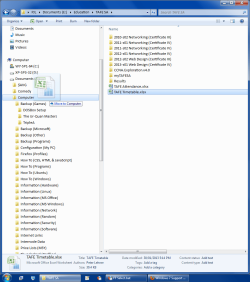
When you Move folders:

  • Do you use the left or right mouse button?
  • Do you still have the old folder and its contents PLUS a new folder with the correct contents?
  • Does the tooltip say "Move to <destination folder name>"?
Folders - Move.png
Does the problem still occur if you use the "Cut & Paste" method?
 

My Computer

Computer type
PC/Desktop
Computer Manufacturer/Model Number
n/a
OS
W7 Ultimate SP1, LM19.2 MATE, W10 Home 1703, W10 Pro 1703 VM, #All 64 bit
CPU
AMD Phenom II x6 1100T, 3.3 GHz
Motherboard
ASUS M4A88T-M/USB3 (AM3)
Memory
12GB DDR3 1333 G-Skill (4GB x 2), G-Skill (2GB x 2)
Graphics Card(s)
NVIDIA GeForce GTX 660
Sound Card
Realtek?
Monitor(s) Displays
Samsung S23B350
Screen Resolution
1920x1080
Hard Drives
WD Green 2TB (SATA), WD Green 3TB (SATA), WD Blue 4TB (SATA), WD Blue 6TB (SATA)
PSU
Cooler Master
Case
Antec GX300 Tower
Cooling
3x Antec TRICOOL 120mm Fans
Mouse
Wired Optical
Internet Speed
DSL
Antivirus
Avast
Browser
Pale Moon (64 bit)
Other Info
2018-12-27 Upgraded HDDs
2015-12-10 Upgraded case, graphics card, storage
2015-08-15 Upgraded motherboard & RAM
2015-07-15 Upgraded LM17.1 to LM17.2
Left mouse button - drag and drop.
The old directory tree remains behind, but with no files left; in the place I move things to, the directory tree and files exist with correct contents
Yes, the tooltip says "move to <destination>"

I have not tried cut and paste (it's even more cumbersome than deleting the empty directory tree after moving files). Unfortunately, as MSchild and I discussed above, the problem is intermittent. I shall try cutting and pasting next time I encounter the issue and report the results.
 

My Computer

Computer type
PC/Desktop
Computer Manufacturer/Model Number
N/A - home brew of parts
OS
Linux
sfc /scannow

The old directory tree remains behind, but with no files left; in the place I move things to, the directory tree and files exist with correct contents.

That happens to me when I am working in the "Start Menu" programs folder:
C:\ProgramData\Microsoft\Windows\Start Menu\Programs
It only happens there and only ~75% of the time (i.e. sometimes it works properly). :confused:

What happens if you use the right mouse button to Move folders?


Have you tried running "sfc /scannow"?

Tutorial
http://www.sevenforums.com/tutorials/1538-sfc-scannow-command-system-file-checker.html
 

My Computer

Computer type
PC/Desktop
Computer Manufacturer/Model Number
n/a
OS
W7 Ultimate SP1, LM19.2 MATE, W10 Home 1703, W10 Pro 1703 VM, #All 64 bit
CPU
AMD Phenom II x6 1100T, 3.3 GHz
Motherboard
ASUS M4A88T-M/USB3 (AM3)
Memory
12GB DDR3 1333 G-Skill (4GB x 2), G-Skill (2GB x 2)
Graphics Card(s)
NVIDIA GeForce GTX 660
Sound Card
Realtek?
Monitor(s) Displays
Samsung S23B350
Screen Resolution
1920x1080
Hard Drives
WD Green 2TB (SATA), WD Green 3TB (SATA), WD Blue 4TB (SATA), WD Blue 6TB (SATA)
PSU
Cooler Master
Case
Antec GX300 Tower
Cooling
3x Antec TRICOOL 120mm Fans
Mouse
Wired Optical
Internet Speed
DSL
Antivirus
Avast
Browser
Pale Moon (64 bit)
Other Info
2018-12-27 Upgraded HDDs
2015-12-10 Upgraded case, graphics card, storage
2015-08-15 Upgraded motherboard & RAM
2015-07-15 Upgraded LM17.1 to LM17.2
I ran sfc /verifyonly (I prefer diagnosis before treatment, rather than simultaneous; letting a program blindly forge on can occasionally cause issues. Found no integrity violations.

It will be a while before I respond again - while it is morning in Australia, it is very late at night here in Canada, and I generally need sleep once every other night, at least.
 

My Computer

Computer type
PC/Desktop
Computer Manufacturer/Model Number
N/A - home brew of parts
OS
Linux
I have not tried cut and paste (it's even more cumbersome than deleting the empty directory tree after moving files)

Hotkeys are your friend (: I actually never use drag and drop, I prefer the keyboard method.
Shift+arrow keys to select, Ctrl+X to cut, Alt+Tab to switch windows (or WinKey+E to get a new Explorer window) then Ctrl+V to paste.
I got into the habit of using hotkeys for copying though because if you drag n drop between drives/partitions Windows does a copy, and if you do it within a partition it does a move. I like to explicitly tell it Ctrl+C for copy or Ctrl+X for cut.
 

My Computer

Computer Manufacturer/Model Number
Always changing!
OS
Windows 7/8/8.1 x64 &&& Debian-Based Linux
CPU
Always AMD
Motherboard
Always Asus
Memory
Always G-Skill
Graphics Card(s)
Always ATi/AMD
Internet Speed
Never fast enough
Antivirus
MBAM, MBAR, MBAE, Outpost (WinDefender Disabled)
Browser
Firefox w/plugins galore
Heh, true, but I tend to work in the same explorer window, using the left hand directory pane. That said, I always use explicit commands for drag and drop - control is always copy, shift is always move, and alt is always shortcut (and thus very rarely used). Every user has their own workflow. (As a recent XKCD comic points out, there are extreme cases.)
 

My Computer

Computer type
PC/Desktop
Computer Manufacturer/Model Number
N/A - home brew of parts
OS
Linux
Back
Top