Solved How to Delete folders labelled .tmp ?

Snugglebugs

New member
Member
Local time
11:16 AM
Messages
79
Location
Vormark in Denmark
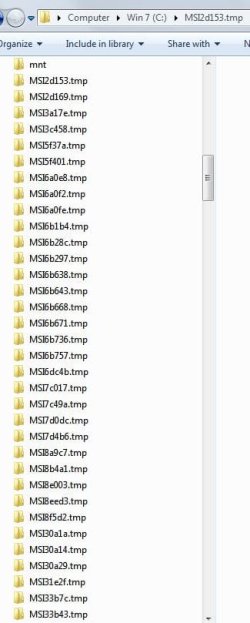
I have about 300 folders in the root of my hard drive that are all labelled similar to "MSI2d153.tmp". Each folder is empty and they seem to be made most days. BUT, not every day, and several times more than one folder per day. It is a very time consuming task to delete them as only one at a time can be deleted, and only after giving permissions to do so. I attach a screenshot showing the first few folders listed.

I have Win 7 Pro and I have used the Disk Cleanup to try and get rid of all this junk - also with the tab for cleaning system files.

I also downloaded the TFC.exe programme and ran that.

After each process I restarted the computer and checked again.

The curious thing is that the folders are labelled .tmp - they are not files :sick:

I wonder what programme is generating these folders and why!
 

Attachments
  • tmp folders.JPG
    tmp folders.JPG
    40.9 KB · Views: 0

My Computer My Computer

Computer type
PC/Desktop
Computer Manufacturer/Model Number
Acer twice plus Lenovo
OS
XP Pro and Win7 Pro both 32 bit plus Win 8.1 64bit
Memory
4 G
Hard Drives
300G and 500 G with 4TB backup drive
Antivirus
AVG, MS Essentials and Windows Defender
Browser
IE8, IE9, IE11 and Opera.
Other Info
The various items listed are NOT all on one PC! But all PCs are connected via a combined LAN/WLAN which also provides connection to a network printer

My Computer My Computer

Computer type
PC/Desktop
Computer Manufacturer/Model Number
Custom assembled by me :}
OS
Win-7-Pro64bit 7-H-Prem-64bit
CPU
i7-5930K 2nd i9-9940x both water blocked VRM's too
Motherboard
ASUS SABERTOOTH X99 2nd ASUS x299 Apex
Memory
Trident-z 3200C14 2nd Trident-z 3600C16
Graphics Card(s)
EVGA 1080ti ftw3 2nd Titan Xp both water blocked
Sound Card
Built-in Realtek
Monitor(s) Displays
1-AOC G2460PG 24"G-Sync 144Hz/ 2nd 1-ASUS VG248QE 24" 144Hz
Screen Resolution
1920 x 1080 144Hz
Hard Drives
2-Samsung M.2 Evo & Evo Plus
2-Samsung 850 EVO 500GB SSD's/ 3-2.5 W.D. Black 1tb-&3-1tb/3-3.5 WD Black 1tb hdd's
PSU
EVGA SuperNOVA 1000-P2 2nd 1200-P2
Case
2-Corsair Obsidian Series 450D Black ATX Mid Tower
Cooling
Custom water loops
Keyboard
Logitech G710+/ 2nd Logitech G910
Mouse
2-RedDragon M901 Perdition 16400 dpi Gaming mouse = wired
Internet Speed
Comcast Ping 19ms 89.31mbps download speed 6.12mbps upload
Antivirus
Malwarebytes Pro/ Superantispyware Pro
Browser
FireFox & Pale moon
Other Info
2nd ASUS X299 Apex/Intel i9-9940x with Custom water loop/7H-Prem-x64/Corsair 450D case/Ram Trident-z 3600C16 4x8gb / Samsung970Evo plus 500gb SSD/Dual ssd EZ swap evo/PSU EVGA SuperNova 1200w-P2 80+Platinum/GPU Titan Xp /8-ML-140 on push-pull on 2-280GTX rads
I did place TFC.exe on my desktop, closed all programmes and restarted after cleaning. But I did not download it from the link you give.

I will try again tomorrow using that download link and report back.
 

My Computer My Computer

Computer type
PC/Desktop
Computer Manufacturer/Model Number
Acer twice plus Lenovo
OS
XP Pro and Win7 Pro both 32 bit plus Win 8.1 64bit
Memory
4 G
Hard Drives
300G and 500 G with 4TB backup drive
Antivirus
AVG, MS Essentials and Windows Defender
Browser
IE8, IE9, IE11 and Opera.
Other Info
The various items listed are NOT all on one PC! But all PCs are connected via a combined LAN/WLAN which also provides connection to a network printer
ccleaner by default leaves alone any such temp files that are less than 7 days old; one must "un-choose" that default, then ccleaner will delete whatever TMP type files it finds -- except for the temp-files still in use by Windows or by 3rd party program during that particular Windows session.
 

My Computer My Computer

Computer type
PC/Desktop
Computer Manufacturer/Model Number
Antec desktop; Acer Aspire laptops
OS
Windows 7 Professional 64-bit
CPU
Desktop i5; Acers i5 & i7
Memory
desktop 16GB; 1 Acer 8GB & 1 Acer 16GB
Hard Drives
1TB split into 2 equal partitions [OS and data] usable by RJS
Internet Speed
AT&T DSL
Browser
FF, GChrome, msIE
Other Info
Windows 7 Firewall, Emsisoft AM/AV, MSE [scan-only], SpywareBlaster, Ruiware/BillP combine
Hi,
Why not the download is clean I posted :)
Where did you get TFC CNet :p
 

My Computer My Computer

Computer type
PC/Desktop
Computer Manufacturer/Model Number
Custom assembled by me :}
OS
Win-7-Pro64bit 7-H-Prem-64bit
CPU
i7-5930K 2nd i9-9940x both water blocked VRM's too
Motherboard
ASUS SABERTOOTH X99 2nd ASUS x299 Apex
Memory
Trident-z 3200C14 2nd Trident-z 3600C16
Graphics Card(s)
EVGA 1080ti ftw3 2nd Titan Xp both water blocked
Sound Card
Built-in Realtek
Monitor(s) Displays
1-AOC G2460PG 24"G-Sync 144Hz/ 2nd 1-ASUS VG248QE 24" 144Hz
Screen Resolution
1920 x 1080 144Hz
Hard Drives
2-Samsung M.2 Evo & Evo Plus
2-Samsung 850 EVO 500GB SSD's/ 3-2.5 W.D. Black 1tb-&3-1tb/3-3.5 WD Black 1tb hdd's
PSU
EVGA SuperNOVA 1000-P2 2nd 1200-P2
Case
2-Corsair Obsidian Series 450D Black ATX Mid Tower
Cooling
Custom water loops
Keyboard
Logitech G710+/ 2nd Logitech G910
Mouse
2-RedDragon M901 Perdition 16400 dpi Gaming mouse = wired
Internet Speed
Comcast Ping 19ms 89.31mbps download speed 6.12mbps upload
Antivirus
Malwarebytes Pro/ Superantispyware Pro
Browser
FireFox & Pale moon
Other Info
2nd ASUS X299 Apex/Intel i9-9940x with Custom water loop/7H-Prem-x64/Corsair 450D case/Ram Trident-z 3600C16 4x8gb / Samsung970Evo plus 500gb SSD/Dual ssd EZ swap evo/PSU EVGA SuperNova 1200w-P2 80+Platinum/GPU Titan Xp /8-ML-140 on push-pull on 2-280GTX rads
NOT CNET! I keep clear of that site!
I found a link to TFC on another thread where this URL was given
TFC Download

A very strange site with all sorts of oddities but the download eventually arrived.
I think it is just a redirect to the URL you give.

Anyway, I will do it again to be on the safe side, and see about the configuration for unchoosing.

(Does anyone have a clue as to where the folders are generated? Is 'MS' Microsoft?)
 

My Computer My Computer

Computer type
PC/Desktop
Computer Manufacturer/Model Number
Acer twice plus Lenovo
OS
XP Pro and Win7 Pro both 32 bit plus Win 8.1 64bit
Memory
4 G
Hard Drives
300G and 500 G with 4TB backup drive
Antivirus
AVG, MS Essentials and Windows Defender
Browser
IE8, IE9, IE11 and Opera.
Other Info
The various items listed are NOT all on one PC! But all PCs are connected via a combined LAN/WLAN which also provides connection to a network printer
Hi,
Yea bleepingcomputer is okay too

Did the folders disappear ?
 

My Computer My Computer

Computer type
PC/Desktop
Computer Manufacturer/Model Number
Custom assembled by me :}
OS
Win-7-Pro64bit 7-H-Prem-64bit
CPU
i7-5930K 2nd i9-9940x both water blocked VRM's too
Motherboard
ASUS SABERTOOTH X99 2nd ASUS x299 Apex
Memory
Trident-z 3200C14 2nd Trident-z 3600C16
Graphics Card(s)
EVGA 1080ti ftw3 2nd Titan Xp both water blocked
Sound Card
Built-in Realtek
Monitor(s) Displays
1-AOC G2460PG 24"G-Sync 144Hz/ 2nd 1-ASUS VG248QE 24" 144Hz
Screen Resolution
1920 x 1080 144Hz
Hard Drives
2-Samsung M.2 Evo & Evo Plus
2-Samsung 850 EVO 500GB SSD's/ 3-2.5 W.D. Black 1tb-&3-1tb/3-3.5 WD Black 1tb hdd's
PSU
EVGA SuperNOVA 1000-P2 2nd 1200-P2
Case
2-Corsair Obsidian Series 450D Black ATX Mid Tower
Cooling
Custom water loops
Keyboard
Logitech G710+/ 2nd Logitech G910
Mouse
2-RedDragon M901 Perdition 16400 dpi Gaming mouse = wired
Internet Speed
Comcast Ping 19ms 89.31mbps download speed 6.12mbps upload
Antivirus
Malwarebytes Pro/ Superantispyware Pro
Browser
FireFox & Pale moon
Other Info
2nd ASUS X299 Apex/Intel i9-9940x with Custom water loop/7H-Prem-x64/Corsair 450D case/Ram Trident-z 3600C16 4x8gb / Samsung970Evo plus 500gb SSD/Dual ssd EZ swap evo/PSU EVGA SuperNova 1200w-P2 80+Platinum/GPU Titan Xp /8-ML-140 on push-pull on 2-280GTX rads
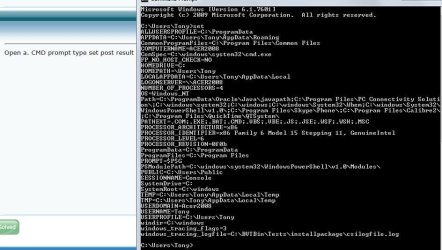
Open a. CMD prompt type set post result
 

My Computer My Computer

Computer type
PC/Desktop
OS
win 8 32 bit
Attached is screenshot as requested.

Before I read your message I had run the new download of TFC and the folders are still there, and still empty!

Do you have any idea which programme is generating them?
 

Attachments

  • cmd.JPG
    cmd.JPG
    78.2 KB · Views: 2

My Computer My Computer

Computer type
PC/Desktop
Computer Manufacturer/Model Number
Acer twice plus Lenovo
OS
XP Pro and Win7 Pro both 32 bit plus Win 8.1 64bit
Memory
4 G
Hard Drives
300G and 500 G with 4TB backup drive
Antivirus
AVG, MS Essentials and Windows Defender
Browser
IE8, IE9, IE11 and Opera.
Other Info
The various items listed are NOT all on one PC! But all PCs are connected via a combined LAN/WLAN which also provides connection to a network printer
Thread starter, how did things go trying deletion within Safe Mode?
 

My Computer My Computer

Computer type
PC/Desktop
Computer Manufacturer/Model Number
Antec desktop; Acer Aspire laptops
OS
Windows 7 Professional 64-bit
CPU
Desktop i5; Acers i5 & i7
Memory
desktop 16GB; 1 Acer 8GB & 1 Acer 16GB
Hard Drives
1TB split into 2 equal partitions [OS and data] usable by RJS
Internet Speed
AT&T DSL
Browser
FF, GChrome, msIE
Other Info
Windows 7 Firewall, Emsisoft AM/AV, MSE [scan-only], SpywareBlaster, Ruiware/BillP combine
Hi,
Yea I was hopping sam.. would return he is a good person to figure this out.

Could be Oracle/ skype/ QuickTime sludge ?

I did the same instructions and did not have any of those although I'm not surprised seeing I have none of these programs/ utilities installed.
 

My Computer My Computer

Computer type
PC/Desktop
Computer Manufacturer/Model Number
Custom assembled by me :}
OS
Win-7-Pro64bit 7-H-Prem-64bit
CPU
i7-5930K 2nd i9-9940x both water blocked VRM's too
Motherboard
ASUS SABERTOOTH X99 2nd ASUS x299 Apex
Memory
Trident-z 3200C14 2nd Trident-z 3600C16
Graphics Card(s)
EVGA 1080ti ftw3 2nd Titan Xp both water blocked
Sound Card
Built-in Realtek
Monitor(s) Displays
1-AOC G2460PG 24"G-Sync 144Hz/ 2nd 1-ASUS VG248QE 24" 144Hz
Screen Resolution
1920 x 1080 144Hz
Hard Drives
2-Samsung M.2 Evo & Evo Plus
2-Samsung 850 EVO 500GB SSD's/ 3-2.5 W.D. Black 1tb-&3-1tb/3-3.5 WD Black 1tb hdd's
PSU
EVGA SuperNOVA 1000-P2 2nd 1200-P2
Case
2-Corsair Obsidian Series 450D Black ATX Mid Tower
Cooling
Custom water loops
Keyboard
Logitech G710+/ 2nd Logitech G910
Mouse
2-RedDragon M901 Perdition 16400 dpi Gaming mouse = wired
Internet Speed
Comcast Ping 19ms 89.31mbps download speed 6.12mbps upload
Antivirus
Malwarebytes Pro/ Superantispyware Pro
Browser
FireFox & Pale moon
Other Info
2nd ASUS X299 Apex/Intel i9-9940x with Custom water loop/7H-Prem-x64/Corsair 450D case/Ram Trident-z 3600C16 4x8gb / Samsung970Evo plus 500gb SSD/Dual ssd EZ swap evo/PSU EVGA SuperNova 1200w-P2 80+Platinum/GPU Titan Xp /8-ML-140 on push-pull on 2-280GTX rads
Process Monitor should be able to tell you which app is creating those tmp folders.

Let me know if you want to try using Process Monitor and I'll suggest some settings.
 

My Computer My Computer

Computer type
Laptop
Computer Manufacturer/Model Number
Employer provided Dell Latitude
OS
W7 Pro SP1 64bit
CPU
i7
Memory
8GB
Graphics Card(s)
Intel HD Graphics
Hard Drives
crappy SSD
Antivirus
Employer mandated Symantec Endpoint Protection
Browser
Pale Moon 64bit, IE11 64bit & Chrome 64bit
Yes, I would like to try that and would appreciate your suggestions before I do.

Regarding another commentator regarding Safe Mode. No, as I want to actually delete all these empty folders, SM will not allow that so it would not help. As I wrote, I can delete each folder (they are ALL empty!) with a complicated method of changing properties and permissions individually and then deleting. You can imagine the length of time that takes :cry:

(Incidentally, I have XP installed on the computer on an old hard drive. If I boot to that one then I can see the Win 7 hard drive. But it won't allow me to cheat and delete the folders through XP :( )

If the PM tool works for me then that would be ideal as I can then track down why these folder started to appear a year or so ago.

Process Monitor should be able to tell you which app is creating those tmp folders.

Let me know if you want to try using Process Monitor and I'll suggest some settings.
 

My Computer My Computer

Computer type
PC/Desktop
Computer Manufacturer/Model Number
Acer twice plus Lenovo
OS
XP Pro and Win7 Pro both 32 bit plus Win 8.1 64bit
Memory
4 G
Hard Drives
300G and 500 G with 4TB backup drive
Antivirus
AVG, MS Essentials and Windows Defender
Browser
IE8, IE9, IE11 and Opera.
Other Info
The various items listed are NOT all on one PC! But all PCs are connected via a combined LAN/WLAN which also provides connection to a network printer
Process Monitor downloads as a zip file.
Open the zip file and copy its contents to a folder of your choice.
Double click on Procmon.exe

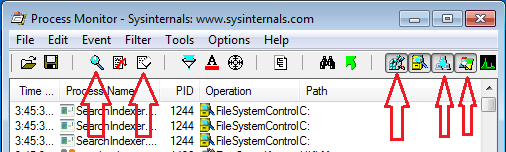
Starting with the leftmost icon*, click on each of the icons shown/highlighted below:
*starts/stops data collection
1.png

The window should look like this...
...with only the one (File System Activity) icon selected:
2.png

Add a Filter as shown below.
3.png

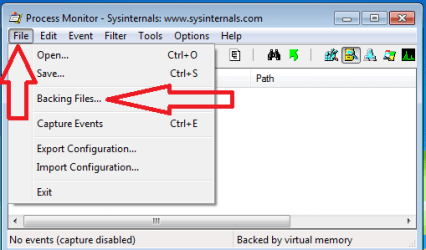
Change the Backing Files:
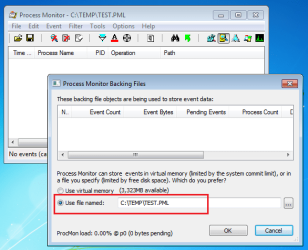
4.png

You can use any existing folder that you want.
The name of the file (TEST.PML) is not important.
5.png

As you use Process Monitor, you might see this:
6.png
It is okay to say yes.

Start the data collection using the left most icon highlighted in the first screenshot.

Move Process Monitor's window off to the side and use your computer as you normally would. If rows of info show in Process Monitor's window, then the app(s) listed in the column named Process Name might be the app that created to TMP folder. You might also see entries for your antivirus app as it watches the newly created folder.

I originally tried a filter of TEMP\*.TMP, but could not get wildcards to work.

Also Process Monitor crashed a lot in my unpatched virtual machine, but not in my patched host computer.


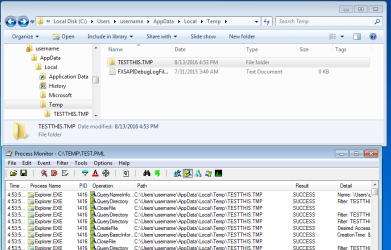
This screenshot shows Process Monitor's entries when I used Windows (file) Explorer to create a test TMP folder.
7.PNG
 

My Computer My Computer

Computer type
Laptop
Computer Manufacturer/Model Number
Employer provided Dell Latitude
OS
W7 Pro SP1 64bit
CPU
i7
Memory
8GB
Graphics Card(s)
Intel HD Graphics
Hard Drives
crappy SSD
Antivirus
Employer mandated Symantec Endpoint Protection
Browser
Pale Moon 64bit, IE11 64bit & Chrome 64bit
I'm wondering if those pesky TMPs can be deleted by booting Puppy Linux and using its file manager.
 

My Computer My Computer

Computer type
PC/Desktop
Computer Manufacturer/Model Number
Antec desktop; Acer Aspire laptops
OS
Windows 7 Professional 64-bit
CPU
Desktop i5; Acers i5 & i7
Memory
desktop 16GB; 1 Acer 8GB & 1 Acer 16GB
Hard Drives
1TB split into 2 equal partitions [OS and data] usable by RJS
Internet Speed
AT&T DSL
Browser
FF, GChrome, msIE
Other Info
Windows 7 Firewall, Emsisoft AM/AV, MSE [scan-only], SpywareBlaster, Ruiware/BillP combine
...I can delete each folder (they are ALL empty!) with a complicated method of changing properties and permissions individually and then deleting...
edit: I did not notice (until now) that these TMP folders were in the root of the C drive.
Unlocker won't help much there.

You can delete the entire TEMP folder. It will be rebuilt when you reboot.

Install Unlocker.
(See this post.)
Restart the computer.
Navigate to the user TEMP folder via Windows (file) Explorer.
Right click on that TEMP folder and select Unlocker from the context menu.
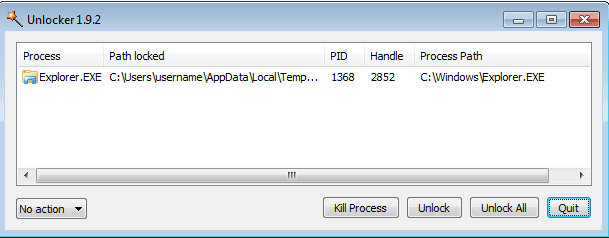
IF (and only IF) Explorer is the only app* locking that user TEMP folder, then:
8.PNG
...select Delete from the drop down menu in the lower left part of the window
...click on the button named Unlock All.
Restart the computer to rebuild that TEMP folder.


* Let us know if other apps are already locking that TEMP folder so soon after a reboot.
 
Last edited:

My Computer My Computer

Computer type
Laptop
Computer Manufacturer/Model Number
Employer provided Dell Latitude
OS
W7 Pro SP1 64bit
CPU
i7
Memory
8GB
Graphics Card(s)
Intel HD Graphics
Hard Drives
crappy SSD
Antivirus
Employer mandated Symantec Endpoint Protection
Browser
Pale Moon 64bit, IE11 64bit & Chrome 64bit
The empty folders are in the root of the hard drive - see earlier screenshot. They are named as, for example, MSI7c017.tmp . It is the folder name that has the .tmp included - not a file!

...I can delete each folder (they are ALL empty!) with a complicated method of changing properties and permissions individually and then deleting...
You can delete the entire TEMP folder. It will be rebuilt when you reboot.

Install Unlocker.
(See this post.)
Restart the computer.
Navigate to the user TEMP folder via Windows (file) Explorer.
Right click on that TEMP folder and select Unlocker from the context menu.
IF (and only IF) Explorer is the only app* locking that user TEMP folder, then:
View attachment 390582
...select Delete from the drop down menu in the lower left part of the window
...click on the button named Unlock All.
Restart the computer to rebuild that TEMP folder.


* Let us know if other apps are already locking that TEMP folder so soon after a reboot.
 

My Computer My Computer

Computer type
PC/Desktop
Computer Manufacturer/Model Number
Acer twice plus Lenovo
OS
XP Pro and Win7 Pro both 32 bit plus Win 8.1 64bit
Memory
4 G
Hard Drives
300G and 500 G with 4TB backup drive
Antivirus
AVG, MS Essentials and Windows Defender
Browser
IE8, IE9, IE11 and Opera.
Other Info
The various items listed are NOT all on one PC! But all PCs are connected via a combined LAN/WLAN which also provides connection to a network printer
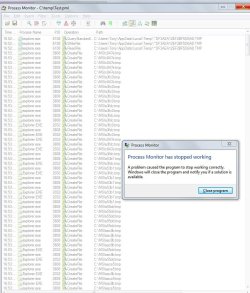
I went through the process you spelt out in full. No problems.

Then I made the test file as described in your last step and got the warning as in the screenshot attached. NOT like your last screenshot. :(

Start the data collection using the left most icon highlighted in the first screenshot.

Move Process Monitor's window off to the side and use your computer as you normally would. If rows of info show in Process Monitor's window, then the app(s) listed in the column named Process Name might be the app that created to TMP folder. You might also see entries for your antivirus app as it watches the newly created folder.

I originally tried a filter of TEMP\*.TMP, but could not get wildcards to work.

Also Process Monitor crashed a lot in my unpatched virtual machine, but not in my patched host computer.


This screenshot shows Process Monitor's entries when I used Windows (file) Explorer to create a test TMP folder.
View attachment 390575[/QUOTE]
 

Attachments

  • testthis.JPG
    testthis.JPG
    113.5 KB · Views: 1

My Computer My Computer

Computer type
PC/Desktop
Computer Manufacturer/Model Number
Acer twice plus Lenovo
OS
XP Pro and Win7 Pro both 32 bit plus Win 8.1 64bit
Memory
4 G
Hard Drives
300G and 500 G with 4TB backup drive
Antivirus
AVG, MS Essentials and Windows Defender
Browser
IE8, IE9, IE11 and Opera.
Other Info
The various items listed are NOT all on one PC! But all PCs are connected via a combined LAN/WLAN which also provides connection to a network printer
Over in BleepingComputer forum, a couple of the best techs in BC, for software problems such as these, often have the thred-starter download, install, and run MiniToolBox [with only reporting items checked at first] and Piriform's Speccy. Even though I'm not even close to their reading of, analyzing of, the MiniToolBox log and the "published URL" of the Speccy log, I'm beginning to suspect a set of programs and/or a set of utilities running both in the background and in the foregound are causing this mysterious folder and files.
 

My Computer My Computer

Computer type
PC/Desktop
Computer Manufacturer/Model Number
Antec desktop; Acer Aspire laptops
OS
Windows 7 Professional 64-bit
CPU
Desktop i5; Acers i5 & i7
Memory
desktop 16GB; 1 Acer 8GB & 1 Acer 16GB
Hard Drives
1TB split into 2 equal partitions [OS and data] usable by RJS
Internet Speed
AT&T DSL
Browser
FF, GChrome, msIE
Other Info
Windows 7 Firewall, Emsisoft AM/AV, MSE [scan-only], SpywareBlaster, Ruiware/BillP combine
Your final sentence gave me an idea!
I tried many different searches using keywords that might better target the problem. In the end I came up with a single reference that looks to be a possible answer. I will try it myself after a couple of days (Too busy to do it straight away) but here is the link for you to read and see what you think.
(My System Variables do not look like their example code.)

windows installer (msi) create unwant .tmp folder on root of - Microsoft Community

Over in BleepingComputer forum, a couple of the best techs in BC, for software problems such as these, often have the thred-starter download, install, and run MiniToolBox [with only reporting items checked at first] and Piriform's Speccy. Even though I'm not even close to their reading of, analyzing of, the MiniToolBox log and the "published URL" of the Speccy log, I'm beginning to suspect a set of programs and/or a set of utilities running both in the background and in the foregound are causing this mysterious folder and files.
 

My Computer My Computer

Computer type
PC/Desktop
Computer Manufacturer/Model Number
Acer twice plus Lenovo
OS
XP Pro and Win7 Pro both 32 bit plus Win 8.1 64bit
Memory
4 G
Hard Drives
300G and 500 G with 4TB backup drive
Antivirus
AVG, MS Essentials and Windows Defender
Browser
IE8, IE9, IE11 and Opera.
Other Info
The various items listed are NOT all on one PC! But all PCs are connected via a combined LAN/WLAN which also provides connection to a network printer
Back
Top