Solved How to Delete folders labelled .tmp ?

I agree with you, but as the Process Monitor didn't work for me, I still don't know where they came from. Except, insofar as the Microsoft Community link correspondence suggested that an alteration to the way that MSI works may have caused it.
So for that part of the problem, I will keep looking at File Explorer to see if any new empty folders turn up.

The other part of the problem, how to delete so many folders that can't easily be grouped to prevent "Access Denied", I found in that same MS Community a suggestion to use the Puran Utilities 'Delete Empty Folders' app and that worked wonderfully :D

I am trying all their tools one at a time and like them. The first one I tried rapidly detected 184 empty folders and a few clicks later, they have all gone. Highly recommended and there doesn't seem to be any popup or advertising catches. Puran Software - Quality First Now I must make a donation.

At present I am happy to have achieved my main aim, so thanks for the inputs.

Tony

I'm beginning to suspect a set of programs and/or a set of utilities running both in the background and in the foregound are causing this mysterious folder and files.
 

My Computer My Computer

At a glance

XP Pro and Win7 Pro both 32 bit plus Win 8.1 ...4 G
Computer type
PC/Desktop
Computer Manufacturer/Model Number
Acer twice plus Lenovo
OS
XP Pro and Win7 Pro both 32 bit plus Win 8.1 64bit
Memory
4 G
Hard Drives
300G and 500 G with 4TB backup drive
Antivirus
AVG, MS Essentials and Windows Defender
Browser
IE8, IE9, IE11 and Opera.
Other Info
The various items listed are NOT all on one PC! But all PCs are connected via a combined LAN/WLAN which also provides connection to a network printer
I've used Process Monitor for many years and this is the first time that I've had it crash like that. You might try it again, now that most of the TMP folders are gone. Even if something is messed up with the way MSI files work on your computer, it would still be nice to know what is installing/updating so often.
 

My Computer My Computer

At a glance

W7 Pro SP1 64biti78GBIntel HD Graphics
Computer type
Laptop
Computer Manufacturer/Model Number
Employer provided Dell Latitude
OS
W7 Pro SP1 64bit
CPU
i7
Memory
8GB
Graphics Card(s)
Intel HD Graphics
Hard Drives
crappy SSD
Antivirus
Employer mandated Symantec Endpoint Protection
Browser
Pale Moon 64bit, IE11 64bit & Chrome 64bit
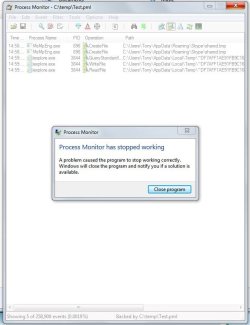
Sounds sensible, so I just tried again. I used the same procmon settings as you told me and then switched capture back on. This time it only got a few entries and stayed working for almost two minutes before crashing! I attach the screenshot.

It had created a Test.pml file of 76 MB. Just double clicking on the file didn't open it. Trying to Open it from the File menu in Procmon (after closing and restarting the programme) got me the message "The file was not closed cleanly during capture and is corrupt." Hardly surprising I guess :rolleyes:

Maybe there are some different/additional settings to setup Procmon that will let it run without crashing?

Tony
PS two days after deleting the folders I haven't got any new *.tmp named folders on my C drive :)

I've used Process Monitor for many years and this is the first time that I've had it crash like that. You might try it again, now that most of the TMP folders are gone. Even if something is messed up with the way MSI files work on your computer, it would still be nice to know what is installing/updating so often.
 

Attachments

  • procmon2.JPG
    procmon2.JPG
    53.8 KB · Views: 0

My Computer My Computer

At a glance

XP Pro and Win7 Pro both 32 bit plus Win 8.1 ...4 G
Computer type
PC/Desktop
Computer Manufacturer/Model Number
Acer twice plus Lenovo
OS
XP Pro and Win7 Pro both 32 bit plus Win 8.1 64bit
Memory
4 G
Hard Drives
300G and 500 G with 4TB backup drive
Antivirus
AVG, MS Essentials and Windows Defender
Browser
IE8, IE9, IE11 and Opera.
Other Info
The various items listed are NOT all on one PC! But all PCs are connected via a combined LAN/WLAN which also provides connection to a network printer
One of the tmp files shown is from MSE. Are you running MSE and AVG at the same time on the same computer?

If the TMP folders come back, look in the Windows event logs to see if there are any helpful entries around the time that the folders were created.
 

My Computer My Computer

At a glance

W7 Pro SP1 64biti78GBIntel HD Graphics
Computer type
Laptop
Computer Manufacturer/Model Number
Employer provided Dell Latitude
OS
W7 Pro SP1 64bit
CPU
i7
Memory
8GB
Graphics Card(s)
Intel HD Graphics
Hard Drives
crappy SSD
Antivirus
Employer mandated Symantec Endpoint Protection
Browser
Pale Moon 64bit, IE11 64bit & Chrome 64bit
Over in BleepingComputer forum, a couple of the best techs in BC, for software problems such as these, often have the thred-starter download, install, and run MiniToolBox [with only reporting items checked at first] and Piriform's Speccy. Even though I'm not even close to their ability of the reading and analyzing of, the MiniToolBox log and the "published URL" of the Speccy log, I'm beginning to suspect a set of programs and/or a set of utilities running both in the background and in the foregound are causing this mysterious folder and files.

Addendum: this post was in the "hopper" for a whole day before I "freed" it. It might be outdated by now.
 

My Computer My Computer

At a glance

Windows 7 Professional 64-bitDesktop i5; Acers i5 & i7desktop 16GB; 1 Acer 8GB & 1 Acer 16GB
Computer type
PC/Desktop
Computer Manufacturer/Model Number
Antec desktop; Acer Aspire laptops
OS
Windows 7 Professional 64-bit
CPU
Desktop i5; Acers i5 & i7
Memory
desktop 16GB; 1 Acer 8GB & 1 Acer 16GB
Hard Drives
1TB split into 2 equal partitions [OS and data] usable by RJS
Internet Speed
AT&T DSL
Browser
FF, GChrome, msIE
Other Info
Windows 7 Firewall, Emsisoft AM/AV, MSE [scan-only], SpywareBlaster, Ruiware/BillP combine
I am not talking, or showing, tmp files. The problem here has always been about folders that include the characters .tmp in the folder name.

No, I am not using AVG at all with MSE! I was greatly relieved when I installed Win 7 and found that MSE was again useable :D

Tony

One of the tmp files shown is from MSE. Are you running MSE and AVG at the same time on the same computer?

If the TMP folders come back, look in the Windows event logs to see if there are any helpful entries around the time that the folders were created.
 

My Computer My Computer

At a glance

XP Pro and Win7 Pro both 32 bit plus Win 8.1 ...4 G
Computer type
PC/Desktop
Computer Manufacturer/Model Number
Acer twice plus Lenovo
OS
XP Pro and Win7 Pro both 32 bit plus Win 8.1 64bit
Memory
4 G
Hard Drives
300G and 500 G with 4TB backup drive
Antivirus
AVG, MS Essentials and Windows Defender
Browser
IE8, IE9, IE11 and Opera.
Other Info
The various items listed are NOT all on one PC! But all PCs are connected via a combined LAN/WLAN which also provides connection to a network printer

My Computer My Computer

At a glance

W7 Pro SP1 64biti78GBIntel HD Graphics
Computer type
Laptop
Computer Manufacturer/Model Number
Employer provided Dell Latitude
OS
W7 Pro SP1 64bit
CPU
i7
Memory
8GB
Graphics Card(s)
Intel HD Graphics
Hard Drives
crappy SSD
Antivirus
Employer mandated Symantec Endpoint Protection
Browser
Pale Moon 64bit, IE11 64bit & Chrome 64bit
No, the System Info in my profile is merely a list - it does not imply that there is any particular connection between any of the items in the list!

I have several computers with different OS's and programmes, so a lot of practical experience with technology going back to the 1960s. To keep the various machines (and programmes) in working order it is necessary to understand them all - good fun at times, although occasionally irritating :cry:

Tony

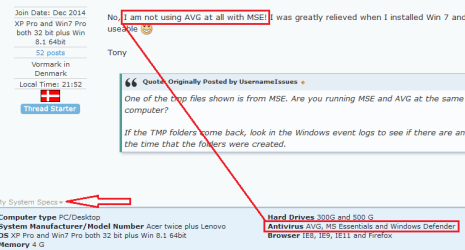
I got the impression that you were using AVG and MSE at the same time from this info:

View attachment 390754

You can update/change that info via this link:
http://www.sevenforums.com/profile.php?do=extra
 

My Computer My Computer

At a glance

XP Pro and Win7 Pro both 32 bit plus Win 8.1 ...4 G
Computer type
PC/Desktop
Computer Manufacturer/Model Number
Acer twice plus Lenovo
OS
XP Pro and Win7 Pro both 32 bit plus Win 8.1 64bit
Memory
4 G
Hard Drives
300G and 500 G with 4TB backup drive
Antivirus
AVG, MS Essentials and Windows Defender
Browser
IE8, IE9, IE11 and Opera.
Other Info
The various items listed are NOT all on one PC! But all PCs are connected via a combined LAN/WLAN which also provides connection to a network printer
Back
Top