Solved moving system files from HDD to SSD

Amaterasu

Member
Member
Local time
10:00 PM
Messages
74
hi there,
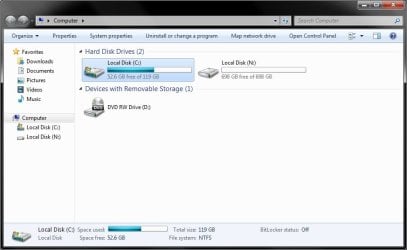
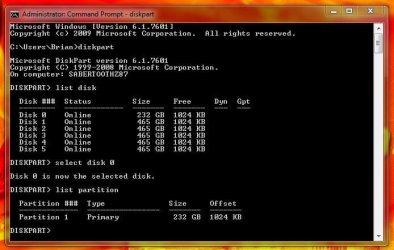
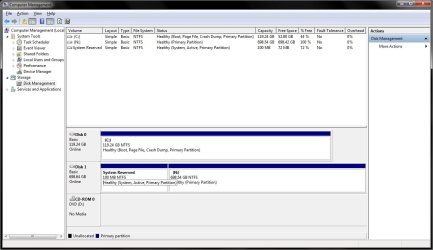
i recently installed windows 7 on my SSD as i just want to use my HDD just for storage but the problem i have is that i need both drives plugged in the my PC to boot so how to i move the system files to my SSD where the should be in the first place.
thanks
 

Attachments
  • 1.jpg
    1.jpg
    82 KB · Views: 2
  • 2.jpg
    2.jpg
    40.1 KB · Views: 0

My Computer My Computer

At a glance

Windows 7 Ultimate 64-bit SP1Intel i7-3930K 3.20GHz 6-Core ProcessorG Skill Ripjaws Z 32GB DDR3 1866MHzEVGA Nvidia GeForce GTX 980 4GB
Computer type
PC/Desktop
Computer Manufacturer/Model Number
Custom Build
OS
Windows 7 Ultimate 64-bit SP1
CPU
Intel i7-3930K 3.20GHz 6-Core Processor
Motherboard
Asus Sabertooth X79
Memory
G Skill Ripjaws Z 32GB DDR3 1866MHz
Graphics Card(s)
EVGA Nvidia GeForce GTX 980 4GB
Monitor(s) Displays
29" LG Curved Ultrawide IPS Monitor
Screen Resolution
2560 x 1080
Hard Drives
Samsung 850 Pro 128GB
PSU
Corsair AX760
Case
Aerocool DS200
Cooling
Cooler Master Nepton 240M
Keyboard
Wireless Keyboard
Mouse
Wireless Mouse
Internet Speed
32MB
Antivirus
Bitdefender
Browser
Google Chrome
Other Info
TP-LINK Archer T9E Network adapter
You did not unplug the hard drive when you installed windows on the ssd. :(

You should reinstall windows to the ssd, WITHOUT the hard drive connected.

Anywho, you need the ssd marked Active, then you can write the system files to the ssd by runnng startup repair.

You can use the install dvd and Diskpart to mark the ssd Active.

Did you setup and align the ssd before you did the install ?

If the SSD is not aligned, you may as well start over.

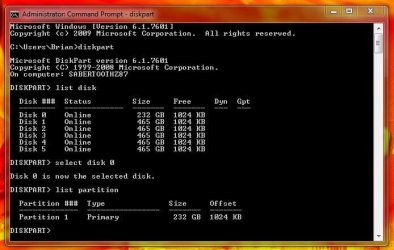
You can check the alignment like this.

In command prompt type Diskpart, hit enter

list disk, hit enter

select disk 0, hit enter

list partition, hit enter

if the offset on the KB level is not divisable by 4 then it`s wrong.

Example:
 

Attachments

  • Diskpart.JPG
    Diskpart.JPG
    50.9 KB · Views: 18

My Computer My Computer

At a glance

Windows 10 Pro x64Intel Core i7 6700KGSkill TridentZ RGB 16GB 3600 16-16-16-36EVGA GTX 980 Ti SC x2
Computer type
PC/Desktop
Computer Manufacturer/Model Number
Skylake Special #666
OS
Windows 10 Pro x64
CPU
Intel Core i7 6700K
Motherboard
Asus Sabertooth Z170 Mark 1
Memory
GSkill TridentZ RGB 16GB 3600 16-16-16-36
Graphics Card(s)
EVGA GTX 980 Ti SC x2
Sound Card
Realtek High Definition
Monitor(s) Displays
AOC G2460PG
Screen Resolution
1920 x 1080 144Hz
Hard Drives
Samsung 860 Pro 256GB, Seagate Barracuda 4TB x2
PSU
EVGA 1000 P2, EVGA White Custom Braided Cables
Case
Corsair Vengeance C70 Gunmetal Black
Cooling
Corsair H100i v2, Corsair ML120 x2, Thermal Grizzly Kryonaut
Keyboard
Logitech G910 Orion Spectrum
Mouse
Logitech G700s
Internet Speed
Verizon Fios Quantum Gateway 75/75
Antivirus
Windows Defender, Malwarebytes Free 3.8.3
Browser
Chrome
Other Info
Corsair SP120 x4, LG Blu-ray Drive, Durabrand HT-395 100 Watt Dolby Digital Amp, Corsair H2100 Wireless 7.1 Headset

My Computer My Computer

At a glance

Windows 10 Pro x64Intel Core i7 6700KGSkill TridentZ RGB 16GB 3600 16-16-16-36EVGA GTX 980 Ti SC x2
Computer type
PC/Desktop
Computer Manufacturer/Model Number
Skylake Special #666
OS
Windows 10 Pro x64
CPU
Intel Core i7 6700K
Motherboard
Asus Sabertooth Z170 Mark 1
Memory
GSkill TridentZ RGB 16GB 3600 16-16-16-36
Graphics Card(s)
EVGA GTX 980 Ti SC x2
Sound Card
Realtek High Definition
Monitor(s) Displays
AOC G2460PG
Screen Resolution
1920 x 1080 144Hz
Hard Drives
Samsung 860 Pro 256GB, Seagate Barracuda 4TB x2
PSU
EVGA 1000 P2, EVGA White Custom Braided Cables
Case
Corsair Vengeance C70 Gunmetal Black
Cooling
Corsair H100i v2, Corsair ML120 x2, Thermal Grizzly Kryonaut
Keyboard
Logitech G910 Orion Spectrum
Mouse
Logitech G700s
Internet Speed
Verizon Fios Quantum Gateway 75/75
Antivirus
Windows Defender, Malwarebytes Free 3.8.3
Browser
Chrome
Other Info
Corsair SP120 x4, LG Blu-ray Drive, Durabrand HT-395 100 Watt Dolby Digital Amp, Corsair H2100 Wireless 7.1 Headset
I moved boot files from System Reserved to C with EasyBCD (later deleted SR and regained empty space on the left with Partition Wizard 9 free).

AddRAM - would this not work?
- Use EasyBCD to move boot files
- Mark SSD active in Disk Management (if not with Partition Wizard from Windows or boot)
- restart

You can try this right before a reinstall, and you wouldn't be losing anything other than a few minutes :)
 

My Computer My Computer

At a glance

Windows 7 Ultimate x64 SP1AMD Phenom 2 1090T2x8GB Kingston HyperX Fury Black 1600Mhz Unga...MSI GTX 970 Gaming 4G
Computer type
PC/Desktop
Computer Manufacturer/Model Number
Custom Build
OS
Windows 7 Ultimate x64 SP1
CPU
AMD Phenom 2 1090T
Motherboard
Gigabyte GA-890FXA-UD5
Memory
2x8GB Kingston HyperX Fury Black 1600Mhz Unganged
Graphics Card(s)
MSI GTX 970 Gaming 4G
Sound Card
Realtek On-Board HD 7.1 Audio / Logitech G35
Monitor(s) Displays
3xAcer GD245HQ
Screen Resolution
1920x1080
Hard Drives
Samsung 850 Pro 512GB SSD - OS /
WD Caviar Black SATA 3 - 1 TBx2 - Dynamic RAID 0 /
WD Caviar Green SATA 2 - 640GBx2 - Dynamic RAID 0 /
WD Caviar Green SATA 2 - 640GB - Internal Backup /
Seagate Barracude SATA 3 - 3TB - External Backup/ Sync
PSU
HighPower 1000W
Case
Cooler Master HAF 932
Cooling
Noctua NH-D14
Keyboard
Logitech G19
Mouse
Logitech G500
Internet Speed
100/4 Mbit Cable (100GB quota)
Antivirus
ZoneAlarm Extreme Security / MBAM Pro / MBAE Free / SAS Free
Browser
IE 11 - Firefox - Chrome
Other Info
Logitech F710/ G27/ G940/ Z5500 // TrackIR 5 // Nvidia 3D Surround Vision
Of course that will work, but it`s better to teach people how to setup a partition properly, then install windows, instead of just fixing it all the time.

The best practice is to either let the installer do everything. ( No other drives plugged in )

Set the drive up with Diskpart ( no system reserved partition ) (and probably the easiest way ) although not for a novice.

Set the drive up using a Partition Wizard Boot CD ( my favorite way )

Bootable Partition Manger | MiniTool Partition Wizard Bootable Edition

Example:
 

Attachments

  • Samsung Drive.JPG
    Samsung Drive.JPG
    21.6 KB · Views: 2

My Computer My Computer

At a glance

Windows 10 Pro x64Intel Core i7 6700KGSkill TridentZ RGB 16GB 3600 16-16-16-36EVGA GTX 980 Ti SC x2
Computer type
PC/Desktop
Computer Manufacturer/Model Number
Skylake Special #666
OS
Windows 10 Pro x64
CPU
Intel Core i7 6700K
Motherboard
Asus Sabertooth Z170 Mark 1
Memory
GSkill TridentZ RGB 16GB 3600 16-16-16-36
Graphics Card(s)
EVGA GTX 980 Ti SC x2
Sound Card
Realtek High Definition
Monitor(s) Displays
AOC G2460PG
Screen Resolution
1920 x 1080 144Hz
Hard Drives
Samsung 860 Pro 256GB, Seagate Barracuda 4TB x2
PSU
EVGA 1000 P2, EVGA White Custom Braided Cables
Case
Corsair Vengeance C70 Gunmetal Black
Cooling
Corsair H100i v2, Corsair ML120 x2, Thermal Grizzly Kryonaut
Keyboard
Logitech G910 Orion Spectrum
Mouse
Logitech G700s
Internet Speed
Verizon Fios Quantum Gateway 75/75
Antivirus
Windows Defender, Malwarebytes Free 3.8.3
Browser
Chrome
Other Info
Corsair SP120 x4, LG Blu-ray Drive, Durabrand HT-395 100 Watt Dolby Digital Amp, Corsair H2100 Wireless 7.1 Headset
I get you.

When I clean installed last month during HDD-SSD transition, I knew to disconnect all other drives from what I have read here but wasn't aware of System Reserved being needed for bitlocker only. I had to remove it later, but hopefully it worked alright.
 

My Computer My Computer

At a glance

Windows 7 Ultimate x64 SP1AMD Phenom 2 1090T2x8GB Kingston HyperX Fury Black 1600Mhz Unga...MSI GTX 970 Gaming 4G
Computer type
PC/Desktop
Computer Manufacturer/Model Number
Custom Build
OS
Windows 7 Ultimate x64 SP1
CPU
AMD Phenom 2 1090T
Motherboard
Gigabyte GA-890FXA-UD5
Memory
2x8GB Kingston HyperX Fury Black 1600Mhz Unganged
Graphics Card(s)
MSI GTX 970 Gaming 4G
Sound Card
Realtek On-Board HD 7.1 Audio / Logitech G35
Monitor(s) Displays
3xAcer GD245HQ
Screen Resolution
1920x1080
Hard Drives
Samsung 850 Pro 512GB SSD - OS /
WD Caviar Black SATA 3 - 1 TBx2 - Dynamic RAID 0 /
WD Caviar Green SATA 2 - 640GBx2 - Dynamic RAID 0 /
WD Caviar Green SATA 2 - 640GB - Internal Backup /
Seagate Barracude SATA 3 - 3TB - External Backup/ Sync
PSU
HighPower 1000W
Case
Cooler Master HAF 932
Cooling
Noctua NH-D14
Keyboard
Logitech G19
Mouse
Logitech G500
Internet Speed
100/4 Mbit Cable (100GB quota)
Antivirus
ZoneAlarm Extreme Security / MBAM Pro / MBAE Free / SAS Free
Browser
IE 11 - Firefox - Chrome
Other Info
Logitech F710/ G27/ G940/ Z5500 // TrackIR 5 // Nvidia 3D Surround Vision
Yep, no one taught me, it took a while to learn :)

With a Partition Wizard Boot CD, you can create, align, format and set Active the install partition in less then 5 minutes.

Is your SSD aligned ?

Check it.

If not the PW Boot CD can fix that too :)
 

My Computer My Computer

At a glance

Windows 10 Pro x64Intel Core i7 6700KGSkill TridentZ RGB 16GB 3600 16-16-16-36EVGA GTX 980 Ti SC x2
Computer type
PC/Desktop
Computer Manufacturer/Model Number
Skylake Special #666
OS
Windows 10 Pro x64
CPU
Intel Core i7 6700K
Motherboard
Asus Sabertooth Z170 Mark 1
Memory
GSkill TridentZ RGB 16GB 3600 16-16-16-36
Graphics Card(s)
EVGA GTX 980 Ti SC x2
Sound Card
Realtek High Definition
Monitor(s) Displays
AOC G2460PG
Screen Resolution
1920 x 1080 144Hz
Hard Drives
Samsung 860 Pro 256GB, Seagate Barracuda 4TB x2
PSU
EVGA 1000 P2, EVGA White Custom Braided Cables
Case
Corsair Vengeance C70 Gunmetal Black
Cooling
Corsair H100i v2, Corsair ML120 x2, Thermal Grizzly Kryonaut
Keyboard
Logitech G910 Orion Spectrum
Mouse
Logitech G700s
Internet Speed
Verizon Fios Quantum Gateway 75/75
Antivirus
Windows Defender, Malwarebytes Free 3.8.3
Browser
Chrome
Other Info
Corsair SP120 x4, LG Blu-ray Drive, Durabrand HT-395 100 Watt Dolby Digital Amp, Corsair H2100 Wireless 7.1 Headset
Is your SSD aligned ? Check it. If not the PW Boot CD can fix that too :)

Yes, of course. I use "AS SSD Benchmark" to check though.

Amaterasu, you can use the above program to check alignment (also see which drivers are used by SSD). Text in upper left when you open the program - top: driver, bottom: alignment (green is good, red is misaligned)
 

My Computer My Computer

At a glance

Windows 7 Ultimate x64 SP1AMD Phenom 2 1090T2x8GB Kingston HyperX Fury Black 1600Mhz Unga...MSI GTX 970 Gaming 4G
Computer type
PC/Desktop
Computer Manufacturer/Model Number
Custom Build
OS
Windows 7 Ultimate x64 SP1
CPU
AMD Phenom 2 1090T
Motherboard
Gigabyte GA-890FXA-UD5
Memory
2x8GB Kingston HyperX Fury Black 1600Mhz Unganged
Graphics Card(s)
MSI GTX 970 Gaming 4G
Sound Card
Realtek On-Board HD 7.1 Audio / Logitech G35
Monitor(s) Displays
3xAcer GD245HQ
Screen Resolution
1920x1080
Hard Drives
Samsung 850 Pro 512GB SSD - OS /
WD Caviar Black SATA 3 - 1 TBx2 - Dynamic RAID 0 /
WD Caviar Green SATA 2 - 640GBx2 - Dynamic RAID 0 /
WD Caviar Green SATA 2 - 640GB - Internal Backup /
Seagate Barracude SATA 3 - 3TB - External Backup/ Sync
PSU
HighPower 1000W
Case
Cooler Master HAF 932
Cooling
Noctua NH-D14
Keyboard
Logitech G19
Mouse
Logitech G500
Internet Speed
100/4 Mbit Cable (100GB quota)
Antivirus
ZoneAlarm Extreme Security / MBAM Pro / MBAE Free / SAS Free
Browser
IE 11 - Firefox - Chrome
Other Info
Logitech F710/ G27/ G940/ Z5500 // TrackIR 5 // Nvidia 3D Surround Vision
It`s easier to use Diskpart in Command Prompt, you don`t have to download or install anything. Takes less the 30 seconds.
 

Attachments

  • Diskpart.JPG
    Diskpart.JPG
    50.9 KB · Views: 14

My Computer My Computer

At a glance

Windows 10 Pro x64Intel Core i7 6700KGSkill TridentZ RGB 16GB 3600 16-16-16-36EVGA GTX 980 Ti SC x2
Computer type
PC/Desktop
Computer Manufacturer/Model Number
Skylake Special #666
OS
Windows 10 Pro x64
CPU
Intel Core i7 6700K
Motherboard
Asus Sabertooth Z170 Mark 1
Memory
GSkill TridentZ RGB 16GB 3600 16-16-16-36
Graphics Card(s)
EVGA GTX 980 Ti SC x2
Sound Card
Realtek High Definition
Monitor(s) Displays
AOC G2460PG
Screen Resolution
1920 x 1080 144Hz
Hard Drives
Samsung 860 Pro 256GB, Seagate Barracuda 4TB x2
PSU
EVGA 1000 P2, EVGA White Custom Braided Cables
Case
Corsair Vengeance C70 Gunmetal Black
Cooling
Corsair H100i v2, Corsair ML120 x2, Thermal Grizzly Kryonaut
Keyboard
Logitech G910 Orion Spectrum
Mouse
Logitech G700s
Internet Speed
Verizon Fios Quantum Gateway 75/75
Antivirus
Windows Defender, Malwarebytes Free 3.8.3
Browser
Chrome
Other Info
Corsair SP120 x4, LG Blu-ray Drive, Durabrand HT-395 100 Watt Dolby Digital Amp, Corsair H2100 Wireless 7.1 Headset
ok thanks addram and gokay for your help is will have a look later and report back :)
 

My Computer My Computer

At a glance

Windows 7 Ultimate 64-bit SP1Intel i7-3930K 3.20GHz 6-Core ProcessorG Skill Ripjaws Z 32GB DDR3 1866MHzEVGA Nvidia GeForce GTX 980 4GB
Computer type
PC/Desktop
Computer Manufacturer/Model Number
Custom Build
OS
Windows 7 Ultimate 64-bit SP1
CPU
Intel i7-3930K 3.20GHz 6-Core Processor
Motherboard
Asus Sabertooth X79
Memory
G Skill Ripjaws Z 32GB DDR3 1866MHz
Graphics Card(s)
EVGA Nvidia GeForce GTX 980 4GB
Monitor(s) Displays
29" LG Curved Ultrawide IPS Monitor
Screen Resolution
2560 x 1080
Hard Drives
Samsung 850 Pro 128GB
PSU
Corsair AX760
Case
Aerocool DS200
Cooling
Cooler Master Nepton 240M
Keyboard
Wireless Keyboard
Mouse
Wireless Mouse
Internet Speed
32MB
Antivirus
Bitdefender
Browser
Google Chrome
Other Info
TP-LINK Archer T9E Network adapter

If you don't want to reinstall then you can indeed move the Bootmgr - Move to C:\ with EasyBCD - Windows 7 Forums making sure at reboot you set the Win7 drive to boot first in BIOS setup.

Then if Win7 is marked System Active in Disk Mgmt, you can delete the System Reserved partition in Disk Mgmt after marking it Inactive Partition - Mark as Inactive , boot the old drive using the one-time BIOS boot menu key, or move trhe data off to wipe the old hard drive with Diskpart Clean Command to get it cleanest then repartition in Disk Mgmt and move the data back on.
 
Last edited:
If you don't want to reinstall then you can indeed move the Bootmgr - Move to C:\ with EasyBCD - Windows 7 Forums making sure at reboot you set the Win7 drive to boot first in BIOS setup.

Then if Win7 is marked System Active in BIOS setup, you can delete the System Reserved partition in Disk Mgmt after marking it Inactive Partition - Mark as Inactive , boot the old drive using the one-time BIOS boot menu key, or move trhe data off to wipe the old hard drive with Diskpart Clean Command to get it cleanest then repartition in Disk Mgmt and move the data back on.

thanks for your help problem solved
 

My Computer My Computer

At a glance

Windows 7 Ultimate 64-bit SP1Intel i7-3930K 3.20GHz 6-Core ProcessorG Skill Ripjaws Z 32GB DDR3 1866MHzEVGA Nvidia GeForce GTX 980 4GB
Computer type
PC/Desktop
Computer Manufacturer/Model Number
Custom Build
OS
Windows 7 Ultimate 64-bit SP1
CPU
Intel i7-3930K 3.20GHz 6-Core Processor
Motherboard
Asus Sabertooth X79
Memory
G Skill Ripjaws Z 32GB DDR3 1866MHz
Graphics Card(s)
EVGA Nvidia GeForce GTX 980 4GB
Monitor(s) Displays
29" LG Curved Ultrawide IPS Monitor
Screen Resolution
2560 x 1080
Hard Drives
Samsung 850 Pro 128GB
PSU
Corsair AX760
Case
Aerocool DS200
Cooling
Cooler Master Nepton 240M
Keyboard
Wireless Keyboard
Mouse
Wireless Mouse
Internet Speed
32MB
Antivirus
Bitdefender
Browser
Google Chrome
Other Info
TP-LINK Archer T9E Network adapter
Glad to hear it. If there's nothing else we can help you with then you can mark the thread Solved at top.
 
Back
Top