
Moving User Data and Sharing Between Windows 7 & 8 Dual Boot.

escribblings

New member
Local time
3:18 AM
Messages
6
I am in the process of setting up my multi-boot system. I have a 250GB SSD and a 1TB Magnetic.

My 2 main OS will be Windows 7 Ultimate x64 and Windows 8.1 Professional x64 (with various Linux thrown in)

I will be installing the OS onto the SSD (obviously :sarc:), but as Native Booting VHD's (not so obvious :geek:)I want to put all the user data/profiles over on to the magnetic and I know how to do that for each OS thanks to the following threads:

But is there a way to share the locations between them so that documents autmatically saved in 7 show up in 8 and vice versa.

Many thanks
 

My Computer

Computer type
PC/Desktop
Computer Manufacturer/Model Number
Custom Build
OS
Multi-Boot - Windows 8.1 Professional x64 / Windows 7 Ultimate x64 / Other
CPU
Intel i7 4770k
Motherboard
Asus Z87 Sabertooth
Memory
8GB (2x4GB) DDR3 Corsiar Vengeance Pro 2133MHz CL9
Graphics Card(s)
Asus GeForce GTX 760 DirectCU II OC
Hard Drives
0.250 TB SSD Samsung 840 EVO
1.000 TB 07200 RPM / 8 GB SSD Hybrid Seagate ST1000DX001-1CM162
0.037 TB 10000 RPM Western Digital Raptor WD360GD-00FLA2 (x4)
Hi Escribblings, welcome to the Seven forums.

First, please notice that you should not relocate the Users folder, main profile folder, of both Seven and Eight to the same partition. Partition your storage HDD so that you have own partitions for respective Windows 7 and Windows 8 user profiles. When you sysprep a Windows installation asking it to change the location of <ProfilesDirectory> on a disk where the folder Users already exists from another Windows installation, too much could go wrong. Using the same main folder Users will not work.

After installing both systems and sysprepping them, it's an easy task to add the user folders from the other system to Libraries. Add Windows 8 Users\Your_Username\Documents to Windows 7 Documents library and so on.

Kari
 

My Computer

Computer type
Laptop
Computer Manufacturer/Model Number
HP ENVY 17-1150eg
OS
Windows 10 Pro x64 EN-GB
CPU
1.6 GHz Intel Core i7-720QM Processor
Memory
6 GB
Graphics Card(s)
ATI Mobility Radeon HD 5850 Graphics
Sound Card
Beats sound system with integrated subwoofer
Monitor(s) Displays
17" laptop display, 22" LED and 32" Full HD TV through HDMI
Screen Resolution
1600*900 (1), 1920*1080 (2&3)
Hard Drives
Internal: 2 x 500 GB SATA Hard Disk Drive 7200 rpm
External: 2TB for backups, 3TB USB3 network drive for media
Cooling
As Envy runs a bit warm, I have it on a Cooler Master pad
Keyboard
Logitech diNovo Media Desktop Laser (bluetooth)
Mouse
Logitech Performance Mouse MX
Internet Speed
50/10 Mbps VDSL
Antivirus
Windows Defender 4.3.9431.0
Browser
Maxthon 3.5.2., IE11

My Computer

Computer Manufacturer/Model Number
HP, Dell, Gateway, Toshiba - 4 laptops and 2 desktops
OS
Vista, Windows7, Mint Mate, Zorin, Windows 8
CPU
from 1.6GHz Duo to i7
Monitor(s) Displays
2x HP w2207
Hard Drives
5x HDD, 7x SSD, 12x Externals
Keyboard
with trackball - no mices
Mouse
Trackball mice
Internet Speed
DSL 6000
Hi Escribblings, welcome to the Seven forums.

First, please notice that you should not relocate the Users folder, main profile folder, of both Seven and Eight to the same partition. Partition your storage HDD so that you have own partitions for respective Windows 7 and Windows 8 user profiles. When you sysprep a Windows installation asking it to change the location of <ProfilesDirectory> on a disk where the folder Users already exists from another Windows installation, too much could go wrong. Using the same main folder Users will not work.

After installing both systems and sysprepping them, it's an easy task to add the user folders from the other system to Libraries. Add Windows 8 Users\Your_Username\Documents to Windows 7 Documents library and so on.

Kari

Noted. I will look into the libraries.

Make a third partition for your data, copy the User folders there as a single set with all data sorted into each.

Then as suggested add each User folder to the respective OS's Library - Include a Folder - Windows 7 Forums.

Then designate each folder as the official Library - Set Save Folder - Windows 7 Help Forums

Not sure why I need a 3rd partition. Can you explain

[Ninja edit] My system has 6 physical disks, 1x 250GB SSD, 1x 1TB SATA3 7200RPM Magnetic/SSD Hybrid & 4 older 10000 RPM Raptors.

The SSD holds my Win 7 & 8 VHDs, and the 1TB is my data disk. The 4 Raptors are scratch/Linux disks [/ninja edit]

I am sure you have your reasons to go for a double booting configuration. But I think it is a lot more practical to run Windows 8.1 in virtual. Have a look at the video and you'll understand why I sau that.

http://www.sevenforums.com/virtualization/277690-vmware-player-windows-8-demo.html

And there is a way to share a data partition between the guest and the host.

VMware Player - Share Partitions Between Host and Guest

Just a suggestion for a nice alternative, ;)

I want both 7 and 8 to have full hardware access. I am currently installing then both on mounted VHDs with no installation as such in the primary partition on the SSD.

If I have any problems, the one I decide to be primary will be put onto the partition direct, but for now they are both VHDs :geek:
 

My Computer

Computer type
PC/Desktop
Computer Manufacturer/Model Number
Custom Build
OS
Multi-Boot - Windows 8.1 Professional x64 / Windows 7 Ultimate x64 / Other
CPU
Intel i7 4770k
Motherboard
Asus Z87 Sabertooth
Memory
8GB (2x4GB) DDR3 Corsiar Vengeance Pro 2133MHz CL9
Graphics Card(s)
Asus GeForce GTX 760 DirectCU II OC
Hard Drives
0.250 TB SSD Samsung 840 EVO
1.000 TB 07200 RPM / 8 GB SSD Hybrid Seagate ST1000DX001-1CM162
0.037 TB 10000 RPM Western Digital Raptor WD360GD-00FLA2 (x4)
Not sure why I need a 3rd partition. Can you explain?
If you don't do it like that, you will get permission conflicts.
 

My Computer

Computer Manufacturer/Model Number
HP, Dell, Gateway, Toshiba - 4 laptops and 2 desktops
OS
Vista, Windows7, Mint Mate, Zorin, Windows 8
CPU
from 1.6GHz Duo to i7
Monitor(s) Displays
2x HP w2207
Hard Drives
5x HDD, 7x SSD, 12x Externals
Keyboard
with trackball - no mices
Mouse
Trackball mice
Internet Speed
DSL 6000
Not sure why I need a 3rd partition. Can you explain?
If you don't do it like that, you will get permission conflicts.

I still don't understand this 3rd partition.

Disk 0 is my SSD/Boot disk with a Win7.VHD and a Win81.VHD.
Disk 1 is my 1TB data disk.
Then there are my other 4 disks as well.

Now I understand that I may need to split the Data disk into 2 partitions for 7 & 8. Are you saying I need to add a 3rd as well?

I may just create some more dynamic VHDs on the data disk and attach them instead.
 

My Computer

Computer type
PC/Desktop
Computer Manufacturer/Model Number
Custom Build
OS
Multi-Boot - Windows 8.1 Professional x64 / Windows 7 Ultimate x64 / Other
CPU
Intel i7 4770k
Motherboard
Asus Z87 Sabertooth
Memory
8GB (2x4GB) DDR3 Corsiar Vengeance Pro 2133MHz CL9
Graphics Card(s)
Asus GeForce GTX 760 DirectCU II OC
Hard Drives
0.250 TB SSD Samsung 840 EVO
1.000 TB 07200 RPM / 8 GB SSD Hybrid Seagate ST1000DX001-1CM162
0.037 TB 10000 RPM Western Digital Raptor WD360GD-00FLA2 (x4)
All of your data can go on one separate partition, in one set of User folders linked to each OS by libraries.
 
All of your data can go on one separate partition, in one set of User folders linked to each OS by libraries.

I understand that. What I was looking at was moving the entire user data, not just linking a new folder into the library.

However, that may be the safest route.
 

My Computer

Computer type
PC/Desktop
Computer Manufacturer/Model Number
Custom Build
OS
Multi-Boot - Windows 8.1 Professional x64 / Windows 7 Ultimate x64 / Other
CPU
Intel i7 4770k
Motherboard
Asus Z87 Sabertooth
Memory
8GB (2x4GB) DDR3 Corsiar Vengeance Pro 2133MHz CL9
Graphics Card(s)
Asus GeForce GTX 760 DirectCU II OC
Hard Drives
0.250 TB SSD Samsung 840 EVO
1.000 TB 07200 RPM / 8 GB SSD Hybrid Seagate ST1000DX001-1CM162
0.037 TB 10000 RPM Western Digital Raptor WD360GD-00FLA2 (x4)
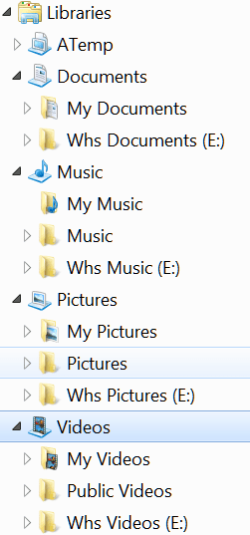
Don't move it (e.g. with the Location tab in Properties), but make brand new folders which you INCLUDE into the appropriate library. Like this - my data partition is E.

2013-12-12_1759.png
 

My Computer

Computer Manufacturer/Model Number
HP, Dell, Gateway, Toshiba - 4 laptops and 2 desktops
OS
Vista, Windows7, Mint Mate, Zorin, Windows 8
CPU
from 1.6GHz Duo to i7
Monitor(s) Displays
2x HP w2207
Hard Drives
5x HDD, 7x SSD, 12x Externals
Keyboard
with trackball - no mices
Mouse
Trackball mice
Internet Speed
DSL 6000
Don't move it (e.g. with the Location tab in Properties), but make brand new folders which you INCLUDE into the appropriate library. Like this - my data partition is E.

View attachment 297239

Cheers. Might be the best option.
 

My Computer

Computer type
PC/Desktop
Computer Manufacturer/Model Number
Custom Build
OS
Multi-Boot - Windows 8.1 Professional x64 / Windows 7 Ultimate x64 / Other
CPU
Intel i7 4770k
Motherboard
Asus Z87 Sabertooth
Memory
8GB (2x4GB) DDR3 Corsiar Vengeance Pro 2133MHz CL9
Graphics Card(s)
Asus GeForce GTX 760 DirectCU II OC
Hard Drives
0.250 TB SSD Samsung 840 EVO
1.000 TB 07200 RPM / 8 GB SSD Hybrid Seagate ST1000DX001-1CM162
0.037 TB 10000 RPM Western Digital Raptor WD360GD-00FLA2 (x4)
Back
Top