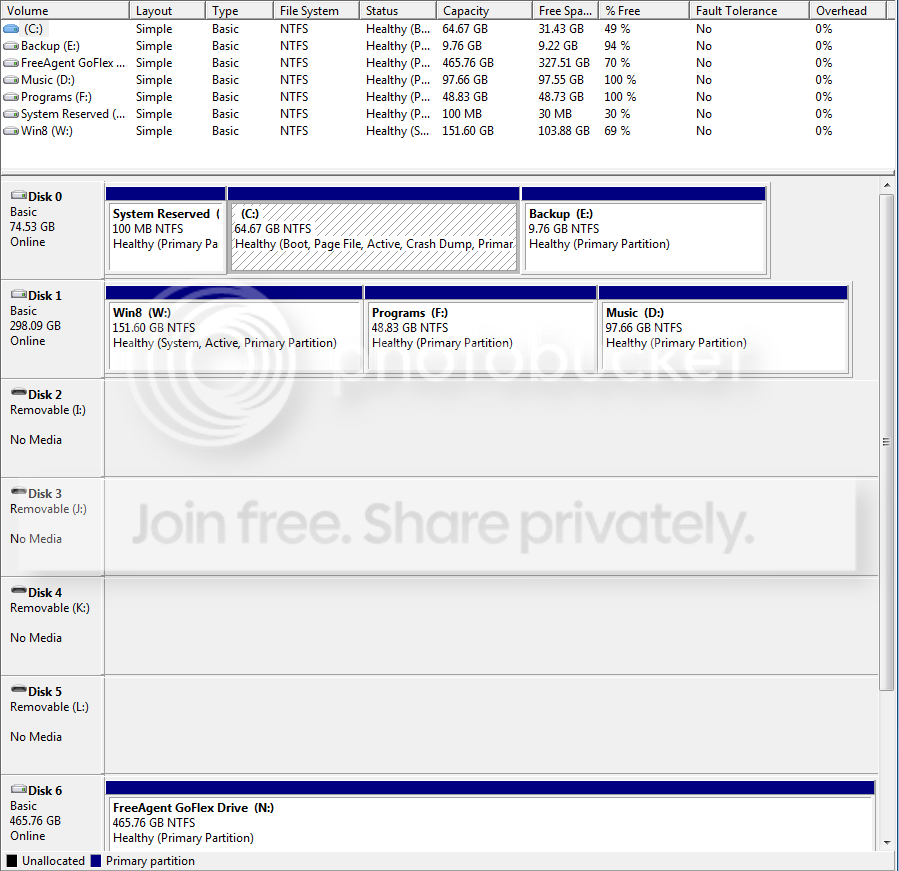
So I have Windows 7 on an SSD that is Disk 0. I decided to make a dual boot with Windows 8 for Hyper V because I have a class where I need to setup VM's with it (but thats not the point).
Anyway, I wiped my secondary hard drive (Western Digital 300gb HDD) and created a partition to load Windows 8 on. After that I installed it with no problems and was up and running in a few minutes. So I never switched back to Windows 7 in the Bios because I was busy setting up some servers on HyperV but this morning I go to switch the boot order in Bios from my HDD to the SSD with Win7. No errors came up, it just went straight back to Windows 8. So I restarted the computer again to check bios again, same problem.
So I checked fdisk and found that my Windows 7 partition on the SSD was no longer the active partition, so I made it active then tried again. This time I get Bootmgr not found. So I go back into Windows 8 and google around bit and end up getting Visual BCD, now when I boot into the HDD (windows 8) I get a screen that allows me to choose between Windows 8 and Windows 7. Now, worst case scenario, I'm ok with booting into the HDD from now on and choosing between the two OS, but I'd rather be able to switch the boot priority and it be correct. Right now if make the SSD (Windows 7) the first boot priority, I get the Bootmgr error and it won't boot into Windows from the SSD. I can only boot into Windows 7 after I change the bios so that the HDD (Windows 8) boots first and I can choose between 7/8.
After that, windows 7 boots perfectly fine... but I like things to happen the way they should happen so I wanted to know if anyone knows a fix I can use for this problem.
Thanks in advance.
Anyway, I wiped my secondary hard drive (Western Digital 300gb HDD) and created a partition to load Windows 8 on. After that I installed it with no problems and was up and running in a few minutes. So I never switched back to Windows 7 in the Bios because I was busy setting up some servers on HyperV but this morning I go to switch the boot order in Bios from my HDD to the SSD with Win7. No errors came up, it just went straight back to Windows 8. So I restarted the computer again to check bios again, same problem.
So I checked fdisk and found that my Windows 7 partition on the SSD was no longer the active partition, so I made it active then tried again. This time I get Bootmgr not found. So I go back into Windows 8 and google around bit and end up getting Visual BCD, now when I boot into the HDD (windows 8) I get a screen that allows me to choose between Windows 8 and Windows 7. Now, worst case scenario, I'm ok with booting into the HDD from now on and choosing between the two OS, but I'd rather be able to switch the boot priority and it be correct. Right now if make the SSD (Windows 7) the first boot priority, I get the Bootmgr error and it won't boot into Windows from the SSD. I can only boot into Windows 7 after I change the bios so that the HDD (Windows 8) boots first and I can choose between 7/8.
After that, windows 7 boots perfectly fine... but I like things to happen the way they should happen so I wanted to know if anyone knows a fix I can use for this problem.
Thanks in advance.
My Computer
At a glance
Dual Boot: Windows 8.1 & Server 2012r2 VMs: K...A10 7700 Kavari SteamRoller8GB DDR3 SDRAM PC3-85001024MB ATI AMD Radeon R7 Graphics
- Computer type
- PC/Desktop
- Computer Manufacturer/Model Number
- Custom
- OS
- Dual Boot: Windows 8.1 & Server 2012r2 VMs: Kali Linux, Backbox, Matriux, Windows 8.1
- CPU
- A10 7700 Kavari SteamRoller
- Motherboard
- ASUS A88XM-PLUS (FM2+ )
- Memory
- 8GB DDR3 SDRAM PC3-8500
- Graphics Card(s)
- 1024MB ATI AMD Radeon R7 Graphics
- Sound Card
- Realtek High Definition Audio
- Monitor(s) Displays
- Samsung
- Hard Drives
- SSD Crucial 120gb
WD VelociRaptor 1tb
- PSU
- Rosewill Gaming 650w
- Case
- Rosewill Galaxy 2
- Internet Speed
- 55/12
- Antivirus
- Malwarebytes, MSE, SAS
- Browser
- FireFox, Chrome