Solved Moving Win 7 to new drive

LunaEros

New member
Member
Local time
6:16 AM
Messages
43
Moving Win 7 from old mdr drive to new gpt drive

Hopefully someone is around still that can help.
I got a new 8tb disk to replace my 2tb main drive. I've been trying to move the system to it for a couple weeks with no luck.
Today I got the closest to it by using MiniTool partition wizard.
The old 2tb drive is an mbr and I have the new 8tb drive as gpt so I can access all the space on it.
I used partition wizard's copy disk to move the whole 2tb drive to the 8tb. It copied the whole drive and put it on the new one with the correct gpt partitions. I know it is booting from the 8tb now because I set the bios to only use UEFI. The problem is it is booting the system partition on the 8tb but reverting to the 2tb for the OS boot files.
How can I move the boot volume to the 8tb drive so it only uses that drive and I can pull the 2tb out.

I hope that wasn't too confusing.
 
Last edited:

My Computer My Computer

Computer type
PC/Desktop
OS
Windows 7 Ultimate x64
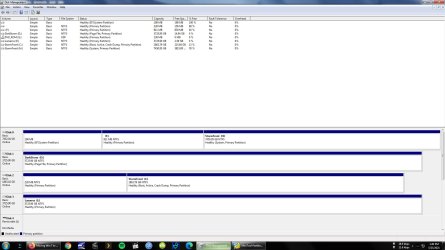
Post a screenshot of the disk management window.
 

My Computers My Computers

System One System Two

  • Computer type
    PC/Desktop
    OS
    7 X64
    CPU
    i5 8400
    Motherboard
    gigabyte b365m ds3h
    Memory
    2x8gb 3200mhz
    Hard Drives
    various
    PSU
    pure power 11 400w cm
    Case
    Coolermaster
    Cooling
    cryorig m9i
  • Computer type
    PC/Desktop
    OS
    7x64
    CPU
    g5400
    Motherboard
    ga b365m ds3h
    Memory
    8gb ddr4 2400
    PSU
    xfx pro 450w
Discs.jpg
 

My Computer My Computer

Computer type
PC/Desktop
OS
Windows 7 Ultimate x64
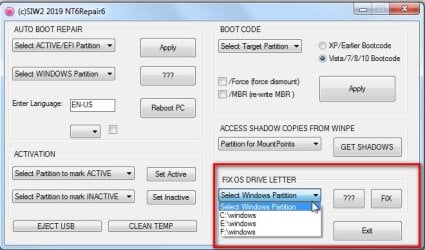
Use nt6repair View attachment nt6repair9x86.zip

Select H:\windows in the dropdown then click FIX

nt6repair6-FIXOSLETTER.jpg


Allocate a letter e.g. Z to disk0 partition1 then open an admin cmd prompt and type
bcdboot h:\windows /s z:
then press enter.
 

My Computers My Computers

System One System Two

  • Computer type
    PC/Desktop
    OS
    7 X64
    CPU
    i5 8400
    Motherboard
    gigabyte b365m ds3h
    Memory
    2x8gb 3200mhz
    Hard Drives
    various
    PSU
    pure power 11 400w cm
    Case
    Coolermaster
    Cooling
    cryorig m9i
  • Computer type
    PC/Desktop
    OS
    7x64
    CPU
    g5400
    Motherboard
    ga b365m ds3h
    Memory
    8gb ddr4 2400
    PSU
    xfx pro 450w
I assume you mean that above for the EFI System partition on drive 0, correct?
Tried it and it gave me
"Failed to create a new system store. Status = [c000003a]

I've got a program called EasyBCD. Would that somehow be able to fix it?
 

My Computer My Computer

Computer type
PC/Desktop
OS
Windows 7 Ultimate x64
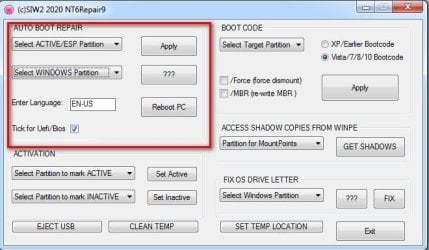
After Applying the FIX in my previous post ( if you havent already done it )

Allocate letter Z to disk0 partition 1

Tick the Uefi box

Select Z in the top dropdown which says Select Active\ESP partition

Select H in the second dropdown which Says select Windows partition.

Click Apply

nt6repair-bootrepair.jpg
 

My Computers My Computers

System One System Two

  • Computer type
    PC/Desktop
    OS
    7 X64
    CPU
    i5 8400
    Motherboard
    gigabyte b365m ds3h
    Memory
    2x8gb 3200mhz
    Hard Drives
    various
    PSU
    pure power 11 400w cm
    Case
    Coolermaster
    Cooling
    cryorig m9i
  • Computer type
    PC/Desktop
    OS
    7x64
    CPU
    g5400
    Motherboard
    ga b365m ds3h
    Memory
    8gb ddr4 2400
    PSU
    xfx pro 450w
It's only letting me choose up to letter "L" in the top dropdown.
Should I use your first step again and change it to L?
 

My Computer My Computer

Computer type
PC/Desktop
OS
Windows 7 Ultimate x64
Ok. That won't work either since MS disk management won't let me change the drive letter so I had to use Partition Wizard and that won't let me change the letter to anything before "M".
 

My Computer My Computer

Computer type
PC/Desktop
OS
Windows 7 Ultimate x64
I suggest you to clone the 2T B drive to the 8T B drive. You will end with a 6T unallocated partition.

Detach all other drives leaving on only the 8T drive

Win 10 has a function (mbr2gpt.exe) that will make a EFI partition on the drive and convert the drive into GPT.
Although it is a Win 10 function it works the same way on a Win 7 installation.
Make a Win 10 installation, boot from it, launch the CMD window (Shift+F10) and type the commands to start to convert to EFI-GPT.
Convert Windows from Legacy BIOS to UEFI without Data Loss | Tutorials

As you have a desktop, why don't you install a small SSD (120G - US$30) for Windows and programs and use the HDD for data only?
A SSD is almost 6 times faster than a HDD. It will boot in 20 seconds and open programs at a blink of an eye.
 
Last edited:

My Computers My Computers

System One System Two

  • Computer type
    PC/Desktop
    Computer Manufacturer/Model Number
    custom build
    OS
    Windows 7 HP 64
    CPU
    i5 6600K - 800MHz to 4200MHz
    Motherboard
    GA-Z170-HD3P
    Memory
    4+4G GSkill DDR4 3000
    Graphics Card(s)
    IG - Intel 530
    Monitor(s) Displays
    Samsung 226BW
    Screen Resolution
    1680x1050
    Hard Drives
    (1) -1 SM951 – 128GB M.2 AHCI PCIe SSD drive for Windows 7 and Lubuntu
    (2) -1 WD SATA 3 - 1T for Data
    (3) -1 WD SATA 3 - 1T for backup
    PSU
    Thermaltake 450W TR2 gold
    Keyboard
    Old and good Chicony mechanical keyboard
    Mouse
    Logitech mX performance - 9 buttons (had to disable some)
    Internet Speed
    500Mb/s
    Browser
    Firefox 64
    Other Info
    TinyWall firewall
  • Computer type
    Laptop
    System Manufacturer/Model Number
    Asus Q550LF
    OS
    Windows 7 Pro
    CPU
    i7-4500U 800MHz to 3.0GHz
    Motherboard
    Asus Q550LF
    Memory
    (4+4)G DDR3 1600
    Graphics Card(s)
    IG intel 4400 + NVIDIA GeForce GT 745M
    Sound Card
    Realtek
    Monitor(s) Displays
    LG Display LP156WF4-SPH1
    Screen Resolution
    1920 x 1080
    Hard Drives
    BX500 120G SSD for Windows and programs +
    1T HDD for data
    Internet Speed
    500 Mb/s
    Browser
    Firefox
    Other Info
    TinyWall firewall
I suggest you to clone the 2T B drive to the 8T B drive. You will end with a 6T unallocated partition.
Win 10 has a function (mbr2gpt.exe) that will make a EFI partition on the drive and convert the drive into GPT.
Although it is a Win 10 has a function it works the same way on a Win 7 installation.
Make a Win 10 installation, boot from it, launch the CMD window (Shift+F10) and type the commands to start to convert to EFI-GPT.
Convert Windows from Legacy BIOS to UEFI without Data Loss | Tutorials


I don't have Windows 10 or even windows 8.
 

My Computer My Computer

Computer type
PC/Desktop
OS
Windows 7 Ultimate x64
And I don't think cloning would work now anyway since the disc manager is showing the boot and system partitions being on different drives.
 

My Computer My Computer

Computer type
PC/Desktop
OS
Windows 7 Ultimate x64
Disk 2 has C: partition as active.
If you clone disk 2 into disk 0 and apply mbr2gpt it will work
 

My Computers My Computers

System One System Two

  • Computer type
    PC/Desktop
    Computer Manufacturer/Model Number
    custom build
    OS
    Windows 7 HP 64
    CPU
    i5 6600K - 800MHz to 4200MHz
    Motherboard
    GA-Z170-HD3P
    Memory
    4+4G GSkill DDR4 3000
    Graphics Card(s)
    IG - Intel 530
    Monitor(s) Displays
    Samsung 226BW
    Screen Resolution
    1680x1050
    Hard Drives
    (1) -1 SM951 – 128GB M.2 AHCI PCIe SSD drive for Windows 7 and Lubuntu
    (2) -1 WD SATA 3 - 1T for Data
    (3) -1 WD SATA 3 - 1T for backup
    PSU
    Thermaltake 450W TR2 gold
    Keyboard
    Old and good Chicony mechanical keyboard
    Mouse
    Logitech mX performance - 9 buttons (had to disable some)
    Internet Speed
    500Mb/s
    Browser
    Firefox 64
    Other Info
    TinyWall firewall
  • Computer type
    Laptop
    System Manufacturer/Model Number
    Asus Q550LF
    OS
    Windows 7 Pro
    CPU
    i7-4500U 800MHz to 3.0GHz
    Motherboard
    Asus Q550LF
    Memory
    (4+4)G DDR3 1600
    Graphics Card(s)
    IG intel 4400 + NVIDIA GeForce GT 745M
    Sound Card
    Realtek
    Monitor(s) Displays
    LG Display LP156WF4-SPH1
    Screen Resolution
    1920 x 1080
    Hard Drives
    BX500 120G SSD for Windows and programs +
    1T HDD for data
    Internet Speed
    500 Mb/s
    Browser
    Firefox
    Other Info
    TinyWall firewall
But cloning copies the whole disc while destroying what's on the target disc. Windows no longer sees active system files on the C: drive even though they seem to be there.
 

My Computer My Computer

Computer type
PC/Desktop
OS
Windows 7 Ultimate x64

My Computers My Computers

System One System Two

  • Computer type
    PC/Desktop
    OS
    7 X64
    CPU
    i5 8400
    Motherboard
    gigabyte b365m ds3h
    Memory
    2x8gb 3200mhz
    Hard Drives
    various
    PSU
    pure power 11 400w cm
    Case
    Coolermaster
    Cooling
    cryorig m9i
  • Computer type
    PC/Desktop
    OS
    7x64
    CPU
    g5400
    Motherboard
    ga b365m ds3h
    Memory
    8gb ddr4 2400
    PSU
    xfx pro 450w
One way to allocate a drive letter to disk0 part1 is with diskgenius


Disk Genius is giving me the same issue. It won't let me pick a letter other than from M to Z
 

My Computer My Computer

Computer type
PC/Desktop
OS
Windows 7 Ultimate x64
You can give the ESP partition any letter.

then start nt6repair and select whatever that letter is in the dropdown.
 

My Computers My Computers

System One System Two

  • Computer type
    PC/Desktop
    OS
    7 X64
    CPU
    i5 8400
    Motherboard
    gigabyte b365m ds3h
    Memory
    2x8gb 3200mhz
    Hard Drives
    various
    PSU
    pure power 11 400w cm
    Case
    Coolermaster
    Cooling
    cryorig m9i
  • Computer type
    PC/Desktop
    OS
    7x64
    CPU
    g5400
    Motherboard
    ga b365m ds3h
    Memory
    8gb ddr4 2400
    PSU
    xfx pro 450w
You can give the ESP partition any letter.
then start nt6repair and select whatever that letter is in the dropdown.

None of the programs are giving me a choice of drive letter other than M through Z.

I just noticed though, the nt6repair you sent is x86. I have Windows Ultimate x64. Isn't that gonna make a difference?
 

My Computer My Computer

Computer type
PC/Desktop
OS
Windows 7 Ultimate x64
None of the programs are giving me a choice of drive letter other than M through Z.


Then pick one of the letters between M and Z

the nt6repair you sent is x86. I have Windows Ultimate x64. Isn't that gonna make a difference?

no
 

My Computers My Computers

System One System Two

  • Computer type
    PC/Desktop
    OS
    7 X64
    CPU
    i5 8400
    Motherboard
    gigabyte b365m ds3h
    Memory
    2x8gb 3200mhz
    Hard Drives
    various
    PSU
    pure power 11 400w cm
    Case
    Coolermaster
    Cooling
    cryorig m9i
  • Computer type
    PC/Desktop
    OS
    7x64
    CPU
    g5400
    Motherboard
    ga b365m ds3h
    Memory
    8gb ddr4 2400
    PSU
    xfx pro 450w
Then pick one of the letters between M and Z

I tried to do that before but the nt6repair only gives me a choice of drive letters from C to L in that "AUTO BOOT REPAIR" section you told me to use.
 

My Computer My Computer

Computer type
PC/Desktop
OS
Windows 7 Ultimate x64
Did you start or restart nt6repair after you have assigned the letter?
 

My Computers My Computers

System One System Two

  • Computer type
    PC/Desktop
    OS
    7 X64
    CPU
    i5 8400
    Motherboard
    gigabyte b365m ds3h
    Memory
    2x8gb 3200mhz
    Hard Drives
    various
    PSU
    pure power 11 400w cm
    Case
    Coolermaster
    Cooling
    cryorig m9i
  • Computer type
    PC/Desktop
    OS
    7x64
    CPU
    g5400
    Motherboard
    ga b365m ds3h
    Memory
    8gb ddr4 2400
    PSU
    xfx pro 450w
Back
Top