Solved Moving Win 7 to new drive

Ah. I did have it point to that on one of the bios boot manager entries but it still started like it is now but without the error beforehand.

The drive looks like it has the files it needs but what do I know.

Will adding an entry with EZBCD modify the files on disk 0 so it only starts from that when I choose it?
I want to get rid of the 2TC MBR drive and replace it with the 8TB GPT drive.
 

My Computer My Computer

At a glance

Windows 7 Ultimate x64
Computer type
PC/Desktop
OS
Windows 7 Ultimate x64
Before getting rid of the MBR drive, you need to get the Windows on Volume H to boot. You can't get it to boot without any entry. Please stop asking for now what else adding an entry will do than making the other Windows boot and dare to do the step.

I did have it point to that on one of the bios boot manager entries
Not sure how you tried to specify a volume in the BIOS.
 

My Computer My Computer

At a glance

Windows 7 Home Premium
Computer type
PC/Desktop
OS
Windows 7 Home Premium
The boot manager looks in the bcd store to find out where he is going.

Therefore the bcd store needs an entry pointing at the correct place.
 

My Computers My Computers

  • At a glance

    7 X64i5 84002x8gb 3200mhz
    Computer type
    PC/Desktop
    OS
    7 X64
    CPU
    i5 8400
    Motherboard
    gigabyte b365m ds3h
    Memory
    2x8gb 3200mhz
    Hard Drives
    various
    PSU
    pure power 11 400w cm
    Case
    Coolermaster
    Cooling
    cryorig m9i
  • At a glance

    7x64g54008gb ddr4 2400
    Computer type
    PC/Desktop
    OS
    7x64
    CPU
    g5400
    Motherboard
    ga b365m ds3h
    Memory
    8gb ddr4 2400
    PSU
    xfx pro 450w

My Computer My Computer

At a glance

Windows 7 Ultimate x64
Computer type
PC/Desktop
OS
Windows 7 Ultimate x64
You have told the bios where to look for the efi file.

It is the bcd store entries that you need to modify now.

Those are two different things.

The bcd store should have entries pointing at the operating system partition.

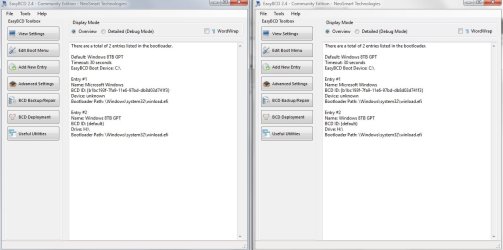
According to your easybcd screenshot, your bcd store does not have an entry pointing at disk0 partition3 .

Have you tried added the entry with easybcd yet?

Then post another picture of what easybcd says.
 
Last edited:

My Computers My Computers

  • At a glance

    7 X64i5 84002x8gb 3200mhz
    Computer type
    PC/Desktop
    OS
    7 X64
    CPU
    i5 8400
    Motherboard
    gigabyte b365m ds3h
    Memory
    2x8gb 3200mhz
    Hard Drives
    various
    PSU
    pure power 11 400w cm
    Case
    Coolermaster
    Cooling
    cryorig m9i
  • At a glance

    7x64g54008gb ddr4 2400
    Computer type
    PC/Desktop
    OS
    7x64
    CPU
    g5400
    Motherboard
    ga b365m ds3h
    Memory
    8gb ddr4 2400
    PSU
    xfx pro 450w
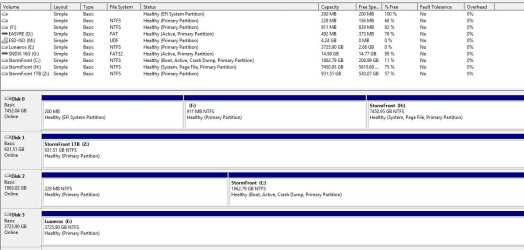
Ok. That didn't work. I added an entry for the disk 0 gpt drive but I didn't even get a menu when it booted and most everything is still reading the same on the programs except that even though I didn't get a menu to choose from EasyBCD is showing there is a menu entry for it and MS Disk management is now showing the old MBR C: drive as active when it wasn't before.

BCD1.jpg
MS-Disk 1.jpg
 

Attachments

  • BCD1.jpg
    BCD1.jpg
    79.9 KB · Views: 2

My Computer My Computer

At a glance

Windows 7 Ultimate x64
Computer type
PC/Desktop
OS
Windows 7 Ultimate x64
easybcd is not very reliable on efi.

I would use bcdboot

at admin cmd prompt, type:
bcdboot h:\windows
then press enter
 

My Computers My Computers

  • At a glance

    7 X64i5 84002x8gb 3200mhz
    Computer type
    PC/Desktop
    OS
    7 X64
    CPU
    i5 8400
    Motherboard
    gigabyte b365m ds3h
    Memory
    2x8gb 3200mhz
    Hard Drives
    various
    PSU
    pure power 11 400w cm
    Case
    Coolermaster
    Cooling
    cryorig m9i
  • At a glance

    7x64g54008gb ddr4 2400
    Computer type
    PC/Desktop
    OS
    7x64
    CPU
    g5400
    Motherboard
    ga b365m ds3h
    Memory
    8gb ddr4 2400
    PSU
    xfx pro 450w
Have you tried using Macrium Reflect? If not, you should. It's a program that allows you to easily backup, restore, and clone a hard drive or a partition.

Macrium Software | Reflect Free Edition
 

My Computer My Computer

At a glance

Windows 11 x64
Computer type
Laptop
Computer Manufacturer/Model Number
MSI
OS
Windows 11 x64
I would use bcdboot
at admin cmd prompt, type:
bcdboot h:\windows
then press enter

Ok. Did that and rebooted. Started back up the exact same way it did with the last reboot above.

I'm wondering if I booted into UEFI USB DiskGenius PE and tried cloning in that if it would work right and fix it.

I'm beginning to think I'm gonna have to disconnect the old MBR drive then boot into the UEFI USB dvd drive and use the Win10 upgrade disk I made on the new gpt drive. Really didn't want to move to 10 though.
 

My Computer My Computer

At a glance

Windows 7 Ultimate x64
Computer type
PC/Desktop
OS
Windows 7 Ultimate x64
I used partition wizard's copy disk to move the whole 2tb drive to the 8tb

I am not sure minitool understood you were migrating an os. It might have just done what it thought was a data copy.

1. The first thing is to fix the os drive letter on the 8tb volume H:

View attachment nt6repair9x86Native.zip

Select H:\Windows in the dropdown and click FIX. In a couple of seconds, it should tell you the operation completed successfully

nt6repair6-FIXOSLETTER.jpg

2. Next, sort out the boot critical files

use diskgenius to click on the Efi System Partition and check the device path, which is probably
\Device\HarddiskVolume1

then use that device path in the command as below:

bcdboot h:\windows /s \Device\HarddiskVolume1
 
Last edited:

My Computers My Computers

  • At a glance

    7 X64i5 84002x8gb 3200mhz
    Computer type
    PC/Desktop
    OS
    7 X64
    CPU
    i5 8400
    Motherboard
    gigabyte b365m ds3h
    Memory
    2x8gb 3200mhz
    Hard Drives
    various
    PSU
    pure power 11 400w cm
    Case
    Coolermaster
    Cooling
    cryorig m9i
  • At a glance

    7x64g54008gb ddr4 2400
    Computer type
    PC/Desktop
    OS
    7x64
    CPU
    g5400
    Motherboard
    ga b365m ds3h
    Memory
    8gb ddr4 2400
    PSU
    xfx pro 450w
I am not sure minitool understood you were migrating an os. It might have just done what it thought was a data copy.
1. The first thing is to fix the os drive letter on the 8tb volume H:
Select H:\Windows in the dropdown and click FIX. In a couple of seconds, it should tell you the operation completed successfully
2. Next, sort out the boot critical files use diskgenius to click on the Efi System Partition and check the device path, which is probably
\Device\HarddiskVolume1
then use that device path in the command as below:
bcdboot h:\windows /s \Device\HarddiskVolume1

Minitool should've realized it was a migrate because that's the button I clicked to do it.

But anyways, HOLY SHIT! I did what you said above and I think it worked!
I rebooted, went into the bios and chose the entry I saved before that has the EFI partition for the path and booted.
I got the menu for the 2 different windows that you guys had me make before and chose the one I made for H:.
It booted into windows and I thought it was booting into C again because it wanted to run checkdisk on C.
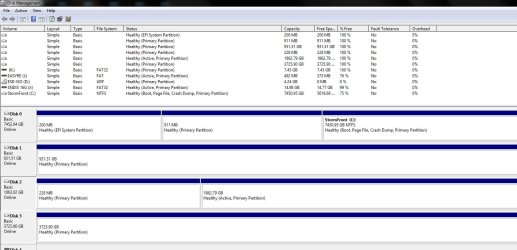
But the desktop was a little different this time so I know it was on the GPT windows. I opened up the Windows Disk Management expecting to find it booting from both drives again but I don't seem to see either system or boot on the old 2TB mbr drive and the new 8TB GPT drive is showing up as C:.

I think it worked! I just hope I'm not reading it wrong. Am I? If I'm not then how do I get rid of the second boot menu entry so I can get rid of the 2TB MBR drive after I finish getting whatever incidental files I saved on it moved to the new GPT drive?

Edit: I also need to know how to get drive letters back. My old 4TB D: drive doesn't have a letter now and the disk management isn't letting me pick any letters before L:
MSDM1.jpg
 

My Computer My Computer

At a glance

Windows 7 Ultimate x64
Computer type
PC/Desktop
OS
Windows 7 Ultimate x64
disk management isn't letting me pick any letters before L:

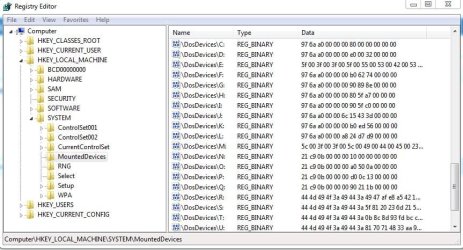
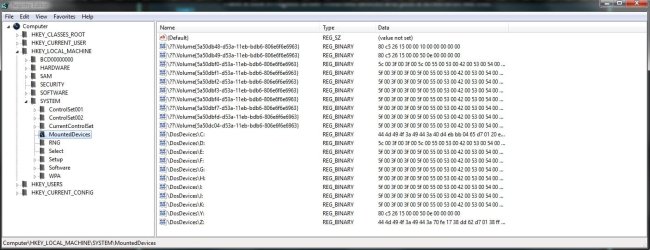
Have a look in regedit under mounted devices and post a screenshot like this:

mounted-devices.JPG
 

My Computers My Computers

  • At a glance

    7 X64i5 84002x8gb 3200mhz
    Computer type
    PC/Desktop
    OS
    7 X64
    CPU
    i5 8400
    Motherboard
    gigabyte b365m ds3h
    Memory
    2x8gb 3200mhz
    Hard Drives
    various
    PSU
    pure power 11 400w cm
    Case
    Coolermaster
    Cooling
    cryorig m9i
  • At a glance

    7x64g54008gb ddr4 2400
    Computer type
    PC/Desktop
    OS
    7x64
    CPU
    g5400
    Motherboard
    ga b365m ds3h
    Memory
    8gb ddr4 2400
    PSU
    xfx pro 450w
After all this is another Windows installation running. D is currently assigned to a DVD Drive - file system UDF.
 

My Computer My Computer

At a glance

Windows 7 Home Premium
Computer type
PC/Desktop
OS
Windows 7 Home Premium
Regedit.jpg
 

My Computer My Computer

At a glance

Windows 7 Ultimate x64
Computer type
PC/Desktop
OS
Windows 7 Ultimate x64
Another letter must be assigned to the DVD Drive for D to become available.
 

My Computer My Computer

At a glance

Windows 7 Home Premium
Computer type
PC/Desktop
OS
Windows 7 Home Premium
Another letter must be assigned to the DVD Drive for D to become available.


Ok, but that doesn't explain why none of the letters are available until L:. Other than A and B.
 

My Computer My Computer

At a glance

Windows 7 Ultimate x64
Computer type
PC/Desktop
OS
Windows 7 Ultimate x64
Your Registry Editor says they're all in use, as well as Y and Z...
 

My Computer My Computer

At a glance

Windows 7 Home Premium
Computer type
PC/Desktop
OS
Windows 7 Home Premium
But they're not as you can see from the image I posted above of Windows Disk Management.
 

My Computer My Computer

At a glance

Windows 7 Ultimate x64
Computer type
PC/Desktop
OS
Windows 7 Ultimate x64
They can be assigned to volumes previously attached.
 

My Computer My Computer

At a glance

Windows 7 Home Premium
Computer type
PC/Desktop
OS
Windows 7 Home Premium
You can delete \DosDevices\D: and the others ( not C:) from the mounted devices key. Do not try and delete \DosDevices\C:
 

My Computers My Computers

  • At a glance

    7 X64i5 84002x8gb 3200mhz
    Computer type
    PC/Desktop
    OS
    7 X64
    CPU
    i5 8400
    Motherboard
    gigabyte b365m ds3h
    Memory
    2x8gb 3200mhz
    Hard Drives
    various
    PSU
    pure power 11 400w cm
    Case
    Coolermaster
    Cooling
    cryorig m9i
  • At a glance

    7x64g54008gb ddr4 2400
    Computer type
    PC/Desktop
    OS
    7x64
    CPU
    g5400
    Motherboard
    ga b365m ds3h
    Memory
    8gb ddr4 2400
    PSU
    xfx pro 450w
Back
Top