Solved Moving Win 7 to new drive

So I can delete all those Dosdevices except for the ones I'm using that are showing in Disk management and it will give me those letters back?

Do I have to reboot for them to show up after?
 

My Computer My Computer

Computer type
PC/Desktop
OS
Windows 7 Ultimate x64
yes
 

My Computers My Computers

System One System Two

  • Computer type
    PC/Desktop
    OS
    7 X64
    CPU
    i5 8400
    Motherboard
    gigabyte b365m ds3h
    Memory
    2x8gb 3200mhz
    Hard Drives
    various
    PSU
    pure power 11 400w cm
    Case
    Coolermaster
    Cooling
    cryorig m9i
  • Computer type
    PC/Desktop
    OS
    7x64
    CPU
    g5400
    Motherboard
    ga b365m ds3h
    Memory
    8gb ddr4 2400
    PSU
    xfx pro 450w
I'll try that this morning but now I'm not sure if it worked or not.

When it had the system and boot statuses on different drives in windows disk management before those drives both opened the system properties when I right clicked them in explorer instead of the normal non system property window for one of them.
I just tried it with the way it is now and both the new gpt and old mbr are still doing that even though I don't see system or boot on listed in disk management for the old drive.
I've got a feeling it's not gonna boot when you guys tell me the process of removing the old drive from the boot menu and pullit from the computer.

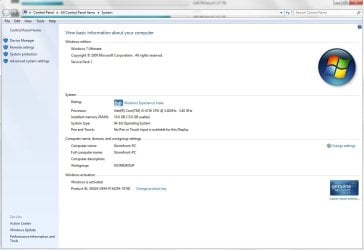
System.jpg
 

My Computer My Computer

Computer type
PC/Desktop
OS
Windows 7 Ultimate x64
I don't see system or boot on listed in disk management for the old drive.

Disk management only shows system and boot for the currently live os.

So they wont show show for the other disk. It is normal. Dont worry.
 

My Computers My Computers

System One System Two

  • Computer type
    PC/Desktop
    OS
    7 X64
    CPU
    i5 8400
    Motherboard
    gigabyte b365m ds3h
    Memory
    2x8gb 3200mhz
    Hard Drives
    various
    PSU
    pure power 11 400w cm
    Case
    Coolermaster
    Cooling
    cryorig m9i
  • Computer type
    PC/Desktop
    OS
    7x64
    CPU
    g5400
    Motherboard
    ga b365m ds3h
    Memory
    8gb ddr4 2400
    PSU
    xfx pro 450w
Disk management only shows system and boot for the currently live os.

So they wont show show for the other disk. It is normal. Dont worry.

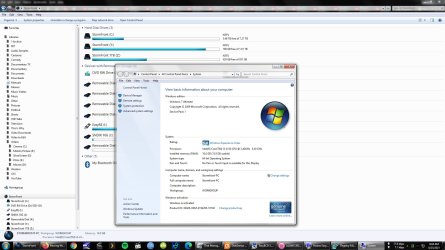
I understand that with disk management but in Explorer when you right click/properties on the system disk it shows this....

Xplorer.jpg

But only on the system drive. When you click on properties for non system disks it shows the actual disk properties.

I'm getting the system dialog above on both the new gpt C: drive and the old mbr drive too.

Apparently it's still seeing both as system disks even though it's not showing it in disk management.


Edit: Nevermind. Scratch that. Apparently it's showing the system property dialog on every drive in that window now whether it has system files or not and whether it shows as active or not in disk management. It didn't work like that before when it was booting from the mbr drive.
 

My Computer My Computer

Computer type
PC/Desktop
OS
Windows 7 Ultimate x64
What are your full system specs, just out of curiosity.

Your pic shows you have i3-4130 cpu
 

My Computers My Computers

System One System Two

  • Computer type
    PC/Desktop
    OS
    7 X64
    CPU
    i5 8400
    Motherboard
    gigabyte b365m ds3h
    Memory
    2x8gb 3200mhz
    Hard Drives
    various
    PSU
    pure power 11 400w cm
    Case
    Coolermaster
    Cooling
    cryorig m9i
  • Computer type
    PC/Desktop
    OS
    7x64
    CPU
    g5400
    Motherboard
    ga b365m ds3h
    Memory
    8gb ddr4 2400
    PSU
    xfx pro 450w
What are your full system specs, just out of curiosity.
Your pic shows you have i3-4130 cpu

Well most of the specs are in that window but it's Win7 Ultimate x64 running at 3.4ghz 16gb ram on an MSI H81-P33 board and when I get the drives finally set it'll have 20TB (8+4+4+4) on those altogether. And have a Westinghouse 55" LCD I use for a monitor. Plus multiple USB devices.
 

My Computer My Computer

Computer type
PC/Desktop
OS
Windows 7 Ultimate x64
it'll have 20TB (8+4+4+4)

Which of those will be ssd ? I think it worth using at least one of your sataIII ports for a fast boot disk.

4tb ssd are not cheap, but 1tb and under are quite reasonable now
 

My Computers My Computers

System One System Two

  • Computer type
    PC/Desktop
    OS
    7 X64
    CPU
    i5 8400
    Motherboard
    gigabyte b365m ds3h
    Memory
    2x8gb 3200mhz
    Hard Drives
    various
    PSU
    pure power 11 400w cm
    Case
    Coolermaster
    Cooling
    cryorig m9i
  • Computer type
    PC/Desktop
    OS
    7x64
    CPU
    g5400
    Motherboard
    ga b365m ds3h
    Memory
    8gb ddr4 2400
    PSU
    xfx pro 450w
They're all regular drives. No SSD. It's fast enough for me. Besides for my purposes storage space is more imporant than speed.
I'll probably get one if they finally come down enough. Something in the vicinity of an 8TB in the 100-150 range. I suspect it'll be a while before they get down to that price. ;)

- - - Updated - - -

Ok. I've got how to get the drive letters back now.
Now how should I get rid of the second windows boot menu entry made with EasyBCD so I can get rid of the 2TB MBR drive after I finish getting whatever incidental files I saved on it moved to the new GPT drive?
Do I just use the "delete" function in EZBCD? Will it work in UEFI mode because the program warns some things don't work in that mode.
 

My Computer My Computer

Computer type
PC/Desktop
OS
Windows 7 Ultimate x64
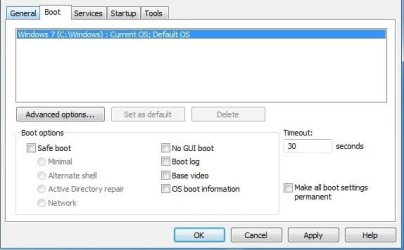
type msconfig in start search box or in the run box. Look under the msconfig Boot tab and you can delete the other entry there
 

My Computers My Computers

System One System Two

  • Computer type
    PC/Desktop
    OS
    7 X64
    CPU
    i5 8400
    Motherboard
    gigabyte b365m ds3h
    Memory
    2x8gb 3200mhz
    Hard Drives
    various
    PSU
    pure power 11 400w cm
    Case
    Coolermaster
    Cooling
    cryorig m9i
  • Computer type
    PC/Desktop
    OS
    7x64
    CPU
    g5400
    Motherboard
    ga b365m ds3h
    Memory
    8gb ddr4 2400
    PSU
    xfx pro 450w
type msconfig in start search box or in the run box. Look under the msconfig Boot tab and you can delete the other entry there


������
 

My Computer My Computer

Computer type
PC/Desktop
OS
Windows 7 Ultimate x64
No, I got it, Z.

Those were supposed to be thumbs up emojis. (shrug)

- - - Updated - - -

Thanks for all the help guys! Everything is finally working right now.
 

My Computer My Computer

Computer type
PC/Desktop
OS
Windows 7 Ultimate x64
Back
Top