Moving Windows 7 to another partition

magnetite

New member
Member
Local time
3:27 PM
Messages
93
Location
Calgary, Alberta, Canada
I originally had Vista on this machine and did an upgrade install. However, I find the system is unusually slow (more than Vista I think). Maybe it's the hardware. This machine is about 4 years old, although it is well maintained.

Anyways, I was wondering if there was a way to make a new partition and copy my old Windows 7 install onto it without losing all my data. This hard drive is 2 TB and it has about 400 GB of free space, and I don't have a big enough hard drive to back it all up.

So I basically just need to copy the Windows 7 install (programs & Windows 7 installation files), not all my video files I have stored on here. Is that possible without losing my data?
 

My Computer My Computer

At a glance

Windows 10 Pro 64-bitIntel Core i7 6700K 4.5 GHz w/TurboBoost & HT...16 GB DDR4 RAM 2133 MHzEVGA GTX 1080 Ti 11 GB
Computer type
PC/Desktop
Computer Manufacturer/Model Number
Custom
OS
Windows 10 Pro 64-bit
CPU
Intel Core i7 6700K 4.5 GHz w/TurboBoost & HT enabled
Motherboard
Asus ROG Strix Z270E
Memory
16 GB DDR4 RAM 2133 MHz
Graphics Card(s)
EVGA GTX 1080 Ti 11 GB
Sound Card
Realtek
Monitor(s) Displays
Acer S243HL
Screen Resolution
1920x1080
Hard Drives
WD Caviar Black 2 TB, WD Black 4 TB, WD Caviar Green 2 TB (x3), WD Caviar Green 3 TB, Crucial M4 256 GB SSD, Samsung 850 Pro SSD
PSU
Corsair 850W
Case
Fractal Design Define R5
Cooling
Cooler Master Hyper 212 Evo
Internet Speed
300 Mbps Shaw Broadband 300
Please post back a screenshot of your full Disk Management drive map with listings, using SNipping Tool in Start Menu.

Moving Win7 to another partition won't affect performance noticeably and can cause new problems.

The problem is likely the inferior Upgrade install. You need to clean reinstall to a wiped/formatted partition at the beginning of your HD.

YOu should always back up your data or risk loss due to HD failure, however if you place the data in another partition, then you can boot the Win7 DVD and as long as you are certain that you are choosing only the first target partition for install the data should be there when you finish.
 
Last edited:
Hmm, that triggers a few points:

1. moving your system to a new partition on the same drive is not going to help with performance.
2. if your user data is in the OS partition and not in a seperate partition, you would have to move the whole thing - and for that you do not have enough free space
3. if you seriously want to persue that, I suggest you seperate the data into a seperate partition so that you have a more reasonable size OS partition. For that you will need the help of a good size external disk.
4. your performance problems probably have another cause. Maybe you can be more specific on that point and we can see what should be done.
5. if you really, really want to cure the problem, I would spend $100 on a SSD and install the OS there. That would make a world of difference.

If you want to persue any of these ideas, post back and we can develop a plan of attack.
 

My Computer My Computer

At a glance

Vista, Windows7, Mint Mate, Zorin, Windows 8from 1.6GHz Duo to i7
Computer Manufacturer/Model Number
HP, Dell, Gateway, Toshiba - 4 laptops and 2 desktops
OS
Vista, Windows7, Mint Mate, Zorin, Windows 8
CPU
from 1.6GHz Duo to i7
Monitor(s) Displays
2x HP w2207
Hard Drives
5x HDD, 7x SSD, 12x Externals
Keyboard
with trackball - no mices
Mouse
Trackball mice
Internet Speed
DSL 6000
I have a SSD, but it's on my main system. Performance is very fast on that system. This is my older system. Since they don't sell external hard drives around 2 TB that I could afford I'll probably just wait until they come down in price and do it then. I guess for now, I'll keep my data on my current drive. Thanks for looking into this though. Probably was the upgrade install.
 

My Computer My Computer

At a glance

Windows 10 Pro 64-bitIntel Core i7 6700K 4.5 GHz w/TurboBoost & HT...16 GB DDR4 RAM 2133 MHzEVGA GTX 1080 Ti 11 GB
Computer type
PC/Desktop
Computer Manufacturer/Model Number
Custom
OS
Windows 10 Pro 64-bit
CPU
Intel Core i7 6700K 4.5 GHz w/TurboBoost & HT enabled
Motherboard
Asus ROG Strix Z270E
Memory
16 GB DDR4 RAM 2133 MHz
Graphics Card(s)
EVGA GTX 1080 Ti 11 GB
Sound Card
Realtek
Monitor(s) Displays
Acer S243HL
Screen Resolution
1920x1080
Hard Drives
WD Caviar Black 2 TB, WD Black 4 TB, WD Caviar Green 2 TB (x3), WD Caviar Green 3 TB, Crucial M4 256 GB SSD, Samsung 850 Pro SSD
PSU
Corsair 850W
Case
Fractal Design Define R5
Cooling
Cooler Master Hyper 212 Evo
Internet Speed
300 Mbps Shaw Broadband 300
Hello magnetite, welcome to Seven Forums!


Will you please post a snip/screen-shot of the entire disk management drive map so we can see what you have going on as there may be a fairly simple way to resolve the situation.

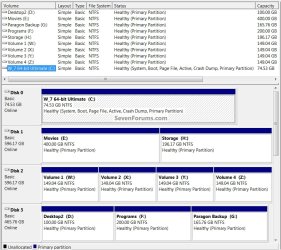
In the Windows start menu right click computer and click manage, in the left pane of the "Computer Management" window that opens click disk management and post a snip of that, it should look similar to this.


How to Post a Screenshot in Seven Forums


click to enlarge
Disk Management.jpg
 

My Computer My Computer

At a glance

W 7 64-bit UltimateIntel Q9550 Yorkfield8GB Dominator 8500C5DATI : XFX 5870
Computer Manufacturer/Model Number
* BFK Customs *
OS
W 7 64-bit Ultimate
CPU
Intel Q9550 Yorkfield
Motherboard
ASUS P5Q Pro
Memory
8GB Dominator 8500C5D
Graphics Card(s)
ATI : XFX 5870
Sound Card
Realtek HD Audio 7-1
Monitor(s) Displays
1x 47" LCD HDMI & 3x 26" LCD HDMI
Screen Resolution
1920x1080P & 1920x1200
Hard Drives
1x 80GB Intel X25-M G2 SSD : 1x 500GB & 1x 640GB WD Caviar Black(s)
PSU
Corsair 620HX
Case
Cooler Master RC-690
Cooling
Tuniq Tower 120, 2x 140mm and 3x 120mm case fans
Keyboard
Microsoft 500
Mouse
Razer Diamondback 3G
Internet Speed
14 Mb/s
Other Info
1x Koutech 3Gb/s SATA HDD Hot Swap Rack
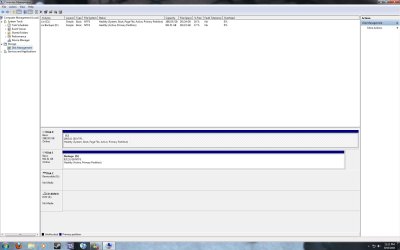
Okay, here's a screenshot of my Disk Management.
 

Attachments

  • disk_mgmt.jpg
    disk_mgmt.jpg
    118.6 KB · Views: 65

My Computer My Computer

At a glance

Windows 10 Pro 64-bitIntel Core i7 6700K 4.5 GHz w/TurboBoost & HT...16 GB DDR4 RAM 2133 MHzEVGA GTX 1080 Ti 11 GB
Computer type
PC/Desktop
Computer Manufacturer/Model Number
Custom
OS
Windows 10 Pro 64-bit
CPU
Intel Core i7 6700K 4.5 GHz w/TurboBoost & HT enabled
Motherboard
Asus ROG Strix Z270E
Memory
16 GB DDR4 RAM 2133 MHz
Graphics Card(s)
EVGA GTX 1080 Ti 11 GB
Sound Card
Realtek
Monitor(s) Displays
Acer S243HL
Screen Resolution
1920x1080
Hard Drives
WD Caviar Black 2 TB, WD Black 4 TB, WD Caviar Green 2 TB (x3), WD Caviar Green 3 TB, Crucial M4 256 GB SSD, Samsung 850 Pro SSD
PSU
Corsair 850W
Case
Fractal Design Define R5
Cooling
Cooler Master Hyper 212 Evo
Internet Speed
300 Mbps Shaw Broadband 300
Hello again.


I see you have a an issue with which Hard Disk Drive (HDD) is marked as "Active" and that could cause boot issues if you want to pursue a future re-install/install of Windows, it is a fairly straight-forward process to correct.

You said you don't want to have to reinstall all your programs/apps to a new Windows 7 install; how involved do you want to get in doing this?
 

My Computer My Computer

At a glance

W 7 64-bit UltimateIntel Q9550 Yorkfield8GB Dominator 8500C5DATI : XFX 5870
Computer Manufacturer/Model Number
* BFK Customs *
OS
W 7 64-bit Ultimate
CPU
Intel Q9550 Yorkfield
Motherboard
ASUS P5Q Pro
Memory
8GB Dominator 8500C5D
Graphics Card(s)
ATI : XFX 5870
Sound Card
Realtek HD Audio 7-1
Monitor(s) Displays
1x 47" LCD HDMI & 3x 26" LCD HDMI
Screen Resolution
1920x1080P & 1920x1200
Hard Drives
1x 80GB Intel X25-M G2 SSD : 1x 500GB & 1x 640GB WD Caviar Black(s)
PSU
Corsair 620HX
Case
Cooler Master RC-690
Cooling
Tuniq Tower 120, 2x 140mm and 3x 120mm case fans
Keyboard
Microsoft 500
Mouse
Razer Diamondback 3G
Internet Speed
14 Mb/s
Other Info
1x Koutech 3Gb/s SATA HDD Hot Swap Rack
As long as I don't have to lose 1.5 TB of data, I'm okay with it.
 

My Computer My Computer

At a glance

Windows 10 Pro 64-bitIntel Core i7 6700K 4.5 GHz w/TurboBoost & HT...16 GB DDR4 RAM 2133 MHzEVGA GTX 1080 Ti 11 GB
Computer type
PC/Desktop
Computer Manufacturer/Model Number
Custom
OS
Windows 10 Pro 64-bit
CPU
Intel Core i7 6700K 4.5 GHz w/TurboBoost & HT enabled
Motherboard
Asus ROG Strix Z270E
Memory
16 GB DDR4 RAM 2133 MHz
Graphics Card(s)
EVGA GTX 1080 Ti 11 GB
Sound Card
Realtek
Monitor(s) Displays
Acer S243HL
Screen Resolution
1920x1080
Hard Drives
WD Caviar Black 2 TB, WD Black 4 TB, WD Caviar Green 2 TB (x3), WD Caviar Green 3 TB, Crucial M4 256 GB SSD, Samsung 850 Pro SSD
PSU
Corsair 850W
Case
Fractal Design Define R5
Cooling
Cooler Master Hyper 212 Evo
Internet Speed
300 Mbps Shaw Broadband 300

My Computer My Computer

At a glance

W 7 64-bit UltimateIntel Q9550 Yorkfield8GB Dominator 8500C5DATI : XFX 5870
Computer Manufacturer/Model Number
* BFK Customs *
OS
W 7 64-bit Ultimate
CPU
Intel Q9550 Yorkfield
Motherboard
ASUS P5Q Pro
Memory
8GB Dominator 8500C5D
Graphics Card(s)
ATI : XFX 5870
Sound Card
Realtek HD Audio 7-1
Monitor(s) Displays
1x 47" LCD HDMI & 3x 26" LCD HDMI
Screen Resolution
1920x1080P & 1920x1200
Hard Drives
1x 80GB Intel X25-M G2 SSD : 1x 500GB & 1x 640GB WD Caviar Black(s)
PSU
Corsair 620HX
Case
Cooler Master RC-690
Cooling
Tuniq Tower 120, 2x 140mm and 3x 120mm case fans
Keyboard
Microsoft 500
Mouse
Razer Diamondback 3G
Internet Speed
14 Mb/s
Other Info
1x Koutech 3Gb/s SATA HDD Hot Swap Rack
You really need an external or secondary HD to move the data off of one of the HD's so you can wipe it to clean reinstall. Or send the data over the network to another computer.

But if you really want to clean reinstall to the 2tb, you can use free Partition Wizard bootable CD to Resize C from the left side (preferred lower address) to make room for a clean Win7 install to the new partition. http://www.sevenforums.com/tutorials/93322-partition-wizard-use-bootable-cd.html

Afterward you can delete Windows files in the old partition to use it as a data partition. Here is how to link your Win7 User folders to another partition: http://www.sevenforums.com/tutorials/18629-user-folders-change-default-location.html

Edit: The only hitch with this is that the new Win7 install will auto-configure a Dual boot with the old Win7 OS unless it is removed or disabled from the data partition just before install. I can test exactly how to do that if you want. You could also force delete old Win7 files from data partition afterward then remove Dual Boot using EasyBCD 2.0 if you'd like the Dual Boot option until it is sorted.
 
Last edited:

My Computer My Computer

At a glance

Windows 10 Pro 64-bitIntel Core i7 6700K 4.5 GHz w/TurboBoost & HT...16 GB DDR4 RAM 2133 MHzEVGA GTX 1080 Ti 11 GB
Computer type
PC/Desktop
Computer Manufacturer/Model Number
Custom
OS
Windows 10 Pro 64-bit
CPU
Intel Core i7 6700K 4.5 GHz w/TurboBoost & HT enabled
Motherboard
Asus ROG Strix Z270E
Memory
16 GB DDR4 RAM 2133 MHz
Graphics Card(s)
EVGA GTX 1080 Ti 11 GB
Sound Card
Realtek
Monitor(s) Displays
Acer S243HL
Screen Resolution
1920x1080
Hard Drives
WD Caviar Black 2 TB, WD Black 4 TB, WD Caviar Green 2 TB (x3), WD Caviar Green 3 TB, Crucial M4 256 GB SSD, Samsung 850 Pro SSD
PSU
Corsair 850W
Case
Fractal Design Define R5
Cooling
Cooler Master Hyper 212 Evo
Internet Speed
300 Mbps Shaw Broadband 300
As long as I don't have to lose 1.5 TB of data, I'm okay with it.


This is the Disk 0 / C: HDD?

That's right.


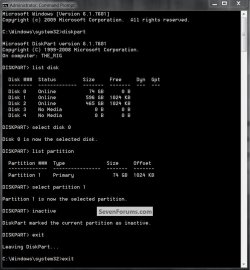
That's where Windows 7 is and it needs to be marked as "Active" first before anything else is done but at the same time (before) the Disk 1 has to be marked as "Inactive" start by having a look at this tutorial at the link below and then the snip shows how to mark the Disk 1 as "Inactive" which HAS to be done so it doesn't cause real issues along the way.

Feel free to ask any questions you want to.

Startup Repair - Run 3 Separate Times


click to enlarge
Inactive2.jpg


My Computer My Computer

At a glance

W 7 64-bit UltimateIntel Q9550 Yorkfield8GB Dominator 8500C5DATI : XFX 5870
Computer Manufacturer/Model Number
* BFK Customs *
OS
W 7 64-bit Ultimate
CPU
Intel Q9550 Yorkfield
Motherboard
ASUS P5Q Pro
Memory
8GB Dominator 8500C5D
Graphics Card(s)
ATI : XFX 5870
Sound Card
Realtek HD Audio 7-1
Monitor(s) Displays
1x 47" LCD HDMI & 3x 26" LCD HDMI
Screen Resolution
1920x1080P & 1920x1200
Hard Drives
1x 80GB Intel X25-M G2 SSD : 1x 500GB & 1x 640GB WD Caviar Black(s)
PSU
Corsair 620HX
Case
Cooler Master RC-690
Cooling
Tuniq Tower 120, 2x 140mm and 3x 120mm case fans
Keyboard
Microsoft 500
Mouse
Razer Diamondback 3G
Internet Speed
14 Mb/s
Other Info
1x Koutech 3Gb/s SATA HDD Hot Swap Rack
You know I just remembered something. The C: is a 5400 RPM hard drive. That could cause something. Maybe I should work with the D: instead. It's 7200 RPM.
 

My Computer My Computer

At a glance

Windows 10 Pro 64-bitIntel Core i7 6700K 4.5 GHz w/TurboBoost & HT...16 GB DDR4 RAM 2133 MHzEVGA GTX 1080 Ti 11 GB
Computer type
PC/Desktop
Computer Manufacturer/Model Number
Custom
OS
Windows 10 Pro 64-bit
CPU
Intel Core i7 6700K 4.5 GHz w/TurboBoost & HT enabled
Motherboard
Asus ROG Strix Z270E
Memory
16 GB DDR4 RAM 2133 MHz
Graphics Card(s)
EVGA GTX 1080 Ti 11 GB
Sound Card
Realtek
Monitor(s) Displays
Acer S243HL
Screen Resolution
1920x1080
Hard Drives
WD Caviar Black 2 TB, WD Black 4 TB, WD Caviar Green 2 TB (x3), WD Caviar Green 3 TB, Crucial M4 256 GB SSD, Samsung 850 Pro SSD
PSU
Corsair 850W
Case
Fractal Design Define R5
Cooling
Cooler Master Hyper 212 Evo
Internet Speed
300 Mbps Shaw Broadband 300
In that case, you can clean up your data as much as possible, move 300+gb to the 2tb HD, Resize to Create a new NTFS Primary Win7 partition on the lefthand side of the smaller HD to clean install Win7.

Unplug the 2tb HD during install so that it doesn't configure a dual boot. When you plug it back in we can help you force-delete the Win7 folders so you can use it solely as a data drive. If you have some reason you need to boot it, use the BIOS one-time Boot Menu key until you delete the old Win7.

As Barefoot says you'll want to mark the partition you shrink with the data Inactive but that's all if you choose to do this instead.

Ask back any questions, or if you tell us exactly what you decide to do we can lay out the steps for you in order. I am gone surfing from 1-7 PST today.
 
In that case, you can clean up your data as much as possible, move 300+gb to the 2tb HD, Resize to Create a new NTFS Primary Win7 partition on the lefthand side of the smaller HD to clean install Win7.

Unplug the 2tb HD during install so that it doesn't configure a dual boot. When you plug it back in we can help you force-delete the Win7 folders so you can use it soley as a data drive. If you have some reason you need to boot it, use the BIOS one-time Boot Menu key until you delete the old Win7.

As Barefoot says you'll want to mark the partition you shrink with the data Inactive but that's all if you choose to do this instead.


Here's the link to the new tutorial at the link below, don't let the title concern you, it does what Greg is suggesting to do, have a look, it's not that complicated and it's the best way to do it for the outcome you want.

Dual Boot : Create Partitions Using PWBD
 

My Computer My Computer

At a glance

W 7 64-bit UltimateIntel Q9550 Yorkfield8GB Dominator 8500C5DATI : XFX 5870
Computer Manufacturer/Model Number
* BFK Customs *
OS
W 7 64-bit Ultimate
CPU
Intel Q9550 Yorkfield
Motherboard
ASUS P5Q Pro
Memory
8GB Dominator 8500C5D
Graphics Card(s)
ATI : XFX 5870
Sound Card
Realtek HD Audio 7-1
Monitor(s) Displays
1x 47" LCD HDMI & 3x 26" LCD HDMI
Screen Resolution
1920x1080P & 1920x1200
Hard Drives
1x 80GB Intel X25-M G2 SSD : 1x 500GB & 1x 640GB WD Caviar Black(s)
PSU
Corsair 620HX
Case
Cooler Master RC-690
Cooling
Tuniq Tower 120, 2x 140mm and 3x 120mm case fans
Keyboard
Microsoft 500
Mouse
Razer Diamondback 3G
Internet Speed
14 Mb/s
Other Info
1x Koutech 3Gb/s SATA HDD Hot Swap Rack
I almost can't keep up with all of your great tutorials, Barefoot ;)


Don't feel bad Greg, it takes me a minute to sort them now too. :roflmao:
 

My Computer My Computer

At a glance

W 7 64-bit UltimateIntel Q9550 Yorkfield8GB Dominator 8500C5DATI : XFX 5870
Computer Manufacturer/Model Number
* BFK Customs *
OS
W 7 64-bit Ultimate
CPU
Intel Q9550 Yorkfield
Motherboard
ASUS P5Q Pro
Memory
8GB Dominator 8500C5D
Graphics Card(s)
ATI : XFX 5870
Sound Card
Realtek HD Audio 7-1
Monitor(s) Displays
1x 47" LCD HDMI & 3x 26" LCD HDMI
Screen Resolution
1920x1080P & 1920x1200
Hard Drives
1x 80GB Intel X25-M G2 SSD : 1x 500GB & 1x 640GB WD Caviar Black(s)
PSU
Corsair 620HX
Case
Cooler Master RC-690
Cooling
Tuniq Tower 120, 2x 140mm and 3x 120mm case fans
Keyboard
Microsoft 500
Mouse
Razer Diamondback 3G
Internet Speed
14 Mb/s
Other Info
1x Koutech 3Gb/s SATA HDD Hot Swap Rack
I almost can't keep up with all of your great tutorials, Barefoot ;)
I think we'll promote BFK to be our resident Partition Wizard Guru. :D
 

My Computer My Computer

At a glance

Vista, Windows7, Mint Mate, Zorin, Windows 8from 1.6GHz Duo to i7
Computer Manufacturer/Model Number
HP, Dell, Gateway, Toshiba - 4 laptops and 2 desktops
OS
Vista, Windows7, Mint Mate, Zorin, Windows 8
CPU
from 1.6GHz Duo to i7
Monitor(s) Displays
2x HP w2207
Hard Drives
5x HDD, 7x SSD, 12x Externals
Keyboard
with trackball - no mices
Mouse
Trackball mice
Internet Speed
DSL 6000

My Computer My Computer

At a glance

W 7 64-bit UltimateIntel Q9550 Yorkfield8GB Dominator 8500C5DATI : XFX 5870
Computer Manufacturer/Model Number
* BFK Customs *
OS
W 7 64-bit Ultimate
CPU
Intel Q9550 Yorkfield
Motherboard
ASUS P5Q Pro
Memory
8GB Dominator 8500C5D
Graphics Card(s)
ATI : XFX 5870
Sound Card
Realtek HD Audio 7-1
Monitor(s) Displays
1x 47" LCD HDMI & 3x 26" LCD HDMI
Screen Resolution
1920x1080P & 1920x1200
Hard Drives
1x 80GB Intel X25-M G2 SSD : 1x 500GB & 1x 640GB WD Caviar Black(s)
PSU
Corsair 620HX
Case
Cooler Master RC-690
Cooling
Tuniq Tower 120, 2x 140mm and 3x 120mm case fans
Keyboard
Microsoft 500
Mouse
Razer Diamondback 3G
Internet Speed
14 Mb/s
Other Info
1x Koutech 3Gb/s SATA HDD Hot Swap Rack
I got Windows 7 installed on my 1 TB drive (7200 RPM), so now I just need to resize it again. As well as somehow get the product key to transfer from the old setup to the new one. Wouldn't take it when I tried to put it in. Probably need to call Microsoft for that. It does feel a bit faster. Probably the 7200 RPM combined with a clean install.
 

My Computer My Computer

At a glance

Windows 10 Pro 64-bitIntel Core i7 6700K 4.5 GHz w/TurboBoost & HT...16 GB DDR4 RAM 2133 MHzEVGA GTX 1080 Ti 11 GB
Computer type
PC/Desktop
Computer Manufacturer/Model Number
Custom
OS
Windows 10 Pro 64-bit
CPU
Intel Core i7 6700K 4.5 GHz w/TurboBoost & HT enabled
Motherboard
Asus ROG Strix Z270E
Memory
16 GB DDR4 RAM 2133 MHz
Graphics Card(s)
EVGA GTX 1080 Ti 11 GB
Sound Card
Realtek
Monitor(s) Displays
Acer S243HL
Screen Resolution
1920x1080
Hard Drives
WD Caviar Black 2 TB, WD Black 4 TB, WD Caviar Green 2 TB (x3), WD Caviar Green 3 TB, Crucial M4 256 GB SSD, Samsung 850 Pro SSD
PSU
Corsair 850W
Case
Fractal Design Define R5
Cooling
Cooler Master Hyper 212 Evo
Internet Speed
300 Mbps Shaw Broadband 300
Back
Top