Solved Mozilla Firefox, error "The connection was reset"

ellellell1

Explorer
Power User
Local time
7:16 AM
Messages
114
Hi, I am running Windows 7 Home Premium. Toshiba Laptop.

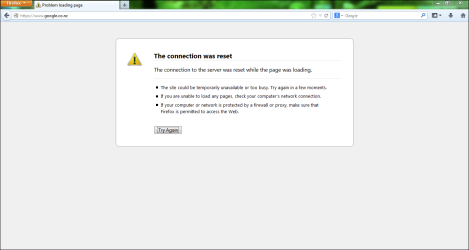
I recently upgraded to the new version of Mozilla Firefox (23.0.1) and when I tried to go on Facebook it came up with this error:

The connection was reset


The connection to the server was reset while the page was loading.


  • The site could be temporarily unavailable or too busy. Try again in a few
    moments.
  • If you are unable to load any pages, check your computer's network
    connection.
  • If your computer or network is protected by a firewall or proxy, make sure
    that Firefox is permitted to access the Web.
I also noticed that it would not go to www.google.com either.

I have tried clearing the cache, cookies, offline web content, user data and I also checked the box "No Proxy" because I don't have a proxy sever. Still no luck :(.

I think there might be something wrong with the http or https?

If anyone has any suggestions of how to fix this, I would appreciate it a lot :).
 
Last edited:

My Computer

Computer type
Laptop
Computer Manufacturer/Model Number
Toshiba, Satellite L750/0T1
OS
Windows 7 64-bit SP1 (VM)
CPU
Intel(R) Core(TM) i7-2670QM CPU @ 2.20GHz (8 CPUs), ~2.2GHz
Motherboard
Intel Corp, PSK2YA-0T102S, Sandy Bridge - 09
Memory
4 GB (Expandable to 8 GB)
Graphics Card(s)
NVIDIA GeForce GT 525M
Sound Card
Conexant SmartAudio HD & NVIDIA High Definition Audio
Monitor(s) Displays
2 (Mobile PC Display, Dell E2009W)
Screen Resolution
1366 x 768 & 1680 x 1050
Hard Drives
TOSHIBA MK7575GSX - 698GB (Main Hard Drive)
WD Elements - 1TB (External Hard Drive)
Keyboard
Standard PS/2 Keyboard & Dell SK-8165
Mouse
Synaptics PS/2 Port TouchPad, Logitech Wireless Mouse M185
Internet Speed
Download: 49 Mb/s, Upload: 2 Mb/s 'via Ethernet' (OOKLA)
Antivirus
AVG AntiVirus Free Edition (Outside VM)
Browser
Internet Explorer, Google Chrome
Other Info
Main OS:Windows 10 64-bit

My Computer

Computer type
Laptop
Computer Manufacturer/Model Number
Employer provided Dell Latitude
OS
W7 Pro SP1 64bit
CPU
i7
Memory
8GB
Graphics Card(s)
Intel HD Graphics
Hard Drives
crappy SSD
Antivirus
Employer mandated Symantec Endpoint Protection
Browser
Pale Moon 64bit, IE11 64bit & Chrome 64bit
Hi UsernameIssues, thanks for posting!

I have tried resetting Firefox, testing Firefox with a new user profile and re-installing Firefox.
Still no luck :(

I am beginning to think it is a bug with the new version of Firefox or something?
Not exactly sure though, I tried downgrading to FF version 22.0 but the same error showed up.

Any other suggestions? :)
 

My Computer

Computer type
Laptop
Computer Manufacturer/Model Number
Toshiba, Satellite L750/0T1
OS
Windows 7 64-bit SP1 (VM)
CPU
Intel(R) Core(TM) i7-2670QM CPU @ 2.20GHz (8 CPUs), ~2.2GHz
Motherboard
Intel Corp, PSK2YA-0T102S, Sandy Bridge - 09
Memory
4 GB (Expandable to 8 GB)
Graphics Card(s)
NVIDIA GeForce GT 525M
Sound Card
Conexant SmartAudio HD & NVIDIA High Definition Audio
Monitor(s) Displays
2 (Mobile PC Display, Dell E2009W)
Screen Resolution
1366 x 768 & 1680 x 1050
Hard Drives
TOSHIBA MK7575GSX - 698GB (Main Hard Drive)
WD Elements - 1TB (External Hard Drive)
Keyboard
Standard PS/2 Keyboard & Dell SK-8165
Mouse
Synaptics PS/2 Port TouchPad, Logitech Wireless Mouse M185
Internet Speed
Download: 49 Mb/s, Upload: 2 Mb/s 'via Ethernet' (OOKLA)
Antivirus
AVG AntiVirus Free Edition (Outside VM)
Browser
Internet Explorer, Google Chrome
Other Info
Main OS:Windows 10 64-bit
I updated Firefox when I saw your post and I had no issues.

When you re-installed, did you uninstall first? If you un-installed, did you tell it to remove your personal data and customizations?

Does IE work? When you re-installed, did you have it import settings from IE?
 

My Computer

Computer type
Laptop
Computer Manufacturer/Model Number
Employer provided Dell Latitude
OS
W7 Pro SP1 64bit
CPU
i7
Memory
8GB
Graphics Card(s)
Intel HD Graphics
Hard Drives
crappy SSD
Antivirus
Employer mandated Symantec Endpoint Protection
Browser
Pale Moon 64bit, IE11 64bit & Chrome 64bit
Yes I uninstalled Firefox first, I checked the box that said to remove your personal data and customizations. I didn't import any settings from IE.

IE works fine with Google and Facebook. I am using it to post and reply at the moment.

But one thing that was interesting, when I went to www.sevenforums.com on FF it worked perfectly.
FF seems to work on most websites, but shows the error on others. It also shows the error when I try to go on the Mozilla Community Forum.:confused:
 

My Computer

Computer type
Laptop
Computer Manufacturer/Model Number
Toshiba, Satellite L750/0T1
OS
Windows 7 64-bit SP1 (VM)
CPU
Intel(R) Core(TM) i7-2670QM CPU @ 2.20GHz (8 CPUs), ~2.2GHz
Motherboard
Intel Corp, PSK2YA-0T102S, Sandy Bridge - 09
Memory
4 GB (Expandable to 8 GB)
Graphics Card(s)
NVIDIA GeForce GT 525M
Sound Card
Conexant SmartAudio HD & NVIDIA High Definition Audio
Monitor(s) Displays
2 (Mobile PC Display, Dell E2009W)
Screen Resolution
1366 x 768 & 1680 x 1050
Hard Drives
TOSHIBA MK7575GSX - 698GB (Main Hard Drive)
WD Elements - 1TB (External Hard Drive)
Keyboard
Standard PS/2 Keyboard & Dell SK-8165
Mouse
Synaptics PS/2 Port TouchPad, Logitech Wireless Mouse M185
Internet Speed
Download: 49 Mb/s, Upload: 2 Mb/s 'via Ethernet' (OOKLA)
Antivirus
AVG AntiVirus Free Edition (Outside VM)
Browser
Internet Explorer, Google Chrome
Other Info
Main OS:Windows 10 64-bit
You might try to re-install and let it import from IE - that really should not matter, but it is worth a shot.

The safe mode should not matter either since this is a fresh install (presumably without a lot of plug ins):
https://support.mozilla.org/en-US/kb/troubleshoot-firefox-issues-using-safe-mode

You might also try uninstalling (not just disabling) Norton Internet Security - just as a test.
 

My Computer

Computer type
Laptop
Computer Manufacturer/Model Number
Employer provided Dell Latitude
OS
W7 Pro SP1 64bit
CPU
i7
Memory
8GB
Graphics Card(s)
Intel HD Graphics
Hard Drives
crappy SSD
Antivirus
Employer mandated Symantec Endpoint Protection
Browser
Pale Moon 64bit, IE11 64bit & Chrome 64bit
I tried doing all of the above, still doesn't make a difference.

Something wrong with Firefox connecting to the internet?
 

My Computer

Computer type
Laptop
Computer Manufacturer/Model Number
Toshiba, Satellite L750/0T1
OS
Windows 7 64-bit SP1 (VM)
CPU
Intel(R) Core(TM) i7-2670QM CPU @ 2.20GHz (8 CPUs), ~2.2GHz
Motherboard
Intel Corp, PSK2YA-0T102S, Sandy Bridge - 09
Memory
4 GB (Expandable to 8 GB)
Graphics Card(s)
NVIDIA GeForce GT 525M
Sound Card
Conexant SmartAudio HD & NVIDIA High Definition Audio
Monitor(s) Displays
2 (Mobile PC Display, Dell E2009W)
Screen Resolution
1366 x 768 & 1680 x 1050
Hard Drives
TOSHIBA MK7575GSX - 698GB (Main Hard Drive)
WD Elements - 1TB (External Hard Drive)
Keyboard
Standard PS/2 Keyboard & Dell SK-8165
Mouse
Synaptics PS/2 Port TouchPad, Logitech Wireless Mouse M185
Internet Speed
Download: 49 Mb/s, Upload: 2 Mb/s 'via Ethernet' (OOKLA)
Antivirus
AVG AntiVirus Free Edition (Outside VM)
Browser
Internet Explorer, Google Chrome
Other Info
Main OS:Windows 10 64-bit
It sounds like some security software (or malware) is preventing Firefox (and only Firefox) from getting to certain websites.

If you still have Norton Internet Security uninstalled, then temporarily disable the Windows Firewall and test your connectivity within Firefox. You might want to install Microsoft Security Essentials while we work on this.
 

My Computer

Computer type
Laptop
Computer Manufacturer/Model Number
Employer provided Dell Latitude
OS
W7 Pro SP1 64bit
CPU
i7
Memory
8GB
Graphics Card(s)
Intel HD Graphics
Hard Drives
crappy SSD
Antivirus
Employer mandated Symantec Endpoint Protection
Browser
Pale Moon 64bit, IE11 64bit & Chrome 64bit

My Computer

Computer Manufacturer/Model Number
Custom Built
OS
Windows 7 Ultimate 32-Bit & Windows 7 Ultimate 64-Bit
CPU
Intel Core i7 CPU 950 @ 3.07GHz
Motherboard
ASUS P6T DELUXE V2
Memory
OCZ 6GB (3 x 2GB) 240-Pin DDR3 SDRAM DDR3 1600 OCZ3X1600R2
Graphics Card(s)
ATI Radeon HD 5700 Series
Sound Card
OnBoard
Hard Drives
WD6400AACS-00M3B0 (640GB SATA )
PSU
CORSAIR 850w
Case
NZXT LEXA
Cooling
Intel Stock Heatsink Fan
Keyboard
Microsoft Wireless Laser Keyboard 7000
Mouse
Microsoft Wireless Laser Mouse 7000
Try the site in Safe Mode with Networking

http://www.sevenforums.com/tutorials/69585-safe-mode.html

See if it works there. If it does, this is not a workaround, it is just for testing. If it works in safe mode. try a clean start to see if there is a conflict.

http://www.sevenforums.com/tutorial...ation-conflicts-performing-clean-startup.html

Since all you did was install the latest version (I updated mine, but just over the top of the older), it seems unlikely it is something external interfering.

A Guy
 

My Computer

Computer type
PC/Desktop
OS
Windows 10 Home x64
CPU
INTEL Core i5-750 Quad-Core 3.37GHz
Motherboard
ASUS P7P55D
Memory
HyperX Fury Black Series 8GB (2 x 4GB) 1866Mhz
Graphics Card(s)
EVGA GeForce GTX 750 Superclocked 1GB 128-Bit GDDR5
Monitor(s) Displays
LG 32MA68HY 32" IPS
Screen Resolution
1920 x 1080
Hard Drives
Samsung 840 Evo 120GB, SEAGATE 500GB Barracuda® 7200.12, SATA 3 Gb/s, 7200 RPM, 16MB cache
PSU
ANTEC TruePower New TP-550, 80 PLUS, 550W
Case
ANTEC Three Hundred Illusion
Cooling
COOLER MASTER Hyper 212 Plus, 4 x 120mm 1 x 140mm Noctua's
Internet Speed
85 + Mbps
Antivirus
Avast
Browser
Vivaldi
Hi, everyone :)

I tried all of these suggestions, and turning off the firewall but still no joy.
Just a quick suggestion that I would like to make.
I am sure this has something to do with the Firefox settings on https or http.
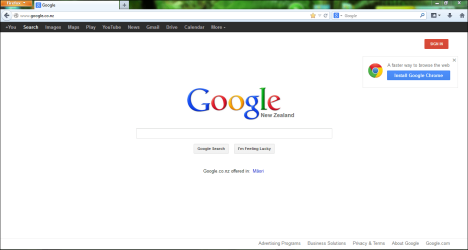
Because if I type www.google.co.nz in the address bar, it works fine. But if I type it like https://www.google.co.nz/ like it would normally appear it shows the error.

Examples:

1 capture.PNG

2 capture.PNG
 

My Computer

Computer type
Laptop
Computer Manufacturer/Model Number
Toshiba, Satellite L750/0T1
OS
Windows 7 64-bit SP1 (VM)
CPU
Intel(R) Core(TM) i7-2670QM CPU @ 2.20GHz (8 CPUs), ~2.2GHz
Motherboard
Intel Corp, PSK2YA-0T102S, Sandy Bridge - 09
Memory
4 GB (Expandable to 8 GB)
Graphics Card(s)
NVIDIA GeForce GT 525M
Sound Card
Conexant SmartAudio HD & NVIDIA High Definition Audio
Monitor(s) Displays
2 (Mobile PC Display, Dell E2009W)
Screen Resolution
1366 x 768 & 1680 x 1050
Hard Drives
TOSHIBA MK7575GSX - 698GB (Main Hard Drive)
WD Elements - 1TB (External Hard Drive)
Keyboard
Standard PS/2 Keyboard & Dell SK-8165
Mouse
Synaptics PS/2 Port TouchPad, Logitech Wireless Mouse M185
Internet Speed
Download: 49 Mb/s, Upload: 2 Mb/s 'via Ethernet' (OOKLA)
Antivirus
AVG AntiVirus Free Edition (Outside VM)
Browser
Internet Explorer, Google Chrome
Other Info
Main OS:Windows 10 64-bit
Try running through these suggestions

https://support.mozilla.org/en-US/k...nect-securely-error#w_check-your-ssl-settings

A Guy

Sorry, it's a https site, if it will not work, here is the instructions

16gyel1.jpg


Test SSL

Boston University | Web Login | Troubleshooting ssl

A Guy
 

My Computer

Computer type
PC/Desktop
OS
Windows 10 Home x64
CPU
INTEL Core i5-750 Quad-Core 3.37GHz
Motherboard
ASUS P7P55D
Memory
HyperX Fury Black Series 8GB (2 x 4GB) 1866Mhz
Graphics Card(s)
EVGA GeForce GTX 750 Superclocked 1GB 128-Bit GDDR5
Monitor(s) Displays
LG 32MA68HY 32" IPS
Screen Resolution
1920 x 1080
Hard Drives
Samsung 840 Evo 120GB, SEAGATE 500GB Barracuda® 7200.12, SATA 3 Gb/s, 7200 RPM, 16MB cache
PSU
ANTEC TruePower New TP-550, 80 PLUS, 550W
Case
ANTEC Three Hundred Illusion
Cooling
COOLER MASTER Hyper 212 Plus, 4 x 120mm 1 x 140mm Noctua's
Internet Speed
85 + Mbps
Antivirus
Avast
Browser
Vivaldi
Hi, A Guy

I think Firefox has removed the encryption tab in the new version, because I can't seem to find it any where in the settings.
On the other hand, I don't have a proxy sever, so I just checked the box "No Proxy". Error remains.:(
 

My Computer

Computer type
Laptop
Computer Manufacturer/Model Number
Toshiba, Satellite L750/0T1
OS
Windows 7 64-bit SP1 (VM)
CPU
Intel(R) Core(TM) i7-2670QM CPU @ 2.20GHz (8 CPUs), ~2.2GHz
Motherboard
Intel Corp, PSK2YA-0T102S, Sandy Bridge - 09
Memory
4 GB (Expandable to 8 GB)
Graphics Card(s)
NVIDIA GeForce GT 525M
Sound Card
Conexant SmartAudio HD & NVIDIA High Definition Audio
Monitor(s) Displays
2 (Mobile PC Display, Dell E2009W)
Screen Resolution
1366 x 768 & 1680 x 1050
Hard Drives
TOSHIBA MK7575GSX - 698GB (Main Hard Drive)
WD Elements - 1TB (External Hard Drive)
Keyboard
Standard PS/2 Keyboard & Dell SK-8165
Mouse
Synaptics PS/2 Port TouchPad, Logitech Wireless Mouse M185
Internet Speed
Download: 49 Mb/s, Upload: 2 Mb/s 'via Ethernet' (OOKLA)
Antivirus
AVG AntiVirus Free Edition (Outside VM)
Browser
Internet Explorer, Google Chrome
Other Info
Main OS:Windows 10 64-bit
So - let's review the major things:
1) Anti-virus is currently MSE (while we troubleshoot this).
2) You tried the Windows Safe Mode with networking - no joy.
3) You turned off Windows Firewall (for a short test) - no joy.
4) You uninstalled Firefox (and let it remove the profile).
5) A fresh install of Firefox has the same issue that the upgrade did.

Are the above 5 items this correct?

I'm not sure what to try next (maybe a new Windows user profile as a test) but I wanted to make sure that we are on the same page.
 

My Computer

Computer type
Laptop
Computer Manufacturer/Model Number
Employer provided Dell Latitude
OS
W7 Pro SP1 64bit
CPU
i7
Memory
8GB
Graphics Card(s)
Intel HD Graphics
Hard Drives
crappy SSD
Antivirus
Employer mandated Symantec Endpoint Protection
Browser
Pale Moon 64bit, IE11 64bit & Chrome 64bit
Jeez, you are right, no encryption tab on mine either (I use Opera 99% of the time). Do you have a system restore point from before the update to 23.0.1? That may be the easiest way to get back to where you were. You will eventually need to update, but perhaps the next major update will work correctly. A Guy
 

My Computer

Computer type
PC/Desktop
OS
Windows 10 Home x64
CPU
INTEL Core i5-750 Quad-Core 3.37GHz
Motherboard
ASUS P7P55D
Memory
HyperX Fury Black Series 8GB (2 x 4GB) 1866Mhz
Graphics Card(s)
EVGA GeForce GTX 750 Superclocked 1GB 128-Bit GDDR5
Monitor(s) Displays
LG 32MA68HY 32" IPS
Screen Resolution
1920 x 1080
Hard Drives
Samsung 840 Evo 120GB, SEAGATE 500GB Barracuda® 7200.12, SATA 3 Gb/s, 7200 RPM, 16MB cache
PSU
ANTEC TruePower New TP-550, 80 PLUS, 550W
Case
ANTEC Three Hundred Illusion
Cooling
COOLER MASTER Hyper 212 Plus, 4 x 120mm 1 x 140mm Noctua's
Internet Speed
85 + Mbps
Antivirus
Avast
Browser
Vivaldi
For Username Issues:

For No.1 if you mean I have uninstalled it, yes.
Otherwise yes, that is all correct.

For A Guy:

I already tried system restore, didn't work.
Sorry probably should of mentioned that.
 

My Computer

Computer type
Laptop
Computer Manufacturer/Model Number
Toshiba, Satellite L750/0T1
OS
Windows 7 64-bit SP1 (VM)
CPU
Intel(R) Core(TM) i7-2670QM CPU @ 2.20GHz (8 CPUs), ~2.2GHz
Motherboard
Intel Corp, PSK2YA-0T102S, Sandy Bridge - 09
Memory
4 GB (Expandable to 8 GB)
Graphics Card(s)
NVIDIA GeForce GT 525M
Sound Card
Conexant SmartAudio HD & NVIDIA High Definition Audio
Monitor(s) Displays
2 (Mobile PC Display, Dell E2009W)
Screen Resolution
1366 x 768 & 1680 x 1050
Hard Drives
TOSHIBA MK7575GSX - 698GB (Main Hard Drive)
WD Elements - 1TB (External Hard Drive)
Keyboard
Standard PS/2 Keyboard & Dell SK-8165
Mouse
Synaptics PS/2 Port TouchPad, Logitech Wireless Mouse M185
Internet Speed
Download: 49 Mb/s, Upload: 2 Mb/s 'via Ethernet' (OOKLA)
Antivirus
AVG AntiVirus Free Edition (Outside VM)
Browser
Internet Explorer, Google Chrome
Other Info
Main OS:Windows 10 64-bit
You can install MSE while we work on this... or operate without any anti-virus protection for a bit.

It would be nice to know if the problem is system wide with your computer (it probably is). One way to test that would be to make a new user profile and see if Firefox works on https websites while using that new OS profile. You can delete that OS profile later on if you want.
 

My Computer

Computer type
Laptop
Computer Manufacturer/Model Number
Employer provided Dell Latitude
OS
W7 Pro SP1 64bit
CPU
i7
Memory
8GB
Graphics Card(s)
Intel HD Graphics
Hard Drives
crappy SSD
Antivirus
Employer mandated Symantec Endpoint Protection
Browser
Pale Moon 64bit, IE11 64bit & Chrome 64bit
If needed, you may be able to confirm/disable TLS settings in about:config

Current Firefox no longer have a user interface setting to disable TLS or SSL3, but you can make the change on the about:config page. SSL3 and TLS 1.0 are enabled by default in the current Firefox release.

You can set the security.tls.version.min and security.tls.version.max prefs to 0 to disable TLS (0 means SSL3)

Be cautious with activating TLS 1.1 because the fallback to lower protocols isn't implemented yet and Firefox will fail to connect if the server doesn't support it (i.e. Firefox will insist on using TLS 1.1).
Security.tls.version.* - MozillaZine Knowledge Base
security.tls.version.min
security.tls.version.max
S0 means SSL 3.0, 1 means TLS 1.0, 2 means TLS 1.1, etc.

Source

Looks like they should be enabled by default, and that would be the case on a fresh install. What was the result of the SSL test page?

Boston University | Web Login | Troubleshooting ssl

A Guy
 

My Computer

Computer type
PC/Desktop
OS
Windows 10 Home x64
CPU
INTEL Core i5-750 Quad-Core 3.37GHz
Motherboard
ASUS P7P55D
Memory
HyperX Fury Black Series 8GB (2 x 4GB) 1866Mhz
Graphics Card(s)
EVGA GeForce GTX 750 Superclocked 1GB 128-Bit GDDR5
Monitor(s) Displays
LG 32MA68HY 32" IPS
Screen Resolution
1920 x 1080
Hard Drives
Samsung 840 Evo 120GB, SEAGATE 500GB Barracuda® 7200.12, SATA 3 Gb/s, 7200 RPM, 16MB cache
PSU
ANTEC TruePower New TP-550, 80 PLUS, 550W
Case
ANTEC Three Hundred Illusion
Cooling
COOLER MASTER Hyper 212 Plus, 4 x 120mm 1 x 140mm Noctua's
Internet Speed
85 + Mbps
Antivirus
Avast
Browser
Vivaldi
Oh, sorry. Thought MSE meant something else.
Now I understand that it means Microsoft Security Essentials, silly me:o

Okay, I will try with a new OS profile.
By the way thanks for all your guys help so far :D.
 

My Computer

Computer type
Laptop
Computer Manufacturer/Model Number
Toshiba, Satellite L750/0T1
OS
Windows 7 64-bit SP1 (VM)
CPU
Intel(R) Core(TM) i7-2670QM CPU @ 2.20GHz (8 CPUs), ~2.2GHz
Motherboard
Intel Corp, PSK2YA-0T102S, Sandy Bridge - 09
Memory
4 GB (Expandable to 8 GB)
Graphics Card(s)
NVIDIA GeForce GT 525M
Sound Card
Conexant SmartAudio HD & NVIDIA High Definition Audio
Monitor(s) Displays
2 (Mobile PC Display, Dell E2009W)
Screen Resolution
1366 x 768 & 1680 x 1050
Hard Drives
TOSHIBA MK7575GSX - 698GB (Main Hard Drive)
WD Elements - 1TB (External Hard Drive)
Keyboard
Standard PS/2 Keyboard & Dell SK-8165
Mouse
Synaptics PS/2 Port TouchPad, Logitech Wireless Mouse M185
Internet Speed
Download: 49 Mb/s, Upload: 2 Mb/s 'via Ethernet' (OOKLA)
Antivirus
AVG AntiVirus Free Edition (Outside VM)
Browser
Internet Explorer, Google Chrome
Other Info
Main OS:Windows 10 64-bit
BTW, you can get Firefox version 23.0 (not 23.0.1) from Filehippo.

And you might try a slightly different version of Firefox called Pale Moon:
Download the Pale Moon browser


...and thanks for sticking with us.
Sorry that so many of the suggestions have been dead ends.
 

My Computer

Computer type
Laptop
Computer Manufacturer/Model Number
Employer provided Dell Latitude
OS
W7 Pro SP1 64bit
CPU
i7
Memory
8GB
Graphics Card(s)
Intel HD Graphics
Hard Drives
crappy SSD
Antivirus
Employer mandated Symantec Endpoint Protection
Browser
Pale Moon 64bit, IE11 64bit & Chrome 64bit
Back
Top