The connection to the server was reset while the page was loading

Phil16v

New member
Local time
7:40 PM
Messages
13
Location
Gloucestershire
I get this message when I try to look at the national-lottery website, but that's the only website I've found so far that has the problem. It only started doing this a couple of weeks ago, but I haven't installed any new software (except for automatic updates) for about 3 months.

I've tried: checking the hosts file in case there's an entry there, running Firefox in safe mode, deleting all my browsing history, accessing the website via Google instead of the URL.

I haven't got another browser on my machine, so I haven't tried that. I can get at the website using my Linux machine, and my Galaxy Tab.

I have noticed that some pages on other websites take a long time to start loading, but I'm not sure if that's related to this problem. I did find similar problems on this andother forums, but on the odd occasions where the problem was resolved, the fix didn't work for me.

Does anyone have any sensible ideas?
 
Last edited:

My Computer My Computer

At a glance

Windows 7 Professional SP1Intel E8200 Core2 Duo 3.00GHz4Gb DDR3MSI N210
Computer type
PC/Desktop
Computer Manufacturer/Model Number
custom
OS
Windows 7 Professional SP1
CPU
Intel E8200 Core2 Duo 3.00GHz
Motherboard
Gigabit
Memory
4Gb DDR3
Graphics Card(s)
MSI N210
Hard Drives
Seagate ST1000DM 1Tb
Mouse
A4 tech battery free
Internet Speed
14MB/s
Antivirus
AVG Free
Browser
Firefox 32.0.3

My Computer My Computer

At a glance

Windows 7 Professional SP1Intel E8200 Core2 Duo 3.00GHz4Gb DDR3MSI N210
Computer type
PC/Desktop
Computer Manufacturer/Model Number
custom
OS
Windows 7 Professional SP1
CPU
Intel E8200 Core2 Duo 3.00GHz
Motherboard
Gigabit
Memory
4Gb DDR3
Graphics Card(s)
MSI N210
Hard Drives
Seagate ST1000DM 1Tb
Mouse
A4 tech battery free
Internet Speed
14MB/s
Antivirus
AVG Free
Browser
Firefox 32.0.3
It is very strange if it just the one Website .. Though you have stated that other Sites can be slow ...

Have you tried to disable your Antivirus Program ... ?
 

My Computer My Computer

At a glance

windows 7 home 64bitINTEL-CORE I716GB
Computer Manufacturer/Model Number
W530-3630QM1
OS
windows 7 home 64bit
CPU
INTEL-CORE I7
Memory
16GB
Hard Drives
750GB
Browser
Chrome
It is very strange if it just the one Website .. Though you have stated that other Sites can be slow ...

Have you tried to disable your Antivirus Program ... ?

Yes, I've tried turning off AVG and it makes no difference. So far, it does just seem to be the one website.
 

My Computer My Computer

At a glance

Windows 7 Professional SP1Intel E8200 Core2 Duo 3.00GHz4Gb DDR3MSI N210
Computer type
PC/Desktop
Computer Manufacturer/Model Number
custom
OS
Windows 7 Professional SP1
CPU
Intel E8200 Core2 Duo 3.00GHz
Motherboard
Gigabit
Memory
4Gb DDR3
Graphics Card(s)
MSI N210
Hard Drives
Seagate ST1000DM 1Tb
Mouse
A4 tech battery free
Internet Speed
14MB/s
Antivirus
AVG Free
Browser
Firefox 32.0.3
Maybe it is time to try another Browser .. See if that makes any difference ..
 

My Computer My Computer

At a glance

windows 7 home 64bitINTEL-CORE I716GB
Computer Manufacturer/Model Number
W530-3630QM1
OS
windows 7 home 64bit
CPU
INTEL-CORE I7
Memory
16GB
Hard Drives
750GB
Browser
Chrome
Maybe it is time to try another Browser .. See if that makes any difference ..
Google Chrome works ok, but I'm reluctant to have a second browser on my machine just so that I can playthe National Lottery, and I'd still like to know what's causing the problem.
 

My Computer My Computer

At a glance

Windows 7 Professional SP1Intel E8200 Core2 Duo 3.00GHz4Gb DDR3MSI N210
Computer type
PC/Desktop
Computer Manufacturer/Model Number
custom
OS
Windows 7 Professional SP1
CPU
Intel E8200 Core2 Duo 3.00GHz
Motherboard
Gigabit
Memory
4Gb DDR3
Graphics Card(s)
MSI N210
Hard Drives
Seagate ST1000DM 1Tb
Mouse
A4 tech battery free
Internet Speed
14MB/s
Antivirus
AVG Free
Browser
Firefox 32.0.3
As it works in Chrome has to be some setting in Firefox .... Could still be to do with your Antivirus ....
 

My Computer My Computer

At a glance

windows 7 home 64bitINTEL-CORE I716GB
Computer Manufacturer/Model Number
W530-3630QM1
OS
windows 7 home 64bit
CPU
INTEL-CORE I7
Memory
16GB
Hard Drives
750GB
Browser
Chrome
As it works in Chrome has to be some setting in Firefox .... Could still be to do with your Antivirus ....
Yes, but which settings? I haven't knowlingly changed anything since it last worked, and I've checked the security / history settings, and they are as they were. It's possible that the last upgrade did something unusual, but it's odd that it only seems to affect one website (and it doesn't matter which page- I've manually typed in the URL for a lot of the pages after calling them up on my Linux machine). It's so specific, I was sure it must be an aberrant entry in my hosts file, but it's not there. It's possible that AVG keeps a similar record, but I'm not sure where it might reside.
 

My Computer My Computer

At a glance

Windows 7 Professional SP1Intel E8200 Core2 Duo 3.00GHz4Gb DDR3MSI N210
Computer type
PC/Desktop
Computer Manufacturer/Model Number
custom
OS
Windows 7 Professional SP1
CPU
Intel E8200 Core2 Duo 3.00GHz
Motherboard
Gigabit
Memory
4Gb DDR3
Graphics Card(s)
MSI N210
Hard Drives
Seagate ST1000DM 1Tb
Mouse
A4 tech battery free
Internet Speed
14MB/s
Antivirus
AVG Free
Browser
Firefox 32.0.3
I know you have already cleared Firefox cache and deleting your saved cookies for the site..

Read the Link below and see if that is any help ..


https://support.mozilla.org/en-US/questions/936428


There seems to be lots of Problems with Firefox and Avg over the years ..


Avg used to be a great Program ... Not so good lately infarct IMO i do not recommend it ...
 

My Computer My Computer

At a glance

windows 7 home 64bitINTEL-CORE I716GB
Computer Manufacturer/Model Number
W530-3630QM1
OS
windows 7 home 64bit
CPU
INTEL-CORE I7
Memory
16GB
Hard Drives
750GB
Browser
Chrome
As it works in Chrome has to be some setting in Firefox .... Could still be to do with your Antivirus ....

Oops. My mistake - it wasn't the national-lottery.co.uk site that worked in Chrome. It was national-lottery.com. I just opened Chrome to check last night's results, and I got an error message saying "No data received". The site works normally on my Linux machine.
 

My Computer My Computer

At a glance

Windows 7 Professional SP1Intel E8200 Core2 Duo 3.00GHz4Gb DDR3MSI N210
Computer type
PC/Desktop
Computer Manufacturer/Model Number
custom
OS
Windows 7 Professional SP1
CPU
Intel E8200 Core2 Duo 3.00GHz
Motherboard
Gigabit
Memory
4Gb DDR3
Graphics Card(s)
MSI N210
Hard Drives
Seagate ST1000DM 1Tb
Mouse
A4 tech battery free
Internet Speed
14MB/s
Antivirus
AVG Free
Browser
Firefox 32.0.3
Who is your Internet Service Provider ? ...
 

My Computer My Computer

At a glance

windows 7 home 64bitINTEL-CORE I716GB
Computer Manufacturer/Model Number
W530-3630QM1
OS
windows 7 home 64bit
CPU
INTEL-CORE I7
Memory
16GB
Hard Drives
750GB
Browser
Chrome
Who is your Internet Service Provider ? ...
It's Utility Warehouse, but they sub-let from TalkTalk. However, my Linux PC is running on the same service, through the same router, and so is my Galaxy Tab. I dragged my old XP machine out of retirement this morning, fired it up, used Firefox to connect to the National Lottery, and it did so without any problems, so I think that means it's something specific to this computer. Clutching at straws, I gave my PC a fixed IP address and switched off DHCP, but that made no difference either.
 

My Computer My Computer

At a glance

Windows 7 Professional SP1Intel E8200 Core2 Duo 3.00GHz4Gb DDR3MSI N210
Computer type
PC/Desktop
Computer Manufacturer/Model Number
custom
OS
Windows 7 Professional SP1
CPU
Intel E8200 Core2 Duo 3.00GHz
Motherboard
Gigabit
Memory
4Gb DDR3
Graphics Card(s)
MSI N210
Hard Drives
Seagate ST1000DM 1Tb
Mouse
A4 tech battery free
Internet Speed
14MB/s
Antivirus
AVG Free
Browser
Firefox 32.0.3
Have to ask yourself what is the difference between the Computer that wont let us address the Website and your other Computers ... Can not be the router as that would have the same settings ... Do not think it is just Firefox as it wont work in Chrome also ... What does that leave us with ? ...
 

My Computer My Computer

At a glance

windows 7 home 64bitINTEL-CORE I716GB
Computer Manufacturer/Model Number
W530-3630QM1
OS
windows 7 home 64bit
CPU
INTEL-CORE I7
Memory
16GB
Hard Drives
750GB
Browser
Chrome
Udate (but no good news) is that I also get the same results when connecting to www.myswinton.co.uk. I've also noticed that a lot of emails with images don't download the images, although I don't get a message syaing "Click here to download online content" which often happens if I open an email from a website that's not in my collected addresses in Thuderbird. Not sure if there's a link between the two.
 

My Computer My Computer

At a glance

Windows 7 Professional SP1Intel E8200 Core2 Duo 3.00GHz4Gb DDR3MSI N210
Computer type
PC/Desktop
Computer Manufacturer/Model Number
custom
OS
Windows 7 Professional SP1
CPU
Intel E8200 Core2 Duo 3.00GHz
Motherboard
Gigabit
Memory
4Gb DDR3
Graphics Card(s)
MSI N210
Hard Drives
Seagate ST1000DM 1Tb
Mouse
A4 tech battery free
Internet Speed
14MB/s
Antivirus
AVG Free
Browser
Firefox 32.0.3
Have you tried Safe Mode with Networking ....
 

My Computer My Computer

At a glance

windows 7 home 64bitINTEL-CORE I716GB
Computer Manufacturer/Model Number
W530-3630QM1
OS
windows 7 home 64bit
CPU
INTEL-CORE I7
Memory
16GB
Hard Drives
750GB
Browser
Chrome
Not yet. I'll give it a go.
 

My Computer My Computer

At a glance

Windows 7 Professional SP1Intel E8200 Core2 Duo 3.00GHz4Gb DDR3MSI N210
Computer type
PC/Desktop
Computer Manufacturer/Model Number
custom
OS
Windows 7 Professional SP1
CPU
Intel E8200 Core2 Duo 3.00GHz
Motherboard
Gigabit
Memory
4Gb DDR3
Graphics Card(s)
MSI N210
Hard Drives
Seagate ST1000DM 1Tb
Mouse
A4 tech battery free
Internet Speed
14MB/s
Antivirus
AVG Free
Browser
Firefox 32.0.3
MS Fixit

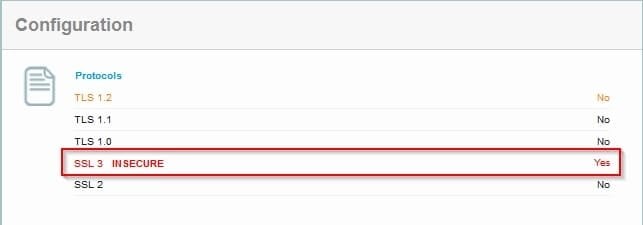
Have you applied the MS Fixit to disable SSL v3? Or taken any other methods to disable SSL v3 in your browser?

I'm just asking because the Swinton website appears to only support SSL v3. I cannot connect without enabling SSL v3.

Test each website here: https://www.ssllabs.com/ssltest/index.html

myswinton Cyberfox.jpg

myswinton Cyberfox 2.jpg
 
Last edited:

My Computer My Computer

At a glance

Microsoft Windows 7 Home Premium 64-bit 7601 ...AMD C-60 APU with Radeon(tm) HD Graphics4.00 GBAMD Radeon HD 6290 Graphics
Computer type
Laptop
Computer Manufacturer/Model Number
ASUS
OS
Microsoft Windows 7 Home Premium 64-bit 7601 Multiprocessor Free Service Pack 1
CPU
AMD C-60 APU with Radeon(tm) HD Graphics
Motherboard
ASUSTeK COMPUTER INC. X501U
Memory
4.00 GB
Graphics Card(s)
AMD Radeon HD 6290 Graphics
Sound Card
(1) AMD High Definition Audio Device (2) Realtek High Defi
Screen Resolution
1366 x 768 x 32 bits (4294967296 colors) @ 60 Hz
Hard Drives
Hitachi HTS545050A7E380 SATA Disk Device
Antivirus
Comodo CIS & FW, SecureAplus App Whitelisting, Threatfire
Browser
Cyberfox 64bit, Opera 64bit, Airfox
Other Info
Spy-The-Spy, HitmanPro.Alert, Norton Connect Safe, MJRegWatcher, BitDefender TrafficLight, Voodoo Shield, Zemana AntiMalware
I haven't knowingly disabled it, but I guess a Firefox or Windows update may have done so. How sould I turn it back on, and is it possible to restrict its use only to those websites that still rely on it?
 

My Computer My Computer

At a glance

Windows 7 Professional SP1Intel E8200 Core2 Duo 3.00GHz4Gb DDR3MSI N210
Computer type
PC/Desktop
Computer Manufacturer/Model Number
custom
OS
Windows 7 Professional SP1
CPU
Intel E8200 Core2 Duo 3.00GHz
Motherboard
Gigabit
Memory
4Gb DDR3
Graphics Card(s)
MSI N210
Hard Drives
Seagate ST1000DM 1Tb
Mouse
A4 tech battery free
Internet Speed
14MB/s
Antivirus
AVG Free
Browser
Firefox 32.0.3

My Computer My Computer

At a glance

windows 7 home 64bitINTEL-CORE I716GB
Computer Manufacturer/Model Number
W530-3630QM1
OS
windows 7 home 64bit
CPU
INTEL-CORE I7
Memory
16GB
Hard Drives
750GB
Browser
Chrome
Back
Top