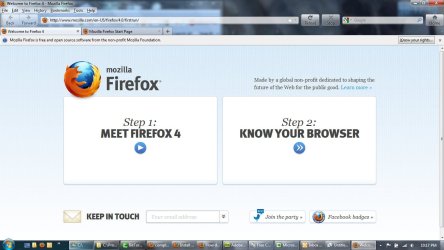
Mozilla launches Firefox 4

If you want to install two separate versions of FF just download and when installing choose Custom - pick a different location to install -- then you must add two items to the command line shortcut when starting... Example:

"C:\Program Files (x86)\Mozilla Firefox4\firefox.exe" -ProfileManager -no-remote

Then it will allow you to create a new profile... and run two instances at once...


Regarding how it looks: someone please tell me how to fix the buttons!!!


I can NOT make 4 look like 3.6... it comes close- but not good enough... Observe the Reload / Stop and Home buttons still in the wrong location:

http://img218.imageshack.us/img218/3916/firefox4c.jpg
 

Attachments
  • firefox4.jpg
    firefox4.jpg
    188.6 KB · Views: 27

My Computer

Computer Manufacturer/Model Number
2many 2list
OS
XP32 and 7 Ultimate64
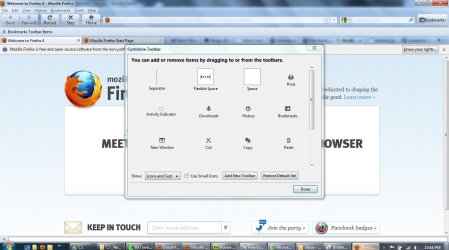
I found a partial solution - you can move the buttons around with a freaky difficult to notice drag system that is accessible in the customize menu - you actually click the buttons and drag them around....

BUT the buttons still have large gaps in them - and when you click 'use small icons' the size does not really change - the buttons are still too big in comparison to 3.6

With these tweaks I'll use it - but I'd still like to know how to make the buttons closer together and smaller - so they take up the same amount of space that they used to...

Any ideas? lol
 

Attachments

  • Firefox 4 buttons.jpg
    Firefox 4 buttons.jpg
    212.3 KB · Views: 22

My Computer

Computer Manufacturer/Model Number
2many 2list
OS
XP32 and 7 Ultimate64

My Computer

Computer Manufacturer/Model Number
Self
OS
Main - Windows 7 Pro SP1 64-Bit; 2nd - Windows Server 2008 R2
CPU
Main - Core i7 2600K; 2nd - Core i7 920
Motherboard
Main - Asus P8Z68-V Pro/Gen3; 2nd - Gigabyte GA-EX58-UDR3
Memory
Main - 16GB Corsair Vengeance; 2nd - 12GB Corsair Vengeance
Graphics Card(s)
Main - XFX Radeon 6870 1GB; 2nd - XFX Radeon 4870 1GB
Sound Card
Both: Onboard Realtek Azalia
Monitor(s) Displays
Main - Hann 25" + I-INC 25" + Acer 23"; 2nd - Upgrading Soon
Screen Resolution
Main - 1920x1080 (All Three Monitors); 2nd - Upgrading Soon
Hard Drives
Main - (1) Crucial M4 128GB (Boot)
Main - (1) Seagate 2TB 64MB Cache (Data)
Main - (1) Seagate 2TB 64MB Cache (Data Backup)
2nd - (1) Intel X25-M SSD 80GB (Boot)
2nd - (3) Seagate 1TB 32MB Cache (Data Backup)
2nd - (1) Seagate 320GB (Because)
PSU
Main - OCZ 600W Modular; 2nd - OCZ 600W
Case
Main - Thermaltake Element G; 2nd - NZXT something or other
Cooling
Main - Corsair H80; 2nd - Prolimatech Megahalems
Keyboard
Main - Razer Reclusa; 2nd - Old MS Keyboard
Mouse
Main - Logitech MX Revolution; 2nd - Old MS Mouse
Internet Speed
20Mbps Time-Warner Cable
Nice suggestion profdlp - I've helped my kids and friends install personas and other odd things... personally I've never considered adding anything to mine as I have always tended to enjoy the plain old boring stock theme... I guess I'll have to adopt one like that. Thanks for reminding me of that option. I guess my complaint is solved I'll troll this thread for a while to see if I can offer any help to others - lol
 

My Computer

Computer Manufacturer/Model Number
2many 2list
OS
XP32 and 7 Ultimate64
Any ideas? lol

Have you tried disabling icon text?

There will still be gaps between the buttons, but the icons themselves no longer look like grandmas big undies.
 

My Computer

Computer type
PC/Desktop
Computer Manufacturer/Model Number
Systems by SmartEyeball
OS
8 Pro x64
CPU
i7 3770K 4.6GHz
Motherboard
ASUS P8Z77 WS
Memory
16GB G.Skill Trident X 2666mhz
Graphics Card(s)
x2 EVGA 780 Ti Superclocked SLI
Sound Card
SB X-FI Surround 5.1 PRO USB / ATH-AD900 Headphones
Monitor(s) Displays
x3 Dell U2410 / 58" Samsung
Screen Resolution
5760*1200/ 1920*1200
Hard Drives
2x Intel 520 240GB (RAID 0) * 2x WD Caviar Blacks 2TB (RAID 0) * 2TB WD Caviar Black * Sony Optirac DVD
PSU
Silverstone Strider Evolution 1200W
Case
Thermaltake Level 10 GT Snow Edition
Cooling
Noctua NH-D14
Keyboard
Topre Realforce // Ducky Shine MX Black // Filco Ninja TKL
Mouse
Thermaltake Theron (Highly Recommended) + Razer Imperator
Antivirus
MSE
Browser
IE, FF, WaterFox
Other Info
GT Extreme V2 Sim Racing Cockpit + 40" LCD and K/B Mouse stand ▼
Fanatec CSR Elite Wheel + Clubsport V1 Pedals + CSR shifter/7G-H ▼Saitek X52 Pro ▼ TrackIR 5 Pro
Buttkicker v2 Seat Rumbler with Dedicated 5.1 and Sub Woofer attached to frame ▼
=
Bloody Big Grin
I found a partial solution - you can move the buttons around with a freaky difficult to notice drag system that is accessible in the customize menu - you actually click the buttons and drag them around....

BUT the buttons still have large gaps in them - and when you click 'use small icons' the size does not really change - the buttons are still too big in comparison to 3.6

With these tweaks I'll use it - but I'd still like to know how to make the buttons closer together and smaller - so they take up the same amount of space that they used to...

Any ideas? lol

lol users have already told you that you can move icons around -_-

what skin are you using? icons shouldn't be looking like that

large icons should look like this
http://www.geeky-gadgets.com/wp-content/uploads/2009/07/firefox-4.jpg

small icons should look like this
 

My Computer

OS
Windows 7 Ultimate
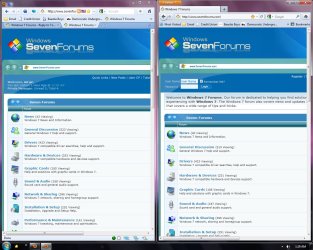
So I finally got 3.6 and 4.0 running in tandem and I made the necessary changes (HD accel/config settings) to improve font quality no avail

And what is up with the FF4 default skin fonts?

The font quality is horrible - this is undeniably a step back in quality.

The Address bar, the google search and especially the favorites bar. Does anyone see this? It's like HD TV without the HD signal.

Does it look better on HDMI monitors?

and why the compressed window? Tabs on top doesn't promise more space for the web apparently.

hmm...I'm reluctant to take a bite out of this but concerned it might turn myself and other FF fans off. IE9's text is more appealing

There must have be developer input on this somewhere.
 

Attachments

  • 3.6 vs 4.0.jpg
    3.6 vs 4.0.jpg
    785 KB · Views: 42

My Computer

OS
Windows 7
And what is up with the FF4 default skin fonts?

The font quality is horrible - this is undeniably a step back in quality.

You are doing it wrong. :huh:

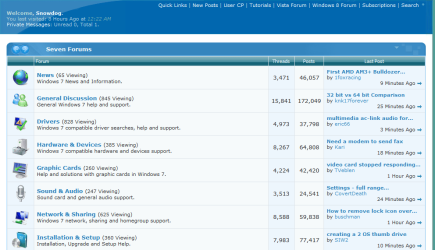
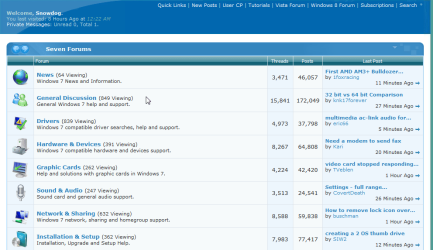
With HW Acceleration on, you get Microsoft DirectWrite fonts. If you don't like them, blame Microsoft.

With HW Acceleration off, FF 3.6 and FF 4.0 render Identical down to the pixel
.

I made an effort to crop these samples perfectly, If you use an image viewer that lets you instantly flip (I use irfanView which is awesome) you will see that spacing, fonts everything is pixel identical.

And again as I posted before. Fonts are identical in FF4 and IE9 both GDI and DirectWrite. Naturally if you compare FF4 DirectWrite to IE9 GDI (or vice versa) then you are mistakenly comparing two different things.
 

Attachments

  • FF3.6Crop.png
    FF3.6Crop.png
    91.7 KB · Views: 11
  • FF4.0Crop.png
    FF4.0Crop.png
    92.2 KB · Views: 12
Last edited:

My Computer

OS
Windows 7 x64 Home Premium
CPU
Intel Q9400 @ 3.2 GHz
Motherboard
Gigabyte DS3L
Memory
6GB PC 6400
Graphics Card(s)
Nvidia 8800GT
Screen Resolution
1920x1200
Hard Drives
Dual WD Green 1TB
Internet Speed
10 Mb/s
Any Bugs, Crashes so far?
 

My Computer

Computer type
PC/Desktop
Computer Manufacturer/Model Number
Self Built
OS
Windows 10 Pro
CPU
Core i5 9600K
Motherboard
ASUS ROG Strix Z390-F Gaming
Memory
Corsair Vengeance Pro 2x 8GB (16GB) 3200MHz DDR4
Graphics Card(s)
MSI GTX 1070 Gaming X 8GB
Sound Card
ASRock A-Style Purity Sound
Monitor(s) Displays
ASUS VX239H IPS
Screen Resolution
1920x1080
Hard Drives
XPG SPECTRIX S40G 2566GB M.2 NVMe | Patriot P210 512GB SSD | Seagate BarraCuda 4TB 5400RPM
PSU
Thermaltake Smart 600w RGB 80Plus
Case
NZXT H500 with 3x Corsair HD120 RGB w/Node Pro
Cooling
Cryorig H7
Keyboard
Corsair K70 RapidFire RGB (Cherry MX Speed)
Mouse
Logitech G402 Hyperion Fury
Internet Speed
20MB Cable Broadband
Browser
Chrome
Other Info
Corsair MM300 Extended Anti-Fray Mouse Pad | Edifier C2 2.1ch Sound System | XBOX One S Controller | XBOX 360 Wireless Controller for Windows | APC SUA1000i Smart-UPS | PS4 Slim 500GB [Region 1 - USA]

My Computer

Computer type
PC/Desktop
Computer Manufacturer/Model Number
Custom Build
OS
Windows 7 Ultimate x64 Service Pack 1
CPU
AMD Athlon II x4 Propus 2.9 GHz
Motherboard
ASRock N68C-GS FX
Memory
2 x 4GB Corsair XMS 3 DDR3 -1600 CL9
Graphics Card(s)
AMD Radeon HD 5850 1GB GDDR5
Sound Card
On-board 6-Channel HD Audio
Monitor(s) Displays
18' LG Flatron E1942TC-BN on DVI, 18' Chimei 95ND on HDMI
Screen Resolution
1366 x 768 x 2
Hard Drives
1 x 500 GB Seagate
1 x 1 TB Western Digital Caviar Green
1 x 1 TB Hitachi Touro Mobile USB 3
PSU
Seasonic S12II 520W
Case
Generic with Cable Management
Cooling
Deep Cool Gammaxx 200
Keyboard
Dragonwar Desert Eagle
Mouse
Logitech B85
Internet Speed
5Mb/s DL, 0.9Mb/s UL
Antivirus
ESET Nod32
Browser
Google Chrome 64 Bit
Other Info
LG G4 H818P - Rooted with Xposed Framework
Any Bugs, Crashes so far?

Occasionally crashes my Geforce 210 drivers, but it's very rare (like once a week maybe?) To be honest though, I suspect that's because I'm choosing to use old drivers.
 

My Computer

Computer type
PC/Desktop
Computer Manufacturer/Model Number
Medion Erazer (note to self: insert model number) - with custom additions
OS
Windows 10 Pro x64
CPU
Intel Core i5 7400 @ 3.00GHz
Motherboard
OEM supllied with PC
Memory
8GB 2133Mhz DDR4 (OEM supplied)
Graphics Card(s)
Gygabyte Windforce GTX 1050Ti (Factory Overclocked)
Sound Card
Realtek
Monitor(s) Displays
Acer Al1980 + HKC
Screen Resolution
1360*768(HKC) / 1280*1024(Acer)
Hard Drives
1TB Toshiba
1TB WD Caviar Green
120GB Samsung Evo 840
PSU
OEM supplied (no power rating on case)
Case
OEM Supplied
Cooling
Stock
Keyboard
Logitech Wireless
Mouse
Logitect Wireless
Internet Speed
40Mb/s Down 10Mb/s Up
Antivirus
Defender
Browser
Firefox
Any Bugs, Crashes so far?


No crashes yet and FF4 has probably been open on my machine 10+ hours/day since release.

These days when someone reports something crashing all over the place, it is is more likely their computer that is the problem.
 

My Computer

OS
Windows 7 x64 Home Premium
CPU
Intel Q9400 @ 3.2 GHz
Motherboard
Gigabyte DS3L
Memory
6GB PC 6400
Graphics Card(s)
Nvidia 8800GT
Screen Resolution
1920x1200
Hard Drives
Dual WD Green 1TB
Internet Speed
10 Mb/s
When I awoke and came to the computer a bit ago, I was greeted by a firewall dialog asking whether to allow a process named mpsigstub.exe. Somewhat thoughtlessly, I let it. Wondering if I should have done so, I Googled it, and found that it is some kind of updater associated with Windows Defender, but since I had never seen that before, I continued looking and found that it is sometimes malware.

This caused me to run Malwarebytes (which found nothing to squawk about) and SpyBot (which quickly listed a registry key belonging to MTC.MakeMeSearch.com). SpyBot listed that as a browser hyjacker. Further reading, this seemed to be related to a search toolbar. Searching my computer, I found an installed program in the root of Program Files (x86), which was named search toolbar. I uninstalled this, but the fact that it's folder was dated 3-21-2011, and the firewall dialogs that I had to clear, listed Firefox as it's target, and that Firefox was the only program of this type that I had installed in that time frame, makes me believe that Firefox installed it.

I had opted for the custom install of Firefox, as I always do with any program that I can, and I always opt out of anything of this kind, if given a choice. Therefore I either wasn't given the choice, or Firefox ignored me and installed it anyway. I'm now curious if anyone else has found this problem, or if it is just me?
 

My Computer

Computer Manufacturer/Model Number
DIY
OS
W7x64 Pro, SuSe 12.1/** W7 x64 Pro, XP MCE
CPU
Phenom II 1090T w/Noctua NH-D14 /**4400+ X2 w/CM Hyper TX 3
Motherboard
ASRock 890FX Deluxe 4/**A8N-SLI
Memory
2 x 2GB Patriot PGS34g1600LLKA/**4x1GB Corsair VS
Graphics Card(s)
EVGA GTX460 SC/**EVGA 8800GTS
Sound Card
Asus Xonar D2X/**Xonar D1
Monitor(s) Displays
Acer X233H, Dell E152FPc /**LG M237-WD
Screen Resolution
1920x1080 & 1024x768/**1980x1080
Hard Drives
WDC 2TB, 1.5TB, 1TB, 500GB,Seagate 500GB , Maxtor 80GB /**500GB Seagate & WDC 1TB Black
PSU
CM RS600 w/ APC BX1000G/**Antec 500 TP w/ APC BX1000
Case
HAF922/**Antec 1040IIB
Cooling
3x200mm, 1x140 and 1x120mm/**5x80mm fans
Keyboard
Logitech Media USB/**Saitek Eclipse
Mouse
Cordless Trackman Wheel/**Ditto
Internet Speed
3.3Mbps
Other Info
SB 560 5.1 w/ Sennheiser RS140/**Creative T20 speakers, Dvico FusionHDTV7 Gold RT, Cisco E3000, HP 5510V AIO, Linksys E3000, Belkin F5U237 hub and **F5D8055 adapter
(** = 2nd rig)
Nope.
I did a full scan with Malwarebytes before yesterday. Result: "clean".
 
Last edited:

My Computer

Computer Manufacturer/Model Number
WALLONN7 / LIN BLACK SERIES II
OS
Windows 7 Ultimate x64 SP1
CPU
AMD PHENOM II X6 1090T 3.2GHz
Motherboard
GIGABYTE GA-890FXA-UD7
Memory
8GB G.SKILL RIPJAWS - F3-10666CL7D
Graphics Card(s)
SAPPHIRE ATI RADEON HD 5870 VAPOR X OC
Sound Card
REALTEK DOLBY HOME THEATER
Monitor(s) Displays
LED LG W2486L
Screen Resolution
1080p
Hard Drives
SEAGATE 1TB -ST31000528AS - AHCI MODE - AS SATA
PSU
ZALMAN ZM1000-HP 1000W
Case
THERMALTAKE XASER VI VG4000SWA
Cooling
140MM x3 / 120MM x1 AIR COOLING - THERMALTAKE
Keyboard
MICROSOFT DIGITAL MEDIA KEYBOARD 3000 - USB
Mouse
MICROSOFT BASIC OPTICAL MOUSE 2.0 - USB
Internet Speed
600KBPS
Other Info
MICROSOFT XBOX 360 CONTROLLER
When I awoke and came to the computer a bit ago, I was greeted by a firewall dialog asking whether to allow a process named mpsigstub.exe. Somewhat thoughtlessly, I let it. Wondering if I should have done so, I Googled it, and found that it is some kind of updater associated with Windows Defender, but since I had never seen that before, I continued looking and found that it is sometimes malware.

This caused me to run Malwarebytes (which found nothing to squawk about) and SpyBot (which quickly listed a registry key belonging to MTC.MakeMeSearch.com). SpyBot listed that as a browser hyjacker. Further reading, this seemed to be related to a search toolbar. Searching my computer, I found an installed program in the root of Program Files (x86), which was named search toolbar. I uninstalled this, but the fact that it's folder was dated 3-21-2011, and the firewall dialogs that I had to clear, listed Firefox as it's target, and that Firefox was the only program of this type that I had installed in that time frame, makes me believe that Firefox installed it.

I had opted for the custom install of Firefox, as I always do with any program that I can, and I always opt out of anything of this kind, if given a choice. Therefore I either wasn't given the choice, or Firefox ignored me and installed it anyway. I'm now curious if anyone else has found this problem, or if it is just me?
I did not opt for the custom install, but as of yet nothing popped up. SO now I am running full scans with Superantispyware and MSE, and running a Hitman Pro scan too.....so we'll see what happens.

Edit:Hitman turned up only one tracking cookie. Other scans are ongoing....
 
Last edited:

My Computer

Computer type
PC/Desktop
Computer Manufacturer/Model Number
Gigabyte Technology Co., Ltd.
OS
Win 7 Ultimate 64-bit SP1 (desktop)
CPU
Intel Core 2 Duo E8400
Motherboard
Gigabyte GA-EP35-DS3R
Memory
2x 2GB OCZ DDR II SDRAM PC2-6400
Graphics Card(s)
NVIDIA GeForce 9400GT
Monitor(s) Displays
HP 2009m(primary), Acer P191W
Screen Resolution
1600x900, 1440x900
Hard Drives
Internal:WD Caviar Black 640GB 32MB cache 7200RPM
External:Samsung Story Station 1TB HDD desktop drive
500GB Toshiba portable drive
PSU
Antec Earthwatts EA500D
Case
Antec Sonata III
Cooling
4 fans
Keyboard
Logitech Wave
Mouse
Logitech M-SBF90
Internet Speed
Slow due to home Wireless-G router
Antivirus
MSE, Hitman Pro, Malwarebytes
Browser
Chrome and Palemoon
Other Info
Laptop....Acer 5750Z-4835
15.6" HD Widescreen CineCrystal™ LED-backlit LCD Display: (1366x768 resolution, 16:9 aspect ratio)
Intel® Pentium® Processor B940 (2.0GHz, 2MB L3 cache)
Windows® 7 Home Premium,500GB Hard Drive,4GB DDR3 RAM, Intel® HD Graphics,8X DVD-Super Multi Double-Layer Drive
Multi-in-1 Digital Media Card Reader,802.11b/g/n Wi-Fi
Chrome and Palemoon, MSE, Hitman Pro
No Malware here. Seriously though, do you really think Mozilla is going to stoop that low. You probably picked it up on something you forgot about.
 

My Computer

OS
Windows 7 x64 Home Premium
CPU
Intel Q9400 @ 3.2 GHz
Motherboard
Gigabyte DS3L
Memory
6GB PC 6400
Graphics Card(s)
Nvidia 8800GT
Screen Resolution
1920x1200
Hard Drives
Dual WD Green 1TB
Internet Speed
10 Mb/s
When I awoke and came to the computer a bit ago, I was greeted by a firewall dialog asking whether to allow a process named mpsigstub.exe. Somewhat thoughtlessly, I let it. Wondering if I should have done so, I Googled it, and found that it is some kind of updater associated with Windows Defender, but since I had never seen that before, I continued looking and found that it is sometimes malware.

This caused me to run Malwarebytes (which found nothing to squawk about) and SpyBot (which quickly listed a registry key belonging to MTC.MakeMeSearch.com). SpyBot listed that as a browser hyjacker. Further reading, this seemed to be related to a search toolbar. Searching my computer, I found an installed program in the root of Program Files (x86), which was named search toolbar. I uninstalled this, but the fact that it's folder was dated 3-21-2011, and the firewall dialogs that I had to clear, listed Firefox as it's target, and that Firefox was the only program of this type that I had installed in that time frame, makes me believe that Firefox installed it.

I had opted for the custom install of Firefox, as I always do with any program that I can, and I always opt out of anything of this kind, if given a choice. Therefore I either wasn't given the choice, or Firefox ignored me and installed it anyway. I'm now curious if anyone else has found this problem, or if it is just me?


I have not seen this issue.
 

My Computer

Computer Manufacturer/Model Number
Self-Built in July 2009
OS
Windows 7 Ultimate x64
CPU
Intel Q9550 2.83Ghz OC'd to 3.40Ghz
Motherboard
Gigabyte GA-EP45-UD3R rev. 1.1, F12 BIOS
Memory
8GB G.Skill PI DDR2-800, 4-4-4-12 timings
Graphics Card(s)
EVGA 1280MB Nvidia GeForce GTX570
Sound Card
Realtek ALC899A 8 channel onboard audio
Monitor(s) Displays
23" Acer x233H
Screen Resolution
1920x1080
Hard Drives
Intel X25-M 80GB Gen 2 SSD
Western Digital 1TB Caviar Black, 32MB cache. WD1001FALS
PSU
Corsair 620HX modular
Case
Antec P182
Cooling
stock
Keyboard
ABS M1 Mechanical
Mouse
Logitech G9 Laser Mouse
Internet Speed
15/2 cable modem
Other Info
Windows and Linux enthusiast. Logitech G35 Headset.
Use noscript with firefox, it will prevent anything being injected without your permission.
 

My Computer

Computer Manufacturer/Model Number
Insane hobo technologies. ;-)
OS
Windows 7 x64
CPU
Intel i7 2600k
Motherboard
Asrock z68 extreme 4 gen 3
Memory
G.skill Ripjaw 16gigs @ 1866
Graphics Card(s)
Nvidia gtx580 (evga)
Sound Card
Integrated HD audio + hdmi
Monitor(s) Displays
24" ASUS widescreen + 42" insignia
Screen Resolution
1080p (1920x1080)
Hard Drives
128 Samsung 830
256 Samsung 840
3 x 1tb storage drive (various)
1 western digital 1tb (eSATA)
1 Seagate 1tb (eSATA)
PSU
1 kilowatt SLI/Crossfire rated Silverstone modular
Case
NZXT Phantom + additional 220 fan
Cooling
Zalmann
Keyboard
Microsoft wireless 3000 (v2)
Mouse
MS - wireless 5000 (bluetrack)
Internet Speed
depends on if you ask me or my provider.
Other Info
The above information is provided as is, and the author assumes no responsibility for issues it may cause with your sanity or fanboyism.
I've never, ever, seen or had this happen with the Firefox install, you must have picked it up somewhere else or don't have noscript installed (As Magus said.)

When I awoke and came to the computer a bit ago, I was greeted by a firewall dialog asking whether to allow a process named mpsigstub.exe. Somewhat thoughtlessly, I let it. Wondering if I should have done so, I Googled it, and found that it is some kind of updater associated with Windows Defender, but since I had never seen that before, I continued looking and found that it is sometimes malware.

This caused me to run Malwarebytes (which found nothing to squawk about) and SpyBot (which quickly listed a registry key belonging to MTC.MakeMeSearch.com). SpyBot listed that as a browser hyjacker. Further reading, this seemed to be related to a search toolbar. Searching my computer, I found an installed program in the root of Program Files (x86), which was named search toolbar. I uninstalled this, but the fact that it's folder was dated 3-21-2011, and the firewall dialogs that I had to clear, listed Firefox as it's target, and that Firefox was the only program of this type that I had installed in that time frame, makes me believe that Firefox installed it.

I had opted for the custom install of Firefox, as I always do with any program that I can, and I always opt out of anything of this kind, if given a choice. Therefore I either wasn't given the choice, or Firefox ignored me and installed it anyway. I'm now curious if anyone else has found this problem, or if it is just me?
 

My Computer

Computer Manufacturer/Model Number
HP DV6 1330sa
OS
Windows 7 Professional 64 Bit SP1
CPU
INTEL DUAL CORE 2.1Ghz
Motherboard
N/A
Memory
4GB DDR3
Graphics Card(s)
INTEL
Sound Card
LAPTOP
Monitor(s) Displays
2
Screen Resolution
3200x1080
Hard Drives
250GB
PSU
LAPTOP
Case
LAPTOP
Cooling
LAPTOP
Keyboard
SOLID YEAR 260U
Mouse
USB
Internet Speed
20 MB/S
Nope.
I did a full scan with Malwarebytes before yesterday. Result: "clean".
As I said, Malwarebytes didn't find anything on my computer either...SpyBot did. However, you probably don't need to run that, just check in Program Files (x86) for a folder named Search Toolbar, and also in Programs and Features for the same. If not in either place, then no program is going to detect it.
 

My Computer

Computer Manufacturer/Model Number
DIY
OS
W7x64 Pro, SuSe 12.1/** W7 x64 Pro, XP MCE
CPU
Phenom II 1090T w/Noctua NH-D14 /**4400+ X2 w/CM Hyper TX 3
Motherboard
ASRock 890FX Deluxe 4/**A8N-SLI
Memory
2 x 2GB Patriot PGS34g1600LLKA/**4x1GB Corsair VS
Graphics Card(s)
EVGA GTX460 SC/**EVGA 8800GTS
Sound Card
Asus Xonar D2X/**Xonar D1
Monitor(s) Displays
Acer X233H, Dell E152FPc /**LG M237-WD
Screen Resolution
1920x1080 & 1024x768/**1980x1080
Hard Drives
WDC 2TB, 1.5TB, 1TB, 500GB,Seagate 500GB , Maxtor 80GB /**500GB Seagate & WDC 1TB Black
PSU
CM RS600 w/ APC BX1000G/**Antec 500 TP w/ APC BX1000
Case
HAF922/**Antec 1040IIB
Cooling
3x200mm, 1x140 and 1x120mm/**5x80mm fans
Keyboard
Logitech Media USB/**Saitek Eclipse
Mouse
Cordless Trackman Wheel/**Ditto
Internet Speed
3.3Mbps
Other Info
SB 560 5.1 w/ Sennheiser RS140/**Creative T20 speakers, Dvico FusionHDTV7 Gold RT, Cisco E3000, HP 5510V AIO, Linksys E3000, Belkin F5U237 hub and **F5D8055 adapter
(** = 2nd rig)
Back
Top