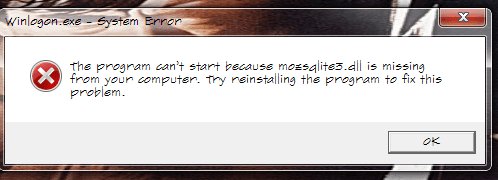
mozqlite3.dll missing after Easeus Todo Backup install

IMAyNeed

New member
Power User
Local time
7:56 AM
Messages
501
This happened right after the restart after Easeus Todo Back up installation.

My worry is why it is mentioning winlogon?

mozqlite3dll.png
 

My Computer My Computer

Computer Manufacturer/Model Number
ASUS G72 Notebook
OS
Windows 7 Ultimate 64-bit
CPU
Intel® Core™2 Duo mobile processor P8700 2.53 GHz
Memory
6GB DDRII
Graphics Card(s)
NVIDIA GeForce GTX 260M
Sound Card
EAX Advanced HD 4.0 + Logitech Wireless Headset G930
Monitor(s) Displays
17.3" LED-backlit LCD high-definition plus widescreen
Screen Resolution
1600 x 900
Hard Drives
2 x Seagate Momentus 500 GB 5400.6 SATA 3Gb/s
Cooling
Targus
Mouse
Logitech Wireless Trackball M570
Internet Speed
3 to 6 Mbps Download / .5 to 1 Mbps Upload
Other Info
Clear Modem with Wi-fi*
Comodo Internet Security Premium
Very high possibility of a Trojan/Virus. Please scan you computer with any freshly updated antivirus software, like:
FREE Microsoft Security Essentials Virus, Spyware & Malware Protection | Microsoft Security Essentials
or
FREE Kaspersky Virus Removal Kaspersky Virus Removal Tool Download
or
people on this forums seems to like Malwarebytes : Malwarebytes Anti-Malware is a free download that removes viruses and malware from your computer

Also you could download this free Autoruns utility by Microsoft/Sysinternals.
It does NOT fix anything, but it can give you an idea what starts with your system, particularly check out Winlogon section.
 

My Computer My Computer

Computer type
PC/Desktop
OS
Windows 8.1 ; Windows 7 x86 (Dec2008-Jan2013)
Other Info
"The scale icon at the top right of a post or tutorial is how you can give rep to the member."
Damn! I did a full scan yesterday (scheduled), and now again...
I uninstalled Todo (doesn't work fro GPT drives anyway, like most of the others).
That was what I was thinking -virus, trojan- because it directly showed winlogon.exe, not another program or process.
That scared me.
 

My Computer My Computer

Computer Manufacturer/Model Number
ASUS G72 Notebook
OS
Windows 7 Ultimate 64-bit
CPU
Intel® Core™2 Duo mobile processor P8700 2.53 GHz
Memory
6GB DDRII
Graphics Card(s)
NVIDIA GeForce GTX 260M
Sound Card
EAX Advanced HD 4.0 + Logitech Wireless Headset G930
Monitor(s) Displays
17.3" LED-backlit LCD high-definition plus widescreen
Screen Resolution
1600 x 900
Hard Drives
2 x Seagate Momentus 500 GB 5400.6 SATA 3Gb/s
Cooling
Targus
Mouse
Logitech Wireless Trackball M570
Internet Speed
3 to 6 Mbps Download / .5 to 1 Mbps Upload
Other Info
Clear Modem with Wi-fi*
Comodo Internet Security Premium
Please, download this free Autoruns utility by Microsoft/Sysinternals.
It does NOT fix anything, but it can give you an idea what starts with your system, particularly check out Winlogon section.
 

My Computer My Computer

Computer type
PC/Desktop
OS
Windows 8.1 ; Windows 7 x86 (Dec2008-Jan2013)
Other Info
"The scale icon at the top right of a post or tutorial is how you can give rep to the member."
Already have that, but thanks for reminding me that.
It didn't come to my mind to use that.
 

My Computer My Computer

Computer Manufacturer/Model Number
ASUS G72 Notebook
OS
Windows 7 Ultimate 64-bit
CPU
Intel® Core™2 Duo mobile processor P8700 2.53 GHz
Memory
6GB DDRII
Graphics Card(s)
NVIDIA GeForce GTX 260M
Sound Card
EAX Advanced HD 4.0 + Logitech Wireless Headset G930
Monitor(s) Displays
17.3" LED-backlit LCD high-definition plus widescreen
Screen Resolution
1600 x 900
Hard Drives
2 x Seagate Momentus 500 GB 5400.6 SATA 3Gb/s
Cooling
Targus
Mouse
Logitech Wireless Trackball M570
Internet Speed
3 to 6 Mbps Download / .5 to 1 Mbps Upload
Other Info
Clear Modem with Wi-fi*
Comodo Internet Security Premium
I checked with autoruns, and made a full scan. Still couldn't find the source.
 

My Computer My Computer

Computer Manufacturer/Model Number
ASUS G72 Notebook
OS
Windows 7 Ultimate 64-bit
CPU
Intel® Core™2 Duo mobile processor P8700 2.53 GHz
Memory
6GB DDRII
Graphics Card(s)
NVIDIA GeForce GTX 260M
Sound Card
EAX Advanced HD 4.0 + Logitech Wireless Headset G930
Monitor(s) Displays
17.3" LED-backlit LCD high-definition plus widescreen
Screen Resolution
1600 x 900
Hard Drives
2 x Seagate Momentus 500 GB 5400.6 SATA 3Gb/s
Cooling
Targus
Mouse
Logitech Wireless Trackball M570
Internet Speed
3 to 6 Mbps Download / .5 to 1 Mbps Upload
Other Info
Clear Modem with Wi-fi*
Comodo Internet Security Premium
What does it show in winlogon section of autoruns?
Please also, Enable Hidden files and folders as well as Unhide system folders and search your hdd for fake copies "Winlogon.exe"

Also, when this windows is open, do not close it. Instead do Ctrl+Alt+Del for Task Manager. In application tab find that Error window, then Right click - Go to process - Right click on the process - Go to file location / or Properties. Check details of that file.
 

My Computer My Computer

Computer type
PC/Desktop
OS
Windows 8.1 ; Windows 7 x86 (Dec2008-Jan2013)
Other Info
"The scale icon at the top right of a post or tutorial is how you can give rep to the member."
Have you tried running "sfc /scannow" from an elevated command prompt? That file is used in Firefox 4 but should have nothing to do with the winlogon process.
 

My Computer My Computer

OS
XP / Win7 x64 Pro
CPU
Intel Quad-Core Q9450 @ 3.2GHz
Motherboard
Asus P5-E
Memory
2x2GB GSkill DDR2
Graphics Card(s)
NVIDIA GeForce 8600 GTS (EVGA)
Monitor(s) Displays
Dell 2408WFP
Screen Resolution
1920x1200
What does it show in winlogon section of autoruns?
Please also, Enable Hidden files and folders as well as Unhide system folders and search your hdd for fake copies "Winlogon.exe"

Also, when this windows is open, do not close it. Instead do Ctrl+Alt+Del for Task Manager. In application tab find that Error window, then Right click - Go to process - Right click on the process - Go to file location / or Properties. Check details of that file.

Thanks for this.
I will inform the results next time it appears.
 

My Computer My Computer

Computer Manufacturer/Model Number
ASUS G72 Notebook
OS
Windows 7 Ultimate 64-bit
CPU
Intel® Core™2 Duo mobile processor P8700 2.53 GHz
Memory
6GB DDRII
Graphics Card(s)
NVIDIA GeForce GTX 260M
Sound Card
EAX Advanced HD 4.0 + Logitech Wireless Headset G930
Monitor(s) Displays
17.3" LED-backlit LCD high-definition plus widescreen
Screen Resolution
1600 x 900
Hard Drives
2 x Seagate Momentus 500 GB 5400.6 SATA 3Gb/s
Cooling
Targus
Mouse
Logitech Wireless Trackball M570
Internet Speed
3 to 6 Mbps Download / .5 to 1 Mbps Upload
Other Info
Clear Modem with Wi-fi*
Comodo Internet Security Premium
Have you tried running "sfc /scannow" from an elevated command prompt? That file is used in Firefox 4 but should have nothing to do with the winlogon process.

That was my worry.
I am still trying to find out why?
I may try to uninstall and reinstall Firefox to see the results.
 

My Computer My Computer

Computer Manufacturer/Model Number
ASUS G72 Notebook
OS
Windows 7 Ultimate 64-bit
CPU
Intel® Core™2 Duo mobile processor P8700 2.53 GHz
Memory
6GB DDRII
Graphics Card(s)
NVIDIA GeForce GTX 260M
Sound Card
EAX Advanced HD 4.0 + Logitech Wireless Headset G930
Monitor(s) Displays
17.3" LED-backlit LCD high-definition plus widescreen
Screen Resolution
1600 x 900
Hard Drives
2 x Seagate Momentus 500 GB 5400.6 SATA 3Gb/s
Cooling
Targus
Mouse
Logitech Wireless Trackball M570
Internet Speed
3 to 6 Mbps Download / .5 to 1 Mbps Upload
Other Info
Clear Modem with Wi-fi*
Comodo Internet Security Premium
What I'm saying is it's most likely unrelated to FF4 since it's being used in the winlogon process. Uninstalling and reinstalling might fix it temporarily but something is altering your system in a bad way. You need to rule out malware first.

Have you downloaded and installed anything recently that wasn't from a retailer?
 

My Computer My Computer

OS
XP / Win7 x64 Pro
CPU
Intel Quad-Core Q9450 @ 3.2GHz
Motherboard
Asus P5-E
Memory
2x2GB GSkill DDR2
Graphics Card(s)
NVIDIA GeForce 8600 GTS (EVGA)
Monitor(s) Displays
Dell 2408WFP
Screen Resolution
1920x1200
What I'm saying is it's most likely unrelated to FF4 since it's being used in the winlogon process. Uninstalling and reinstalling might fix it temporarily but something is altering your system in a bad way. You need to rule out malware first.

Have you downloaded and installed anything recently that wasn't from a retailer?

You are right. I need to find the process doing it first.
It happened first time after installing EASEUS Todo Back up installation. I uninstalled it though (no support for GPT Disks).
All my programs are safe downloads from the sites.
I have remote control and network programs, but they are safe.
I have steam. I play it online, but I don't think it can cause this.
My firewall is set to inform me any in/out activity for every application to take permission from me, and also set to inform me for changing any process to take permission from me.
I ran a full scan, but couldn't find anything related.
When it appears next time, I will try to find the process it is related with.
I am dealing with lots of different softwares, and also trying different softwares for my needs, but all my downloads are from the original sites or links from the original sites of the softwares. I checked both x86 and x64 Program Files folders and couldn't find any file or folder suspicious, but maybe I missed or this process is located another place, but I know all the programs installed on my computer (I uninstalled several programs I wasn't using).
I will try to do different stuff next time it appears and will inform (Not every restart it is happening, but even happening just sometimes is enough to annoy, and enough to know that there is a process going on that I don't know about).
Can it be a FF plug-in such as "close tabs to the right"?
But what does it have to do with winlogon.exe?
Anyway, I will inform...

 

My Computer My Computer

Computer Manufacturer/Model Number
ASUS G72 Notebook
OS
Windows 7 Ultimate 64-bit
CPU
Intel® Core™2 Duo mobile processor P8700 2.53 GHz
Memory
6GB DDRII
Graphics Card(s)
NVIDIA GeForce GTX 260M
Sound Card
EAX Advanced HD 4.0 + Logitech Wireless Headset G930
Monitor(s) Displays
17.3" LED-backlit LCD high-definition plus widescreen
Screen Resolution
1600 x 900
Hard Drives
2 x Seagate Momentus 500 GB 5400.6 SATA 3Gb/s
Cooling
Targus
Mouse
Logitech Wireless Trackball M570
Internet Speed
3 to 6 Mbps Download / .5 to 1 Mbps Upload
Other Info
Clear Modem with Wi-fi*
Comodo Internet Security Premium
Process Explorer might help

Process Monitor might also help. It take some learning of the app, but if there is some rouge process that runs intermittently, this could help find it. However, there is no way of knowing if there is one until you can identify what is really happening. It's kinda a shot in the dark though at this point. But, still useful.
 

My Computer My Computer

Computer Manufacturer/Model Number
Self Built
OS
Win 7 Ultimate 32bit
CPU
C2D E6600 2.4Ghz
Motherboard
Intel D965WH
Memory
4G Kingston KHX5400D2
Graphics Card(s)
EVGA GTX 570 HD SC (012-P3-1573-KR)
Sound Card
On-Board
Monitor(s) Displays
Samsung 226BW
Screen Resolution
1680 x 1050
Hard Drives
2 x 250 Seagate Barracuda
2 x 500 Seagate Barracuda (Raid1)
PSU
Corsair TX750W
Case
In-Win C589
Cooling
Stock Intel Cooling
On a separate note, why are your drives using GPT?
 

My Computer My Computer

OS
XP / Win7 x64 Pro
CPU
Intel Quad-Core Q9450 @ 3.2GHz
Motherboard
Asus P5-E
Memory
2x2GB GSkill DDR2
Graphics Card(s)
NVIDIA GeForce 8600 GTS (EVGA)
Monitor(s) Displays
Dell 2408WFP
Screen Resolution
1920x1200
On a separate note, why are your drives using GPT?

I have four operating systems installed on my computer and one of them is Mac which requires GPT and I need Mac for Xcode (Which you cannot even open Apple Developer's Page from another operating system).
 

My Computer My Computer

Computer Manufacturer/Model Number
ASUS G72 Notebook
OS
Windows 7 Ultimate 64-bit
CPU
Intel® Core™2 Duo mobile processor P8700 2.53 GHz
Memory
6GB DDRII
Graphics Card(s)
NVIDIA GeForce GTX 260M
Sound Card
EAX Advanced HD 4.0 + Logitech Wireless Headset G930
Monitor(s) Displays
17.3" LED-backlit LCD high-definition plus widescreen
Screen Resolution
1600 x 900
Hard Drives
2 x Seagate Momentus 500 GB 5400.6 SATA 3Gb/s
Cooling
Targus
Mouse
Logitech Wireless Trackball M570
Internet Speed
3 to 6 Mbps Download / .5 to 1 Mbps Upload
Other Info
Clear Modem with Wi-fi*
Comodo Internet Security Premium
Process Explorer might help

Process Monitor might also help. It take some learning of the app, but if there is some rouge process that runs intermittently, this could help find it. However, there is no way of knowing if there is one until you can identify what is really happening. It's kinda a shot in the dark though at this point. But, still useful.

I will try to identify, just that warning happens just sometimes. But when it happens, I wil ltry to identify what is going on. Today, it never happened. I hope it was related to one of the unnecessary programs I uninstalled.
 

My Computer My Computer

Computer Manufacturer/Model Number
ASUS G72 Notebook
OS
Windows 7 Ultimate 64-bit
CPU
Intel® Core™2 Duo mobile processor P8700 2.53 GHz
Memory
6GB DDRII
Graphics Card(s)
NVIDIA GeForce GTX 260M
Sound Card
EAX Advanced HD 4.0 + Logitech Wireless Headset G930
Monitor(s) Displays
17.3" LED-backlit LCD high-definition plus widescreen
Screen Resolution
1600 x 900
Hard Drives
2 x Seagate Momentus 500 GB 5400.6 SATA 3Gb/s
Cooling
Targus
Mouse
Logitech Wireless Trackball M570
Internet Speed
3 to 6 Mbps Download / .5 to 1 Mbps Upload
Other Info
Clear Modem with Wi-fi*
Comodo Internet Security Premium
The process is csrss.exe.
When I right click it and select properties, nothing is coming up (no windows is appearing, nothing is happening).
When I click Open file Location, nothing is happening either.
Username field is empty too.
 

My Computer My Computer

Computer Manufacturer/Model Number
ASUS G72 Notebook
OS
Windows 7 Ultimate 64-bit
CPU
Intel® Core™2 Duo mobile processor P8700 2.53 GHz
Memory
6GB DDRII
Graphics Card(s)
NVIDIA GeForce GTX 260M
Sound Card
EAX Advanced HD 4.0 + Logitech Wireless Headset G930
Monitor(s) Displays
17.3" LED-backlit LCD high-definition plus widescreen
Screen Resolution
1600 x 900
Hard Drives
2 x Seagate Momentus 500 GB 5400.6 SATA 3Gb/s
Cooling
Targus
Mouse
Logitech Wireless Trackball M570
Internet Speed
3 to 6 Mbps Download / .5 to 1 Mbps Upload
Other Info
Clear Modem with Wi-fi*
Comodo Internet Security Premium
csrss.exe = Client Server Runtime Process
It is a valid system file, however, it can be taken over by a trojan apparently

I am not trying to imply that you have a virus, but just telling you what that process it.

Scan with Eset Online scanner and see what it finds.
 

My Computer My Computer

Computer Manufacturer/Model Number
Self Built
OS
Win 7 Ultimate 32bit
CPU
C2D E6600 2.4Ghz
Motherboard
Intel D965WH
Memory
4G Kingston KHX5400D2
Graphics Card(s)
EVGA GTX 570 HD SC (012-P3-1573-KR)
Sound Card
On-Board
Monitor(s) Displays
Samsung 226BW
Screen Resolution
1680 x 1050
Hard Drives
2 x 250 Seagate Barracuda
2 x 500 Seagate Barracuda (Raid1)
PSU
Corsair TX750W
Case
In-Win C589
Cooling
Stock Intel Cooling
Back
Top